Screentogif: [Bug] Remove Duplicates resets from 100% to 0.1%.
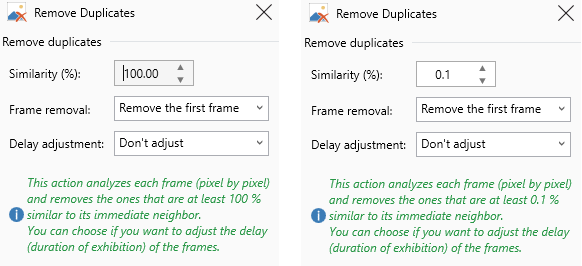
When I open the remove duplicates panel it will show my last used value (usually 100%). When I click on Apply it will instead quickly turn into 0.1% and mess up my project. So I have to click somewhere on the green text, it will switch to 0.1%, then I enter 100%, and then the value will actually stick and work.
This feature also crashed a couple times in the past, I think this may be the log:
► Title -
    Current Domain Unhandled Exception - Unknown
▬ Message -
    Sequence contains no elements
○ Type -
    System.InvalidOperationException
♦ [Version] Date/Hour -
    [2.12.1] 03/14/2018 07:54:14
▲ Source -
    mscorlib
▼ TargetSite -
    System.Runtime.Remoting.Messaging.IMessage EndInvokeHelper(System.Runtime.Remoting.Messaging.Message, Boolean)
♠ StackTrace -

Server stack trace:
   at System.Linq.Enumerable.Min(IEnumerable`1 source)
   at System.Runtime.Remoting.Messaging.StackBuilderSink._PrivateProcessMessage(IntPtr md, Object[] args, Object server, Object[]& outArgs)
   at System.Runtime.Remoting.Messaging.StackBuilderSink.AsyncProcessMessage(IMessage msg, IMessageSink replySink)

Exception rethrown at [0]:
   at System.Runtime.Remoting.Proxies.RealProxy.EndInvokeHelper(Message reqMsg, Boolean bProxyCase)
   at System.Runtime.Remoting.Proxies.RemotingProxy.Invoke(Object NotUsed, MessageData& msgData)
   at ScreenToGif.Windows.Editor.RemoveDuplicates.EndInvoke(IAsyncResult result)
   at ScreenToGif.Windows.Editor.RemoveDuplicatesCallback(IAsyncResult ar)
   at System.Runtime.Remoting.Messaging.AsyncResult.SyncProcessMessage(IMessage msg)
   at System.Runtime.Remoting.Messaging.StackBuilderSink.AsyncProcessMessage(IMessage msg, IMessageSink replySink)
   at System.Threading.ExecutionContext.RunInternal(ExecutionContext executionContext, ContextCallback callback, Object state, Boolean preserveSyncCtx)
   at System.Threading.ExecutionContext.Run(ExecutionContext executionContext, ContextCallback callback, Object state, Boolean preserveSyncCtx)
   at System.Threading.QueueUserWorkItemCallback.System.Threading.IThreadPoolWorkItem.ExecuteWorkItem()
   at System.Threading.ThreadPoolWorkQueue.Dispatch()
 Henry00IS
All 9 comments
Thank you for the feedback.
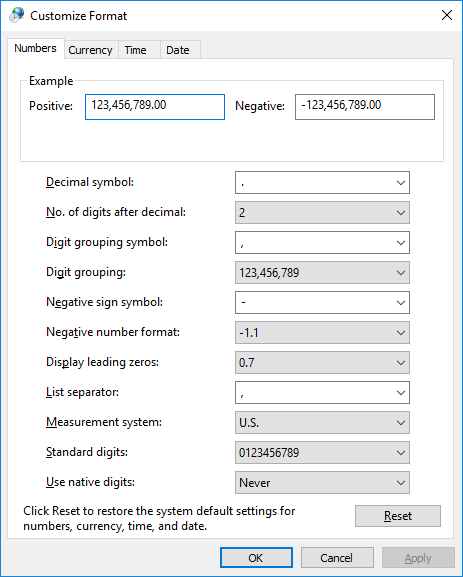
For the current installed language on your system, what's the decimal separator supposed to be? A dot or a comma? Maybe something else.
 NickeManarin
on 24 Mar 2018
NickeManarin
on 24 Mar 2018
Just the defaults. A period for English Windows. Like I said actually typing a value in the textbox makes it work, I presume it's probably the bounds check keeping it between 0 and 100 when the focus is lost that is not aware of the value displayed in the textbox unless the user makes an actual edit causing a OnTextChanged event (I didn't see any of the source code though).
Henry00IS
on 24 Mar 2018
This feature also crashed a couple times in the past, I think this may be the log:
This one got fixed.
NickeManarin
on 24 Mar 2018
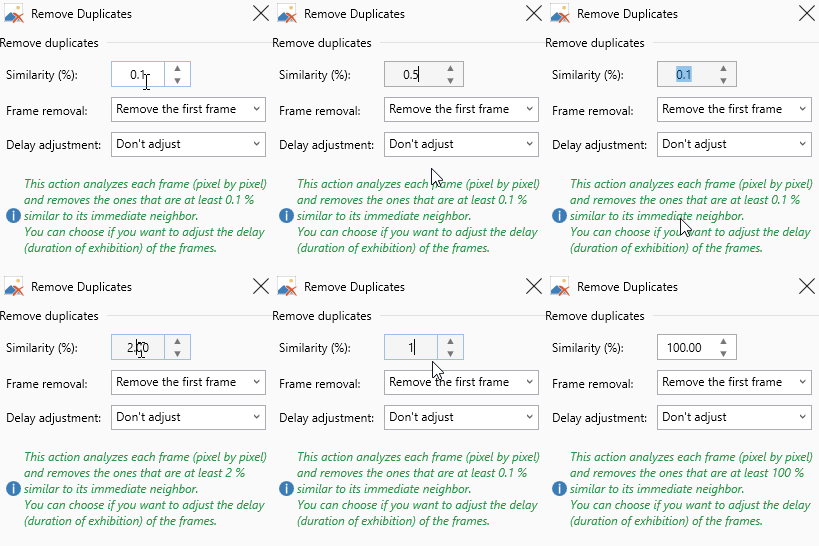
Actually it's very buggy for me:
Henry00IS
on 24 Mar 2018
Ok, after changing the region format of the numbers I'm able to reproduce this bug.
NickeManarin
on 24 Mar 2018
Actually it's very buggy for me:
I believe that this one got fixed. I'll run more tests.
A regex was not accepting the input, I replaced with a double.TryParse() instead.
It happened inside the IsTextAllowed() method.
So, with this bug fix, no longer the value will jump from 100.00 to 0.1.
Thank you for your detailed feedback. :)
NickeManarin
on 24 Mar 2018
It works perfectly! Would you like the honor of closing this issue? And thank you so much for the superb real-time solution solving! 😁
Henry00IS
on 24 Mar 2018
Awesome! Thank you for spending part of your Saturday helping the project!
NickeManarin
on 24 Mar 2018
Awesome! Thank you for spending part of your Saturday helping the project!
Thanks for appreciating your testers :)
 vatterspun
on 12 Apr 2018
vatterspun
on 12 Apr 2018
Related issues
 Quisquose
·
3Comments
Quisquose
·
3Comments
 Kristinita
·
4Comments
Kristinita
·
4Comments
 L0Lock
·
4Comments
L0Lock
·
4Comments
 EirikBirkeland
·
5Comments
Kristinita
·
4Comments
EirikBirkeland
·
5Comments
Kristinita
·
4Comments
Most helpful comment
Awesome! Thank you for spending part of your Saturday helping the project!