1) color issue
white on white - not the best choice)
it was really hard for me to find out where is the icon... really
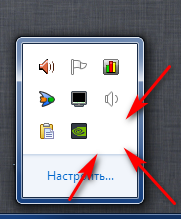
2) looks very similarly with "network connection" icon

3) mouse LEFT button clicks
no reaction at all - neither for single click, not for double
it should open the last closed window..
would it be single or double - your choice
4) there is no need to allow STG make new copies of itself (2nd, 3rd, etc.)
so when a user trying to start already launched STG - the last active window should be opened

5) when my recording window is active and I want, for example, make a new "Webcam recording" - I cannot - all three buttons in the context menu are disabled
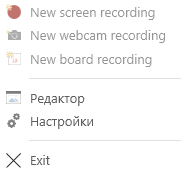
6) do you want to exit?
you've implemented options for these annoying questions in the options.
can you also make an option for this one?
so I could disable it and do not press YES every time
Thanks!
 user3323
All 5 comments
Yeah,this is the issue I want to description.
 laiqun
on 19 Mar 2018
laiqun
on 19 Mar 2018
1) Alright, when designing the icon, I only had in mind Windows 10. I'll create an icon for other version of the OS.
2) Humm, it's a wireframe version of the logo of this app. I'm using this style because it matches the OS design.
3) Ok, I'll think about this. Maybe I'll make it configurable.
4) This matter touches a grey area. It's the only way to open two recorder instances. Maybe I'll add an option to let this happen, but making it default to give focus to an already opened instance.
5) I disabled the other recorders by design. Currently the keyboard watcher (that works for detecting keyboard presses) only allows one usage per instance. I need to change the code under the hood in order to allow multiple recorders.
6) Yes. I'll create and option for that one too.
 NickeManarin
on 22 Mar 2018
NickeManarin
on 22 Mar 2018
Just a remark, when I first started version 2.13 the tray icon appeared in the hidden part of the system tray and it was invisible until I hovered the mouse pointer over the blank space.
 smaragdus
on 22 Mar 2018
smaragdus
on 22 Mar 2018
- Done.
NickeManarin
on 5 May 2018
- Done!

You can test here if you wish: https://github.com/NickeManarin/ScreenToGif/issues/551
- I'll track this suggestion in another issue ticket.
NickeManarin
on 18 Nov 2019
Related issues
 AdKiller
·
5Comments
AdKiller
·
5Comments
 ForkandBeard
·
4Comments
ForkandBeard
·
4Comments
 duarteframos
·
3Comments
duarteframos
·
3Comments
 hanzhangyu
·
3Comments
hanzhangyu
·
3Comments
 L0Lock
·
4Comments
L0Lock
·
4Comments
Most helpful comment
1) Alright, when designing the icon, I only had in mind Windows 10. I'll create an icon for other version of the OS.
2) Humm, it's a wireframe version of the logo of this app. I'm using this style because it matches the OS design.
3) Ok, I'll think about this. Maybe I'll make it configurable.
4) This matter touches a grey area. It's the only way to open two recorder instances. Maybe I'll add an option to let this happen, but making it default to give focus to an already opened instance.
5) I disabled the other recorders by design. Currently the keyboard watcher (that works for detecting keyboard presses) only allows one usage per instance. I need to change the code under the hood in order to allow multiple recorders.
6) Yes. I'll create and option for that one too.