Screentogif: gif transparency replaced by a black background?
I opened a .gif that was created by a different software with ScreenToGif.
I edited it, everything was fine.
Then, when I saved it to a new .gif file, the transparent background was replaced by a black background. How can I fix this? I tried changing the "unchanged pixels" colors, but it doesn't do anything. :/
 aguyinmontreal
All 6 comments
Gif transparency is currently not supported.
 NickeManarin
on 11 Feb 2018
NickeManarin
on 11 Feb 2018
thanks for letting me know!
aguyinmontreal
on 11 Feb 2018
Please support transparency. It's very useful.
 hzj629206
on 1 Mar 2018
hzj629206
on 1 Mar 2018
Up for transparency. It would be enough to replace one color with transparent. Thank you for the program, very nice.
 maxmax91
on 24 Apr 2020
maxmax91
on 24 Apr 2020
Need this, badly
 byzod
on 29 Jun 2020
byzod
on 29 Jun 2020
Support for transparency added, but it wont work right now with some features.
You can import your gif with transparency and save them, without turning the background black.
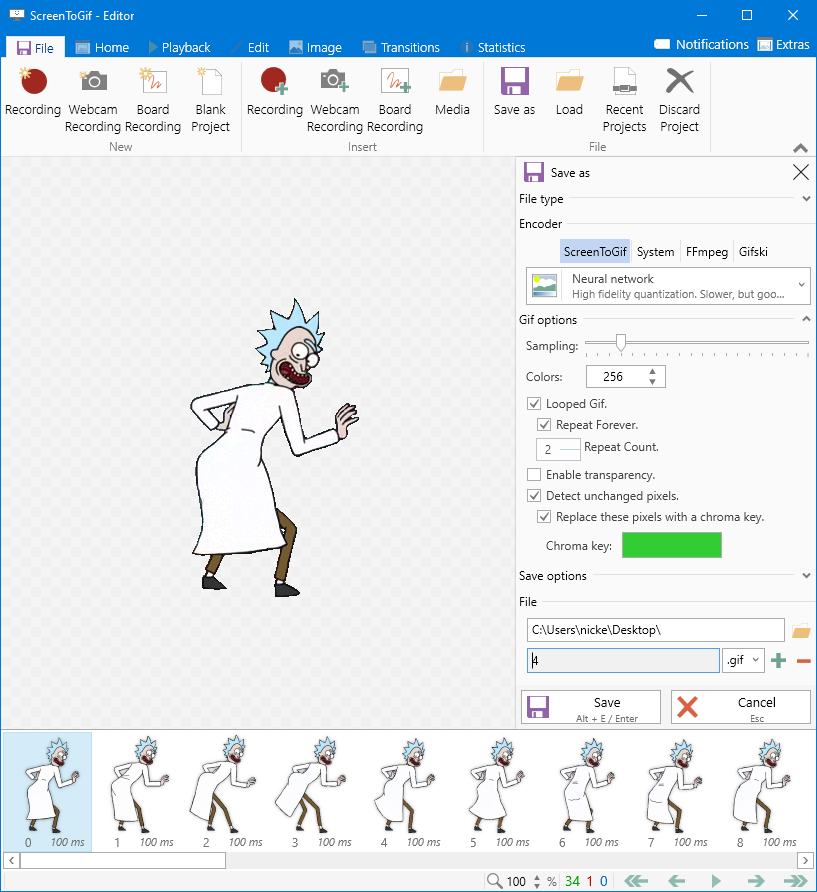
To enabled, just tick the option "Enable transparency". You can let the app detect the transparency in the frame or pick one color to be converted to transparent.
This feature will be available with the next version.
NickeManarin
on 29 Jun 2020
Related issues
 AdKiller
·
5Comments
AdKiller
·
5Comments
 Tox86
·
3Comments
Tox86
·
3Comments
 alphestdev
·
4Comments
alphestdev
·
4Comments
 tomasorti
·
4Comments
tomasorti
·
4Comments
 duarteframos
·
3Comments
duarteframos
·
3Comments
Most helpful comment
Please support transparency. It's very useful.