Screentogif: The new recorder UI does not support multi-screen
When the new recorder UI is enabled (just as the setting item below) , I find that it does not support multi-screen.

In details:
- When the editor UI shows in the extended screen, the new recorder UI will no longer show any pixel.
- But even when the editor UI shows on the main screen, the new recorder UI still show half when it is dragged to the edge.
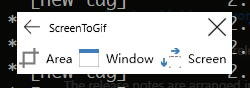
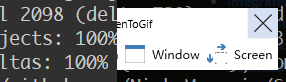
(Normal on the left and clipped on the right) - When
Areais activated, theArea selectionwindow only shows on the main screen. Then I can't record on the extended screen.
 walterlv
All 9 comments
I need a few details about this bug:
Are you using a high DPI monitor?
Did you connect the external/second monitor after opening the recorder?
 NickeManarin
on 19 Jul 2017
NickeManarin
on 19 Jul 2017
I have two monitors connecting to my PC.
- Both use 96Dpi.
- Neither of them connect or disconnect during the Recorder Window displaying.
- I can reproduce this issue everytime with normal procedure.
To solve this issue, we could not create a maximized window and put a recorder UI onto it. These may help:
- Use multi-window and display each of them in one screen.
- Use a single window with non-maximized state and cover it to all screens.
Maybe I can find out and solve this issue this weekend. After that, I will create a new pull request.
EDIT
I realize that you've done all the efforts above, but it still happens.
walterlv
on 20 Jul 2017
Oh, I think that I understand what's happening.
Is your secondary screen to the left of your primary screen?
NickeManarin
on 22 Jul 2017
I just tested in here... I was assuming that no monitor would use a negative position (> 0;0/Left;Top), but if the secondary display is set to the left side, the app won't cover that screen.
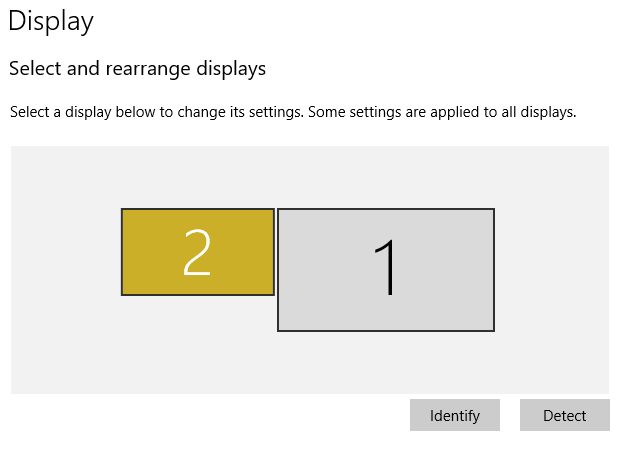
NickeManarin
on 22 Jul 2017
To solve this, it's pretty simple, just set Left and Top to the VirtualScreen coordinates:
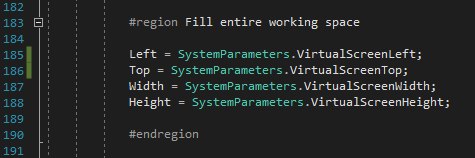
Of course, there's a few adjustments to make, but nothing big.
NickeManarin
on 22 Jul 2017
You'are right!
My secondary screen is on the left.
walterlv
on 22 Jul 2017
It's not that simple.
It is possible that your coordinate will be incorrect when your window location changes.
walterlv
on 22 Jul 2017
When the window location changes, it's possible to detect the new arrangement by listening to this event:
SystemEvents.DisplaySettingsChanged += (sender, args) => { Dialog.Ok("a", "b", "c"); };
NickeManarin
on 22 Jul 2017
Solved. See #166 .
walterlv
on 24 Jul 2017
Related issues
 tpkn
·
11Comments
tpkn
·
11Comments
 Cornstar23
·
11Comments
Cornstar23
·
11Comments
 positr0nic
·
17Comments
positr0nic
·
17Comments
 Kenya-West
·
16Comments
Kenya-West
·
16Comments
 vatterspun
·
13Comments
vatterspun
·
13Comments