Scratch-vm: Hiragana and Katakana are equal!?
Expected Behavior
They shouldn't be equal. It's not capitalization, and they are different letters.
Actual Behavior
あ = ア
Steps to Reproduce
Use block <(あ) = (ア)>
Operating System and Browser
Windows 10, Firefox 61.0.2
 apple502j
All 10 comments
I can definitely say this - scratch-vm/src/util/cast.js Lie 121
It is localeCompare that makes the problem.
apple502j
on 24 Aug 2018
@apple502j you say "definitely", but "あ".localeCompare("ア") results in -1, which is not 0 -- a sign of inequality. Do you have some evidence to suggest the contrary?
 joker314
on 24 Aug 2018
joker314
on 24 Aug 2018
Unable to reproduce with Chrome on Windows on https://beta.scratch.mit.edu. Upon clicking, the block shows a bubble with the text "false".
joker314
on 24 Aug 2018
@joker314 Likewise here on Firefox 62.0b19 / Linux:
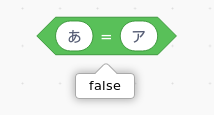
 towerofnix
on 24 Aug 2018
towerofnix
on 24 Aug 2018
Chrome 68.0.3440.106 Windows 10.0.17134.228
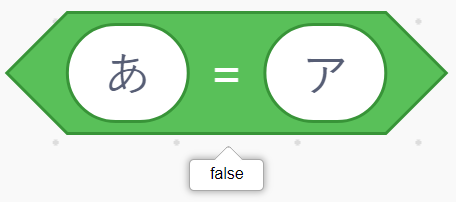
 Kenny2github
on 24 Aug 2018
Kenny2github
on 24 Aug 2018
@joker314 @towerofnix @Kenny2github I also found why you can't reproduce - It is a problem when you use Firefox in Japanese. The second argument of localeCompare is missing, so it uses your browser's language first.
Example:
When I ran "あ".localeCompare("ア","en"), it returned -1.
But when I ran "あ".localeCompare("ア","ja") it returned 0
I set the browser language to Japanese, so the default is latter one.
You use English one, don't you? Then the default is former one.
What I mean, in other words:
Use Japanese computer to reproduce this.
apple502j
on 24 Aug 2018
https://help.adobe.com/en_US/FlashPlatform/reference/actionscript/3/String.html#localeCompare()
While this method is intended to handle the comparison in a locale-specific way, the ActionScript 3.0 implementation does not produce a different result from other string comparisons such as the equality (==) or inequality (!=) operators.
I believe it's the same as < and >, because ECMA prescribes that as the fallback when locale-based sorting is unsupported. However, I might be completely mistaken!
joker314
on 24 Aug 2018
/cc @chrisgarrity
 thisandagain
on 27 Aug 2018
thisandagain
on 27 Aug 2018
/cc @kchadha
thisandagain
on 27 Aug 2018
@thisandagain Question: Can't it be normal compare?
why localeCompare?
apple502j
on 17 Sep 2018
Related issues
 BeksOmega
·
4Comments
BeksOmega
·
4Comments
 fsih
·
7Comments
apple502j
·
6Comments
fsih
·
7Comments
apple502j
·
6Comments
 ericrosenbaum
·
3Comments
ericrosenbaum
·
3Comments
 kchadha
·
6Comments
kchadha
·
6Comments
Most helpful comment
@joker314 @towerofnix @Kenny2github I also found why you can't reproduce - It is a problem when you use Firefox in Japanese. The second argument of localeCompare is missing, so it uses your browser's language first.
Example:
When I ran
"あ".localeCompare("ア","en"), it returned -1.But when I ran
"あ".localeCompare("ア","ja")it returned 0I set the browser language to Japanese, so the default is latter one.
You use English one, don't you? Then the default is former one.
What I mean, in other words:
Use Japanese computer to reproduce this.