Scratch-gui: What should `translate (join (apple) (banana)) to (<language other than english>)` do?
Expected Behavior
Plugging in blocks into translate block with a language other than the viewer's language selected should translate that phrase into the selected language.
Actual Behavior
This is really a question about what the translate block should do if it fails to translate a phrase.
The following combination of blocks (composed of unchanged blocks found in the toolbox) results in 'applebanana' in English.

This feels a little broken, especially since it still translates to a string in English. Maybe this should result in the empty string, indicating that a translation for that phrase in the desired language could not be found.
 kchadha
All 14 comments
@kchadha That is normal since you can't translate a word that doesn't exist in a certain language like applebanana which isn't even a word in English. Only words that exist would translate. It registers as a name since it doesn't exist in the language.
 AmazingMech2418
on 5 Jun 2018
AmazingMech2418
on 5 Jun 2018
Update: @ericrosenbaum and I noticed during lunch that this has varying support depending on the language selected in the dropdown menu. For example:
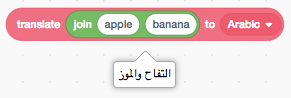
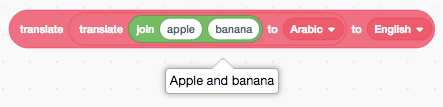
kchadha
on 5 Jun 2018
I think if there is a translation, it should be returned, and otherwise a blank string will be returned.
 kyleplo
on 6 Jun 2018
kyleplo
on 6 Jun 2018
@kyleplo What about names then? What if a user decides to name their account applebanana?
AmazingMech2418
on 7 Jun 2018
@kyleplo Also, what if a real name is in the translated text?
AmazingMech2418
on 7 Jun 2018
@amazinigmech2418, that's a good point about proper names. Unfortunately, the inconsistency between languages makes it a little more confusing (e.g. the string does get translated in some languages but not in others), but yeah, I am not sure that this is something that necessarily has a better solution than what exists now.
kchadha
on 8 Jun 2018
@kchadha Thank you. I think there should be a way to add settings to the extension so you can add names to the settings, so it won't translate any configured names. Also, there could be blocks for the settings if no settings menu is added for the google translate extension, or just to add to it.
Note: The edit was because I accidentally said "you're welcome" instead of "thank you".
AmazingMech2418
on 11 Jun 2018
Just a note on the technical side: "applebanana" is what the translate api returns for that query and many other made up words just return the original as well. If we did want to return the empty string instead, I don't see any score in the response that we could use to help make that decision.
This is my new favorite example of this :-D

 picklesrus
on 12 Jun 2018
picklesrus
on 12 Jun 2018
The real issue is with the join block. It should by default be (like in 2.0) (join (string ) (string)) instead of (join (string) (string)) (the second has no space after apple).
 chexbox
on 7 Aug 2018
chexbox
on 7 Aug 2018
@chexbox I like that change because it forces new users to learn that the space isn't automatic.
kyleplo
on 7 Aug 2018
@picklesrus In Japanese, "blorp" translates to "broken"
kyleplo
on 7 Aug 2018
@kyleplo Indeed. Google translate returns "broken" spelled out in Katakana. I don't know enough Japanese to know why though. I was hoping maybe it was an onomatopoeia, but I can't find any evidence to support that.
picklesrus
on 7 Aug 2018
That's a valid translation of broken in Japanese. A lot of Japanese words are basically English :p
 fsih
on 7 Aug 2018
fsih
on 7 Aug 2018
I've filed an issue to change the default values in the join block so they report two words with a space in between, and I'm going to close this one.
 ericrosenbaum
on 11 Sep 2018
ericrosenbaum
on 11 Sep 2018
Related issues
 chrisgarrity
·
4Comments
chrisgarrity
·
4Comments
ericrosenbaum
·
4Comments
chrisgarrity
·
4Comments
chrisgarrity
·
4Comments
ericrosenbaum
·
4Comments
 MrBlockCat
·
4Comments
ericrosenbaum
·
4Comments
MrBlockCat
·
4Comments
ericrosenbaum
·
4Comments
Most helpful comment
Just a note on the technical side: "applebanana" is what the translate api returns for that query and many other made up words just return the original as well. If we did want to return the empty string instead, I don't see any score in the response that we could use to help make that decision.
This is my new favorite example of this :-D
