Scratch-blocks: "Create variable" button click is only on the button text, not the button rect
Expected Behavior
Clicking anywhere on the "create variable" button makes the modal appear.
Actual Behavior
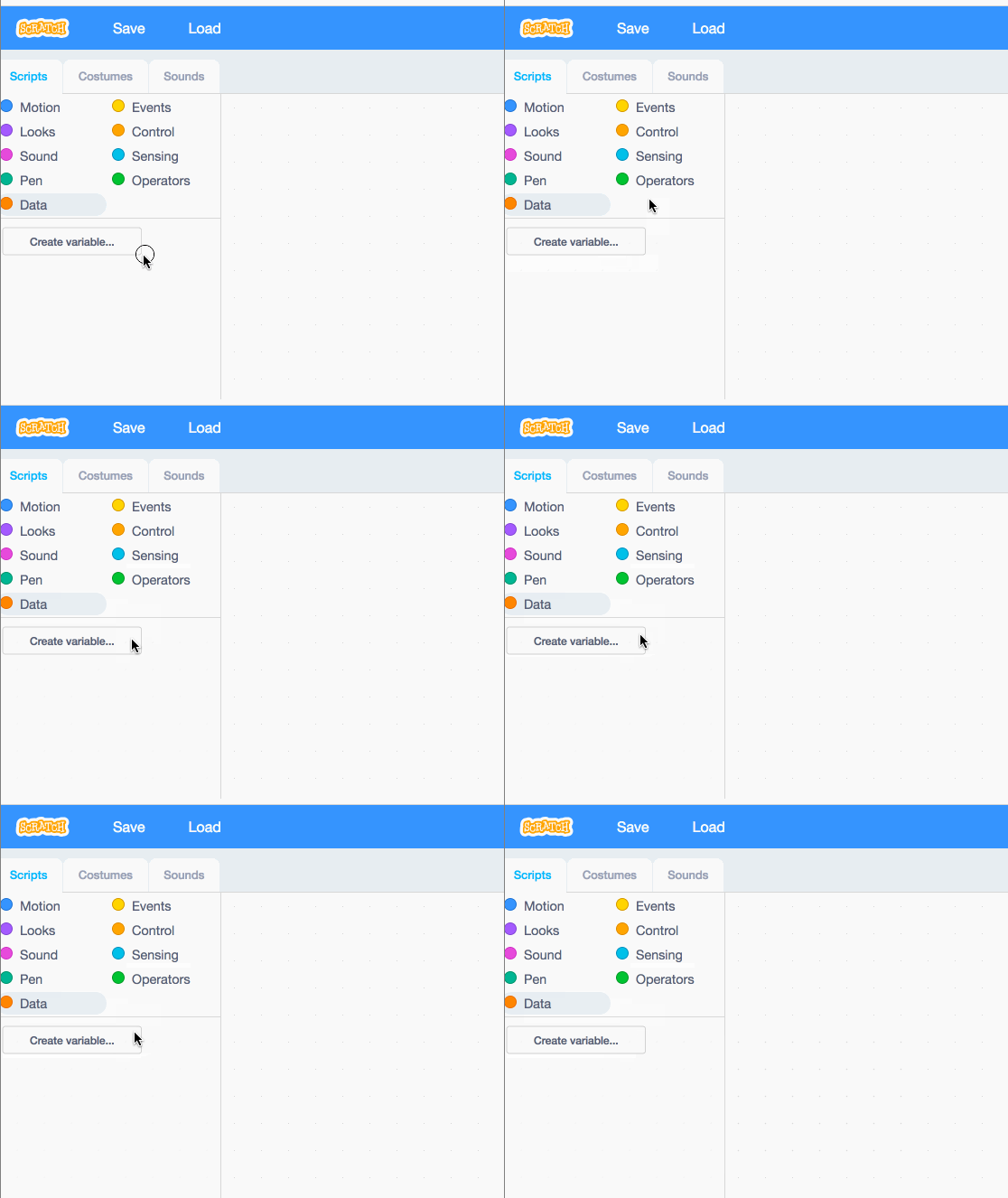
Only clicking on the text makes the modal appear.
Steps to Reproduce
Open the vertical playground
Go to the "Data" category
Click on the background of the "create variable" button
Operating System and Browser
Ubuntu, Chrome
 rachel-fenichel
All 7 comments
Can't repro on MacOS, Chrome (latest) but we should try to repro on Ubuntu.
 thisandagain
on 15 Jun 2017
thisandagain
on 15 Jun 2017
There is some funky behavior on that button. Sometimes clicking the whole button works, but sometimes it doesn't. Here is a gif of what I saw. Note that cursor style correlates directly with clickability, so any time you see the hand it was possible to click.
 paulkaplan
on 15 Jun 2017
paulkaplan
on 15 Jun 2017
@paulkaplan that matches what I was seeing. It seems like once you hit the text it becomes clickable, and then stays clickable to the edge of the button, but I'm not sure.
I quickly checked the Blockly playground and couldn't repro, but that button is styled pretty differently.
rachel-fenichel
on 16 Jun 2017
@paulkaplan I'm seeing this behavior as well.
 prail
on 29 Jul 2017
prail
on 29 Jul 2017
We fixed this issue internally (at least for Android) by adding a transparent background to the flyout label attributes in the call to create the background rectangle in Blockly.FlyoutButton.prototype.createDom.
 msintov
on 20 Dec 2017
msintov
on 20 Dec 2017
@rachel-fenichel I can hover over the text and then click anywhere in the box, but it seems like the event listener is only attached to the text with a mouseover event with a mouseout on the rectangle.
 AmazingMech2418
on 16 Apr 2018
AmazingMech2418
on 16 Apr 2018
On touch on chrome OS this problem makes the buttons very difficult to click (usually takes six or seven tries).
 ericrosenbaum
on 25 May 2018
ericrosenbaum
on 25 May 2018
Related issues
 bfunc
·
5Comments
bfunc
·
5Comments
 tmickel
·
6Comments
tmickel
·
3Comments
tmickel
·
6Comments
tmickel
·
3Comments
 Alzter
·
3Comments
Alzter
·
3Comments
 towerofnix
·
6Comments
towerofnix
·
6Comments
Most helpful comment
We fixed this issue internally (at least for Android) by adding a transparent background to the flyout label attributes in the call to create the background rectangle in Blockly.FlyoutButton.prototype.createDom.