ScoutSuite flags storage account incorrectly when 3 exceptions allowed
Description
When running ScoutSuite against our Azure infrastructure, an incorrect flag is given for the Trusted Microsoft Services Enabled rule for storage accounts.
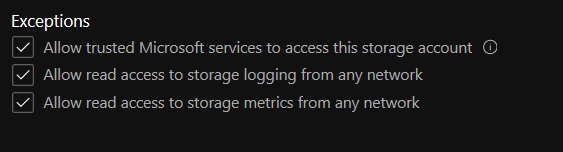
We allow all 3 exceptions for our Azure storage accounts, as presented below:
- Allow trusted Microsoft services to access this storage account
- Allow read access to storage account loggin from any network
- Allow read access to storage metrics from any network
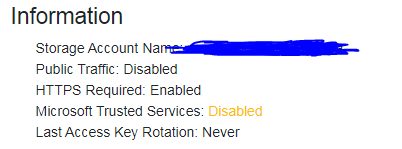
However, ScoutSuite flags the storage account and says that the Trusted Microsoft Services are disabled.
To Reproduce
- Create Azure storage account
- Go to storage account -> Firewalls and virtual networks
- Allow all three exceptions
- Run ScoutSuite for the subscription where storage account has been deployed
The following CLI parameters have been used:
- Azure
- Subscription
- Service-principal
- Tenant
- Client-id
- Client-secret
- Skip-aad
The full command executed to generate report:
python3 scout.py azure --subscription xxxx --service-principal --tenant xxxx --client-id xxxx --client-secret xxxx --skip aad
Additional context
ScoutSuite version 5.8.1 has been used.
We use default rules and conditions.
 Dziubey
All 5 comments
Thank you @Dziubey, we'll look into it.
 x4v13r64
on 1 Jun 2020
x4v13r64
on 1 Jun 2020
@Dziubey Any chance you're able to run az storage account show --name NAME --query 'networkRuleSet.bypass'? This is the query primarily backing this findings, so it'll make debugging easier.
Further background: for now we are checking if it is equal to "AzureServices" to pass the check. I'm not the Azure guy so it may be we need to broaden this check
 ramimac
on 9 Jun 2020
ramimac
on 9 Jun 2020
Hi @ramimac , apologies for the delayed reply. The output we received for two tested storage accounts was: "Logging, Metrics, AzureServices".
Please see the screenshot for reference:

Hope that helps. Just let me know if you would need any additional information.
Dziubey
on 9 Jun 2020
Awesome! Super helpful, I'll go get this rule refined.
ramimac
on 9 Jun 2020
Closing, fixed in develop.
x4v13r64
on 15 Jun 2020
Related issues
x4v13r64
·
8Comments
 regevbr
·
7Comments
regevbr
·
7Comments
 prisas
·
4Comments
prisas
·
4Comments
 alitheg
·
8Comments
alitheg
·
8Comments
 JLLeitschuh
·
4Comments
JLLeitschuh
·
4Comments