Scout: How to set up Simple login
Dear all,
I can not find the documentation or example config.py that specifies how to arrange a "simple login". For our teaching scenario, this is the preferred login method.
The docs over at:
http://www.clinicalgenomics.se/scout/admin-guide/login-system/#simple-login-with-userid-and-password
Just say:
Basic login with userid and password is the login system available whenever no advanced login system (either Google or LDAP) is specified in the Scout config file.
It is not clear if it is already specified in some file sitting around on disk, or if it should be specified here by the admin.
Can you please provide the means for arranging a simple login?
 andreaswallberg
All 30 comments
Answering myself here: commenting out the Google OAuth part of the main config file pulls up the simple login instead.
Next challenge: figuring out how to whitelist a user.
andreaswallberg
on 24 Aug 2020
Good! We should just leave you at it and you will have it figured in notime! Sorry if there were still references to whitelisting: I thought we had them all gone? Please let us know if it for some reason doesn't work with a plain user load (adding a user, that is) as in the admin guide. Or if you wish, just use a mongo db client to edit users like the demo ones; MongoDB Compass is pretty handy.
 dnil
on 24 Aug 2020
dnil
on 24 Aug 2020
Dont forget institutes! 😸
dnil
on 24 Aug 2020
Even after creating institutes, users and assigning institutes and roles to them, I keep triggering the issue upon simple login:
User not whitelisted
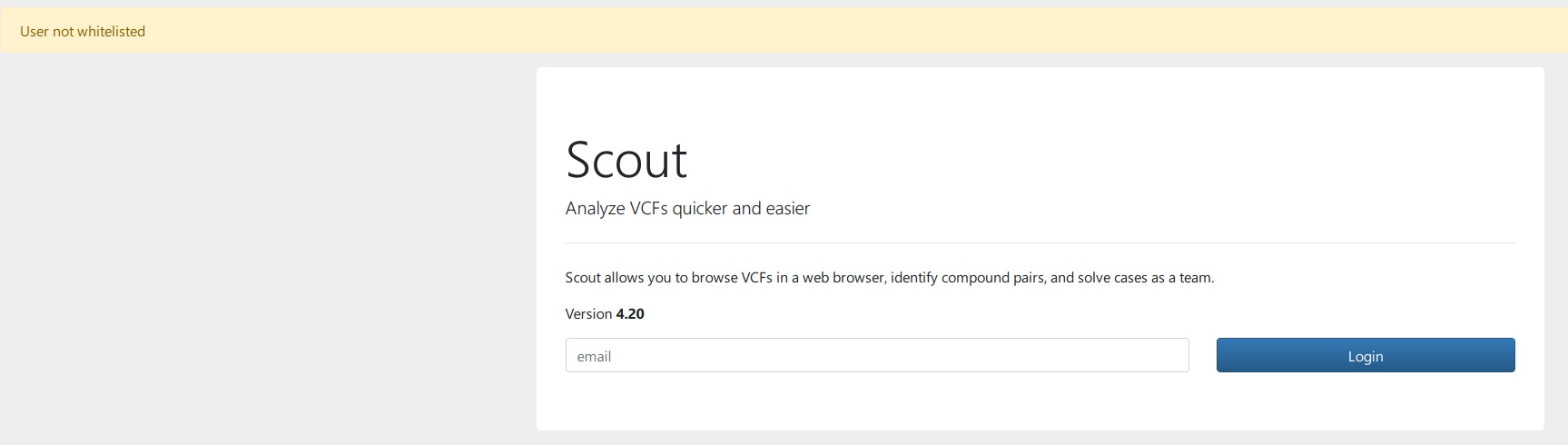
No idea what I am doing wrong. Maybe you have all used Google OAth for so long there is some bitrot in there for simple logins (outside the demo session?)? ;-)
andreaswallberg
on 24 Aug 2020
I believe it triggers the error at line 84 of views.py , but I can not understand why.
andreaswallberg
on 24 Aug 2020
I think you are right: this likely happens when you nowadays add non-demo users that have email and user_id that differ. Once upon a time they were the same. Let’s fix that tomorrow. Sleep tight! 😴
dnil
on 24 Aug 2020
Hi! If you want to create a simple login user please omit the -id parameter when you create it from the command line. The command would be for instance:
scout (--demo) load user -i cust000 -u "Your Name" -m [email protected]
Then you use the email for logging in.
It's not really a bug, but we should definitely document the process better!
 northwestwitch
on 25 Aug 2020
northwestwitch
on 25 Aug 2020
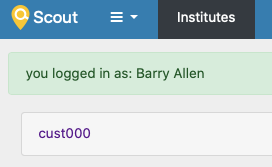
Thanks @northwestwitch! Sorry @andreaswallberg - we may have been a bit tired yesterday. I can't reproduce your issue now. Could you provide some commands / db snapshot - or better yet try again and find it working? Both with and without a forced _id work for me. See below, but drop --demo obviously - or substitute for your db connection preferences if you need it.
´´´
scout --demo load user -i cust000 -u "Barry Allen" -m "[email protected]" -id "inaflash"
scout --demo load user -i cust000 -u "Funker Ejder" -m "[email protected]"
´´´
dnil
on 25 Aug 2020
I tried both Barry Allen and Funker Ejder but I get the same problem. I can see the attempted login in the Scout server log, and there is not error message there (in multiple web browsers).
scout view users confirms they are all there:
name email roles institutes
Clark Kent clark.[email protected] admin cust000
Barry Allen inaflash cust000
Funker Ejder [email protected] cust000
Your Name [email protected] cust000
For the record, I am not running a demo site, but initiated scout as scout setup database. I have confirmed the presence of them in the database with Compass and can see that users created without id gets the email for id as well.
andreaswallberg
on 25 Aug 2020
If I press login without providing any email, I get this error in the server log:
scout.adapter.mongo.user[138357] WARNING No key provided to fetch user
That does not happen when I provide emails.
If I comment out this in views.py:
    if user_obj is None:
        flash("User not whitelisted", "warning")
        return redirect(url_for("public.index"))
I get a server error on the web page, so my best guess is whatever user_object store.user was meant to collect on the line before, it did indeed fail.
andreaswallberg
on 25 Aug 2020
Must a user be assigned roles or cases or something else before it can log in?
andreaswallberg
on 25 Aug 2020
Must a user be assigned roles or cases or something else before it can log in?
No, it should work anyway. Does the institute associated to the user exist in the database?
northwestwitch
on 25 Aug 2020
Nope, not needed. Also works for me on a local non-demo instance. Your user table looks good. And you are typing the email, not user id in the cases where they differ.
dnil
on 25 Aug 2020
I updated the docs slightly in #2042, but lets get this working before merging. 😄
dnil
on 25 Aug 2020
Yes it exists. It is default one created by scout setup database
_id internal_id display_name sanger_recipients created_at updated_at coverage_cutoff frequency_cutoff
cust000 cust000 cust000 ['clark.[email protected]'] 2020-08-24 23:22:04.050000 2020-08-24 23:22:04.050000 10 0.01
I have tried both emails and ids at the login :-)
Btw, is it expected that Clark Kent should be created also when running scout setup database (so not the demo)?
andreaswallberg
on 25 Aug 2020
Btw, is it expected that Clark Kent should be created also when running
scout setup database(so not the demo)?
Nope
northwestwitch
on 25 Aug 2020
Trying to reproduce your error @andreaswallberg.
I've been running:
scout setup databasescout load user -u "Diana Prince" -m [email protected] -i cust000scout serve- Logging in with email [email protected]
It works
northwestwitch
on 25 Aug 2020
Do you have Clark Kent among the users?
andreaswallberg
on 25 Aug 2020
Do you have Clark Kent among the users?
Yes I do, then it is created by that command after all..
northwestwitch
on 25 Aug 2020
I will start over now.
scout wipe --yes
scout --demo wipe --yes
In the case of the second wipe, I did not have the demo database in mongodb but I did it anyway :-D
I verified the deletion from mongodb with Compass.
Can you please post your startup scout config.py so that I can compare to mine?
andreaswallberg
on 25 Aug 2020
I'm not using any specific scout config. If you don't specify one it should be using the database named scout on localhost.
northwestwitch
on 25 Aug 2020
Btw, is it expected that Clark Kent should be created also when running scout setup database (so not the demo)?
Well, one user will be created, but you can override the name of your hero with
[-n | --user-name] (defaults to Clark Kent)
dnil
on 25 Aug 2020
You seem to be able to connect to the db fine, since e.g. the wipe commands, user view etc is working. Also the error from empty email login is as expected. I wonder what we do differently for the existing email?! Gotta be something. Unicode for @???
dnil
on 25 Aug 2020
What do you get for an error on the terminal when you try logging in as an existing user? Something like
Validating user None against Scout database?
dnil
on 25 Aug 2020
One step closer.
It works when using @northwestwitch instructions, but only when using scout serve for localhost:5000 and in my case scout serve -h 0.0.0.0 -p XXXXX to bring it up for external login on my custom port.
The error occurs when I switch to gunicorn. It brings up the site, but does not accept the login. This happens regardless of me using HTTP or HTTPS with my own key and cert. So the issue seems to be the behavior when starting the server with gunicorn.
andreaswallberg
on 25 Aug 2020
And how do you provide your scout Flask config path when running through gunicorn? As an environment variable SCOUT_CONFIG?
dnil
on 25 Aug 2020
Got it.
My scout config, copied over from the online instructions, which was only loaded when using gunicorn, had the line:
MONGO_DBNAME = 'scoutTest'
It should of course be:
MONGO_DBNAME = 'scout'
After changing this, it works :-D
andreaswallberg
on 25 Aug 2020
Same here, docs updated a bit in #2042 and #2046. Good luck with the course - looking forward to hear more about your experiences - or issues getting there!
dnil
on 25 Aug 2020
I would just like to add an addendum here. Our course lab worked well in 2020 and we are running it again in fall 2021.
I have been too scared to break things, so for now so I am still at the very same release of Scout that I used last year ;-)
andreaswallberg
on 16 Aug 2021
Our course lab worked well in 2020 and we are running it again in fall 2021.
Nice to hear it! We are about to release a new version of Scout on these days, of course it could happen that something needs fixing, but the current version is stable and shouldn't give you major problems. You could give it a try, we have added a lot of nice features in the last year! :)
northwestwitch
on 17 Aug 2021
Related issues
 hassanfa
·
3Comments
hassanfa
·
3Comments
 KickiLagerstedt
·
5Comments
KickiLagerstedt
·
5Comments
 ielvers
·
3Comments
dnil
·
3Comments
ielvers
·
3Comments
dnil
·
3Comments
 heronikdin
·
4Comments
heronikdin
·
4Comments
Most helpful comment
I would just like to add an addendum here. Our course lab worked well in 2020 and we are running it again in fall 2021.
I have been too scared to break things, so for now so I am still at the very same release of Scout that I used last year ;-)