Scoop-extras: [email protected]: decompress error
Sorry if this has been reported previously. I tried to install Gimp in an Ubuntu WSL2 shell and then in a Powershell Admin shell. Must I turn off Windows Defender Virus check to install some apps?
 scoop install gimp
Installing 'gimp' (2.10.14-2) [64bit]
Loading gimp-2.10.14-setup-2.exe from cache
Checking hash of gimp-2.10.14-setup-2.exe ... ok.
Extracting gimp-2.10.14-setup-2.exe ... ERROR Exit code was 1!
Failed to extract files from C:\Users\benja\scoop\apps\gimp\2.10.14-2\gimp-2.10.14-setup-2.exe.
Log file:
  ~\scoop\apps\gimp\2.10.14-2\innounp.log

Please try again or create a new issue by using the following link and paste your console output:
https://github.com/lukesampson/scoop-extras/issues/new?title=gimp%402.10.14-2%3a+decompress+error
 Benjamin-Connelly
All 7 comments
It looks like this is being caused by Windows Defender. I temporarily turned it off while installing the GIMP and it fixed it.
 DeedleFake
on 31 Dec 2019
DeedleFake
on 31 Dec 2019
Are we sure this is a false positive? I'm a bit hesitant to just turn off Defender.
 jwhipp
on 3 Jan 2020
jwhipp
on 3 Jan 2020
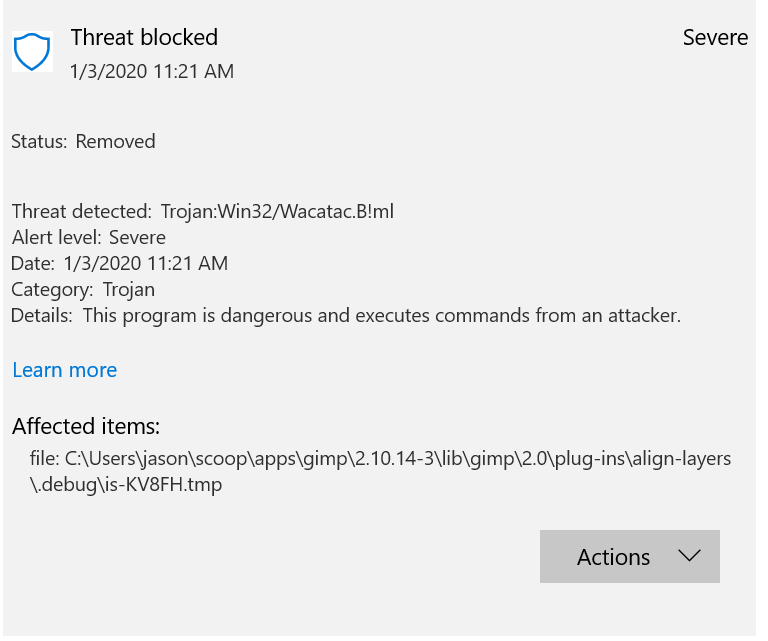
Are you sure its Windows Defender @DeedleFake? Mine doesn't trigger when trying to install but still fails.
EDIT 1: Tag DeedleFake
EDIT 2: Windows Defender was in fact the problem, but why?
 alerithe
on 4 Jan 2020
alerithe
on 4 Jan 2020
EDIT 2: Windows Defender was in fact the problem, but why?
It's detecting a Trojan, the question is, why? Is it an actual trojan or is it a false positive?
jwhipp
on 4 Jan 2020
I ran into this problem trying to install GIMP on a brand new machine. When I installed Avast, Windows disabled Defender in favor of the third-party antivirus, and Avast had no problems with it at all. Doesn't mean that it's not actually a problem, though.
DeedleFake
on 21 Jan 2020
Likewise ran into this with a fresh install of scoop and gimp w/Windows Defender. It also detected Trojan:Win32/Fuery.C!cl and Program:Win32/Uwasson.A!ml.
I excluded C:\ProgramData\scoop\apps\gimp from Windows Defender and the install completed.
After installing GIMP w/Scoop I removed the exclusion and had Defender scan all of C:\ProgramData\scoop\apps. It found nothing.
These are the files Windows Defender claims it find threats in (which don't exist once the install completes):
C:\ProgramData\scoop\apps\gimp\2.10.18-2\lib\gimp\2.0\plug-ins\blur\.debug\is-A91G5.tmp
C:\ProgramData\scoop\apps\gimp\2.10.18-2\lib\gimp\2.0\plug-ins\cml-explorer\.debug\is-T2TA2.tmp
C:\ProgramData\scoop\apps\gimp\2.10.18-2\lib\gimp\2.0\plug-ins\file-exr\.debug\is-J8HAF.tmp
C:\ProgramData\scoop\apps\gimp\2.10.18-2\lib\gimp\2.0\plug-ins\file-faxg3\.debug\is-VB439.tmp
C:\ProgramData\scoop\apps\gimp\2.10.18-2\lib\gimp\2.0\plug-ins\file-gif-load\.debug\is-28SDH.tmp
C:\ProgramData\scoop\apps\gimp\2.10.18-2\lib\gimp\2.0\plug-ins\file-pat\.debug\is-LVK9A.tmp
 mmelvin0
on 5 Apr 2020
mmelvin0
on 5 Apr 2020
Going through the process of setting up a brand new installation of Windows, encountered Windows Defender blocking two files it thinks are malicious exactly what @mmelvin0 sees.
 grrttedwards
on 19 Apr 2020
grrttedwards
on 19 Apr 2020
Related issues
 nitrocode
·
7Comments
nitrocode
·
7Comments
 bickycheese
·
24Comments
bickycheese
·
24Comments
 ggobbe
·
3Comments
ggobbe
·
3Comments
 jahead
·
11Comments
jahead
·
11Comments
 dev-nicolaos
·
4Comments
dev-nicolaos
·
4Comments
Most helpful comment
Are we sure this is a false positive? I'm a bit hesitant to just turn off Defender.