Scoop-extras: VS Code registers one file icon when installed via Scoop
Environment
Windows Build: 10.0.18362.0
Current Scoop Version: 3e55a709
Steps to Reproduce
Assuming scoop is installed, vs code is not, and the extras bucket has been added:
- Run
scoop install vscode - Run
$dir\\vscode-install-context.regto add VS Code as a context menu option - In Explorer, create a folder with various file types supported by VS Code
- For each file:
- Select "Open With..."
- Find VS Code in the list of applications OR if it's not there, select "Look for another app on this PC" and browse to the VS Code executable in scoop
- Check the "Always use this app to open '.file-ext' files" box
Current Behavior
Each file type uses the same VS code icon in Windows explorer
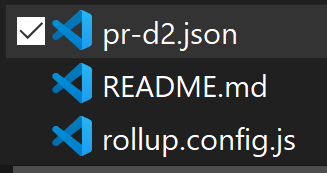
Expected Behavior
Each file type uses it's own icon, as described in the October 2018 release notes. This is the normal behavior when VS Code is installed normally rather than with Scoop.
 dev-nicolaos
All 4 comments
 r15ch13
on 25 Sep 2019
r15ch13
on 25 Sep 2019
@r15ch13 @ratatoeey
Not being an expert in the details of Windows application installation process, my best guess is that the file you linked to runs during normal installations of VS Code and is responsible for associating VS code and it's icons with the relevant file types? (please correct me if this assumption is incorrect).
Two questions:
- Are you suggesting that I run the relevant lines separately (post
scoop install)? If so how would I do that? - Why isn't this file running during
scoop install? Is there a way we can alter the config so it does? If not I imagine we'd have to repeat step 1 every time the icons were updated.
Thanks
dev-nicolaos
on 2 Nov 2019
Those code in iss shows registries related with file icons. You need to convert them to a reg file.
 linsui
on 2 Nov 2019
linsui
on 2 Nov 2019
Is there premade .reg file or is there some easy way to convert this code?
 mrlg255
on 16 Aug 2020
mrlg255
on 16 Aug 2020
Related issues
 TangentFoxy
·
5Comments
TangentFoxy
·
5Comments
 lepicsaintloup
·
10Comments
lepicsaintloup
·
10Comments
 jahead
·
11Comments
jahead
·
11Comments
 Spiraster
·
6Comments
Spiraster
·
6Comments
 Bazalia
·
13Comments
Bazalia
·
13Comments
Most helpful comment
@r15ch13 @ratatoeey
Not being an expert in the details of Windows application installation process, my best guess is that the file you linked to runs during normal installations of VS Code and is responsible for associating VS code and it's icons with the relevant file types? (please correct me if this assumption is incorrect).
Two questions:
scoop install)? If so how would I do that?scoop install? Is there a way we can alter the config so it does? If not I imagine we'd have to repeat step 1 every time the icons were updated.Thanks