Sceneform-android-sdk: Skybox in SceneView
Hello,
I am trying to create a skybox in SceneView using external texture but I can't make it work properly.
Based on the official documents here is my skybox material definition
material {
    name : Skybox,
    parameters : [
        {
           type : sampler2d,
           name : skybox
        }
    ],
    variables : [
         eyeDirection
    ],
    vertexDomain : device,
    depthWrite : false,
    shadingModel : unlit
}

fragment {
    void material(inout MaterialInputs material) {
        prepareMaterial(material);
        float theta = acos(variable_eyeDirection.y);
        float phi = atan(variable_eyeDirection.z / variable_eyeDirection.x) +
            (variable_eyeDirection.x > 0.0 ? 0.0 : PI);
        material.baseColor = texture(materialParams_skybox,
            vec2((phi + PI / 2.0) / (2.0 * PI), theta / PI));
    }
}

vertex {
    void materialVertex(inout MaterialVertexInputs material) {
        float3 p = getPosition().xyz;
        float3 u = mulMat4x4Float3(getViewFromClipMatrix(), p).xyz;
        material.eyeDirection.xyz = mulMat3x3Float3(getWorldFromViewMatrix(), u);
    }
}
I used a simple plane as the shape data since the material has device vertex domain.
o Plane
v -1.000000 -1.000000 1.000000
v 1.000000 -1.000000 1.000000
v -1.000000 1.000000 1.000000
v 1.000000 1.000000 1.000000
vt 1.0000 0.0000
vt 1.0000 1.0000
vt 0.0000 1.0000
vt 0.0000 0.0000
vn 0.0000 0.0000 1.0000
s off
f 1/1/1 2/2/1 4/3/1 3/4/1
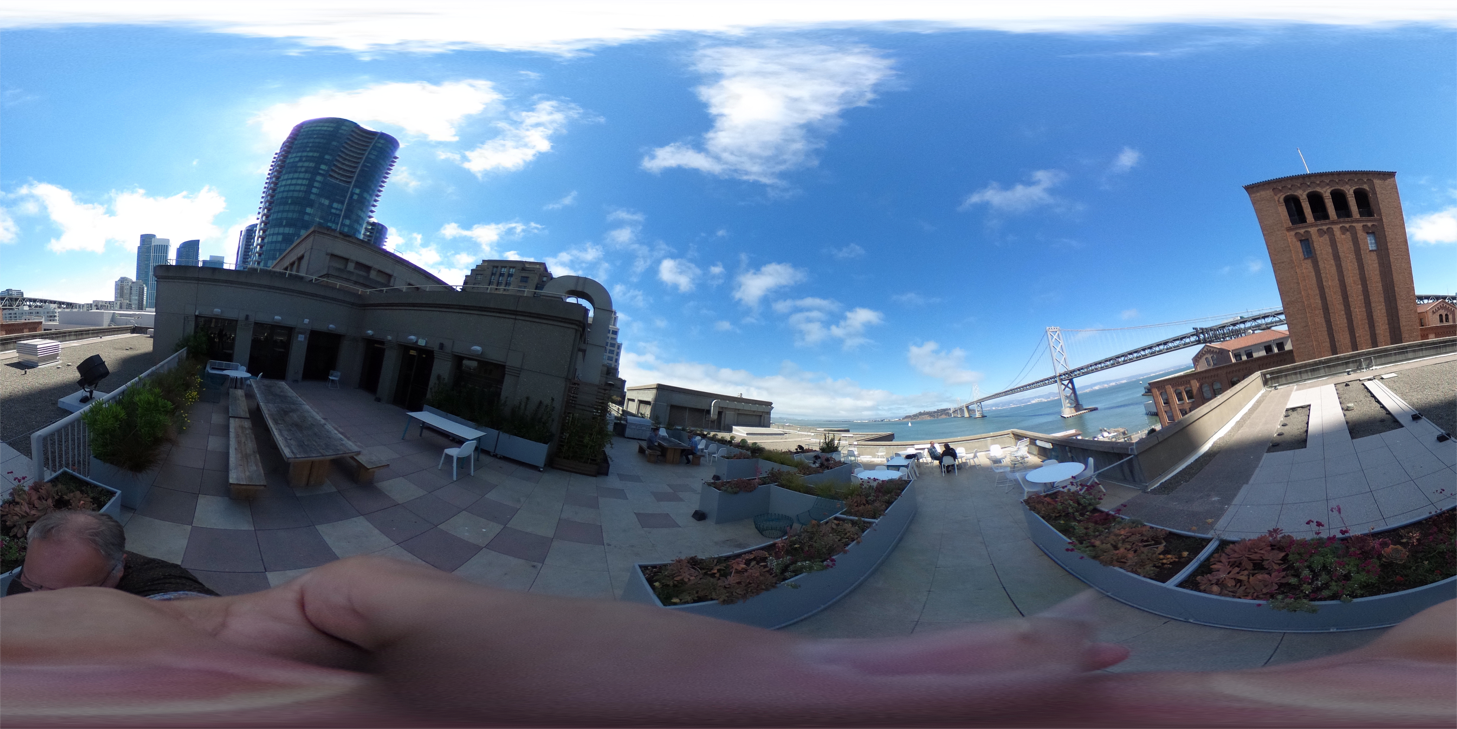
Then my texture image is something link this . I am not really sure what kind of texture image to use here.
When I run it. It looks strange. The top and bottom looks distorted and I saw no texture after turning +90 or -90 degree from start.
I am new to this and really need your help.
Thanks
 seanxtr
All 4 comments
The skybox from the documentation is expecting an equirectangular image. There is a bug in the code actually, so this custom material works better:
material {
    name : "Skybox material",
    parameters : [
        {
            type : sampler2d,
            name : skybox
        }
    ],
    variables : [
        eyeDirection
    ],

    shadingModel : unlit,
    depthWrite: false,
    vertexDomain : device,
}

fragment {
    void material(inout MaterialInputs material) {
        prepareMaterial(material);

        vec3 dir = variable_eyeDirection.xyz;
        float len = sqrt(dir.x*dir.x + dir.y * dir.y + dir.z * dir.z);

        float theta = acos(dir.y/len);
        float phi = atan(dir.x, dir.z);
        float x =  0.5 + phi / (PI * 2.0);
        float y =  theta / PI;
        float c = -dir.y/len;

        material.baseColor = texture(materialParams_skybox, vec2(x, y),
            -2.0 * log2 (1.0 + c * c));
    }
}

vertex {
    void materialVertex(inout MaterialVertexInputs material) {
        float3 p = getPosition().xyz;
        float3 u = mulMat4x4Float3(getViewFromClipMatrix(), p).xyz;
        material.eyeDirection.xyz = mulMat3x3Float3(getWorldFromViewMatrix(), u);
    }
}
The .sfa is:
{
   materials: [
      {
         name: "None",
         parameters: [
            {
               skybox: "sky1",
            },

         ],
         source: "sampledata/models/skybox.mat",
      },
   ],
   model: {
      attributes: [
         "Position",
         "TexCoord",
         "Orientation",
      ],
      collision: {},
      file: "sampledata/models/skybox.obj",
      name: "skybox",
   },
   samplers: [
      {
         file: "sampledata/models/360pic.png",
         name: "sky1",
      },
   ],
   version: "0.51:1",
}
The image I tested with is one I took with a 360 degree camera:
 claywilkinson
on 27 Dec 2018
claywilkinson
on 27 Dec 2018
Please reopen if you still have issues.
claywilkinson
on 8 Jan 2019
Please reopen if you still have issues.
Can you look at your project code? Or a demo, thank you
 Chen-Alexander
on 24 Apr 2019
Chen-Alexander
on 24 Apr 2019
Please reopen if you still have issues.
Can you look at your project code? Or a demo, thank you
@chen8888 I was able to get this to work like so
        Texture.builder()
                .setSource(context, R.sky) // this is my .png
                .build()
                .thenAccept { skyBox ->
                    ModelRenderable.builder()
                            .setSource(context, R.raw.sky_box) // this is my .sfb
                            .build()
                            .thenAccept { skyBoxRenderable ->
                                skyBoxRenderable.material.setTexture("skybox", skyBox)
                                scene.addChild(Node().apply { renderable = skyBoxRenderable })
                            }
                }
 cmt218
on 3 Dec 2019
cmt218
on 3 Dec 2019
Related issues
 dementia2029
·
3Comments
dementia2029
·
3Comments
 yashvv
·
3Comments
yashvv
·
3Comments
 scolar
·
4Comments
scolar
·
4Comments
 michaelvogt
·
4Comments
michaelvogt
·
4Comments
 terezo
·
3Comments
terezo
·
3Comments
Most helpful comment
The skybox from the documentation is expecting an equirectangular image. There is a bug in the code actually, so this custom material works better:
The .sfa is:
The image I tested with is one I took with a 360 degree camera:
