Sceneform-android-sdk: how to show boundingbox of a node?
can sceneform show boundingbox lick this:
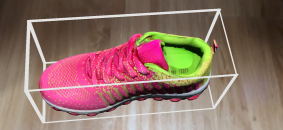
 scolar
All 4 comments
There currently is no debug functionality for showing the bounding box of a node. However, you can write some code to render the bounds yourself like this:
            // Create the andy and add it to the anchor.
            Node andy = new Node();
            andy.setParent(anchorNode);
            andy.setRenderable(andyRenderable);

            // Create node to display the bounds of the andy
            Node boundsNode = new Node();
            boundsNode.setParent(andy);
            MaterialFactory.makeTransparentWithColor(this, new Color(0.8f, 0.8f, 0.8f, 0.5f))
                .thenAccept(
                    material -> {
                      Box box = (Box) andyRenderable.getCollisionShape();
                      Renderable renderable =
                          ShapeFactory.makeCube(box.getSize(), box.getCenter(), material);
                      renderable.setCollisionShape(null);
                      boundsNode.setRenderable(renderable);
                    });
 dsternfeld7
on 28 Jun 2018
dsternfeld7
on 28 Jun 2018
closing due to inactivity.
dsternfeld7
on 9 Jul 2018
The code above is a good start!
Change the following line:
Renderable renderable = ShapeFactory.makeCube(box.getSize(), box.getCenter(), material);
- Above creates a box, masking your object. You can use the center-point and the size of the box to create each individual outline edge.
box.getSize() and box.getCenter() are Vector3(x, y, z) objects. So you can manipulate your cube into a line (or edge), then position each line accordingly (ex. new Vector3(box.getCenter().x + box.getSize().x/2, box.getCenter().y, box.getCenter().z))
- Make a boundsNode for each line (edge), then make andy the parent of all those boundNodes! Hope this helps anyone in the future!
 RichardSantillan
on 3 Apr 2019
RichardSantillan
on 3 Apr 2019
@dsternfeld7
But this relies on a renderable having a CollisionShape, and currently only Box and Sphere shapes are supported. More importantly, CollisionShapes have to be created by the developer anyway. Is there any way to get the "extents" or "size" of an unknown/arbitrary model in code?
165 seems to be wondering this as well. This is super important for many scenarios. For instance, there are many times where you want to know if the model is fully within the view of the screen or whether it goes past the edges in some way. Or, you want to leave the model's origin at its center of mass, but position it sitting on a plane as if its origin were at the 'root'.
 hshapley
on 2 Aug 2019
hshapley
on 2 Aug 2019
Related issues
 peronecode
·
3Comments
peronecode
·
3Comments
 PaulTVungle
·
3Comments
PaulTVungle
·
3Comments
 Brian-Kwon
·
3Comments
Brian-Kwon
·
3Comments
 khonakr
·
3Comments
khonakr
·
3Comments
 rohitagarwal3011
·
4Comments
rohitagarwal3011
·
4Comments