Sceneform-android-sdk: Is there a way to draw a Line between two anchors using Sceneform?
I am working on a functionality in which I require to create a Line between two points using Sceneform. Is there any easy way to do it using Seneform?
 jagsrajput21
All 12 comments
Hello!
Here's a way to achieve a line between points:
 public void lineBetweenPoints(Vector3 point1, Vector3 point2) {
   Node lineNode = new Node();

   /* First, find the vector extending between the two points and define a look rotation in terms of this
        Vector. */

   final Vector3 difference = Vector3.subtract(point1, point2);
   final Vector3 directionFromTopToBottom = difference.normalized();
   final Quaternion rotationFromAToB =
       Quaternion.lookRotation(directionFromTopToBottom, Vector3.up());

   /* Then, create a rectangular prism, using ShapeFactory.makeCube() and use the difference vector
         to extend to the necessary length.  */

    MaterialFactory.makeOpaqueWithColor(this, new Color(android.graphics.Color.WHITE))
       .thenAccept(
           material -> {
             lineRenderable = ShapeFactory.makeCube(new Vector3(.01f, .01f, difference.length()),
                 Vector3.zero(), material);
           });

   /* Last, set the local rotation of the node to the rotation calculated earlier and set the local position to
       the midpoint between the given points . */

   lineNode.setParent(anchorNode);
   lineNode.setRenderable(lineRenderable);
   lineNode.setLocalPosition(Vector3.add(point1, point2).scaled(.5f));
   lineNode.setLocalRotation(rotationFromAToB);

 }
Additionally, if you're rendering many lines, it would be more performant to create a single renderable from the ShapeFactory and then set the length of the line using lineNode.setLocalScale().
Hope this helps!
 destinideinde
on 17 Jul 2018
destinideinde
on 17 Jul 2018
@destinideinde difference.length() is not giving the exact length. It is very short. I had to multiply it by 10.
jagsrajput21
on 23 Jul 2018
Do you still need additional help with this? Are any of the nodes in your hierarchy scaled? That could be one reason you had to multiply it by 10.
 dsternfeld7
on 2 Aug 2018
dsternfeld7
on 2 Aug 2018
Hi @dsternfeld7, since sceneform 1.4 add a ShapeFactory.makeCylinder method (#117), I think this issue can be closed.
Although, I'm not able to get the look rotation right with the new cylinder method:
Node node = new Node();
node.setParent(end);
float height = distanceBetween(start, end);
node.setRenderable(ShapeFactory.makeCylinder(radius, height, new Vector3(0F, 0.5F, 0F), material));
/* 0.5F is used to move the renderable center at one end of the cylinder */

Quaternion lookRotation = Quaternion.lookRotation(Vector3.subtract(end.getWorldPosition(), start.getWorldPosition()), Vector3.up());
node.setWorldRotation(lookRotation);
Size and position are fine, but the cylinder roation is always wrong and I can't find how to fix this.
Edit: it seems that the height direction of the cylinder doesn't correspond to the forward direction...
 SimonMarquis
on 3 Aug 2018
SimonMarquis
on 3 Aug 2018
I believe the height in the ShapeFactory.makeCylinder cylinder is on the y-axis.
dsternfeld7
on 3 Aug 2018
Yes this might be it, but then how do you make it behave correctly with Quaternion.lookRotation?
This function seems to only work on the forward direction (maybe swapping the Quaternion values?)
SimonMarquis
on 3 Aug 2018
Here is my solution to correctly rotate the cylinder:
Vector3 vector = Vector3.subtract(end.getWorldPosition(), start.getWorldPosition());
Quaternion lookRotation = Quaternion.lookRotation(vector, Vector3.up());
// Rotate 90° along the right vector (1, 0, 0)
Quaternion worldRotation = Quaternion.multiply(lookRotation, Quaternion.axisAngle(Vector3.right(), 90))
node.setWorldRotation(worldRotation);
I'm sorry that I have still a question on this topic, but I can't get it to work properly
In onCreate:
fabJustAnchor.setOnClickListener((View view) -> {
            if(isTracking) {
                Frame frame = fragment.getArSceneView().getArFrame();
                android.graphics.Point pt = getScreenCenter();
                List<HitResult> hits;
                if (frame != null) {
                    hits = frame.hitTest(pt.x, pt.y);
                    for (HitResult hit : hits) {
                        Trackable trackable = hit.getTrackable();
                        if ((trackable instanceof Plane && ((Plane) trackable).isPoseInPolygon(hit.getHitPose()))) {

                            if(counter == 0){
                                startAnchor = hit.createAnchor();
                                startAnchorNode = new AnchorNode(startAnchor);
                                fragment.getArSceneView().getScene().addChild(startAnchorNode);
                                counter++;
                                Log.d("MainActivity", "First Point");
                            }else{
                                Log.d("MainActivity", "Second Point");
                                Anchor endAnchor = hit.createAnchor();

                                AnchorNode endAnchorNode = new AnchorNode(endAnchor);
                                fragment.getArSceneView().getScene().addChild(endAnchorNode);
                                Pose startPose = startAnchor.getPose();
                                Pose endPose = endAnchor.getPose();

                                Vector3 start = new Vector3(startPose.tx(), startPose.ty(), startPose.tz());
                                Vector3 end = new Vector3(endPose.tx(), endPose.ty(), endPose.tz());

                                float dx = startPose.tx() - endPose.tx();
                                float dy = startPose.ty() - endPose.ty();
                                float dz = startPose.tz() - endPose.tz();

                                // Compute the straight-line distance.
                                float distanceMeters = (float) Math.sqrt(dx*dx + dy*dy + dz*dz);

                                Quaternion lookRotation = Quaternion.lookRotation(
                                    Vector3.subtract(
                                        endAnchorNode.getWorldPosition(),
                                        startAnchorNode.getWorldPosition()
                                    ),
                                    Vector3.up()
                                );

                                lineBetweenPoints(start, end, endAnchorNode, lookRotation, distanceMeters);


                                Snackbar snackbar = Snackbar.make(findViewById(android.R.id.content),
                                    "Distance between two pose: " + distanceMeters + "m", Snackbar.LENGTH_LONG);
                                snackbar.show();
                                Log.d("MainActivity", "Distance between two pose: " + distanceMeters + "m");

                                //fragment.getArSceneView().getScene().removeChild(startAnchorNode);
                                //startAnchor = null;
                                //startAnchorNode = null;
                                counter = 0;
                            }

                            makeCube(hit, color_green, 0.2f);
                        }
                    }
                }
            }
        });
public void lineBetweenPoints(Vector3 point1, Vector3 point2, AnchorNode anchorNode, Quaternion lookRotation, float distanceMeters) {
        Node lineNode = new Node();

        /* First, find the vector extending between the two points and define a look rotation in terms of this
        Vector. */

        final Quaternion rotationFromAToB = lookRotation;

        /* Then, create a rectangular prism, using ShapeFactory.makeCube() and use the difference vector
         to extend to the necessary length.  */

        MaterialFactory.makeOpaqueWithColor(this, new Color(android.graphics.Color.WHITE))
            .thenAccept(
                material -> {
                    Vector3 size = new Vector3(.01f, .01f, distanceMeters);
                    Vector3 center = new Vector3(.01f/2, .01f/2, distanceMeters/2);
                    cube = ShapeFactory.makeCube(size, center, material);
                });

        /* Last, set the local rotation of the node to the rotation calculated earlier and set the local position to
       the midpoint between the given points . */

        lineNode.setParent(anchorNode);
        lineNode.setRenderable(cube);

        //lineNode.setWorldPosition(Vector3.add(point1, point2).scaled(.5f));
        lineNode.setWorldRotation(rotationFromAToB);
    }
The result is not what I expected, please see the attached Screeshot
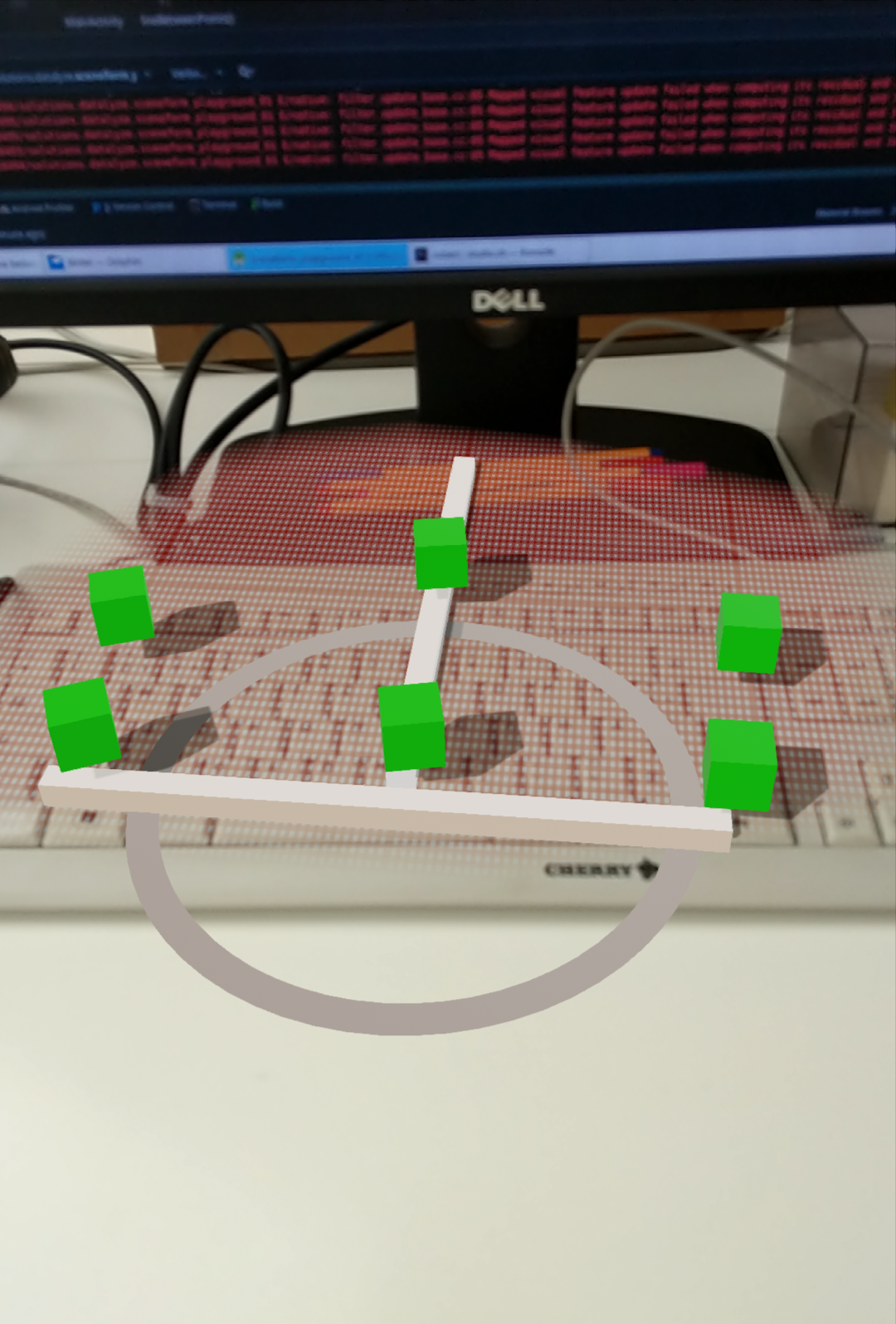
I placed the green cubes as a visual hint for my start and end points. As you can see I had to place six cubes, but only two lines showed up. It looks like that the distance from the past two anchors are used to determine the length.
- Do I have to add the start and end Anchor to the ARScene?
- Should I remove the start Anchor after attaching a generated Line to the end Anchor?
 RGregat
on 23 Aug 2018
RGregat
on 23 Aug 2018
I guess I found a solution
public void lineBetweenPoints(AnchorNode anchorNode, Quaternion lookRotation, float distanceMeters) {
        MaterialFactory.makeOpaqueWithColor(this, new Color(android.graphics.Color.WHITE))
            .thenAccept(
                material -> {
                    Log.d("lineBetweenPoints", "distance: " + distanceMeters);
                    Vector3 size = new Vector3(.01f, .01f, distanceMeters);
                    Vector3 center = new Vector3(.01f/2, .01f/2, distanceMeters/2);
                    cube = ShapeFactory.makeCube(size, center, material);
                    Node lineNode = new Node();
                    final Quaternion rotationFromAToB = lookRotation;

                    lineNode.setParent(anchorNode);
                    lineNode.setRenderable(cube);
                    lineNode.setWorldRotation(rotationFromAToB);
                    fragment.getArSceneView().getScene().addChild(anchorNode);
                });
    }
I was not aware of the new CompletableFuture objects.
RGregat
on 23 Aug 2018
Hello Everyone, Above solution work fine on local Anchor.
Have any one tried on resolved cloud anchor? As resolved
anchorNode.getWorldPosition() Will return zero (0) [x=0.0, y=0.0, z=0.0] By that we are not able to find out distance between two anchor node.
My goal is to draw a line between two resolved cloud anchor.
Help is appreciated.
 praveenbbhati
on 8 Aug 2019
praveenbbhati
on 8 Aug 2019
@praveenbbhati Cloud Anchors are initialized to the center of the world (0,0,0).
You must wait for it to be resolved (see getCloudAnchorState()).
SimonMarquis
on 13 Aug 2019
Here try my Polyline
`
class MainActivity(private var lastAnchorNode: AnchorNode = AnchorNode()) : AppCompatActivity() {
private lateinit var arFragment: ArFragment

override fun onCreate(savedInstanceState: Bundle?) {
    super.onCreate(savedInstanceState)
    setContentView(R.layout.activity_main)

    arFragment = supportFragmentManager.findFragmentById(R.id.arFragment) as ArFragment

    arFragment.setOnTapArPlaneListener(this::addLineBetweenHits)

}
private fun addLineBetweenHits(hitResult: HitResult, plane: Plane, motionEvent: MotionEvent) {
    val value = motionEvent.actionMasked
    val axisVal =
        motionEvent.getAxisValue(MotionEvent.AXIS_X, motionEvent.getPointerId(motionEvent.pointerCount - 1))
    Log.e("Values:", value.toString() + axisVal.toString())

    val firstAnchorNode =  AnchorNode(hitResult.createAnchor())

    firstAnchorNode.setParent(arFragment.arSceneView.scene)
    val point1: Vector3 = lastAnchorNode.worldPosition
    val point2: Vector3 = firstAnchorNode.worldPosition
val difference = Vector3.subtract(point1, point2)
    val directionFromTopToBottom = difference.normalized()

    val rotationFromAToB = Quaternion.lookRotation(directionFromTopToBottom, Vector3.zero())

    MaterialFactory.makeOpaqueWithColor(applicationContext, Color(0f, 255f, 244f))
        .thenAccept { material ->
            // Then, create a rectangular prism, using ShapeFactory.makeCube() and use the difference vector to extend to the necessary length.
            val model = ShapeFactory.makeCube(
                Vector3(.01f, .01f, difference.length()),
                Vector3.zero(), material
            )
            // Last, set the world rotation of the node to the rotation calculated earlier and set the world position to the midpoint between the given points .
            val node = Node()
            node.setParent(firstAnchorNode)
            node.renderable = model
            node.worldPosition = Vector3.add(point1, point2).scaled(.5f)
            node.worldRotation = rotationFromAToB
        }.thenAccept {
            lastAnchorNode =  firstAnchorNode
        }

}
}
`
 cheasoksereyoudom
on 21 Aug 2019
cheasoksereyoudom
on 21 Aug 2019
Related issues
 michaelvogt
·
4Comments
michaelvogt
·
4Comments
 khonakr
·
3Comments
khonakr
·
3Comments
 scolar
·
4Comments
scolar
·
4Comments
 rohitagarwal3011
·
4Comments
rohitagarwal3011
·
4Comments
 KamikX
·
4Comments
KamikX
·
4Comments
Most helpful comment
Hello!
Here's a way to achieve a line between points:
Additionally, if you're rendering many lines, it would be more performant to create a single renderable from the ShapeFactory and then set the length of the line using lineNode.setLocalScale().
Hope this helps!