Salesforcedx-vscode: Run All Tests & Run Test error: No default org is set. Run "SFDX: Create a Default Scratch Org" or "SFDX: Authorize an Org" to set one.
Summary
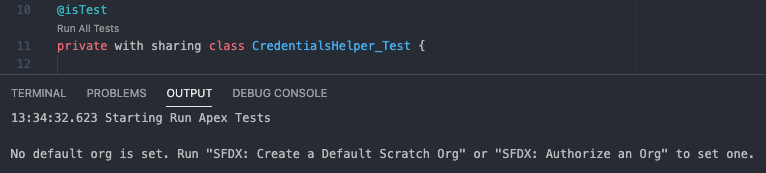
When using the Run All Tests or Run Test overlay in the editor of a test class, I receive the message _No default org is set. Run "SFDX: Create a Default Scratch Org" or "SFDX: Authorize an Org" to set on._, within an already authorized org. If I reset the default org to the already authed org, then these commands start to work again. However, the same message/behavior reappears after restarting VS Code. Strangely, running tests from the command palette works normally under all circumstances.
Steps To Reproduce:
- Restart VS Code.
- Open an already authed project that contains test classes. I'm using the manifest model in this scenario.
- Open a test class.
- Click Run All Tests -- should see error.
- Set a default org or auth a new one.
- Click Run All Tests -- should work this time.
- Restart VS Code.
- Reopen the same project.
- Click the same Run All Tests -- should see error again.
Expected result
The test run should complete with the test results.
Actual result
Receive the error message:
_No default org is set. Run "SFDX: Create a Default Scratch Org" or "SFDX: Authorize an Org" to set one._
Additional information
VS Code Version: 1.52.1
SFDX CLI Version: 7.84.2-a2868a68d5 darwin-x64 node-v12.18.3
OS and version: macOS Big Sur, v11.1
 jjTorrent
All 10 comments
I'm also experiencing this issue on macOS Big Sur 11.1
 BrotherZach
on 21 Jan 2021
BrotherZach
on 21 Jan 2021
Hi @jjTorrent thanks for reporting this! We are aware of this issue and the next release of the extensions will contain a fix to address it. For now, the workaround is to go into your Preferences and turn off the Salesforcedx-vscode-core › Experimental: Use Apex Library setting
 AnanyaJha
on 21 Jan 2021
AnanyaJha
on 21 Jan 2021
@jjTorrent @BrotherZach This issue was addressed with the latest release of the VS Code Extensions. Please update to version 50.14.0 and turn the setting back on to see the changes. Let us know if you have any other feedback, thanks!
AnanyaJha
on 21 Jan 2021
@AnanyaJha this worked for me
jjTorrent
on 21 Jan 2021
I experienced this issue and the settings workaround resolved it. However I have just installed version 50.14.0 and the behavior is the same; it will fail unless I disable the experimental setting.
 PreddyCR
on 21 Jan 2021
PreddyCR
on 21 Jan 2021
@PreddyCR What version of VS Code are you on and what version of the Salesforce CLI extension and Apex extension are you using?
AnanyaJha
on 21 Jan 2021
VSCode 1.52.1, SF CLI Integration Extension v50.14.0; Apex Extension 50.14.0, installed sfdx version sfdx-cli/7.82.1-0 darwin-x64 node-v12.19.0 ; macbook pro
PreddyCR
on 21 Jan 2021
@PreddyCR I'd recommend uninstalling and re-installing the Extension Pack, it's possible all the changes were not picked up immediately because of some delays in the publishing process today. If it's still not picking up on the change, it could be a deeper caching issue. Navigate to the Home directory from the Finder window. Click on .vscode > extensions. Delete the Salesforce extensions with the suffix 50.14.0 and then reinstall through the usual process from VS Code.
AnanyaJha
on 21 Jan 2021
@AnanyaJha This is working for me as well. Thanks!
BrotherZach
on 22 Jan 2021
@AnanyaJha I followed your recommendations - clearing all the extensions and reinstalling - now the symptom is different. It works as expected with Use Apex Library = off; when enabled the immediate error message is "Include the class name SCMIOC only once.". The acronym is the alias/username of my dev org. Perhaps I corrupted my config trying to resolve the actual issue?
PreddyCR
on 25 Jan 2021
Related issues
 frackham
·
6Comments
frackham
·
6Comments
 vtandon-wiley
·
3Comments
vtandon-wiley
·
3Comments
 pranaymistry
·
4Comments
pranaymistry
·
4Comments
 ChuckJonas
·
4Comments
ChuckJonas
·
4Comments
 aheber
·
4Comments
aheber
·
4Comments
Most helpful comment
Hi @jjTorrent thanks for reporting this! We are aware of this issue and the next release of the extensions will contain a fix to address it. For now, the workaround is to go into your Preferences and turn off the
Salesforcedx-vscode-core › Experimental: Use Apex Librarysetting