Salesforcedx-vscode: Run All Tests fails to show result when @testSetup method is failing
Summary
_Run all Tests_ command fails to show exception messages when the @TestSetup method is generating an exception.
I have the flag for retrieving code-coverage enabled.
Steps To Reproduce:
- Create a new Test class with a
@TestSetupmethod and add one or more@isTestmethods - Make sure the
@TestSetupmethod will fail to insert data (it has to raise an exception at runtime, in our case was a new validation rule breaking our test setup) - Clink on the _Run All tests_ link within the test class
Expected result
You should get the exception message
Actual result
You get this:
11:28:15.972 Starting Run Apex Tests


WHERE ApexClassorTriggerId IN ()
                              ^
ERROR at Row:1:Column:162
unexpected token: ')'
VS Code Version: 1.51.1
SFDX CLI Version:
$ sfdx --version
sfdx-cli/7.82.0-3d0c527ac6 darwin-x64 node-v12.18.3
$ sfdx plugins --core
@oclif/plugin-autocomplete 0.3.0
@oclif/plugin-commands 1.3.0 (core)
@oclif/plugin-not-found 1.2.4 (core)
@oclif/plugin-plugins 1.9.4 (core)
@oclif/plugin-warn-if-update-available 1.7.0 (core)
@oclif/plugin-which 1.0.3 (core)
@salesforce/analytics 0.23.0
@salesforce/lwc-dev-server 2.9.0
├─ @oclif/plugin-help 2.2.1
└─ @oclif/plugin-update 1.3.9
@salesforce/sfdx-trust 3.4.3 (core)
alias 1.1.3 (core)
analytics 1.12.1 (core)
auth 1.3.0 (core)
config 1.2.1 (core)
generator 1.1.3 (core)
salesforcedx 50.7.0 (core)
├─ schema 1.0.1 (core)
├─ @salesforce/sfdx-plugin-lwc-test 0.1.7 (core)
├─ apex 0.1.4 (core)
├─ templates 50.1.0 (core)
├─ custom-metadata 1.0.10 (core)
└─ salesforce-alm 50.7.0 (core)
sfdx-cli 7.82.0 (core)
OS and version: Mac OS Mojave
 maaaaarco
All 9 comments
Update
Seems that the entire test framework is broken... I tried disabling the _retrieve code coverage_ flag, and now I do get the exception messages back but the _Run All Tests_ shows as successful :/

maaaaarco
on 14 Jan 2021
Hi @maaaaarco thanks for reporting this! With the last release we made some updates to the Apex test framework that seem to be causing these issues. I was able to reproduce the exception that gets thrown when the @TestSetup method fails and I see the tests running if code coverage is toggled off. However, all of the tests do seem to be correctly failing once the code coverage setting is off. We'll keep working on this and will post back with any updates!
As a workaround, since this feature is still in Beta, you can go back to the old behavior by going into your Preferences and turning off the Salesforcedx-vscode-core › Experimental: Use Apex Library setting.
 AnanyaJha
on 14 Jan 2021
AnanyaJha
on 14 Jan 2021
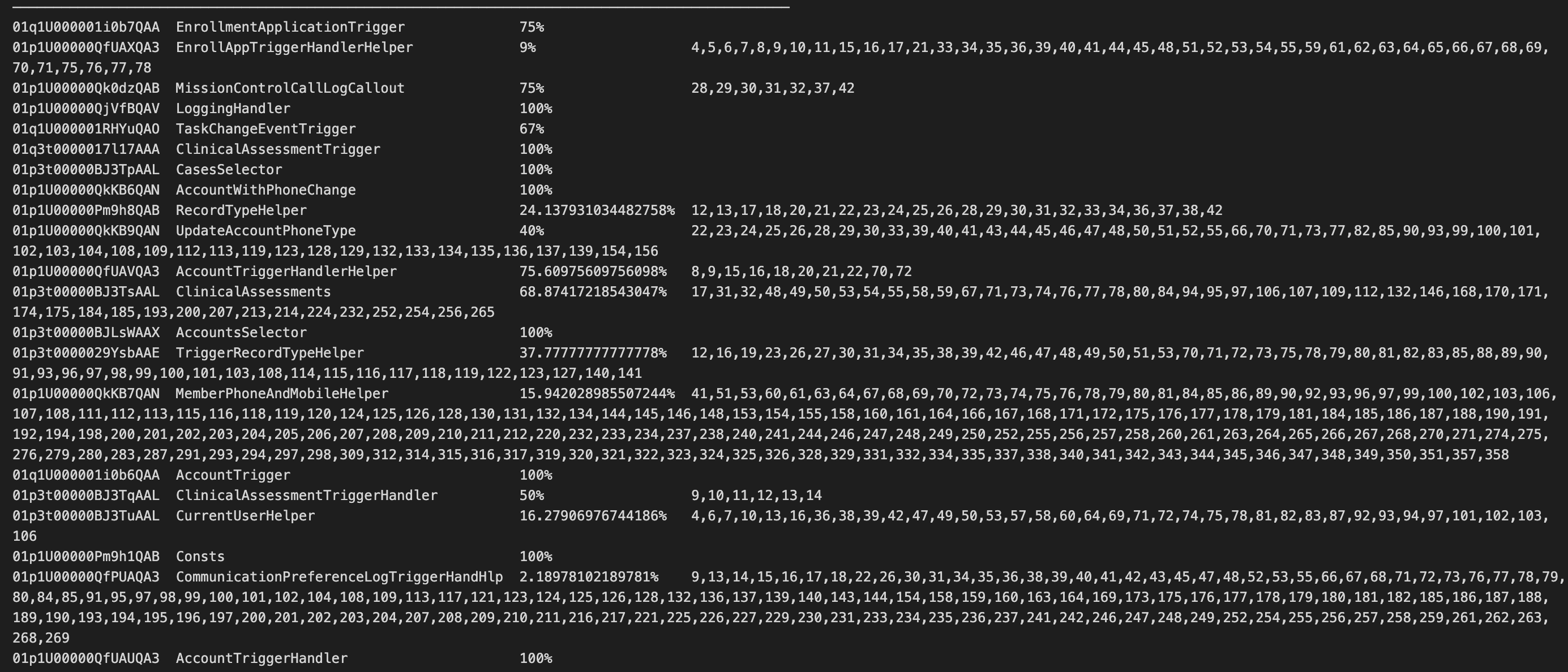
Thank you @AnanyaJha for the workaround. I noticed recently that running test will not give me the full code coverage results as usual:

But it went back to normal after turning off the setting you suggested:
 gbwibawa
on 15 Jan 2021
gbwibawa
on 15 Jan 2021
This issue has been linked to a new work item: W-8725501
![git2gus[bot] picture](https://avatars.githubusercontent.com/in/19654?v=4&s=40) git2gus[bot]
on 15 Jan 2021
git2gus[bot]
on 15 Jan 2021
Hi @gbwibawa thanks for reaching out! The experience you're seeing with the code coverage results is by design- we've been working on updating the output to display more _relevant_ results. Previously, we included a list of all the classes in your org, including ones that were not covered by any of your tests. In the Apex Code Coverage by Class table, we now only display classes that were covered by the tests in your run. In the Apex Code Coverage Test Run xxxxx table, we display a more detailed breakdown of the coverage numbers with a row for each test method & each class it covers.
Here's a link to the spec for more details: https://github.com/forcedotcom/salesforcedx-vscode/issues/2224. Let me know if you have any other questions or notice any other issues!
AnanyaJha
on 15 Jan 2021
Just FYI - I was receiving this error running tests _without_ @TestSetup being called.
Deactivating the setting as mentioned above did clear it, however.
 simonhyphen8
on 21 Jan 2021
simonhyphen8
on 21 Jan 2021
@maaaaarco @simonhyphen8 @gbwibawa This issue was addressed with the latest release of the VS Code Extensions. Please update to version 50.14.0 and turn the setting back on to see the changes. Let us know if you have any other feedback, thanks!
AnanyaJha
on 21 Jan 2021
This is still occurring for me in salesforce.salesforcedx-vscode v50.17.0 while following this trailhead.
Disabling Salesforcedx-vscode-core › Experimental: Use Apex Library worked for me!
 mitchwd
on 24 Feb 2021
mitchwd
on 24 Feb 2021
The last issues related to test information not showing when using the setting salesforcedx-vscode-core.experimental.useApexLibrary have been addressed in version 51.2.0 of the extensions. Thanks for providing feedback.

 lcampos
on 25 Feb 2021
lcampos
on 25 Feb 2021
Related issues
 randi274
·
3Comments
randi274
·
3Comments
 Shokhan
·
6Comments
Shokhan
·
6Comments
 ghost
·
5Comments
ghost
·
5Comments
 ntotten
·
4Comments
ntotten
·
4Comments
 StanZha
·
4Comments
StanZha
·
4Comments
Most helpful comment
Hi @maaaaarco thanks for reporting this! With the last release we made some updates to the Apex test framework that seem to be causing these issues. I was able to reproduce the exception that gets thrown when the
@TestSetupmethod fails and I see the tests running if code coverage is toggled off. However, all of the tests do seem to be correctly failing once the code coverage setting is off. We'll keep working on this and will post back with any updates!As a workaround, since this feature is still in Beta, you can go back to the old behavior by going into your Preferences and turning off the
Salesforcedx-vscode-core › Experimental: Use Apex Librarysetting.