Salesforcedx-vscode: Java.home points to missing folder
Summary
I am unable to get VS Code/SFDX to recognize Java on my Mac. I've downloaded JDKs from Oracle (both 8 & 11) and tried Adopt Open, and still receive the same error message.
Steps To Reproduce:
- Download Java
- In VS Code, navigate to Code -> Preferences -> Settings. In search bar, search for "apex java", select "Edit in settings.json".
- Change "salesforcedx-vscode-apex.java.home" path to Java path on computer. Latest path is "/Library/Java/JavaVirtualMachines/adoptopenjdk-11.jdk/Contents/Home".
- I save and restart VS Code.
Expected result
I would expect to see "Apex Language Server" as an option in the "Output" tab and be able to use the language server for type ahead, be able to run testing and much more.
Actual result
Receive the following error message: The salesforcedx-vscode-apex.java.home setting defined in VS Code settings points to a missing folder. For information on how to setup the Salesforce Apex extension, see Set Your Java Version.
Additional information

VS Code Version: 1.36.1
SFDX CLI Version: 7.14.0-bd96f098e0
OS and version: macOS Mojave 10.14.5
 mattbratton
All 16 comments
I am having this issue as well. Any guidance would be appreciated!
Version numbers are the same with the exception below.
SFDX CLI Version: 7.15.3-c7d407d236
 bbacharz
on 24 Jul 2019
bbacharz
on 24 Jul 2019
same here
 PhilipJohnBasile
on 26 Jul 2019
PhilipJohnBasile
on 26 Jul 2019
Can you confirm that you followed the instructions on this page? https://forcedotcom.github.io/salesforcedx-vscode/articles/getting-started/java-setup
I would suggest trying it with Oracle Java 11 as that is the _most_ tested version. All of them should work, but that is the best starting point.
 ntotten
on 30 Jul 2019
ntotten
on 30 Jul 2019
One other thing I just realized is that in the string you pasted there seems to be extra white space characters in your string (notice the <200e><2068> in the screenshot). Not sure if it is a weird copy/paste issue from github or if it is actually present in your setting.json file, but if it is that could be the issue.

ntotten
on 30 Jul 2019
I can confirm that I followed the directions as explicitly as possible (it looks like the discrete steps need to be updated slightly). Here is a screenshot of the current settings file.

bbacharz
on 31 Jul 2019
@bbacharz Is it possible your settings.json on your project is overrideing that setting? I see that setting in the user settings, but is something else set in the workspace .vscode/settings.json file?
ntotten
on 31 Jul 2019
@ntotten I thought about that as well. Originally, it was empty with the same result, so I added the same line to the settings and am getting the same message.

bbacharz
on 1 Aug 2019
Hi @bbacharz - can you verify that this path really is where Java is installed? You can open the VS Code terminal and do ls /Library/Java/JavaVirtualMachines/jdk-1.8.0_221.jdk/Contents/Home/
 brpowell
on 1 Aug 2019
brpowell
on 1 Aug 2019
Thanks @brpowell
That showed where my issue was! I left a - in the file path that should not have been there for that version.
Version 8
"/Library/Java/JavaVirtualMachines/jdk1.8.0_221.jdk/Contents/Home"
Version 11
"/Library/Java/JavaVirtualMachines/jdk-12.0.2.jdk/Contents/Home"
My error is now fixed, however it will not allow me to use version 11 (it says that java 8 is required). If you have any insight on this, I would appreciate it. Otherwise I will work with what I have. Thank you, again!
bbacharz
on 1 Aug 2019
Awesome @bbacharz! It looks like that path you put for version 11 is actually 12 (jdk 12.0.2) which we currently do not support. Try installing from this downloads page https://www.oracle.com/technetwork/java/javase/downloads/jdk11-downloads-5066655.html
brpowell
on 1 Aug 2019
@brpowell Yep, chalk another one up for not paying attention! I just downloaded installed and changed the settings. All is well with the world. Thanks for all your help!!
bbacharz
on 1 Aug 2019
@bbacharz Here is a screenshot of the terminal. As far as I can see it looks correct. Appreciate the help.
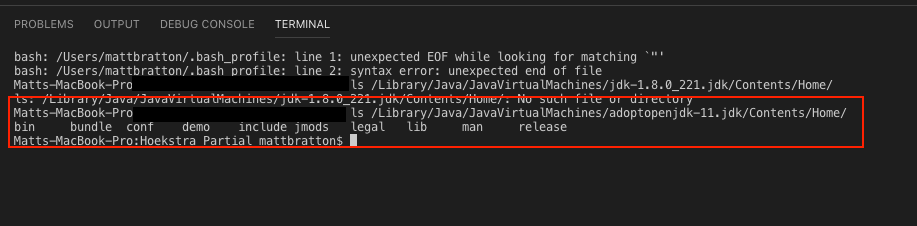
mattbratton
on 1 Aug 2019
@mattbratton Does your home path in settings have an extra slash at the end? like /Library/Java/JavaVirtualMachines/adoptopenjdk-11.jdk/Contents/Home/ instead of /Library/Java/JavaVirtualMachines/adoptopenjdk-11.jdk/Contents/Home? If it does can you try removing it and reloading the window?
brpowell
on 1 Aug 2019
This issue has been automatically closed because there has been no response to our request for more information from the original author. Currently, there is not enough information provided for us to take action. Please reply and reopen this issue if you need additional assistance.
![no-response[bot] picture](https://avatars.githubusercontent.com/u/26350515?v=4&s=40) no-response[bot]
on 8 Aug 2019
no-response[bot]
on 8 Aug 2019
hello @ntotten
could you please help out- i am using adopt OpenJDK and i have put correct path in apex language server- C:\Program Files\AdoptOpenJDK\jdk-11.0.7.10-hotspot
and when i run this command -PS C:\Users\VIDYUT\Documents\LWC-VS Code\helloworldLWC> sfdx force:auth:web:login -a Vdeva -d
then I get below error
{ Error: spawn cmd ENOENT
at Process.ChildProcess._handle.onexit (internal/child_process.js:240:19)
at onErrorNT (internal/child_process.js:415:16)
at process._tickCallback (internal/process/next_tick.js:63:19)
errno: 'ENOENT',
code: 'ENOENT',
syscall: 'spawn cmd',
path: 'cmd',
spawnargs:
[ '/c',
'start',
'""',
'/b',
'https://login.salesforce.com/services/oauth2/authorize?response_type=code^&client_id=PlatformCLI^&redirect_uri=http%3A%2F%2Flocalhost%3A1717%2FOauthRedirect^&state=53f345dbc51b^&prompt=login^&scope=refresh_token%20api%20web^&code_challenge=Az78w9nam0dLRwJ1c1XEfnGgF9ZRfS3ObyxB662BoUc' ] }
{ Error: spawn cmd ENOENT
at Process.ChildProcess._handle.onexit (internal/child_process.js:240:19)
at onErrorNT (internal/child_process.js:415:16)
at process._tickCallback (internal/process/next_tick.js:63:19)
errno: 'ENOENT',
code: 'ENOENT',
syscall: 'spawn cmd',
path: 'cmd',
spawnargs:
[ '/c',
'start',
'""',
'/b',
'https://login.salesforce.com/services/oauth2/authorize?response_type=code^&client_id=PlatformCLI^&redirect_uri=http%3A%2F%2Flocalhost%3A1717%2FOauthRedirect^&state=53f345dbc51b^&prompt=login^&scope=refresh_token%20api%20web^&code_challenge=Az78w9nam0dLRwJ1c1XEfnGgF9ZRfS3ObyxB662BoUc' ] }
{ Error: spawn cmd ENOENT
at Process.ChildProcess._handle.onexit (internal/child_process.js:240:19)
at onErrorNT (internal/child_process.js:415:16)
at process._tickCallback (internal/process/next_tick.js:63:19)
errno: 'ENOENT',
code: 'ENOENT',
syscall: 'spawn cmd',
path: 'cmd',
spawnargs:
[ '/c',
'start',
'""',
'/b',
'https://login.salesforce.com/services/oauth2/authorize?response_type=code^&client_id=PlatformCLI^&redirect_uri=http%3A%2F%2Flocalhost%3A1717%2FOauthRedirect^&state=53f345dbc51b^&prompt=login^&scope=refresh_token%20api%20web^&code_challenge=Az78w9nam0dLRwJ1c1XEfnGgF9ZRfS3ObyxB662BoUc' ] }
{ Error: spawn cmd ENOENT
at Process.ChildProcess._handle.onexit (internal/child_process.js:240:19)
at onErrorNT (internal/child_process.js:415:16)
at process._tickCallback (internal/process/next_tick.js:63:19)
errno: 'ENOENT',
code: 'ENOENT',
syscall: 'spawn cmd',
path: 'cmd',
spawnargs:
[ '/c',
'start',
'""',
'/b',
'https://login.salesforce.com/services/oauth2/authorize?response_type=code^&client_id=PlatformCLI^&redirect_uri=http%3A%2F%2Flocalhost%3A1717%2FOauthRedirect^&state=53f345dbc51b^&prompt=login^&scope=refresh_token%20api%20web^&code_challenge=Az78w9nam0dLRwJ1c1XEfnGgF9ZRfS3ObyxB662BoUc' ] }

Any help will be greatly appreciated i am stuck at it for few days.
 vidyut99
on 17 Jun 2020
vidyut99
on 17 Jun 2020
I had this same error for months. I added the path to my settings.json file and it fixed it! I finally have Apex auto completion now.
{
  "search.exclude": {
    "**/node_modules": true,
    "**/bower_components": true,
    "**/.sfdx": true
  },
  "salesforcedx-vscode-apex.java.home": "/Library/Java/JavaVirtualMachines/zulu-11.jdk/Contents/Home"
}
 jpmorrissee
on 7 Jan 2021
jpmorrissee
on 7 Jan 2021
Related issues
 renatoliveira
·
6Comments
renatoliveira
·
6Comments
 sc5148
·
4Comments
sc5148
·
4Comments
 Shokhan
·
6Comments
Shokhan
·
6Comments
 vtandon-wiley
·
3Comments
vtandon-wiley
·
3Comments
 SalesforceBobLightning
·
5Comments
SalesforceBobLightning
·
5Comments
Most helpful comment
Awesome @bbacharz! It looks like that path you put for version 11 is actually 12 (jdk 12.0.2) which we currently do not support. Try installing from this downloads page https://www.oracle.com/technetwork/java/javase/downloads/jdk11-downloads-5066655.html