Salesforcedx-vscode: Salesforce extension pack does not work
Summary
_After Salesforce Installation Package Installation_. I tried to test SFDX : Create Project
Steps To Reproduce:
- install package.
- launch command SFDX: Create Project
Expected result
_ask project name then project should be created_.
Actual result
_message appears : command 'sfdx.force.project.create' not found _.
Additional information
_Feel free to attach a screenshot_.

VS Code Version: 1.30.2
SFDX CLI Version: sfdx-cli/6.48.0-bfccc40118 (windows-x64) node-v8.9.4
OS and version: Windows 7
 jmcaudron
All 9 comments
Is this a consistent problem or something that happened once? We have seen this issue when the CLI is updating, but that goes away after it finishes.
 ntotten
on 17 Jan 2019
ntotten
on 17 Jan 2019
it is a consistant problem. It tried to reinstall vscode and salesforce extension.
It looks like installation failed without error because Salesforce CLI Integration appears as Installing. When I start again VSCODE extension appears as Installed

jmcaudron
on 17 Jan 2019
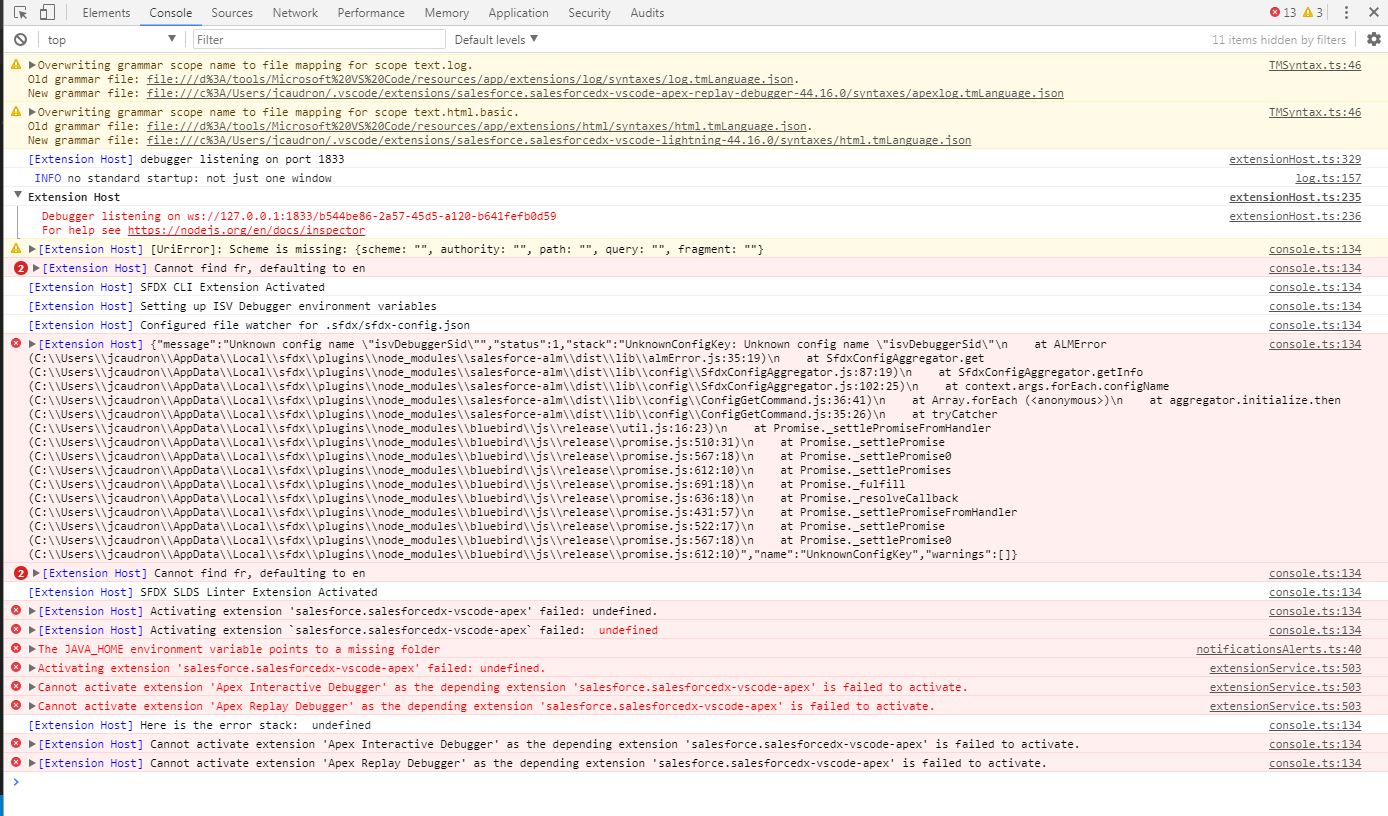
@jmcaudron this seems similar to #742 for which we've released a fix as part of version 44.16.0 of the extensions. Can you verify if your issue is now fixed and if it isn't could you open the Developer Tools by going to Help > Toggle Developer Tools, then go to the Console menu option in the newly opened Dev Tools window and take a screenshot of the output to see if there's an error in it.
 lcampos
on 18 Jan 2019
lcampos
on 18 Jan 2019
Hello @lcampos ,
See screenshot below. It shows many error on activation of sfdx extension
jmcaudron
on 18 Jan 2019
@jmcaudron that error suggests the issue is with a configuration with ISV debugger (https://marketplace.visualstudio.com/items?itemName=salesforce.salesforcedx-vscode-apex-debugger). Are you using a project to debug a managed package for a customer ?
lcampos
on 18 Jan 2019
This issue has been automatically closed because there has been no response to our request for more information from the original author. Currently, there is not enough information provided for us to take action. Please reply and reopen this issue if you need additional assistance.
![no-response[bot] picture](https://avatars.githubusercontent.com/u/26350515?v=4&s=40) no-response[bot]
on 25 Jan 2019
no-response[bot]
on 25 Jan 2019
Thanks @lcampos ,
I had some component from managed package which cause this issue. After removal of this component, it works well.
jmcaudron
on 5 Feb 2019
@jmcaudron: I am having similar issues with my VS code now. Can you tell me which managed packages you removed to resolve the issue ? This will help me a lot! Thanks in advance.
 MadhuriTatineni
on 16 Sep 2019
MadhuriTatineni
on 16 Sep 2019
@jmcaudron Similar to @MadhuriTatineni, I am having issues using VS Code after installing the Salesforce Extension Pack. Which managed package component did you remove to resolve your issue?
 MWinnSalesforce
on 28 Apr 2020
MWinnSalesforce
on 28 Apr 2020
Related issues
 Shokhan
·
6Comments
Shokhan
·
6Comments
 aheber
·
4Comments
aheber
·
4Comments
 sc5148
·
4Comments
sc5148
·
4Comments
 ddodson3
·
6Comments
ddodson3
·
6Comments
 SalesforceBobLightning
·
5Comments
SalesforceBobLightning
·
5Comments
Most helpful comment
@jmcaudron: I am having similar issues with my VS code now. Can you tell me which managed packages you removed to resolve the issue ? This will help me a lot! Thanks in advance.