Salesforcedx-vscode: command 'sfdx.force.auth.dev.hub' not found (Other commands fail too)
Summary
Error "command 'sfdx.force.auth.dev.hub' not found" in new Windows machine when trying to execute a SFDX command from inside VS Code. Other commands also fail.
I have a brand new Windows 8 machine where I have already installed Java, CLI, VS Code, etc. But when I try to execute the command in VS Code to authorize the Org or other commands then I got an error saying the comand is not found. I am sure I am missing some setting but it's not clear what I need to do.
In a mac, I had a similar issue and I set the user settings with this "salesforcedx-vscode-apex.java.home": "/Library/Java/JavaVirtualMachines/jdk1.8.0_191.jdk/Contents/Home" but not sure what to do in Windows.
Steps To Reproduce:
- In the command palette, choose a command (> SFDX: Authrorize Dev Hub)
- This message appears immediately.
Expected result
No errors :-)
Actual result
An error as shown on the screenshot below
Additional information

VS Code Version: 1.28.2
SFDX CLI Version: 6.38
OS and version: Windows 8
 eltoroit
All 26 comments
Hi @eltoroit, the configuration that you show in the screenshot looks correct. The error you are seeing usually means there was an error while loading the extensions. Do you get any other error message in the Debug Console or Output view ?
 lcampos
on 12 Nov 2018
lcampos
on 12 Nov 2018
Thanks @lcampos for confirming. Knowing that the configuration was correct, I upgraded my old machine to Windows 10, installed all the OS patches, reinstalled Java, CLI and VS Code... now it works fine. It could of have been a configuration error. But I was not sure if the settings in VS Code, and I kept trying all combinations ;-)
eltoroit
on 14 Nov 2018
Awesome, glad you got it working. I'll close this issue now.
lcampos
on 14 Nov 2018
Any chance you can open this up again, I'm having exactly the same issue. I'm sure it's something to do with PATH but I'm not sure how to fix it.
No, nothing in Output or Problems.
I've disabled and enabled all Salesforce extensions and reinstalled the CLI extension.
 JodieM
on 2 Jan 2019
JodieM
on 2 Jan 2019
@lcampos @JodieM I am also facing the same issue.
My configuration is -
OS - MacOS Mojave 10.14.2
VS Code version - 1.30.1
SFDX CLI version - sfdx-cli/6.44.0-dead729fb5 (darwin-x64) node-v8.9.4
JAVA_HOME and salesforcedx-vscode-apex.java.home settings -
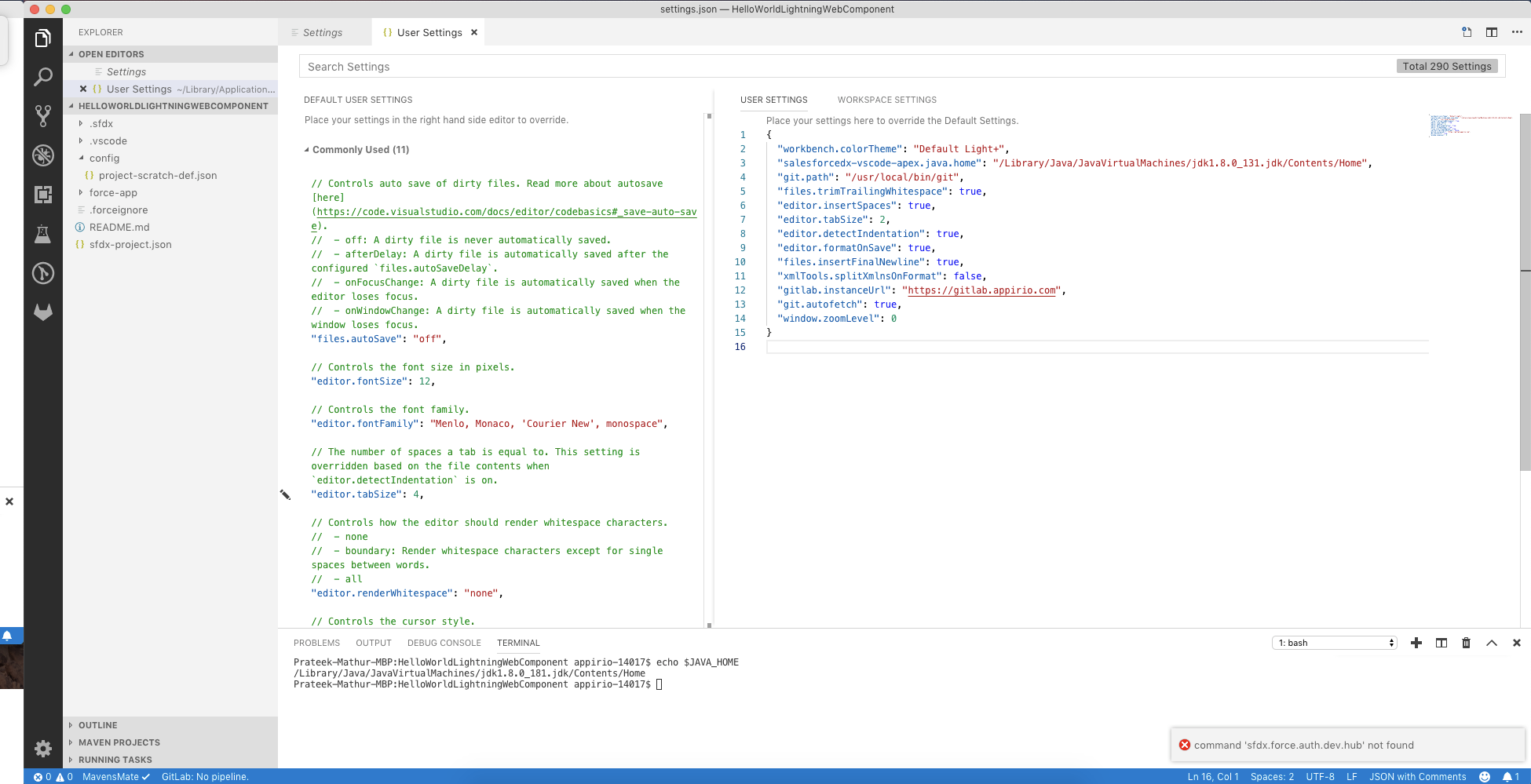
Also, nothing in Output or Problems window.
Please let me know if I am missing anything.
 prateekmathur1991
on 3 Jan 2019
prateekmathur1991
on 3 Jan 2019
I'm getting less and less convinced that this is actually an issue relating to JAVA_HOME at all. See https://salesforce.stackexchange.com/questions/212840/java-runtime-could-not-be-located-when-starting-vscode-with-the-salesforce-ext. This makes me think that the JAVA_HOME is only used for the Apex extension and not to get the SFDX commands working. It also says you DO NOT have to have the Java Home User Settings Set because it will look for JAVA_HOME on your computer. I have tried every combination of forward slashes, back slashes, etc to make it work and nothing works. I am so annoyed that everything always assumes Mac and there is no examples for how it should all be set in Windows.
So back to the original question, why would NONE of the SFDX commands be working when run from the Command Pallette, but they do work when run from the Terminal.
JodieM
on 3 Jan 2019
OK, here's some more info. It's Not JRE also.
See I uninstalled ALL Java when I uninstalled my whole dev environment (see the story in #844) and I noticed that Data Loader was not working anymore becuase that requires JRE. I had to use Data Loader just now so I installed JRE https://java.com/en/download/win10.jsp and that didn't help either. Still got the issue. (But Data Loader is back to working :))
JodieM
on 4 Jan 2019
I have updated to the latest extensions and still this is an issue. Can anyone from the Salesforce team help at all please?
JodieM
on 11 Jan 2019
Hi @JodieM & @prateekmathur1991 , first of all I apologize for replying just now, we're still catching up after the holiday break.
I've read all your posts and watched your youtube video on the install steps you've taken. There are a couple of things we'll need to look at to figure out why you are experiencing this issue with running the commands.
In vscode, can you please open the Developer Tools by going to Help > Toggle Developer Tools, this will open a new window that will show different details on the code currently running. Once you've opened the Dev Tools window, go to the Console menu option, take a screenshot of the output and paste it in this thread.
The second thing we'll need to do is open the vscode terminal, go to the Output window and look at the options available on the picklist located on the right side of the terminal. Adding a screenshot of the options you have available in that picklist would be a good start.
lcampos
on 11 Jan 2019
Oh wow, I think we might have spotted something here.
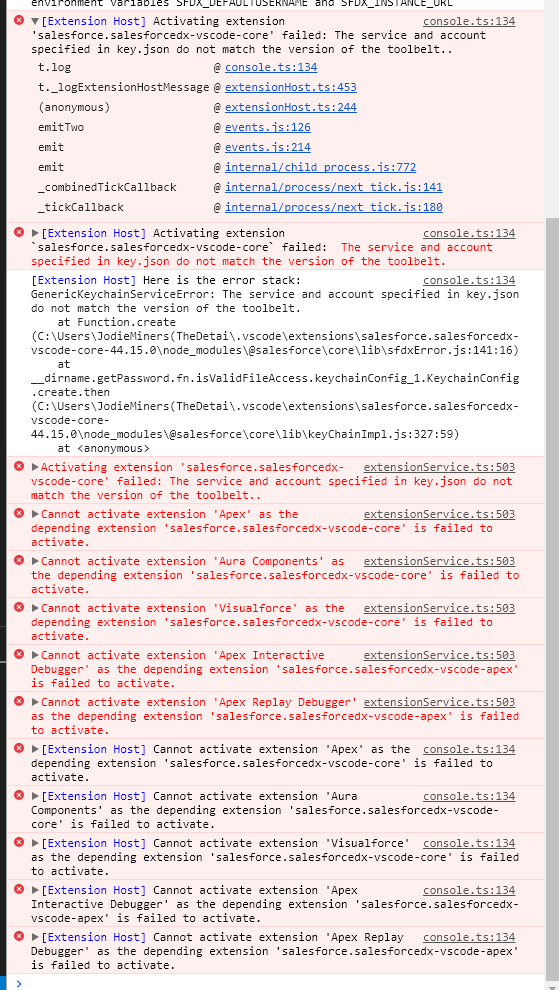
Some of the errors.
[Extension Host] Activating extension 'salesforce.salesforcedx-vscode-core' failed: The service and account specified in key.json do not match the version of the toolbelt..
t.log @ console.ts:134
t._logExtensionHostMessage @ extensionHost.ts:453
(anonymous) @ extensionHost.ts:244
emitTwo @ events.js:126
emit @ events.js:214
emit @ internal/child_process.js:772
_combinedTickCallback @ internal/process/next_tick.js:141
_tickCallback @ internal/process/next_tick.js:180
[Extension Host] Here is the error stack: GenericKeychainServiceError: The service and account specified in key.json do not match the version of the toolbelt.
at Function.create (C:\Users\JodieMiners(TheDetai.vscode\extensions\salesforce.salesforcedx-vscode-core-44.15.0\node_modules\@salesforce\core\lib\sfdxError.js:141:16)
at __dirname.getPassword.fn.isValidFileAccess.keychainConfig_1.KeychainConfig.create.then (C:\Users\JodieMiners(TheDetai.vscode\extensions\salesforce.salesforcedx-vscode-core-44.15.0\node_modules\@salesforce\core\lib\keyChainImpl.js:327:59)
at
Surely it's not something to do with not having Installed Node? And isn't keychain just a mac thing? Searching my whole PC, I can not find a key.json file.
Terminal Options
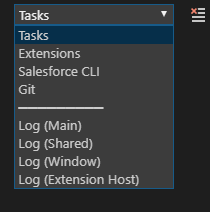
Extension Host Log
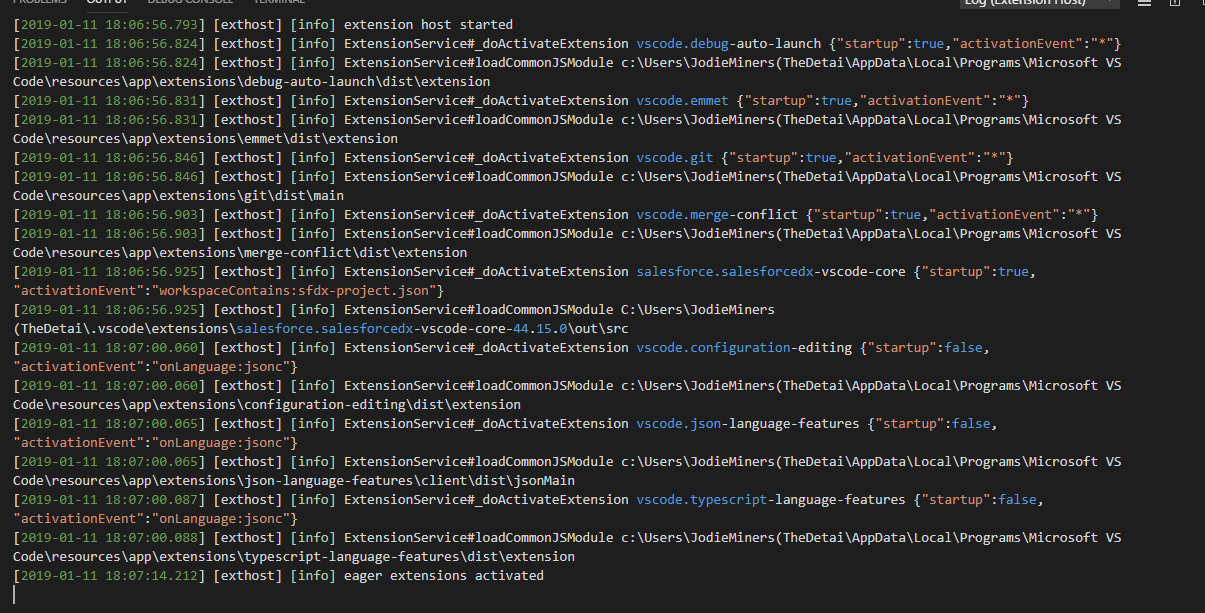
JodieM
on 11 Jan 2019
This explains a lot. What's going on is that one of the dependencies used by the Salesforce CLI extension is running into an issue which prevents the extension from getting properly activated. I'll work on replicating this issue on my side and find a solution to it. I'll post here once we have a fix to this.
lcampos
on 11 Jan 2019
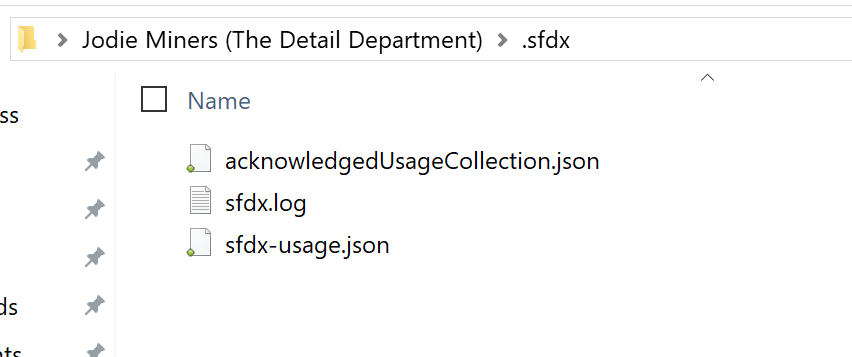
I think that a file on the sfdx cli somehow got corrupted. Can you verify that the file key.json, located in c:\Users\<your username>\.sfdx looks like: {"service":"sfdx","account":"local","key":"XXXXXXXXXXXXXXXXXX"}
FYI, please do not copy-paste the key value here.
lcampos
on 11 Jan 2019
@lcampos
Same issue here, and my key looks like the format you provided. Any suggestions?
 trebleCode
on 11 Jan 2019
trebleCode
on 11 Jan 2019
Yeah, I don't have a key.json file in .sfdx
JodieM
on 12 Jan 2019
I went through the whole process of re-installing the CLI and I still don't have the key.json file there.
JodieM
on 12 Jan 2019
I had the same issue - I resolved it by renaming ~/.sfdx to ~/.sfdx-old and restarting vscode. Background is that I did a full OS reinstall and then reinstated my home directory. So the .sfdx directory was from an earlier version of sfdx tooling.
 egroenen
on 13 Jan 2019
egroenen
on 13 Jan 2019
There are two different issues in this thread where the outcome is the same, the salesforcedx-vscode-core extension not activating properly.
The first one, if you have a clean cli setup and open vscode (I believe this is your current situation @JodieM). This is caused by us trying to load a user context from the cli so that the correct commands are enabled when opening a project. Since there is no valid user context (no key.json and auth files) we run into an exception that prevents the core extension from activating.
The second one, if you share your .sfdx folder for different computers/users or do what @egroenen described above, the cli labels your key.json file as invalid and throws an error.
I've created PR #868 which will address both issues and will allow the extensions to activate. We'll run some tests to make sure it's good to go and release it this week.
@trebleCode since you do have a key.json, could you try deleting that file and the auth files (e.g. .sfdx ? Keep in mind that this will remove all your credentials from the cli. Then, before opening vscode, authenticate to your dev hub or any other non-scratch org ($ sfdx force:auth:web:login --setalias
@JodieM you can try that last step of running the cli command that will allow you to authenticate to your org if you want to get unblocked before we release the fix.
I want to apologize for this, I know how frustrating and time consuming it is to run into this type of issues, we'll get the fix out as soon as possible. And thanks for reporting it.
lcampos
on 14 Jan 2019
Yes, that worked. Thank you! But interestingly it did not work the first time when I did the steps in the troubleshooting guide that includes deleting the .sfdx folder. So I think the key is to do the authorise command via the terminal first, before trying to use SFDX commands. If you can add that step to your wiki that would be great.
JodieM
on 14 Jan 2019
Hi @lcampos and @JodieM - For me the fix was a little bit different.
In my .bash_profile file, I had this line to set the JAVA_HOME variable -
export JAVA_HOME="$(/usr/libexec/java_home)"
which I replaced with -
export JAVA_HOME="$(/usr/libexec/java_home -v 1.8)"
Nevertheless, happy it works for everyone now.
prateekmathur1991
on 14 Jan 2019
@JodieM we'll update the wiki to include debug steps for when the cli config is invalid. For the issue that you ran into, we'll change the extensions so that they work even if you haven't logged to any org given the extensions also allow you to authenticate to orgs.
@prateekmathur1991 I haven't tested with the configuration you mentioned so not sure the current fix would help with it but I'll get back to you once I test for it.
lcampos
on 14 Jan 2019
@lcampos I deleted my .sdx folder under my Windows user folder, as well as the sfdx folder in %APPDATA% on my machine. Then in a Powershell console I ran sfdx update which put me at version sfdx-cli/6.49.0-8edc6e0f5d
Then, I ran sfdx force:auth:web:login -a testorg1 -r https://test.salesforce.com and was able to successfully authenticate to a sandbox I have.
I then opened VS Code, and ran the same command above from a powershell terminal in VS Code, which successfully connected. Then attempted using CTRL+P and typing in SFDX: Authorize an org and still get the message command sfdx.auth.web.login not found
Please let me know any information/screenshots you need for further troubleshooting.
trebleCode
on 17 Jan 2019
@JodieM the fix for the issue you reported is out in release v44.16.0 of the extensions. Thanks again for reporting the issue.
@trebleCode could you update to the latest version of the extensions and see if that helps ? If it doesn't, can you open the Developer Tools by going to Help > Toggle Developer Tools, then go to the Console menu option in the newly opened Dev Tools window and take a screenshot of the output. Also add which version of VSCode, sfdx cli (run sfdx --version in the terminal) and operative system you are using.
lcampos
on 18 Jan 2019
This issue has been automatically closed because there has been no response to our request for more information from the original author. Currently, there is not enough information provided for us to take action. Please reply and reopen this issue if you need additional assistance.
![no-response[bot] picture](https://avatars.githubusercontent.com/u/26350515?v=4&s=40) no-response[bot]
on 18 Jan 2019
no-response[bot]
on 18 Jan 2019

CLI: sfdx-cli/6.49-08edc6e0f5d
VS Code: 1.28.2
trebleCode
on 23 Jan 2019
@lcampos after I uninstalled and reinstalled the extensions is VS Code, the issue has finally ceased.
Thanks so much for all of the help from you and your team!
trebleCode
on 24 Jan 2019
@trebleCode awesome, glad you're able to run the extensions now.
I'm closing this issue now since the rest of the questions/issues in this thread have been addressed.
lcampos
on 24 Jan 2019
Related issues
 celador
·
4Comments
celador
·
4Comments
 pranaymistry
·
4Comments
pranaymistry
·
4Comments
 ddodson3
·
6Comments
ddodson3
·
6Comments
 quangxvu
·
5Comments
quangxvu
·
5Comments
 jpoonam4
·
5Comments
jpoonam4
·
5Comments
Most helpful comment
@lcampos after I uninstalled and reinstalled the extensions is VS Code, the issue has finally ceased.
Thanks so much for all of the help from you and your team!