Salesforcedx-vscode: Error "Retrieve Source from Org failed to run" ERROR: EISDIR: illegal operation on a directory, read.
Summary
Once I have authorised a Sandbox org (changing the url in the sfdx-project.json) I try to retrieve the source from the Manifest access and I always have the error popup in VS Code "Retrieve Source from Org Failed to run"
Steps To Reproduce:
- Create a Project with Manifest
- Authorize a Sandbox org changing the sfdx-project.json to have the test url.
- Retrieve source code org from the manifest.
Expected result
Source code should be retrieved
Actual result
Error popup "Retrieve Source from Org failed to run"
Error in the console:
sfdx force:source:retrieve --manifest /Users/jzabalegui/Coding/SFDX/test/manifest
ERROR: EISDIR: illegal operation on a directory, read.
sfdx force:source:retrieve --manifest /Users/jzabalegui/Coding/SFDX/test/manifest ended with exit code 1
Additional information

VS Code Version:
1.28
* Extension
44.2.0
**SFDX CLI Version:
sfdx-cli/6.35.1-8b7320f7c2 (darwin-x64) node-v8.9.4
OS and version:
MacOS High Sierra 10.13.6
* Java *
java 10.0.2 2018-07-17
Java(TM) SE Runtime Environment 18.3 (build 10.0.2+13)
Java HotSpot(TM) 64-Bit Server VM 18.3 (build 10.0.2+13, mixed mode)
 inakirzabalegui
All 16 comments
I have downgraded my java version. Still same issue
java version "1.8.0_181"
Java(TM) SE Runtime Environment (build 1.8.0_181-b13)
Java HotSpot(TM) 64-Bit Server VM (build 25.181-b13, mixed mode)
inakirzabalegui
on 16 Oct 2018
it works using CLI so it looks like a problem of the extension with VS Code
sfdx force:source:retrieve --manifest /Users/jzabalegui/Coding/borrar/manifest/package.xml
inakirzabalegui
on 16 Oct 2018
Thanks for reporting this @inakirzabalegui. I think this is happening because you are triggering the retrieve by right-clicking the manifest folder instead of right-clicking the package.xml file. Could you try the retrieve by right-clicking the file ?
 lcampos
on 16 Oct 2018
lcampos
on 16 Oct 2018
This error is Node error seems to come from when trying to retrieve information from multilevel directories in for instance Dashboards.
In the example, the dashboard is under folder structure: KPIs/Sales/
Used with VS Code --> SFDX: Retrieve This Source from Org
or by CLI: sfdx force:source:retrieve -x manifest/package.xml
This examples of package.xml file vil give you a "ERROR: EISDIR: illegal operation on a directory, read.":
<?xml version="1.0" encoding="UTF-8"?>
<Package xmlns="http://soap.sforce.com/2006/04/metadata">
  <types>
    <members>KPIs</members>
    <members>Sales</members>
    <members>Sales/gIYNRmAuUHjMQTRSMIYbAOWZhrDwOK</members>
    <name>Dashboard</name>
  </types>
  <version>43.0</version>
</Package>
This examples of package.xml file vil give you a "ERROR: Cannot read property 'getWorkspaceElements' of undefined.":
<?xml version="1.0" encoding="UTF-8"?>
<Package xmlns="http://soap.sforce.com/2006/04/metadata">
  <types>
    <members>KPIs/Sales/gIYNRmAuUHjMQTRSMIYbAOWZhrDwOK</members>
    <name>Dashboard</name>
  </types>
  <version>43.0</version>
</Package>
I have so far not found any good way of retrieving this information with the use of manifest and package.xml.
 Triopticon
on 16 Oct 2018
Triopticon
on 16 Oct 2018
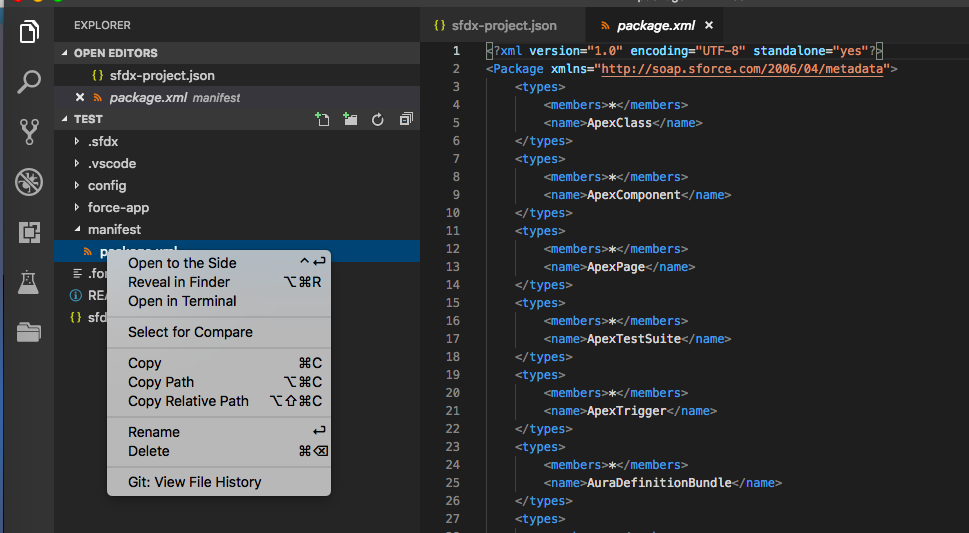
@lcampos you are right. Problem is the option sometimes does not appear in the menu of package.xml but in the manifest folder.
inakirzabalegui
on 16 Oct 2018
@inakirzabalegui I'll close this as duplicate of #678 and we'll continue the conversation there.
@Triopticon you're comment is also on the other thread and will address it there. I still have to be able to replicate it but I do see that the origin for it is different since you are in fact executing the retrieve on the package.xml file.
lcampos
on 19 Oct 2018
Related to #690
 ntotten
on 22 Oct 2018
ntotten
on 22 Oct 2018
This error is Node error seems to come from when trying to retrieve information from multilevel directories in for instance Dashboards.
In the example, the dashboard is under folder structure: KPIs/Sales/
Used with VS Code --> SFDX: Retrieve This Source from Org
or by CLI: sfdx force:source:retrieve -x manifest/package.xmlThis examples of package.xml file vil give you a "ERROR: EISDIR: illegal operation on a directory, read.":
<?xml version="1.0" encoding="UTF-8"?> <Package xmlns="http://soap.sforce.com/2006/04/metadata"> <types> <members>KPIs</members> <members>Sales</members> <members>Sales/gIYNRmAuUHjMQTRSMIYbAOWZhrDwOK</members> <name>Dashboard</name> </types> <version>43.0</version> </Package>This examples of package.xml file vil give you a "ERROR: Cannot read property 'getWorkspaceElements' of undefined.":
<?xml version="1.0" encoding="UTF-8"?> <Package xmlns="http://soap.sforce.com/2006/04/metadata"> <types> <members>KPIs/Sales/gIYNRmAuUHjMQTRSMIYbAOWZhrDwOK</members> <name>Dashboard</name> </types> <version>43.0</version> </Package>I have so far not found any good way of retrieving this information with the use of manifest and package.xml.
Why was this issue closed? I dont see any relation to #690 . I am also getting this error for dashboards
 q-jack
on 8 May 2019
q-jack
on 8 May 2019
Agree with @q-jack here, the issue remains unresolved, and I have observed as recently as today (again dealing with nested Reports/Dashboards) as mentioned in https://github.com/forcedotcom/salesforcedx-vscode/issues/690
Jordans-MacBook-Pro:~ jordanbaucke$ sfdx --version
sfdx-cli/7.6.0-28071a499b darwin-x64 node-v10.15.3
Jordans-MacBook-Pro:~ jordanbaucke$ sfdx plugins --version
sfdx-cli/7.6.0-28071a499b darwin-x64 node-v10.15.3

VS Code: Version 1.33.1 (1.33.1)
MacOS 10.14.4
 jordanbaucke
on 15 May 2019
jordanbaucke
on 15 May 2019
I am getting below error while retrieving source from the dev org
ERROR running force:source:retrieve: Invalid or unsupported zip format. No END header found
 vtandon-wiley
on 28 May 2019
vtandon-wiley
on 28 May 2019
Still an issue in version 1.37.1
 stixwix
on 22 Aug 2019
stixwix
on 22 Aug 2019
This is still an issue with version 1.39.2.
Had to remove Reports, Dashboards and Documents from the package.xml to get the retrieve to work
 nagensahu
on 12 Nov 2019
nagensahu
on 12 Nov 2019
A fix to the problem from trying to retrieve it from the folder is to open the package.xml file and make a retrieve request from the file location.
 harshitagarwal2
on 13 Dec 2019
harshitagarwal2
on 13 Dec 2019
i removed the below content from package.xml
< types >
< members >*
< name >StaticResource
it works fine for me..Fyi..
 shailnedra
on 11 May 2020
shailnedra
on 11 May 2020
I don't think this is a folder issue. I have removed everything by the CustomObject Metadata and I am still getting this error. I reinstalled windows this weekend and it is giving me this error now. ERROR running force:source:retrieve: EISDIR: illegal operation on a directory, read
I am running the retreive through the terminal: sfdx force:source:retrieve -x .\manifest\ -u UOSandbox
Here is my package file:
<?xml version="1.0" encoding="UTF-8" standalone="yes"?>
<Package xmlns="http://soap.sforce.com/2006/04/metadata">
    <types>
        <members>UO_Event__c</members>
        <members>UO_Expense__c</members>
        <members>Site_Settings__mdt</members>
        <members>Lead_Queue_Routing__mdt</members>
        <members>UO_Event_Attendee__c</members>
        <name>CustomObject</name>
    </types>
    <version>47.0</version>
</Package>
 HazenFley
on 23 Jun 2020
HazenFley
on 23 Jun 2020
For some reason after 7 to 8 times of retrieval it stops working and the Retrieve doesnt work at all.
I have tried updating VS as well. But every time I have to retrieve in 2 different projects and then combine because after 7 - 8 times retrieving command it doesnt work.
 shrutinaldiga
on 11 May 2021
shrutinaldiga
on 11 May 2021
Related issues
 randi274
·
3Comments
randi274
·
3Comments
 saramorgan
·
3Comments
ntotten
·
4Comments
saramorgan
·
3Comments
ntotten
·
4Comments
 Shokhan
·
6Comments
Shokhan
·
6Comments
 renatoliveira
·
6Comments
renatoliveira
·
6Comments
Most helpful comment
Why was this issue closed? I dont see any relation to #690 . I am also getting this error for dashboards