Sagemaker-python-sdk: requirements.txt not found
Please fill out the form below.
System Information
- Framework: TensorFlow
- Framework Version: 1.12
- Python Version: Python 3.6.8
- CPU or GPU: CPU (ml.t2.2xlarge)
- Are you using a custom image: No
Describe the problem
I followed this guide put out by AWS on how to deploy a trained keras model on sagemaker. It converts the keras model to TensorFlow. My model does image classification. I am working in a jupyer notebook from the sagemaker console.
The important part of the deploy seems to be:
sagemaker_model = TensorFlowModel(
            model_data = 's3://<my-model-location>/model.tar.gz',
            role = role,
            framework_version = '1.12',
            entry_point = 'train.py'
)

predictor = sagemaker_model.deploy(
    initial_instance_count=1,
    instance_type='ml.m4.xlarge'
)
That code works fine as long as my train.py (in my notebook) file is empty. I am able to call the endpoint from my local machine with
predictor = sagemaker.tensorflow.model.TensorFlowPredictor(endpoint_name, sagemaker_session)
img = image.load_img(path=img_path, target_size=(300, 300, 1))
img_array = image.img_to_array(img)
test_img = img_array.reshape((1, 300, 300, 3))
prediction = predictor.predict(test_img)
My problem is that I want the endpoint to handle the image pre-processing. I have read that the way to do that is to add an input_fn to my train.py which I pass as the entry_point.
Seems straightforward enough, so I move my preproccessing code from the snippet above to a function def input_fn(request_body, content_type=JPEG_CONTENT_TYPE) in train.py. That code imports the io and PIL libraries.
First time around, I got the errors that those modules couldn't be found. I Googled around and found that you can supply a env={'SAGEMAKER_REQUIREMENTS': 'requirements.txt'} to TensorFlowModel in the first snippet. So I added a requirements.txt to my notebook. I see WARNING - container_support.environment - Requirements file:/opt/ml/code/requirements.txt was not found in cloudwatch though, and the input_fn fails because the modules still can't be found.
I also tried passing source_dir="." to TensorFlowModel, but that results in a PermissionError: [Errno 13] Permission denied: './lost+found' error.
I'm missing something big here. How do I specify requirements for my entry_point script so I can have a custom input_fn?
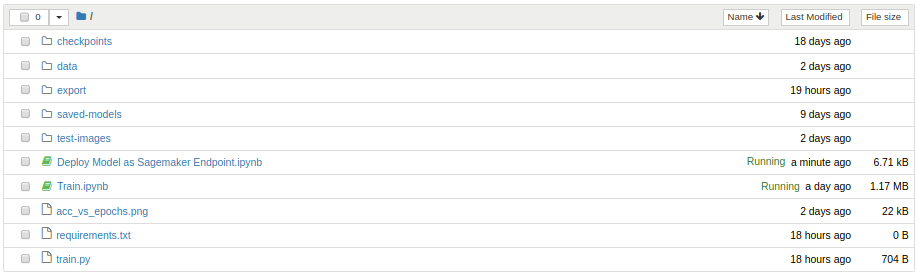
Minimal repro
import boto3, re
from sagemaker import get_execution_role
from sagemaker.tensorflow.model import TensorFlowModel

role = get_execution_role()
sagemaker_model = TensorFlowModel(
            model_data = 's3:/<path-to-model>/model.tar.gz',
            role = role,
            framework_version = '1.12',
            entry_point = 'train.py',
            env={'SAGEMAKER_REQUIREMENTS': 'requirements.txt'}
)

predictor = sagemaker_model.deploy(
    initial_instance_count=1,
    instance_type='ml.m4.xlarge'
)
Logs
Logs:
WARNING - container_support.environment - Requirements file:/opt/ml/code/requirements.txt was not found
 alex9311
All 2 comments
Hi @alex9311, thank you for using SageMaker!
The TensorFlowModel class does not support requirements.txt. You can use our TensorFlow Estimator class to achieve this. Use hyperparameters to pass in your requirements.txt (see the source code here: https://github.com/aws/sagemaker-python-sdk/blob/master/src/sagemaker/tensorflow/estimator.py#L449).
And here's a notebook example on how to use hyperparameters with TensorFlow estimator class.
 otter-bunny
on 24 May 2019
otter-bunny
on 24 May 2019
It actually seems to be working if I put my train.py and requirements.txt in directory my_src in my notebook.
from sagemaker import get_execution_role
from sagemaker.tensorflow.model import TensorFlowModel

role = get_execution_role()

sagemaker_model = TensorFlowModel(
            model_data = 's3://path/to/model/model.tar.gz',
            role = role,
            framework_version = '1.12',
            entry_point = 'train.py',
            source_dir='my_src',
            env={'SAGEMAKER_REQUIREMENTS': 'requirements.txt'}
)

predictor = sagemaker_model.deploy(
    initial_instance_count=1,
    instance_type='ml.m4.xlarge',
)
My problem was not setting src_dir correctly. I will call this issue resolved!
alex9311
on 24 May 2019
Related issues
 elvinx
·
4Comments
elvinx
·
4Comments
 aarsanjani
·
4Comments
aarsanjani
·
4Comments
 meownoid
·
5Comments
meownoid
·
5Comments
 evakravi
·
3Comments
evakravi
·
3Comments
 zjost
·
3Comments
zjost
·
3Comments
Most helpful comment
It actually seems to be working if I put my
train.pyandrequirements.txtin directorymy_srcin my notebook.My problem was not setting
src_dircorrectly. I will call this issue resolved!