Rustup: Discussion UX about sourcing env instructions for beginners (students)
Hi,
I would like to open a discussion for improving the last part of rustup installation of rust the asking for sourcing shell env below the full details! Thanks for reading. :)
If a consensus is reached I would be happy to implement the solution.
Situation
I used rustup to install rust with computer science bachelor two, students in semi-autonomy with docs, and message about «setting environment variable confused them». Not in a way their don't understand but in a way they don't understand that source is part of the full command: source $HOME/.cargo/env the problem repeated for 14 peoples in 2 classes so they only typed $HOME/.cargo/env.
But the problem is really specific that this command in bold is not seen as a command line at first glance by command line beginner.
The message at time of writing
Right now the message is:
To get started you need Cargo's bin directory ($HOME/.cargo/bin) in your PATH
environment variable. Next time you log in this will be done
automatically.

To configure your current shell run source $HOME/.cargo/env ### <- this command is in bold.
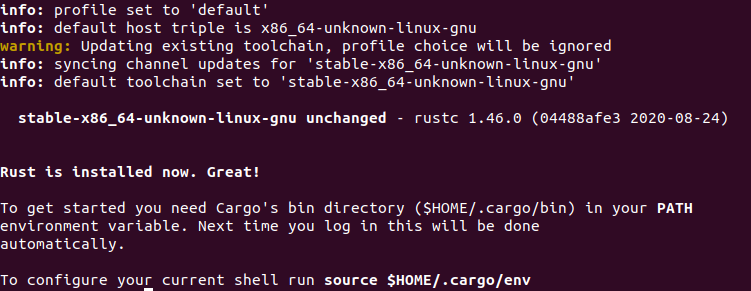
Suggestion to improve UX:
Maybe doing something like:
To configure your current shell run :
    source $HOME/.cargo/env
In this case a clear distinction is made between command and human instruction.
Or more terse:
To configure your current shell run : source $HOME/.cargo/env
Thanks for reading sorry it's a raw UX feedback from teaching Rust right after making their first course of Rust, they already did racket and C language in L1 so their are not totally new to programming and linux! So i wish to open a discussion about this specific issue I observed. :)
 darnuria
All 6 comments
I think this is a good point, bold is not very clear at all.
On Wed, 30 Sep 2020 at 10:06, Axel Viala notifications@github.com wrote:
Hi,
I would like to open a discussion for improving the last part of rustup
installation of rust the asking for sourcing shell env below the full
details! Thanks for reading. :)
SituationI used rustup to install rust with computer science bachelor two, students
in semi-autonomy with docs, and message about «setting environment variable
confused them». Not in a way their don't understand but in a way they don't
understand that source is part of the full command: source
$HOME/.cargo/env the problem repeated for 14 peoples in 2 classes so they
only typed $HOME/.cargo/env.But the problem is really specific that this command in bold is not seen
as a command line at first glance by command line beginner.
The message at time of writingRight now the message is:
To get started you need Cargo's bin directory ($HOME/.cargo/bin) in your PATH
environment variable. Next time you log in this will be done
automatically.
To configure your current shell run source $HOME/.cargo/env ### <- this command is in bold.
[image: Screenshot from 2020-09-30 09-59-35]
https://user-images.githubusercontent.com/2827553/94658846-ae5c4580-0303-11eb-92ab-2baf8506cf3b.png
Suggestion to improve UX:Maybe doing something like:
To configure your current shell run :
source $HOME/.cargo/envIn this case a clear distinction is made between command and human
instruction.Or more terse:
To configure your current shell run : source $HOME/.cargo/env
Thanks for reading sorry it's a raw UX feedback from teaching Rust right
after making their first course of Rust, they already did racket and C
language in L1 so their are not totally new to programming and linux! So i
wish to open a discussion about this specific issue I observed. :)—
You are receiving this because you are subscribed to this thread.
Reply to this email directly, view it on GitHub
https://github.com/rust-lang/rustup/issues/2501, or unsubscribe
https://github.com/notifications/unsubscribe-auth/AADZ7XQ3DGGI5IW5LUIF23DSILRIDANCNFSM4R6YNIFQ
.
 rbtcollins
on 30 Sep 2020
rbtcollins
on 30 Sep 2020
I agree, making this clearer is a good plan. I am happy to mentor someone who wants to make the change.
 kinnison
on 30 Sep 2020
kinnison
on 30 Sep 2020
opine: it should use the first :\n$command\n presentation so that there is an unambiguous start and end for the command.
 workingjubilee
on 30 Sep 2020
workingjubilee
on 30 Sep 2020
Hi !
I'm new to rust and github but I will try to do it by myself.
If I'm stuck, tomorrow in the afternoon I will say " Hi, I need help!".
 AureliaDolo
on 2 Oct 2020
AureliaDolo
on 2 Oct 2020
Hi !
I searched for To configure your current shell and added \n where needed as described by @workingjubilee.
AureliaDolo
on 2 Oct 2020
Update : PR looks good, it's waiting approval to be merged. :)
AureliaDolo
on 17 Oct 2020
Related issues
 monkeydom
·
33Comments
monkeydom
·
33Comments
 s-n-ushakov
·
145Comments
s-n-ushakov
·
145Comments
 camlee
·
30Comments
camlee
·
30Comments
 wongsyrone
·
32Comments
wongsyrone
·
32Comments
 dswd
·
38Comments
dswd
·
38Comments
Most helpful comment
Hi !
I'm new to rust and github but I will try to do it by myself.
If I'm stuck, tomorrow in the afternoon I will say " Hi, I need help!".