Rustup: fresh install fails on Windows: "error: could not rename component file from '... \rust-docs\share/doc/rust/html' ..."
Problem
A fresh install of stable build fails on Windows 8.1 with message "error: could not rename component file from '... rust-docsshare/doc/rust/html' ...".
Expected behavior would be the install to be successful :)
Steps
- Check Windows version is 8.1 (not checked for other versions)
- Ensure
%USERPROFILE%\.rustupand%USERPROFILE%\.cargofolders do not exist - Download the latest stable
rustup-init.exefile (1.35.0 of 2019-05-23) and run it under normal (non-admin) user without elevating user rights. - Respond with "1" to the question regarding "Current installation options"
- Wait until the install fails with message "error: could not rename component file from '... rust-docsshare/doc/rust/html' ..."
C:\Users\ushakov\Documents\-work\Downloads\www.rust-lang.org>rustup-init.exe

Welcome to Rust!

This will download and install the official compiler for the Rust programming
language, and its package manager, Cargo.

It will add the cargo, rustc, rustup and other commands to Cargo's bin
directory, located at:

  C:\Users\ushakov\.cargo\bin

This path will then be added to your PATH environment variable by modifying the
HKEY_CURRENT_USER/Environment/PATH registry key.

You can uninstall at any time with rustup self uninstall and these changes will
be reverted.

Current installation options:

   default host triple: x86_64-pc-windows-msvc
     default toolchain: stable
  modify PATH variable: yes

1) Proceed with installation (default)
2) Customize installation
3) Cancel installation
>1

info: syncing channel updates for 'stable-x86_64-pc-windows-msvc'
info: latest update on 2019-05-23, rust version 1.35.0 (3c235d560 2019-05-20)
info: downloading component 'rustc'
 60.0 MiB /  60.0 MiB (100 %)   8.0 MiB/s in  9s ETA:  0s
info: downloading component 'rust-std'
 53.1 MiB /  53.1 MiB (100 %)   8.3 MiB/s in  7s ETA:  0s
info: downloading component 'cargo'
info: downloading component 'rust-docs'
 10.3 MiB /  10.3 MiB (100 %)   9.3 MiB/s in  1s ETA:  0s
info: installing component 'rustc'
 60.0 MiB /  60.0 MiB (100 %)   7.7 MiB/s in  8s ETA:  0s
info: installing component 'rust-std'
 53.1 MiB /  53.1 MiB (100 %)   7.3 MiB/s in 15s ETA:  0s
info: installing component 'cargo'
  2.9 MiB /   2.9 MiB (100 %)   2.1 MiB/s in  6s ETA:  0s
info: installing component 'rust-docs'
 10.3 MiB /  10.3 MiB (100 %) 473.6 KiB/s in  1m 35s ETA:  0s
info: rolling back changes
error: could not rename component file from 'C:\Users\ushakov\.rustup\tmp\grl2pj2s61kwqrko_dir\rust-docs\share/doc/rust/html' to 'C:\Users\ushakov\.rustup\toolchains\stable-x86_64-pc-windows-msvc\share/doc/rust/html'
info: caused by: Отказано в доступе. (os error 5)

Press the Enter key to continue.
Possible Solution(s)
A possible temporary workaround may be to run the installer with admin privileges, as per https://stackoverflow.com/questions/52542965/rust-installation-fails-on-windows-subsystem-for-linux-could-not-rename-compone/55373522#55373522 , that proved to work for me.
Notes
Output of rustup --version:
rustup 1.18.3 (435397f48 2019-05-22)
Output of rustup show:
Default host: x86_64-pc-windows-msvc

stable-x86_64-pc-windows-msvc (default)
rustc 1.35.0 (3c235d560 2019-05-20)
 s-n-ushakov
All 145 comments
Thank you for generating this report. It does look to me like a probable anti-virus problem.
You mentioned in 1723 that you have procmon traces - have a look in that at the time of the error, are there any other processes with handles open anywhere in that subdirectory? I'm happy to look through if you can upload the PML (as a zip/tar) to s3 or seed it as a torrent or some such...
 rbtcollins
on 25 Jun 2019
rbtcollins
on 25 Jun 2019
@rbtcollins I have placed the zipped PML log (11M) here: http://www.usn.pp.ru/tmp/rustup-init--procmon.2019-06-24.zip . Unfortunately could not find anything suspicious so far... Please let me know whether the log is good when your time allows...
s-n-ushakov
on 26 Jun 2019
The log doesn't have enough info in it (or its not what I think it is, or Defender's implementation has changed radically from Windows 8 to 10).
So this is the event that fails:
5:03:57.3318549 PM 0.0137171 rustup-init.exe 12352 22804 SetRenameInformationFile C:\Users\ushakov\.rustup\tmp\grl2pj2s61kwqrko_dir\rust-docs\share\doc\rust\html ACCESS DENIED ReplaceIfExists: True, FileName: C:\Users\ushakov\.rustup\toolchains\stable-x86_64-pc-windows-msvc\share\doc\rust\html
But there are no events in the trace from other processes than rustup-init.exe - I suspect you've got a filter on the process name.
Check that you aren't filtering for just rustup-init.exe in the filter dialog when you make the trace - something like "Path contains .rustup" would be a good filter - the default filters to exclude procmon.exe itself and so on are fine, but we do want to see activity from other processes within this directory structure.
After you've done the trace and saved the file, you can then edit the filter and add filter to exclude events from rustup-init.exe - I'd expect that then you'd see defender or whatever is causing the issue operating on those files.
I would find the event in the first place by adding a filter on result for 'ACCESS DENIED'
 and then using the microsecond timestamp to find the event in context when that filter is disabled (or clicking on the event, then removing the filter may keep you on it - the UI can be a bit flaky though so...).
rbtcollins
on 26 Jun 2019
@rbtcollins I have finally managed to guess the time values to filter out all the events withing 2 sec timeframe around the failure event :) :

All the excludes are the standard ones suggested by procmon, except the one of mine that restricts the time.
Please find the resulting zipped PML log (0.5M) here: http://www.usn.pp.ru/tmp/rustup-init--procmon.2019-06-24--two-seconds-around.zip
s-n-ushakov
on 27 Jun 2019
Ok so thats super interesting, - definitely other processses in the trace, but none operating on .rustup files.
I suspect we need to get into kernel tracing at this point - ETW / WPR https://docs.microsoft.com/en-us/previous-versions/windows/it-pro/windows-8.1-and-8/hh448205(v=win.10) - - basically looking for the cause of the access denied.
Before doing that, please try building and running master - there's some unpacking IO changes that might make this better - or worse - and would allow me to make the following statement:
We make that dir with the same code for both the binaries and docs, so either both should succeed or both should fail, which is why the third-party-process holding a handle open is the most likely scenario.
rbtcollins
on 27 Jun 2019
@rbtcollins Ok, I'll see if I succeed with building the master on the weekend. Meanwhile could you describe your ideas on further troubleshooting in some more detail? What the next steps may look like, and how to proceed?
s-n-ushakov
on 28 Jun 2019
@s-n-ushakov basically we're at the edge of my ready-to-use knowledge, so I'm going to be vague. But something like: enable kernel event tracing on all file operations, run the failing scenario, disable event tracing, look through the trace which hopefully will have much more detail than procmon, because it wires into the kernel itself rather than purely userspace.
rbtcollins
on 28 Jun 2019
I tried to install rust by chocolatey and got the similar error.
...rust-docssharedocrusthtml' is denied.
After I turned off my vaccine program, it was successful.
 EugeneChung
on 5 Jul 2019
EugeneChung
on 5 Jul 2019
I have the same issue here with the Avira anti-virus. Turning off the "Real-Time Protection" before running rustup-init.exe makes it work.
 mpoullet
on 7 Jul 2019
mpoullet
on 7 Jul 2019
This failed about 5 times for me and then I found this thread. It worked after I deselected the box in the McAfee Access Protection Properties to "Prevent McAfee services from being stopped" and then stopped the `McAfee McShield" service. It is also known as the "McAfee On-Access Scanner service".
This was the error:
info: installing component 'rust-docs'
 11.3 MiB /  11.3 MiB (100 %) 355.2 KiB/s in  1m 28s ETA:  0s
info: rolling back changes
error: could not rename component file from 'C:\Users\taggac\.rustup\tmp\l2_bwq4ke00qaw9i_dir\rust-docs\share/doc/rust/html' to 'C:\Users\taggac\.rustup\toolchains\beta-x86_64-pc-windows-gnu\share/doc/rust/html'
info: caused by: Access is denied. (os error 5)
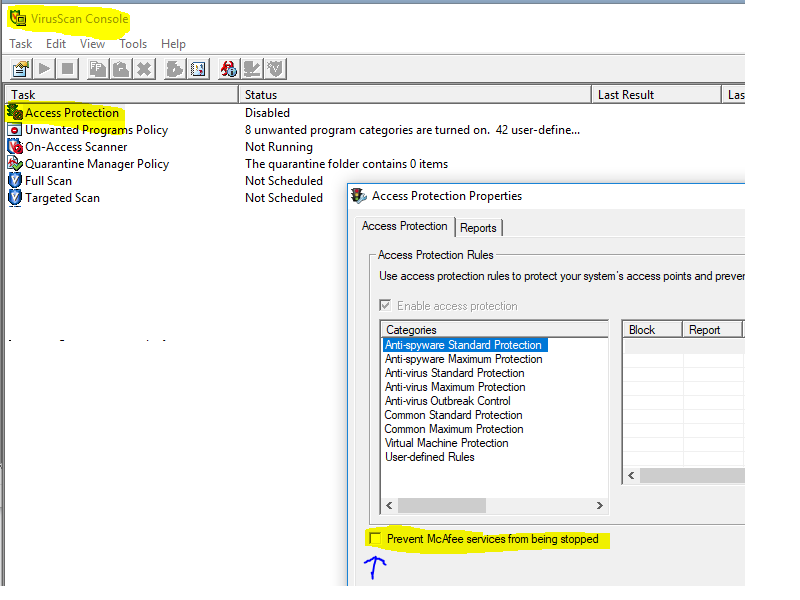
 ctaggart
on 12 Jul 2019
ctaggart
on 12 Jul 2019
@rbtcollins I have to confess that I failed to do the ETW / WPR exercise so far, as my HDD with Windows died. Sorry... Now I am busy with gradual migration to Ubuntu, so it is not very much likely that I will be able to add more to this investigation, at least in the near future. But it is good to know that numerous colleagues here are reporting their observations of problem correlation with antivirus software...
s-n-ushakov
on 1 Aug 2019
Hi.
I confirm the same as the above. After turning off Avira antivirus it worked.
 13webstreet
on 12 Aug 2019
13webstreet
on 12 Aug 2019
Same. Turning off the McAfee On-Access Scanner fixed the Access is denied. (os error 5) message.
 kwaegel
on 15 Aug 2019
kwaegel
on 15 Aug 2019
Badly behaved scan-on-write virus scanners are becoming a great pain to me. I wonder if there's any way we can detect and mitigate this.
 kinnison
on 20 Aug 2019
kinnison
on 20 Aug 2019
If I could disable my anti-virus temporarily I'm sure it would fix this issue. However, at work I am unable to disable the anti-virus program. This makes it impossible for me to use rustup update.
Is it possible to make it so rustup won't give up after the very first attempt at moving? Or give us an option to, instead of moving the files, try copying to destination and deleting from source instead?
 pitaj
on 21 Aug 2019
pitaj
on 21 Aug 2019
Update: this was fixed for me by building from latest master (d62e50446bd52f7d2b5aa03577372e362741902d)
I think this issue is actually fixed by the same fix for #1870
pitaj
on 21 Aug 2019
Handy to know, thanks @pitaj -- I hope to get a release done soonish that will therefore solve this a bit.
kinnison
on 22 Aug 2019
I have the same problem. Corporate laptop with McAfee that can not be turn off. I need this release in order to start learning rust. Please hurry :-)
 refaelsh
on 23 Aug 2019
refaelsh
on 23 Aug 2019
@pitaj Can you please share the binary you've build from the latest master? I cant install rust because of this issue and I cant build the latest master because I don't have rust.
refaelsh
on 23 Aug 2019
Found a way: downloaded the latest master directly from the CI/CD server: here. I can now start learning rust :-)
refaelsh
on 23 Aug 2019
Hello, I fix it by deactivating the antivirus while it is installed.
 esbgo97
on 2 Sep 2019
esbgo97
on 2 Sep 2019
@esbgo97, most corporate laptops do not allow turning off the Antivirus.
refaelsh
on 2 Sep 2019
I keep having the same lately on corporate Windows 10. There is no 3rd-party antivirus though, just built-in Windows Defender.
 RReverser
on 9 Sep 2019
RReverser
on 9 Sep 2019
Found a way: downloaded the latest
masterdirectly from the CI/CD server: here. I can now start learningrust:-)
Yay, I can confirm that nuking .rustup folder and re-installing using the latest build from CI worked.
RReverser
on 9 Sep 2019
Yay, I can confirm that nuking
.rustupfolder and re-installing using the latest build from CI worked.
Unfortunately it does not work for me, I am still getting the following
info: installing component 'rust-docs'
 11.3 MiB /  11.3 MiB (100 %) 252.8 KiB/s in  2m 21s ETA:  0s
info: retrying renaming 'C:\Users\---\.rustup\tmp\fry3x4mosy837ftc_dir\rust-docs\share/doc/rust/html' to 'C:\Users\---\.rustup\toolchains\stable-x86_64-pc-windows-msvc\share/doc/rust/html'
I have a corporate with McAfee enabled, and this is preposterous that docs are blocked from being moved (hey, if it was a virus, it would already have infected my computer).
 vnermolaev
on 9 Sep 2019
vnermolaev
on 9 Sep 2019
It is a big pain, I agree. McAfee is among the worst offenders :(
kinnison
on 9 Sep 2019
If it says "retry renaming" instead of failing then the fix is working.
pitaj
on 9 Sep 2019
To me it says "retry renaming" for a while and then it fails on rustup 1.19.0 (2af131cf9 2019-09-08), Windows 10.
info: rolling back changes
error: could not rename component file from 'C:\Users\gborruni\.rustup\tmp\akm490eg7dpm6pbd_dir\rust-docs\share/doc/rust/html' to 'C:\Users\gborruni\.rustup\toolchains\stable-x86_64-pc-windows-msvc\share/doc/rust/html'
info: caused by: permission denied
Corporate McAfee enabled, cannot disable.
Issue is not restricted to fresh install. I did a rustup update before nuking .rustup and got the same error.
 norru
on 10 Sep 2019
norru
on 10 Sep 2019
I fear McAfee is being sufficiently awful that there's little we can do right now. Can your company IT add a folder exception for rust toolchains?
kinnison
on 10 Sep 2019
@kinnison, no they would not allow whole folder exceptions. I can specify single files though. I will ask anyway but the chances to get an exception are virtually zero (got this problem for other software too, exception was denied, and the workarounds we found were absolutely terrible).
norru
on 10 Sep 2019
@norru If they would be prepared to add rustup to the low-risk program group then it might allow rustup to install toolchains more effectively. The content would then be scanned on first use, rather than on-install. This shouldn't increase the risk to your computer but would allow Rust to install. If corporate IT is not prepared to do this, then I'm not sure there's a lot I can do to help since I have no idea how to work around McAfee breaking filesystem semantics left-and-right.
kinnison
on 10 Sep 2019
This is kind of a big deal - imagine all users which use Rust within a large corporation with strict IT. I can image the sensible business case for the IT department would be to forbid users from using Rust and stick to C++/Visual Studio instead.
norru
on 10 Sep 2019
@kinnison I'll quote your solution to the IT team, thanks!
norru
on 10 Sep 2019
It might be possible to get around this restriction by doing copies instead of moves, and later deleting the source. This would temporarily use more disk space but I think it's better than not being able to use rust.
pitaj
on 10 Sep 2019
@Pitaj @Kinnison That was also my thought - it'll be slower too. Perhaps there should be a --retain-temp flag.
norru
on 10 Sep 2019
The retry logic is around a permissions error which might mean that we'd end up needing retries around the later delete instead which could equally well fail if your AV is being particularly recalcitrant. I'd much rather see if someone with McAfee and Windows experience could lend us some knowledge on how to behave such that the AV works nicely with us, instead of fighting us.
kinnison
on 11 Sep 2019
Who says you have to keep retrying?
I'd rather have a solution which doesn't require waiting for a week for the IT department to evaluate whether using Rust deserves maintenance in the exception list, with the risk of that also being denied because business.
I'd be rather happy if the temp files created by rustup were optionally not deleted at all (can delete manually afterwards).
norru
on 11 Sep 2019
That would be quite a big change to how rustup behaves, requiring entirely different transaction handling on Windows-with-crappy-AV, Windows-with-non-crappy-AV, and non-Windows platforms. I'm not averse to such a change, but we'd need to see that it really was the only way to cope with the differences, otherwise it's three different sets of code to maintain for a team who mostly only uses the third form of systems.
kinnison
on 11 Sep 2019
Unfortunately, on "non third form of systems", nasty corporate AVs are the norm while Rust isn't, so if asked to take sides, aforementioned corporations will choose the former. Not that I personally agree with that, being a non-Windows platform advocate myself.
On another note, it only started yesterday for me. I had both rustup and McAfee co-existing for ages before, with no problem. Has anything changed rustup side?
I'm still waiting to hear back from my Security department and unable to use rust at all on Windows at the moment. I'm not holding my breath.
norru
on 11 Sep 2019
We've been improving the performance of rustup's IO because it used to be execrable on Windows and on high-latency non-Windows platforms. We might simply be too fast for McAfee these days, and previously we were slow enough that you never saw it misbehaving. I guess we could look at offering a --slow-io option or somesuch if you think that might help.
kinnison
on 11 Sep 2019
I think just releasing the version that is already on CI is good enough. Retry logic seems to work around this issue perfectly, while keeping the high speed for most files.
Later, when rust-docs component becomes optional, we can just omit it from installation (since the problem occurs only in its folder due to lots of small files).
RReverser
on 11 Sep 2019
I think just releasing the version that is already on CI is good enough. Retry logic seems to work around this issue perfectly, while keeping the high speed for most files.
We released this on Monday. The comments have come since then.
Later, when rust-docs component becomes optional, we can just omit it from installation (since the problem occurs only in its folder due to lots of small files).
Mmm, We're close to merging that feature too :D
kinnison
on 11 Sep 2019
I think just releasing the version that is already on CI is good enough. Retry logic seems to work around this issue perfectly, while keeping the high speed for most files.
I've tried the version on CI and it doesn't solve the problem. It only delays the failure to after many retries.
norru
on 11 Sep 2019
Is there any workaround?
I have a bunch of people with corporate laptops with McAfee who'll need to to install Rust tomorrow for a class, and installation simply doesn't work. Ta-da.
(Running as admin doesn't work.)
UPDATE: Worked around using https://github.com/rust-lang/rustup.rs/issues/1912#issuecomment-530425094.
 petrochenkov
on 11 Sep 2019
petrochenkov
on 11 Sep 2019
You could try a much older rustup, e.g. 1.17.0 from https://static.rust-lang.org/rustup/archive/1.17.0/x86_64-pc-windows-msvc/rustup-init.exe though you will need to ensure you pass --no-self-update otherwise it'll end up upgrading itself
kinnison
on 11 Sep 2019
In addition, you could try setting RUSTUP_IO_THREADS=disabled in the environment and see if it behaves with that.
kinnison
on 11 Sep 2019
RUSTUP_IO_THREADS=disabled did the trick for me, many thanks! Guess it makes it slower but hey! :)
UPDATE: the trick works for rustup install but not rustup update. The workaround is to rustup uninstall followed by rustup install rather than rustup update for a given toolchain.
norru
on 11 Sep 2019
RUSTUP_IO_THREADS=disableddid the trick for me, many thanks! Guess it makes it slower but hey! :)
Interesting, so disabling threaded install works for you; but I know it doesn't work for another person experiencing problems with McAfee -- Do you have an SSD in your system, and how much CPU do you have? I wonder if this is an IO speed vs. CPU speed thing.
kinnison
on 12 Sep 2019
It's an i7-3930K workstation with a few Crucial CT960 SSD and 32GB of RAM - not cutting edge but not a total wreck either ;). I have seen a similar behaviour from McAfee interacting with other applications on a much more powerful workstation. I think if an application creates a large number of files in a very short time, McAfee can't keep up so it locks them and chucks them in a queue. If the application tries to delete or rename them shortly afterwards, the deletion fails because McAfee hasn't finished with them. I can see this behaviour being exacerbated by multiple threads doing this in parallel.
By default (well, unless an exception is set), our antivirus checks every single file created by every single application in the system.
norru
on 12 Sep 2019
FYI, I got an exception approved, as suggested by @kinnison, and it solves the problem, thanks!
@norru If they would be prepared to add rustup to the low-risk program group then it might allow rustup to install toolchains more effectively.
norru
on 12 Sep 2019
So, basically here mcafee is going to make us wait this time period always. The optimal thing to do will require some thought. disabling IO threads is working because its just slow; increasing the retry backoff by 2 steps would be a good thing to try. I don't recall if I made that environment controlled or not.
rbtcollins
on 13 Sep 2019
...increasing the retry backoff by 2 steps would be a good thing to try. I don't recall if I made that environment controlled or not.
It's not (currently) environment controllable, though I (or you) could add that fairly easily.
kinnison
on 16 Sep 2019
I am not having McAfee but I am experiencing this problem. I'm on Windows 10 though, so it could be caused by the Windows Defender
 MeFisto94
on 24 Sep 2019
MeFisto94
on 24 Sep 2019
Please paste exactly the output you receive. Do you have any
anti-virus or antimalware software installed? If so what is it called?
Ideally you would also get a trace of filesystem activity in ~/.rustup
during the rustup installation as that will inform us of the conflict.
rbtcollins
on 24 Sep 2019
In addition, you could try setting
RUSTUP_IO_THREADS=disabledin the environment and see if it behaves with that.
This method works for me even though I use "rustup update" ~.~
 xiaoaiwhc
on 5 Oct 2019
xiaoaiwhc
on 5 Oct 2019
RUSTUP_IO_THREADS=disabled worked for me as well.
I think it may be due to the fact that McAfee is single threaded.
 ValeTheVioletMote
on 14 Oct 2019
ValeTheVioletMote
on 14 Oct 2019
I have a somewhat workaround for this. Don't do the default installation - i.e. option 1, but instead choose option 2: "Customize installation". Then accept the default values for everything other than the "Profile (which tools and data to install)? (minimal/default/complete)" choice. For that one, use "minimal".
This works because it leaves out the "rust-docs" component - which is the one causing the issue.
 ChrisGreenaway
on 28 Feb 2020
ChrisGreenaway
on 28 Feb 2020
I just hit the same thing running "rustup-init" to get Rust installed for the first time - so looks like it's still a problem with latest Rust and latest McAfee. Had to do a "minimal" install to avoid the failure (the disable threads env var didn't do it for me).
Maybe it's worth increasing the retry backoff as suggested by @rbtcollins ?
 ben-spiller
on 27 Mar 2020
ben-spiller
on 27 Mar 2020
Probably the same bug also causes uninstall to fail after performing a minimal profile install.
C:\Users\andrewss\Downloads>rustup self uninstall


Thanks for hacking in Rust!

This will uninstall all Rust toolchains and data, and remove
%USERPROFILE%\.cargo/bin from your PATH environment variable.

Continue? (y/N) y

info: removing rustup home
info: removing cargo home
info: removing rustup binaries
error: could not copy file from 'C:\Users\andrewss\.cargo\bin/rustup.exe' to 'C:\Users\andrewss\rustup-gc-42b5a2a3.exe'
error: caused by: Access is denied. (os error 5)
 s-andrews
on 6 Apr 2020
s-andrews
on 6 Apr 2020
Hit the same issue with running on WSL with 'curl --proto '=https' --tlsv1.2 -sSf https://sh.rustup.rs | sh'
Install completed with the minimal Profile indicated by @ChrisGreenaway
 pradeepar
on 13 Apr 2020
pradeepar
on 13 Apr 2020
I had the same issue today on Windows 10 with McAffee. Installation as admin or RUSTUP_IO_THREADS=disabled do not help. I had to do the custom minimal installation. Then I installed rust-docs using: rustup component add rust-docs
I think information like that (improved by somebody that knows ...) needs to go to the main install page as this caused me about an hour of delay trying to learn rust ...
 veselj
on 4 May 2020
veselj
on 4 May 2020
McAfee is known to be the worst offender in this. If someone with Windows knowledge and experience wants to review how we cope with AV getting in the way and suggest improvements, then we'd be very appreciative. Is there some API we can call to find out when an AV is done with our files?
kinnison
on 8 May 2020
@kinnison My guess is there isn't one, or, I've never heard of it - and Windows wouldn't allow you to delete a file while it's locked by the AV.
norru
on 8 May 2020
This has been asked before and the answer seems to be just to retry the operation in a loop. https://stackoverflow.com/questions/964920/is-it-possible-to-reasonably-workaround-an-antivirus-scanning-the-working-direct
s-andrews
on 8 May 2020
@s-andrews For the most part we already do that, but we do so many operations that many AV systems get overwhelmed and take so long that our backoff/retry logic gets fed up and times out :(
kinnison
on 8 May 2020
@kinnison - as an option (via command line switch or env var), can you make the install not delete the original files, and leave it to the user to do it later, manually?
norru
on 9 May 2020
I think a good solution is to provide a way to copy instead of move those files. Either by including it in the backoff step or by giving users an option.
pitaj
on 9 May 2020
@pitaj It's a great idea, if the move/rename fails after N attempts, the installer should copy instead, spit out a warning message, and perhaps log the list of files that have been left behind in a text file, so that the user (or the installer) can clean up afterwards.
norru
on 9 May 2020
The behaviour is deep in our transactional installer handling. I think, perhaps, that an eventually-correct non-transactional scheme might be more reliable, but that will be quite a bit of work to complete.
kinnison
on 9 May 2020
See #1798 for some thoughts on that; I have more context now and can perhaps update that when I get some time.
As for this bug, I think the ideas we've mentioned here (adding some more targeted retries, detecting mcaffee and handling that specially) are fairly low hanging fruit - all it really needs is someone that is experiencing the issue to build rustup and make the changes, validate that the ideas work and submit patches.
Assuming that all the recent reports are indeed McAfee :). McAfee's proprietary status means that we can't hook it into CI or build a patch ourselves - not easily anyway. As users of it, everyone affected here is much better placed to correct this.
rbtcollins
on 10 May 2020
Hi
Tried to install rust today same issue
This is my work computer and I cannot disable the McAfee anti-virus
Is there any other possible workarounds
 shishini
on 10 May 2020
shishini
on 10 May 2020
@shishini - did the minimal install workaround work for you?
ChrisGreenaway
on 11 May 2020
@rbtcollins - I'm happy to help with testing something on my machine (Windows 10 with McAfee). The issue happens for me every time.
ChrisGreenaway
on 11 May 2020
@ChrisGreenaway
Just tried minimal
It works, installs with no issue
Thanks a lot
What is the difference between minimal and default, what am I missing, and how can i install this later?
EDIT:
Never mind found this a link that explain the different component of each profile
and was able to add most of them using
rustup component add
shishini
on 11 May 2020
@shishini - the only difference is that the rust-docs component doesn't get installed. Installing minimal helps because the problem occurs during the installation of the docs.
You could try to run rustup component add rust-docs to add that component, but that will likely fail with the same problem.
ChrisGreenaway
on 11 May 2020
@ChrisGreenaway
Yes adding all components works except for rust-docs
thanks
shishini
on 11 May 2020
@ChrisGreenaway ok, so I'm not sure if we have a tunable for the retries right now - have a look at the environment settings in README.md; if we do, try increasing that and see if it works. If we don't, we need to identify the code path that it is failing in and make sure that a) there is a retry in that code path and b) put a variable on it so that you can make a bunch of experiments to find a figure that works reliably fairly quickly.
rbtcollins
on 12 May 2020
@rbtcollins - there doesn't seem to be an environment variable to configure retry behaviour.
ChrisGreenaway
on 12 May 2020
afaict we only retry rename() and only up to 21 times (which sums to around 28 seconds) If it's taking longer than 28 seconds for McAfee to finish with a file, then I'm worried for the performance of the system.
kinnison
on 12 May 2020
The failure when I tried this seemed to happen much more quickly than that. There certainly wasn't a pause for anything like 28 seconds before the error message came up.
s-andrews
on 12 May 2020
I am using a machine with a relatively high-spec: i7-8850H, 32GB RAM, PC401 NVMe SK hynix.
ChrisGreenaway
on 12 May 2020
Okay, so @s-andrews sounds like they're not encountering retry logic failure or else the error they encounter is not a permission denied error since that's the only kind we retry on. Are you able to get a procmon trace of the failure occurring?
kinnison
on 12 May 2020
It looks like it retries for about 20 seconds for me - and then there's a permission denied error. I will sort out a Procmon trace.
ChrisGreenaway
on 12 May 2020
Here's the procmon trace:
Logfile.zip
Worth noting, perhaps, that's it's always the same path where the problem happens: rust-docs\share/doc/rust/html
ChrisGreenaway
on 12 May 2020
@ChrisGreenaway I suspect you filtered on process for your procmon trace; to confirm the contention thats happening you 'll need to only filter on the path (your homedir\.rustup), and include all process activity within that path - that should let us see the conflicting handle to validate the theory.
Nevertheless, I think that we have a pretty good idea and should be in a position to just increase the timeout, since a 20 second pause as you're experiencing is clearly the timeout doing its thing.
This code in utils.rs is what does the retry.
    // https://github.com/rust-lang/rustup/issues/1870
    // 21 fib steps from 1 sums to ~28 seconds, hopefully more than enough
    // for our previous poor performance that avoided the race condition with
    // McAfee and Norton.
    retry(
        Fibonacci::from_millis(1).map(jitter).take(21),
As a first cut, just pushing that up to say 26, and if it works we can talk about further tuning and heuristics.
rbtcollins
on 12 May 2020
Yes - I filtered by process - obviously wrong if I'd thought about it - because we need to see the contention with McAfee (probably).
I've regenerated the trace, filtering on my .rustup path but it's about 90MB zipped and github won't let me upload it. So I've used a file sharing site.
ChrisGreenaway
on 12 May 2020
@s-andrews you may have something different going on; if you can start with the console output you see that would be helpful.
rbtcollins
on 13 May 2020
So some interesting things.
mcshield.exe is certainly very active, but doesn't seem to have a file open across the failed call; OTOH I haven't written a call matcher for PML files yet and with out that I can't be certain.
mcshield walks the written content back up to the root and does so with a lot of file opens and closes, and each seems to take 2570us - or 2.5ms to complete - so we are writing vastly faster than it can keep up. There are 8x75us long create/close pairs in that window, with some
I'm also seeing SearchIndexer activity in there. Now Search Indexing hasn't previously been a cause of failures (for me), and it's not reading the content as far as I can tell (or if it is it's using some sleight of hand to do so, perhaps precisely to avoid issues :).
There are a few experiments to do I think.
- Disable search indexing on that directory entirely and see if the problem goes away (tells us if its an interaction with mcafee+search)
- Disable mcafee on-demand to verify that your system can install ok with search enabled (tells is it really is mcafee).
- Change to an aggressive retry strategy: retry with a high frequency attempting to slide in through a gap between operations, rather than just waiting for things to be finished.
- Change to a much higher retry interval - as I mentioned up thread.
10:58:00.2282398 PM 0.0004654   rustup.exe  16300   4152    SetRenameInformationFile    ACCESS DENIED   C:\Users\CGRE\.rustup\tmp\v5xkzravg3jyiypq_dir\rust-docs\share\doc\rust\html    ReplaceIfExists: True, FileName: C:\Users\CGRE\.rustup\toolchains\stable-x86_64-pc-windows-msvc\share\doc\rust\html
10:58:00.2320835 PM 0.0005896   rustup.exe  16300   4152    SetRenameInformationFile    ACCESS DENIED   C:\Users\CGRE\.rustup\tmp\v5xkzravg3jyiypq_dir\rust-docs\share\doc\rust\html    ReplaceIfExists: True, FileName: C:\Users\CGRE\.rustup\toolchains\stable-x86_64-pc-windows-msvc\share\doc\rust\html
10:58:00.2354145 PM 0.0005202   rustup.exe  16300   4152    SetRenameInformationFile    ACCESS DENIED   C:\Users\CGRE\.rustup\tmp\v5xkzravg3jyiypq_dir\rust-docs\share\doc\rust\html    ReplaceIfExists: True, FileName: C:\Users\CGRE\.rustup\toolchains\stable-x86_64-pc-windows-msvc\share\doc\rust\html
10:58:00.2389664 PM 0.0004828   rustup.exe  16300   4152    SetRenameInformationFile    ACCESS DENIED   C:\Users\CGRE\.rustup\tmp\v5xkzravg3jyiypq_dir\rust-docs\share\doc\rust\html    ReplaceIfExists: True, FileName: C:\Users\CGRE\.rustup\toolchains\stable-x86_64-pc-windows-msvc\share\doc\rust\html
10:58:00.2428098 PM 0.0004576   rustup.exe  16300   4152    SetRenameInformationFile    ACCESS DENIED   C:\Users\CGRE\.rustup\tmp\v5xkzravg3jyiypq_dir\rust-docs\share\doc\rust\html    ReplaceIfExists: True, FileName: C:\Users\CGRE\.rustup\toolchains\stable-x86_64-pc-windows-msvc\share\doc\rust\html
10:58:00.2478578 PM 0.0005287   rustup.exe  16300   4152    SetRenameInformationFile    ACCESS DENIED   C:\Users\CGRE\.rustup\tmp\v5xkzravg3jyiypq_dir\rust-docs\share\doc\rust\html    ReplaceIfExists: True, FileName: C:\Users\CGRE\.rustup\toolchains\stable-x86_64-pc-windows-msvc\share\doc\rust\html
10:58:00.2542978 PM 0.0004705   rustup.exe  16300   4152    SetRenameInformationFile    ACCESS DENIED   C:\Users\CGRE\.rustup\tmp\v5xkzravg3jyiypq_dir\rust-docs\share\doc\rust\html    ReplaceIfExists: True, FileName: C:\Users\CGRE\.rustup\toolchains\stable-x86_64-pc-windows-msvc\share\doc\rust\html
10:58:00.2664996 PM 0.0004609   rustup.exe  16300   4152    SetRenameInformationFile    ACCESS DENIED   C:\Users\CGRE\.rustup\tmp\v5xkzravg3jyiypq_dir\rust-docs\share\doc\rust\html    ReplaceIfExists: True, FileName: C:\Users\CGRE\.rustup\toolchains\stable-x86_64-pc-windows-msvc\share\doc\rust\html
10:58:00.2792774 PM 0.0004815   rustup.exe  16300   4152    SetRenameInformationFile    ACCESS DENIED   C:\Users\CGRE\.rustup\tmp\v5xkzravg3jyiypq_dir\rust-docs\share\doc\rust\html    ReplaceIfExists: True, FileName: C:\Users\CGRE\.rustup\toolchains\stable-x86_64-pc-windows-msvc\share\doc\rust\html
10:58:00.2849055 PM 0.0004746   rustup.exe  16300   4152    SetRenameInformationFile    ACCESS DENIED   C:\Users\CGRE\.rustup\tmp\v5xkzravg3jyiypq_dir\rust-docs\share\doc\rust\html    ReplaceIfExists: True, FileName: C:\Users\CGRE\.rustup\toolchains\stable-x86_64-pc-windows-msvc\share\doc\rust\html
10:58:00.3340424 PM 0.0005285   rustup.exe  16300   4152    SetRenameInformationFile    ACCESS DENIED   C:\Users\CGRE\.rustup\tmp\v5xkzravg3jyiypq_dir\rust-docs\share\doc\rust\html    ReplaceIfExists: True, FileName: C:\Users\CGRE\.rustup\toolchains\stable-x86_64-pc-windows-msvc\share\doc\rust\html
10:58:00.3911845 PM 0.0006239   rustup.exe  16300   4152    SetRenameInformationFile    ACCESS DENIED   C:\Users\CGRE\.rustup\tmp\v5xkzravg3jyiypq_dir\rust-docs\share\doc\rust\html    ReplaceIfExists: True, FileName: C:\Users\CGRE\.rustup\toolchains\stable-x86_64-pc-windows-msvc\share\doc\rust\html
10:58:00.4391040 PM 0.0004607   rustup.exe  16300   4152    SetRenameInformationFile    ACCESS DENIED   C:\Users\CGRE\.rustup\tmp\v5xkzravg3jyiypq_dir\rust-docs\share\doc\rust\html    ReplaceIfExists: True, FileName: C:\Users\CGRE\.rustup\toolchains\stable-x86_64-pc-windows-msvc\share\doc\rust\html
10:58:00.6063088 PM 0.0005579   rustup.exe  16300   4152    SetRenameInformationFile    ACCESS DENIED   C:\Users\CGRE\.rustup\tmp\v5xkzravg3jyiypq_dir\rust-docs\share\doc\rust\html    ReplaceIfExists: True, FileName: C:\Users\CGRE\.rustup\toolchains\stable-x86_64-pc-windows-msvc\share\doc\rust\html
10:58:00.7903294 PM 0.0003155   rustup.exe  16300   4152    SetRenameInformationFile    ACCESS DENIED   C:\Users\CGRE\.rustup\tmp\v5xkzravg3jyiypq_dir\rust-docs\share\doc\rust\html    ReplaceIfExists: True, FileName: C:\Users\CGRE\.rustup\toolchains\stable-x86_64-pc-windows-msvc\share\doc\rust\html
10:58:01.0237970 PM 0.0002829   rustup.exe  16300   4152    SetRenameInformationFile    ACCESS DENIED   C:\Users\CGRE\.rustup\tmp\v5xkzravg3jyiypq_dir\rust-docs\share\doc\rust\html    ReplaceIfExists: True, FileName: C:\Users\CGRE\.rustup\toolchains\stable-x86_64-pc-windows-msvc\share\doc\rust\html
10:58:01.5252913 PM 0.0003771   rustup.exe  16300   4152    SetRenameInformationFile    ACCESS DENIED   C:\Users\CGRE\.rustup\tmp\v5xkzravg3jyiypq_dir\rust-docs\share\doc\rust\html    ReplaceIfExists: True, FileName: C:\Users\CGRE\.rustup\toolchains\stable-x86_64-pc-windows-msvc\share\doc\rust\html
10:58:02.8863669 PM 0.0278680   rustup.exe  16300   4152    SetRenameInformationFile    ACCESS DENIED   C:\Users\CGRE\.rustup\tmp\v5xkzravg3jyiypq_dir\rust-docs\share\doc\rust\html    ReplaceIfExists: True, FileName: C:\Users\CGRE\.rustup\toolchains\stable-x86_64-pc-windows-msvc\share\doc\rust\html
10:58:04.0639646 PM 0.0005321   rustup.exe  16300   4152    SetRenameInformationFile    ACCESS DENIED   C:\Users\CGRE\.rustup\tmp\v5xkzravg3jyiypq_dir\rust-docs\share\doc\rust\html    ReplaceIfExists: True, FileName: C:\Users\CGRE\.rustup\toolchains\stable-x86_64-pc-windows-msvc\share\doc\rust\html
10:58:05.0995220 PM 0.0005555   rustup.exe  16300   4152    SetRenameInformationFile    ACCESS DENIED   C:\Users\CGRE\.rustup\tmp\v5xkzravg3jyiypq_dir\rust-docs\share\doc\rust\html    ReplaceIfExists: True, FileName: C:\Users\CGRE\.rustup\toolchains\stable-x86_64-pc-windows-msvc\share\doc\rust\html
10:58:09.5100664 PM 0.0003908   rustup.exe  16300   4152    SetRenameInformationFile    ACCESS DENIED   C:\Users\CGRE\.rustup\tmp\v5xkzravg3jyiypq_dir\rust-docs\share\doc\rust\html    ReplaceIfExists: True, FileName: C:\Users\CGRE\.rustup\toolchains\stable-x86_64-pc-windows-msvc\share\doc\rust\html
10:58:18.1853496 PM 0.0005495   rustup.exe  16300   4152    SetRenameInformationFile    ACCESS DENIED   C:\Users\CGRE\.rustup\tmp\v5xkzravg3jyiypq_dir\rust-docs\share\doc\rust\html    ReplaceIfExists: True, FileName: C:\Users\CGRE\.rustup\toolchains\stable-x86_64-pc-windows-msvc\share\doc\rust\html
time                                duration          proc                 pid            tid
10:58:00.2256621 PM 0.0000244   mcshield.exe    8396    17700   CreateFile  SUCCESS C:\Users\CGRE\.rustup\tmp\v5xkzravg3jyiypq_dir\rust-docs\share\doc\rust\html\core\core_arch\x86\mmx Desired Access: Read Attributes, Synchronize, Disposition: Open, Options: Synchronous IO Non-Alert, Open For Backup, Attributes: n/a, ShareMode: Read, Write, Delete, AllocationSize: n/a, OpenResult: Opened
10:58:00.2257096 PM 0.0000061   mcshield.exe    8396    17700   QuerySecurityFile   SUCCESS C:\Users\CGRE\.rustup\tmp\v5xkzravg3jyiypq_dir\rust-docs\share\doc\rust\html\core\core_arch\x86\mmx Information: Attribute
10:58:00.2257542 PM 0.0000039   mcshield.exe    8396    17700   <Unknown>   SUCCESS C:\Users\CGRE\.rustup\tmp\v5xkzravg3jyiypq_dir\rust-docs\share\doc\rust\html\core\core_arch\x86\mmx
10:58:00.2257798 PM 0.0000080   mcshield.exe    8396    17700   CloseFile   SUCCESS C:\Users\CGRE\.rustup\tmp\v5xkzravg3jyiypq_dir\rust-docs\share\doc\rust\html\core\core_arch\x86\mmx
10:58:00.2257843 PM 0.0000281   mcshield.exe    8396    11952   CreateFile  SUCCESS C:\Users\CGRE\.rustup\tmp\v5xkzravg3jyiypq_dir\rust-docs\share\doc\rust\html\core\arch\x86\fn._mm_set1_epi32.html   Desired Access: Read Attributes, Disposition: Open, Options: Open For Backup, Open Reparse Point, Attributes: n/a, ShareMode: Read, Write, Delete, AllocationSize: n/a, OpenResult: Opened
10:58:00.2258299 PM 0.0000034   mcshield.exe    8396    11952   QueryBasicInformationFile   SUCCESS C:\Users\CGRE\.rustup\tmp\v5xkzravg3jyiypq_dir\rust-docs\share\doc\rust\html\core\arch\x86\fn._mm_set1_epi32.html   CreationTime: 12/05/2020 10:57:56 PM, LastAccessTime: 12/05/2020 10:57:56 PM, LastWriteTime: 12/05/2020 10:57:56 PM, ChangeTime: 12/05/2020 10:57:56 PM, FileAttributes: A
10:58:00.2258476 PM 0.0000074   mcshield.exe    8396    11952   CloseFile   SUCCESS C:\Users\CGRE\.rustup\tmp\v5xkzravg3jyiypq_dir\rust-docs\share\doc\rust\html\core\arch\x86\fn._mm_set1_epi32.html
10:58:00.2259571 PM 0.0000258   mcshield.exe    8396    17700   CreateFile  SUCCESS C:\Users\CGRE\.rustup\tmp\v5xkzravg3jyiypq_dir\rust-docs\share\doc\rust\html\core\core_arch\x86 Desired Access: Read Attributes, Synchronize, Disposition: Open, Options: Synchronous IO Non-Alert, Open For Backup, Attributes: n/a, ShareMode: Read, Write, Delete, AllocationSize: n/a, OpenResult: Opened
10:58:00.2260071 PM 0.0000025   mcshield.exe    8396    17700   QuerySecurityFile   SUCCESS C:\Users\CGRE\.rustup\tmp\v5xkzravg3jyiypq_dir\rust-docs\share\doc\rust\html\core\core_arch\x86 Information: Attribute
10:58:00.2260312 PM 0.0000033   mcshield.exe    8396    17700   <Unknown>   SUCCESS C:\Users\CGRE\.rustup\tmp\v5xkzravg3jyiypq_dir\rust-docs\share\doc\rust\html\core\core_arch\x86
10:58:00.2260528 PM 0.0000070   mcshield.exe    8396    17700   CloseFile   SUCCESS C:\Users\CGRE\.rustup\tmp\v5xkzravg3jyiypq_dir\rust-docs\share\doc\rust\html\core\core_arch\x86
10:58:00.2262287 PM 0.0000249   mcshield.exe    8396    17700   CreateFile  SUCCESS C:\Users\CGRE\.rustup\tmp\v5xkzravg3jyiypq_dir\rust-docs\share\doc\rust\html\core\core_arch Desired Access: Read Attributes, Synchronize, Disposition: Open, Options: Synchronous IO Non-Alert, Open For Backup, Attributes: n/a, ShareMode: Read, Write, Delete, AllocationSize: n/a, OpenResult: Opened
10:58:00.2262748 PM 0.0000025   mcshield.exe    8396    17700   QuerySecurityFile   SUCCESS C:\Users\CGRE\.rustup\tmp\v5xkzravg3jyiypq_dir\rust-docs\share\doc\rust\html\core\core_arch Information: Attribute
10:58:00.2262975 PM 0.0000031   mcshield.exe    8396    17700   <Unknown>   SUCCESS C:\Users\CGRE\.rustup\tmp\v5xkzravg3jyiypq_dir\rust-docs\share\doc\rust\html\core\core_arch
10:58:00.2263201 PM 0.0000079   mcshield.exe    8396    17700   CloseFile   SUCCESS C:\Users\CGRE\.rustup\tmp\v5xkzravg3jyiypq_dir\rust-docs\share\doc\rust\html\core\core_arch
10:58:00.2264931 PM 0.0000241   mcshield.exe    8396    17700   CreateFile  SUCCESS C:\Users\CGRE\.rustup\tmp\v5xkzravg3jyiypq_dir\rust-docs\share\doc\rust\html\core   Desired Access: Read Attributes, Synchronize, Disposition: Open, Options: Synchronous IO Non-Alert, Open For Backup, Attributes: n/a, ShareMode: Read, Write, Delete, AllocationSize: n/a, OpenResult: Opened
10:58:00.2265374 PM 0.0000037   mcshield.exe    8396    17700   QuerySecurityFile   SUCCESS C:\Users\CGRE\.rustup\tmp\v5xkzravg3jyiypq_dir\rust-docs\share\doc\rust\html\core   Information: Attribute
10:58:00.2265636 PM 0.0000037   mcshield.exe    8396    17700   <Unknown>   SUCCESS C:\Users\CGRE\.rustup\tmp\v5xkzravg3jyiypq_dir\rust-docs\share\doc\rust\html\core
10:58:00.2265847 PM 0.0000077   mcshield.exe    8396    17700   CloseFile   SUCCESS C:\Users\CGRE\.rustup\tmp\v5xkzravg3jyiypq_dir\rust-docs\share\doc\rust\html\core
10:58:00.2267522 PM 0.0000378   mcshield.exe    8396    17700   CreateFile  SUCCESS C:\Users\CGRE\.rustup\tmp\v5xkzravg3jyiypq_dir\rust-docs\share\doc\rust\html    Desired Access: Read Attributes, Synchronize, Disposition: Open, Options: Synchronous IO Non-Alert, Open For Backup, Attributes: n/a, ShareMode: Read, Write, Delete, AllocationSize: n/a, OpenResult: Opened
10:58:00.2268101 PM 0.0000022   mcshield.exe    8396    17700   QuerySecurityFile   SUCCESS C:\Users\CGRE\.rustup\tmp\v5xkzravg3jyiypq_dir\rust-docs\share\doc\rust\html    Information: Attribute
10:58:00.2268305 PM 0.0000029   mcshield.exe    8396    17700   <Unknown>   SUCCESS C:\Users\CGRE\.rustup\tmp\v5xkzravg3jyiypq_dir\rust-docs\share\doc\rust\html
10:58:00.2268497 PM 0.0000060   mcshield.exe    8396    17700   CloseFile   SUCCESS C:\Users\CGRE\.rustup\tmp\v5xkzravg3jyiypq_dir\rust-docs\share\doc\rust\html
10:58:00.2269976 PM 0.0000249   mcshield.exe    8396    17700   CreateFile  SUCCESS C:\Users\CGRE\.rustup\tmp\v5xkzravg3jyiypq_dir\rust-docs\share\doc\rust Desired Access: Read Attributes, Synchronize, Disposition: Open, Options: Synchronous IO Non-Alert, Open For Backup, Attributes: n/a, ShareMode: Read, Write, Delete, AllocationSize: n/a, OpenResult: Opened
10:58:00.2270410 PM 0.0000020   mcshield.exe    8396    17700   QuerySecurityFile   SUCCESS C:\Users\CGRE\.rustup\tmp\v5xkzravg3jyiypq_dir\rust-docs\share\doc\rust Information: Attribute
10:58:00.2270606 PM 0.0000029   mcshield.exe    8396    17700   <Unknown>   SUCCESS C:\Users\CGRE\.rustup\tmp\v5xkzravg3jyiypq_dir\rust-docs\share\doc\rust
10:58:00.2270787 PM 0.0000058   mcshield.exe    8396    17700   CloseFile   SUCCESS C:\Users\CGRE\.rustup\tmp\v5xkzravg3jyiypq_dir\rust-docs\share\doc\rust
10:58:00.2272354 PM 0.0000210   mcshield.exe    8396    17700   CreateFile  SUCCESS C:\Users\CGRE\.rustup\tmp\v5xkzravg3jyiypq_dir\rust-docs\share\doc  Desired Access: Read Attributes, Synchronize, Disposition: Open, Options: Synchronous IO Non-Alert, Open For Backup, Attributes: n/a, ShareMode: Read, Write, Delete, AllocationSize: n/a, OpenResult: Opened
10:58:00.2272742 PM 0.0000021   mcshield.exe    8396    17700   QuerySecurityFile   SUCCESS C:\Users\CGRE\.rustup\tmp\v5xkzravg3jyiypq_dir\rust-docs\share\doc  Information: Attribute
10:58:00.2272945 PM 0.0000028   mcshield.exe    8396    17700   <Unknown>   SUCCESS C:\Users\CGRE\.rustup\tmp\v5xkzravg3jyiypq_dir\rust-docs\share\doc
10:58:00.2273129 PM 0.0000057   mcshield.exe    8396    17700   CloseFile   SUCCESS C:\Users\CGRE\.rustup\tmp\v5xkzravg3jyiypq_dir\rust-docs\share\doc
10:58:00.2274570 PM 0.0000198   mcshield.exe    8396    17700   CreateFile  SUCCESS C:\Users\CGRE\.rustup\tmp\v5xkzravg3jyiypq_dir\rust-docs\share  Desired Access: Read Attributes, Synchronize, Disposition: Open, Options: Synchronous IO Non-Alert, Open For Backup, Attributes: n/a, ShareMode: Read, Write, Delete, AllocationSize: n/a, OpenResult: Opened
10:58:00.2274953 PM 0.0000020   mcshield.exe    8396    17700   QuerySecurityFile   SUCCESS C:\Users\CGRE\.rustup\tmp\v5xkzravg3jyiypq_dir\rust-docs\share  Information: Attribute
10:58:00.2275161 PM 0.0000028   mcshield.exe    8396    17700   <Unknown>   SUCCESS C:\Users\CGRE\.rustup\tmp\v5xkzravg3jyiypq_dir\rust-docs\share
10:58:00.2275346 PM 0.0000065   mcshield.exe    8396    17700   CloseFile   SUCCESS C:\Users\CGRE\.rustup\tmp\v5xkzravg3jyiypq_dir\rust-docs\share
10:58:00.2276866 PM 0.0000207   mcshield.exe    8396    17700   CreateFile  SUCCESS C:\Users\CGRE\.rustup\tmp\v5xkzravg3jyiypq_dir\rust-docs    Desired Access: Read Attributes, Synchronize, Disposition: Open, Options: Synchronous IO Non-Alert, Open For Backup, Attributes: n/a, ShareMode: Read, Write, Delete, AllocationSize: n/a, OpenResult: Opened
10:58:00.2277264 PM 0.0000020   mcshield.exe    8396    17700   QuerySecurityFile   SUCCESS C:\Users\CGRE\.rustup\tmp\v5xkzravg3jyiypq_dir\rust-docs    Information: Attribute
10:58:00.2277463 PM 0.0000026   mcshield.exe    8396    17700   <Unknown>   SUCCESS C:\Users\CGRE\.rustup\tmp\v5xkzravg3jyiypq_dir\rust-docs
10:58:00.2277640 PM 0.0000060   mcshield.exe    8396    17700   CloseFile   SUCCESS C:\Users\CGRE\.rustup\tmp\v5xkzravg3jyiypq_dir\rust-docs
10:58:00.2279086 PM 0.0000211   mcshield.exe    8396    17700   CreateFile  SUCCESS C:\Users\CGRE\.rustup\tmp\v5xkzravg3jyiypq_dir  Desired Access: Read Attributes, Synchronize, Disposition: Open, Options: Synchronous IO Non-Alert, Open For Backup, Attributes: n/a, ShareMode: Read, Write, Delete, AllocationSize: n/a, OpenResult: Opened
10:58:00.2279495 PM 0.0000021   mcshield.exe    8396    17700   QuerySecurityFile   SUCCESS C:\Users\CGRE\.rustup\tmp\v5xkzravg3jyiypq_dir  Information: Attribute
10:58:00.2279703 PM 0.0000028   mcshield.exe    8396    17700   <Unknown>   SUCCESS C:\Users\CGRE\.rustup\tmp\v5xkzravg3jyiypq_dir
10:58:00.2279890 PM 0.0000060   mcshield.exe    8396    17700   CloseFile   SUCCESS C:\Users\CGRE\.rustup\tmp\v5xkzravg3jyiypq_dir
10:58:00.2281494 PM 0.0000214   mcshield.exe    8396    17700   CreateFile  SUCCESS C:\Users\CGRE\.rustup\tmp   Desired Access: Read Attributes, Synchronize, Disposition: Open, Options: Synchronous IO Non-Alert, Open For Backup, Attributes: n/a, ShareMode: Read, Write, Delete, AllocationSize: n/a, OpenResult: Opened
10:58:00.2281906 PM 0.0000023   mcshield.exe    8396    17700   QuerySecurityFile   SUCCESS C:\Users\CGRE\.rustup\tmp   Information: Attribute
10:58:00.2282119 PM 0.0000030   mcshield.exe    8396    17700   <Unknown>   SUCCESS C:\Users\CGRE\.rustup\tmp
10:58:00.2282321 PM 0.0000062   mcshield.exe    8396    17700   CloseFile   SUCCESS C:\Users\CGRE\.rustup\tmp
Unfortunately, I am unable to disable McAfee - even if it's just for that directory.
I disabled search indexing and the issue still occurs.
I'm happy to try tweaks to rustup to see if it helps, but I need more context to do it. I could edit the utils.rs file to increase the number of retries, but I don't know how to build / run the result. I tried building the project, then uninstalling Rust and then using the rustup-init.exe that I'd built, but it failed (can't remember the error). Are there some instructions for how to do this? Otherwise I can try a pre-built binary / set an environment variable / etc.
ChrisGreenaway
on 13 May 2020
@s-andrews you may have something different going on; if you can start with the console output you see that would be helpful.
I've put the console output below. The procmon log file can be downloaded from http://ftp1.babraham.ac.uk/ftpusr76/rust_install.zip for the next month.
There was a pause at the end for around 20 seconds and McAffee was completely swamping the CPU through the whole operation.
Incidentally there was a (presumably) similar failure when I tried to uninstall to do this test.
C:\Users\andrewss\Downloads>rustup-init.exe

Welcome to Rust!

This will download and install the official compiler for the Rust
programming language, and its package manager, Cargo.

It will add the cargo, rustc, rustup and other commands to
Cargo's bin directory, located at:

  C:\Users\andrewss\.cargo\bin

This can be modified with the CARGO_HOME environment variable.

Rustup metadata and toolchains will be installed into the Rustup
home directory, located at:

  C:\Users\andrewss\.rustup

This can be modified with the RUSTUP_HOME environment variable.

This path will then be added to your PATH environment variable by
modifying the HKEY_CURRENT_USER/Environment/PATH registry key.

You can uninstall at any time with rustup self uninstall and
these changes will be reverted.

Current installation options:


   default host triple: x86_64-pc-windows-msvc
     default toolchain: stable
               profile: default
  modify PATH variable: yes

1) Proceed with installation (default)
2) Customize installation
3) Cancel installation
>1

info: profile set to 'default'
info: default host triple is x86_64-pc-windows-msvc
info: syncing channel updates for 'stable-x86_64-pc-windows-msvc'
info: latest update on 2020-05-07, rust version 1.43.1 (8d69840ab 2020-05-04)
info: downloading component 'cargo'
  3.2 MiB /   3.2 MiB (100 %)   1.8 MiB/s in  2s ETA:  0s
info: downloading component 'clippy'
info: downloading component 'rust-docs'
 12.1 MiB /  12.1 MiB (100 %) 979.2 KiB/s in 10s ETA:  0s
info: downloading component 'rust-std'
 14.8 MiB /  14.8 MiB (100 %)   1.7 MiB/s in  9s ETA:  0s
info: downloading component 'rustc'
 36.3 MiB /  36.3 MiB (100 %)   1.8 MiB/s in 22s ETA:  0s
info: downloading component 'rustfmt'
  2.0 MiB /   2.0 MiB (100 %)   1.2 MiB/s in  2s ETA:  0s
info: installing component 'cargo'
info: installing component 'clippy'
info: installing component 'rust-docs'
 12.1 MiB /  12.1 MiB (100 %) 449.6 KiB/s in 26s ETA:  0s
info: retrying renaming 'C:\Users\andrewss\.rustup\tmp\fvkhz7zkmy_n6zxw_dir\rust-docs\share/doc/rust/html' to 'C:\Users\andrewss\.rustup\toolchains\stable-x86_64-pc-windows-msvc\share/doc/rust/html'
info: retrying renaming 'C:\Users\andrewss\.rustup\tmp\fvkhz7zkmy_n6zxw_dir\rust-docs\share/doc/rust/html' to 'C:\Users\andrewss\.rustup\toolchains\stable-x86_64-pc-windows-msvc\share/doc/rust/html'
info: retrying renaming 'C:\Users\andrewss\.rustup\tmp\fvkhz7zkmy_n6zxw_dir\rust-docs\share/doc/rust/html' to 'C:\Users\andrewss\.rustup\toolchains\stable-x86_64-pc-windows-msvc\share/doc/rust/html'
info: retrying renaming 'C:\Users\andrewss\.rustup\tmp\fvkhz7zkmy_n6zxw_dir\rust-docs\share/doc/rust/html' to 'C:\Users\andrewss\.rustup\toolchains\stable-x86_64-pc-windows-msvc\share/doc/rust/html'
info: retrying renaming 'C:\Users\andrewss\.rustup\tmp\fvkhz7zkmy_n6zxw_dir\rust-docs\share/doc/rust/html' to 'C:\Users\andrewss\.rustup\toolchains\stable-x86_64-pc-windows-msvc\share/doc/rust/html'
info: retrying renaming 'C:\Users\andrewss\.rustup\tmp\fvkhz7zkmy_n6zxw_dir\rust-docs\share/doc/rust/html' to 'C:\Users\andrewss\.rustup\toolchains\stable-x86_64-pc-windows-msvc\share/doc/rust/html'
info: retrying renaming 'C:\Users\andrewss\.rustup\tmp\fvkhz7zkmy_n6zxw_dir\rust-docs\share/doc/rust/html' to 'C:\Users\andrewss\.rustup\toolchains\stable-x86_64-pc-windows-msvc\share/doc/rust/html'
info: retrying renaming 'C:\Users\andrewss\.rustup\tmp\fvkhz7zkmy_n6zxw_dir\rust-docs\share/doc/rust/html' to 'C:\Users\andrewss\.rustup\toolchains\stable-x86_64-pc-windows-msvc\share/doc/rust/html'
info: retrying renaming 'C:\Users\andrewss\.rustup\tmp\fvkhz7zkmy_n6zxw_dir\rust-docs\share/doc/rust/html' to 'C:\Users\andrewss\.rustup\toolchains\stable-x86_64-pc-windows-msvc\share/doc/rust/html'
info: retrying renaming 'C:\Users\andrewss\.rustup\tmp\fvkhz7zkmy_n6zxw_dir\rust-docs\share/doc/rust/html' to 'C:\Users\andrewss\.rustup\toolchains\stable-x86_64-pc-windows-msvc\share/doc/rust/html'
info: retrying renaming 'C:\Users\andrewss\.rustup\tmp\fvkhz7zkmy_n6zxw_dir\rust-docs\share/doc/rust/html' to 'C:\Users\andrewss\.rustup\toolchains\stable-x86_64-pc-windows-msvc\share/doc/rust/html'
info: retrying renaming 'C:\Users\andrewss\.rustup\tmp\fvkhz7zkmy_n6zxw_dir\rust-docs\share/doc/rust/html' to 'C:\Users\andrewss\.rustup\toolchains\stable-x86_64-pc-windows-msvc\share/doc/rust/html'
info: retrying renaming 'C:\Users\andrewss\.rustup\tmp\fvkhz7zkmy_n6zxw_dir\rust-docs\share/doc/rust/html' to 'C:\Users\andrewss\.rustup\toolchains\stable-x86_64-pc-windows-msvc\share/doc/rust/html'
info: retrying renaming 'C:\Users\andrewss\.rustup\tmp\fvkhz7zkmy_n6zxw_dir\rust-docs\share/doc/rust/html' to 'C:\Users\andrewss\.rustup\toolchains\stable-x86_64-pc-windows-msvc\share/doc/rust/html'
info: retrying renaming 'C:\Users\andrewss\.rustup\tmp\fvkhz7zkmy_n6zxw_dir\rust-docs\share/doc/rust/html' to 'C:\Users\andrewss\.rustup\toolchains\stable-x86_64-pc-windows-msvc\share/doc/rust/html'
info: retrying renaming 'C:\Users\andrewss\.rustup\tmp\fvkhz7zkmy_n6zxw_dir\rust-docs\share/doc/rust/html' to 'C:\Users\andrewss\.rustup\toolchains\stable-x86_64-pc-windows-msvc\share/doc/rust/html'
info: retrying renaming 'C:\Users\andrewss\.rustup\tmp\fvkhz7zkmy_n6zxw_dir\rust-docs\share/doc/rust/html' to 'C:\Users\andrewss\.rustup\toolchains\stable-x86_64-pc-windows-msvc\share/doc/rust/html'
info: retrying renaming 'C:\Users\andrewss\.rustup\tmp\fvkhz7zkmy_n6zxw_dir\rust-docs\share/doc/rust/html' to 'C:\Users\andrewss\.rustup\toolchains\stable-x86_64-pc-windows-msvc\share/doc/rust/html'
info: retrying renaming 'C:\Users\andrewss\.rustup\tmp\fvkhz7zkmy_n6zxw_dir\rust-docs\share/doc/rust/html' to 'C:\Users\andrewss\.rustup\toolchains\stable-x86_64-pc-windows-msvc\share/doc/rust/html'
info: retrying renaming 'C:\Users\andrewss\.rustup\tmp\fvkhz7zkmy_n6zxw_dir\rust-docs\share/doc/rust/html' to 'C:\Users\andrewss\.rustup\toolchains\stable-x86_64-pc-windows-msvc\share/doc/rust/html'
info: retrying renaming 'C:\Users\andrewss\.rustup\tmp\fvkhz7zkmy_n6zxw_dir\rust-docs\share/doc/rust/html' to 'C:\Users\andrewss\.rustup\toolchains\stable-x86_64-pc-windows-msvc\share/doc/rust/html'
info: retrying renaming 'C:\Users\andrewss\.rustup\tmp\fvkhz7zkmy_n6zxw_dir\rust-docs\share/doc/rust/html' to 'C:\Users\andrewss\.rustup\toolchains\stable-x86_64-pc-windows-msvc\share/doc/rust/html'
info: rolling back changes
error: could not rename component file from 'C:\Users\andrewss\.rustup\tmp\fvkhz7zkmy_n6zxw_dir\rust-docs\share/doc/rust/html' to 'C:\Users\andrewss\.rustup\toolchains\stable-x86_64-pc-windows-msvc\share/doc/rust/html'
error: caused by: permission denied

Press the Enter key to continue.
Looks the same as my console output.
ChrisGreenaway
on 13 May 2020
@s-andrews ok so that does mean you're having the same problem - cool.
@ChrisGreenaway once you've built rustup-init.exe, you can run it as RUSTUP_FORCE_ARG0=rustup ./target/debug/rustup-init e.g. RUSTUP_FORCE_ARG0=rustup ./target/debug/rustup-init toolchain add stable
rbtcollins
on 14 May 2020
@rbtcollins - I've tried various things to try to run my own build, but I keep getting error: io error SetInformationJobObject when installing cargo and the installation rolls back.
The steps I am using:
- Install Rust minimal profile using the normal installation process (I've tried with both stable and nightly in this step)
- Build the rustup project using
cargo build - Run
rustup self uninstall - Run
RUSTUP_FORCE_ARG0=rustup ./target/debug/rustup-init toolchain add stable
ChrisGreenaway
on 14 May 2020
Just to give you a datapoint for how long to retry - I had a file read (50kb text file) this morning block for just over 65 seconds because of McAffee - it was consuming 100% of one core through the whole operation. We could easily be looking at a similar amount of time for the rust install.
s-andrews
on 14 May 2020
That's a terrifyingly long time for it to scan one file, what on earth was it up to?
FYI you shouldn't need to uninstall rustup to install a dev copy, it'll just update your existing installation of rustup if you let it, or leave it alone if you use RUSTUP_FORCE_ARG0=rustup to not even update it.
kinnison
on 14 May 2020
I had a file read (50kb text file) this morning block for just over 65 seconds because of McAffee
It could be that the file was locked while McAfee was doing something else. If it is the case, I can speculate the reason for it is to minimize the chances that McAfee leaves a new file unscanned for too long. From its point of view, if that file had been malicious, it would have been left unattended for 65 seconds, otherwise!
norru
on 14 May 2020
@rbtcollins - I've tried various things to try to run my own build, but I keep getting
error: io error SetInformationJobObjectwhen installing cargo and the installation rolls back.
The steps I am using:
1. Install Rust minimal profile using the normal installation process (I've tried with both stable and nightly in this step)

2. Build the rustup project using `cargo build`
good
3. Run `rustup self uninstall`
skip this
4. Run `RUSTUP_FORCE_ARG0=rustup ./target/debug/rustup-init toolchain add stable`
We use job objects to detect available memory in the ulimited_memory. See the effective-limits.rs crate where I've just noticed a bad error message - its QueryInformationJobObject that is failing. I've never seen it fail. I will fix that. We should be getting a bit more info than just io_error - the error number would be very useful to know what the situation is - e.g. no job, etc?
I have this comment in the code:
// It is possible, even likely that this doesn't handle being run without a
// job today, but hard to tell :/.
So thats the most like case; we'll need to decide whether to handle this on the client(rustup) side of the API or the provider(effective-limits), but that should be clear once we know whats actually happening.
Are you running this from within an IDE, or from cmd? Can you get the errno that is happening? (Any way you like - even procmon at a pinch :)).
rbtcollins
on 15 May 2020
I'm running this via the command line.
No error code is output. The process returns 1. If you can tell me where to change the rustup source to print the error code, I could do that.
I've attached a procmon log (filtered to the rustup-init process) - perhaps that helps:
Logfile.zip
Although, I ran RUSTUP_FORCE_ARG0=rustup ./target/debug/rustup-init component add rust-docs instead of an installation from scratch because I hadn't uninstalled rustup. Just trying to add the rust-docs component is enough to reproduce both the rename problem (when using the standard rustup) and the SetJobInformationObject problem (when using the custom built rustup-init).
ChrisGreenaway
on 15 May 2020
Does RUST_BACKTRACE=1 as another variable get more detail on the error (I mean, other than the trace itself, obviously ;)).
rbtcollins
on 16 May 2020
FWIW, I had the same problem installing rust via rustup-init.exe because of McAfee, but I was able to install it using choco install rust
Alternatively, I was also able to install it via safe mode and select the Disable early launch anti-malware protection under startup settings
 SunnyRaj
on 16 May 2020
SunnyRaj
on 16 May 2020
@rbtcollins - here's the output with RUST_BACKTRACE=1:
$ RUST_BACKTRACE=1 RUSTUP_FORCE_ARG0=rustup ./target/debug/rustup-init component add rust-docs
info: downloading component 'rust-docs'
info: installing component 'rust-docs'
info: rolling back changes
error: io error SetInformationJobObject
error: backtrace:
error:    0: <unknown>
   1: <unknown>
   2: <unknown>
   3: <unknown>
   4: <unknown>
   5: <unknown>
   6: <unknown>
   7: <unknown>
   8: <unknown>
   9: <unknown>
  10: <unknown>
  11: <unknown>
  12: <unknown>
  13: <unknown>
  14: <unknown>
  15: <unknown>
  16: <unknown>
  17: <unknown>
  18: <unknown>
  19: <unknown>
  20: <unknown>
  21: <unknown>
  22: <unknown>
  23: <unknown>
  24: <unknown>
  25: BaseThreadInitThunk
  26: RtlUserThreadStart
We've been assuming that the PermissionDenied error is caused by the anti-virus problem every time it retries... but actually the anti-virus problem maybe only caused the very _first_ PermissionDenied.
The utils.rs code for the rename function tries to rename src to dest, and if it fails tries again to rename src to dest after a backoff time. I think this logic is faulty (at least on Windows) if the rename "partly" fails (i.e. some files are moved but others are not). In that case, every time it does a retry the dest will already exist and on Windows guess what error you get when renaming to a directory dest that already exists - a code:5 PermissionDenied! :) In which case no matter how many times it retries it's never gonna work.
So maybe what we need to make this robust is some retry logic that can cope with the dest already existing?
The description in https://en.cppreference.com/w/cpp/filesystem/rename suggests that on POSIX is the new directory already exists it will be deleted first but a) a trivial invocation of fs::rename shows that isn't what happens on Windows and b) even if it was, that would be dangerous for the way rustup is using rename in the case where the src directory was _partly_ moved to dest since we dont' want to delete away the chunk of documentation that was successfully moved and end up with half the files missing.
ben-spiller
on 18 May 2020
I ran rustup component add rust-docs whilst looking at the .rustup/toolchains/stable-x86_64-pc-windows-msvc/share/doc/rust directory. I didn't see the html directory created there - and it should have been visible for about 20 seconds if the problem was caused by the html directory already existing.
ChrisGreenaway
on 19 May 2020
At the very least I'd suggest it's worth adding a panic or log message to that code in utils.rs so we get a clear message (rather than futile retries!) if the dest directory does exist - at least then we'll know. I'm struggling to find another reason it would behave like this. And that code is clearly assuming that PermissionDenied errors are worth retrying which is only a valid assumption if the destination doesn't already exist, so this would be a safe check to add.
I did an experiment creating a trivial Rust program that just runs fs::rename (i.e. not using rustup) and I was able to successfully rename that html directory (including moments after unzipping it, so freshly written) without any problem from McAfee. So there must be another factor making it worse when rustup does it, not sure what that is.
ben-spiller
on 19 May 2020
@ChrisGreenaway thanks; I will have to change the effective-limits error marshalling code it seems :/. I will do so and return - probably in the weekend but maybe before. You could attempt that yourself if you have time, its a very small crate.
@ben-spiller uhm, those docs aren't the docs to consult - you want https://doc.rust-lang.org/std/fs/fn.rename.html which is https://docs.microsoft.com/en-us/windows/win32/api/winbase/nf-winbase-movefileexw - the source where rust calls that is https://github.com/rust-lang/rust/blob/master/src/libstd/sys/windows/fs.rs#L715
MOVEFILE_COPY_ALLOWED is not being passed, so this is a true move, not a copy, so the hypothesis that a partial-copy occurs is highly improbable, and I believe it is in fact disproved by the procmon trace we already have, which should show it degrading into a copy operation. Not 100% sure that is the case.
Your rename succeeding is interesting, perhaps you could upload your test code somewhere where we can see what its doing, have others try using it ? My guess is that you are extracting single-threaded, and mcafee is will keep up with your extraction allowing it to succeed. I suggest modifying your extraction to be parallel like the the Rustup extractor.
As a reference point, here is the extraction time on my Windows 10 workstation:
C:\Users\robertc>rustup component add rust-docs
info: downloading component 'rust-docs'
 12.1 MiB /  12.1 MiB (100 %)   1.2 MiB/s in  2s ETA:  0s
info: installing component 'rust-docs'
 12.1 MiB /  12.1 MiB (100 %)   1.7 MiB/s in  6s ETA:  0s
Single threaded IO is :
time tar xf ./docs.tar.xz

real    0m29.924s
user    0m3.391s
sys     0m27.656s
This gets throttled by Defender on writes (which is often present even when McAfee is as well), allowing McAfee to read the file from another thread just microseconds behind. But, as the timings show, we can dispatch IO far in advance of the virus scanners ability to keep up, since all we're doing is decompressing.
I am very interested in the idea that it is an interaction with mcafee rather than than 'just' mcafee, so if we can figure that out that would be great, but there is little evidence to support that right now.
rbtcollins
on 20 May 2020
Oh, and you can disable rustups parallel IO via RUSTUP_IO_THREADS=disabled to see if that helps, though folk have reported mixed results - I think it has depended on class of machine perhaps.
rbtcollins
on 20 May 2020
I've tried the RUSTUP_IO_THREADS before and it has never made a difference. Just tried it again (RUSTUP_IO_THREADS=disabled rustup component add rust-docs) and it still doesn't work.
At least I don't have any problem reproducing the issue!
ChrisGreenaway
on 20 May 2020
@ChrisGreenaway have a look in procmon and see if mcafee is still doing scans of files in the html directory the rename attempts start retrying; if it is then we've still out-stripped it on your machine. If not, then it really is something different and I'd like to see the trace.
rbtcollins
on 20 May 2020
So I had a look through the procmon trace (I already posted one). I filtered to just the html directory (the tmp one).
I can see the following timeline (minutes:seconds) of operations on the html directory:
@0:00 (by definition) - rustup - first operation - presumably writing files.
@0:01 - McAfee - first operation - presumably scanning files
@0:05 - rustup - first ACCESS DENIED
McAfee still has operations in the html directory
@0:28 - rustup - last ACCESS DENIED (gap of 0:10 to previous ACCESS DENIED)
@1:12 - McAfee - last operation on the html directory
@1:25 - rustup - last operation - presumably finishing cleanup
There's one and only one operation on the .rustup\toolchains\stable-x86_64-pc-windows-msvc\share\doc\rust\html directory - rustup CreateFile NAME_NOT_FOUND just before the first rustup ACCESS DENIED.
ChrisGreenaway
on 21 May 2020
@ChrisGreenaway thats with RUSTUP_IO_THREADS=disabled ?
rbtcollins
on 21 May 2020
No. Is that what you wanted?
ChrisGreenaway
on 22 May 2020
It seemed like it would be an interesting question, if you reproduce the problem in single threaded mode it suggests that we're outpacing McAfee even with single-threaded IO, and thats much less plausible.. unless you don't have defender active at all and @ben-spiller does, or some such variance.
rbtcollins
on 23 May 2020
info: installing component 'rust-docs'
info: rolling back changes
error: io error SetInformationJobObject
error: backtrace:
error: 0:
Odd: this is missing the 'caused by' data I was expecting to see. Oh. Yeah, my anyhow branch is in limbo.
I'll put the error in the Display in effective-limits.
rbtcollins
on 25 May 2020
@ChrisGreenaway I've released effective-limits 0.5, if you could be so kind as to update your Cargo.toml in rustup's source and rebuild, and try again, the error should be more descriptive. error-chain was hiding things :(.
rbtcollins
on 25 May 2020
Question: Does deleting files/directories work ok with McAfee? Is it only renaming that causes the problem?
 ChrisDenton
on 25 May 2020
ChrisDenton
on 25 May 2020
My thought is to perform directory moves by doing the following:
- Walk the
srcdirectory - Use hardlinks (if possible) to "copy" each file to
dst. - Mark the
srcfiles for deletion but ignore any errors (if those errors are causing an issue).
Perform any necessary cleanup right before exit, informing the user if this fails. I think this isn't too difficult if the src directory was a subfolder of the tmp folder?
ChrisDenton
on 25 May 2020
@ChrisGreenaway #2344 should allow you to proceed past the error (without addressing the underlying cause for now -that can proceed in parallel) to allow investigation of altered retry strategies as we were trying to do)
rbtcollins
on 25 May 2020
@ChrisDenton thats an interesting idea and worth exploring. I don't know if hardlinking will trigger defender pathology, or what the semantics are on quarantine and hardlinking under mcafee. https://docs.microsoft.com/en-us/windows/win32/api/winbase/nf-winbase-createhardlinkw does specify that sharing from CreateFile applies on the underlying file, not the directory entry so we could run into two classes of error I think:
- hardlink might be something quarantine blocks
- deletion blocked as you note
We'd need fallback support for homedirs on TFO SMB servers, otherwise rustup will stop working there (and ReFS if that ever becomes a thing).
I'm also concerned/intruiged by the performance impact - 40k additional IOPS on a filesystem that is already busy is non-trivial and will add up: it may be faster to just wait.
Anyhow to answer the question deleting files 'usually' works with mcafee: it is only NTFS's transitive locking that makes moving a dir not work as far as we can tell, and the individual lock times are hmm, relatively short - 125ns or so, but threaded so no guarantee of quiet time on the dir - but for any one file during a (say) 3 second busy period, a low chance of hitting that 125ns window.
But! this loses the transactional semantics. And if we're going to lose the transactional semantics, why not just unpack directly into the target location - this is a discussion we've been having in discord :).
rbtcollins
on 25 May 2020
@rbtcollins - the error I get with effective-limits 0.5 is:
error: io error QueryInformationJobObject (Os { code: 5, kind: PermissionDenied, message: "Access is denied." })
ChrisGreenaway
on 26 May 2020
I ran the custom rustup (with 26 rather than 21 retries).
component add rust-docs ran without a problem and took 59 seconds to complete.
ChrisGreenaway
on 26 May 2020
So I guess, we have a better workaround now too - for those that want rust-docs installed, the workaround is to do a minimal install (the previous workaround which gets you everything in the default install except the rust-docs), and then:
- Clone
https://github.com/rust-lang/rustup.git - Edit
src/utils/utils.rsto change
Fibonacci::from_millis(1).map(jitter).take(21)
to
Fibonacci::from_millis(1).map(jitter).take(26) - Run
RUSTUP_FORCE_ARG0=rustup ./target/debug/rustup-init component add rust-docs
ChrisGreenaway
on 26 May 2020
As far as I can tell renaming files works fine without retries, even if other applications hold an open file handle. However, renaming directories doesn't work if a file within the directory is open.
So you can rename a file that's open but not the folder that it's in. At least that is the behaviour I'm seeing on Windows 10. This being the case, I'd agree that retrying the rename is the best option if atomicity is a requirement.
I do wonder though, would a loop that yields be better than one that sleeps for x milliseconds? So that it has a chance to do a rename after a file is closed but before another one is opened, instead of waiting for the scan to finish? Or would that not work?
ChrisDenton
on 26 May 2020
@ChrisGreenaway success! cool; permission denied on the job object, interesting - I'd like to dig into that deeper at some point, at least I have something to go on. If you could poke around and see what permissions you have / need on the default job object in your win10 user session, that would be useful. You might find the effective-limits.rs test suite to be useful too.
@ChrisDenton Yes, most of the time, you'd need to be unlucky to race on a file, but its not safe-safe, though we could of course retry on that too. And yes, that behaviour is exactly the problem we're working around. I'm not sure of the distinction you're drawing here between yield and sleep: we're giving up the CPU and trying each time. But McAfee is multi-threaded; there is often no gap between files:
fileA opened
fileA read
fileB opened
fileA closed
fileB read
etc
rbtcollins
on 28 May 2020
@ChrisGreenaway, oh, with 26 retries you should be able to install the entire toolchain at once, no need for profile minimal.
rbtcollins
on 28 May 2020
@rbtcollins I mean there should literally be some time after a file handle is a closed and before another is open. Even if they have a tight loop it takes time for the OS to check arguments do security checks, etc even in multithreaded code you can get lucky. My theory is that it may be possible to slot between an open and a close. A very rough example would be:
let mut result = Ok(())
// Number of iterations is probably way too large
for _ in 0..100_000 {
    result = fs::rename(src, dest);
    if let Err(e) = &result {
        if e.kind() == io::ErrorKind::PermissionDenied {
            // yield this thread's timeslice back to the OS
            // so it can run other threads on the same CPU core.
            std::thread::yield_now();
            continue;
        }
    }
    break;
}
result.chain_err(|| ErrorKind::RenamingFile {
    name,
    src: PathBuf::from(src),
    dest: PathBuf::from(dest),
})
@rbtcollins - I got that permission denied on the job object error even when running as a machine adminstrator.
You asked me to "see what permissions [I] have / need on the default job object in [my] win10 user session". How would I do that?
ChrisGreenaway
on 28 May 2020
@ChrisDenton oh, yield_now, which is more-or-less sleep(0), except that there are some guarantees about not causing processor migrations on Windows. No, that is not of any help at all, because McAfee is holding these locks because it is running concurrently with Rust.
The least number of hardware threads in a laptop you can feasibly buy today is 4 I think; possibly 2. The traces we have show clearly that multiple mcafee threads are holding handles open across each others open and closes with no windows between them, as I sketched in my last comment. Allowing more another 20ms of mcafee time (which is what yield_now will be more or less as it is backed by SwitchToThread, and desktop Windows scheduler granularity), is basically what we do now, except that by not backing off, you're just probing more often in a wait-loop.
But by all means test it ! what we need is empirical data here :). Like @ben-spiller's extraction test, doing experiments is valuable and useful - but please do post the patch or code so we can make sure we all understand what was tested ;)
rbtcollins
on 28 May 2020
@ChrisGreenaway process explorer perhaps? I'm not 100% sure, job objects are still a new API for me :).
Basically we're calling https://docs.microsoft.com/en-us/windows/win32/api/jobapi2/nf-jobapi2-queryinformationjobobject like so:
QueryInformationJobObject(
NULL,
JobObjectExtendedLimitInformation,
...
)
which should get the default job object, if any. The API says we have to have JOB_OBJECT_QUERY on the handle, but we're using the implied handle. https://docs.microsoft.com/en-us/windows/win32/procthread/job-object-security-and-access-rights documents those, but it's not clear how we wouldn't have access to read extendedlimitinformation on the associated job object,... unless perhaps there's some corporate setup restruction that is ultra limited - but perhaps we can open the job manually with appropriate permissions - anyhow, basically there is an investigation we need to do, ...
rbtcollins
on 28 May 2020
Ok, I went away and did some tests. I don't have a McAfee so I made my own. You can find my code here.
It seems to work but there could of course be other factors at play that I'm missing (or my AV simulator is broken in some way). I've made a rustup fork (rename_dir branch) for real world testing if anybody is willing. The only changes are to utils.rs. The idea is to catch a moment where all files have been closed but none are yet open. This may be a rare occurrence but, with the vagaries of both threads and file I/O, the stars should hopefully align eventually. It could go without the yield_now at all but I'd worry about the chance of starving a process that needs to make forward progress to release a handle. Though admittedly this is very unlikely with a multi-core system and a scheduler that can move threads between cores.
To be clear, I'm not saying this will definitely work or is the best idea. But I am interested in file handling in Windows and would at least like to rule out this possibility.
ChrisDenton
on 29 May 2020
@ChrisDenton - I ran component add rust-docs using your fork. It succeeded. However, it took 1 minute and 20 seconds, so I suspect that it just succeeds after McAfee has finished.
ChrisGreenaway
on 29 May 2020
@rbtcollins - is there a test you could add to effective-limits to check the job object? Then I could clone the project and run cargo test. I just tried that and all the tests pass at the moment.
ChrisGreenaway
on 29 May 2020
@ChrisGreenaway Fair, enough. Thanks for testing.
ChrisDenton
on 29 May 2020
We've merged an update to the retry count in readiness for 1.22 so hopefully that'll mitigate things as per the discussion above, but I won't close this as it's just papering over the cracks still, until we can resolve things properly.
kinnison
on 30 May 2020
@ChrisDenton I think your simulator is faulty, sorry. You're dropping the opened files immediately in your simulated av action loops. So they aren't open for x number of ns, they are open for the time it takes to do the syscall. This means it only supports the idea of being able to zip in if and only if the activity was limited to open+close with no reads and no delays in time between them, neither of which are true.
For higher fidelity I think you need
loop{
_file = open()
sleep(65ns)
drop(_file)
sleep(random_inter_file_thread_gap)
}
I'm getting bit by this bug as well. Corporate laptop, strict policy with McAfee antivirus.
 rckhpe
on 8 Jun 2020
rckhpe
on 8 Jun 2020
I am also getting bit by this bug. Since it is corporate laptop I cannot remove Mcafee. Is there a way we can make installation wait longer so that Mcafee completes its check
 vnnv01
on 25 Jun 2020
vnnv01
on 25 Jun 2020
We hope to release a new rustup soon which will help a little; but there's a bug we need to bottom first which is causing problems mentioned above around QueryInformationJobObject
kinnison
on 25 Jun 2020
The latest version of rustup (out yesterday) has this change in.
ChrisGreenaway
on 7 Jul 2020
Just tried it again now. The installation seems to work great. Despite that it temporarily hangs up / long loops on
retrying renaming 'C:\Users\username\.rustup\tmp\utq1gp9blz83pn2s_dire\rust-docs\share/doc/rust/html' to 'C:\Users\username\.rustup\toolchains\stable-x86_64-pc-windows-msvc\share/doc/rust/html'
for several dozen retries...it does succeed in installation now.
Thank you so much, you guys are fantastic!
 rckoepke
on 7 Jul 2020
rckoepke
on 7 Jul 2020
Wonderful, thank you for checking for us. I'll close this now then.
kinnison
on 7 Jul 2020
I thought the change that had been merged was an interim fix. @kinnison - said it was just papering over the cracks. Presumably, on different hardware, the timeout may need to be different - although we could just wait to see if anyone encounters the issue.
If the current fix is as considered acceptable, then I wonder whether the repeated logging of retrying renaming that @rckoepke mentioned should be suppressed.
I had to run rustup update a couple of times to make everything work - I think because rustup only updated itself after trying to update the version of Rust. The first run failed to install the latest Rust but installed the latest rustup. The second run then succeeded on updating Rust. This isn't particularly surprising, I suppose, but worth mentioning in case others encounter this issue. Although I would have thought it would make more sense to update rustup before anything else.
ChrisGreenaway
on 7 Jul 2020
you're quite right, I was overzealous there.
kinnison
on 7 Jul 2020
Addressing #2417 may provide a permanent solution to this as well.
rbtcollins
on 29 Jul 2020
@rustbot label: +O-windows
 workingjubilee
on 29 Apr 2021
workingjubilee
on 29 Apr 2021
I'm closing this as the symptom is well resolved. I'm going to file a new bug about possible future improvements.
rbtcollins
on 21 May 2021
Related issues
 zwg-zero
·
3Comments
zwg-zero
·
3Comments
 durka
·
3Comments
durka
·
3Comments
 davidawad
·
3Comments
davidawad
·
3Comments
 fenhl
·
4Comments
fenhl
·
4Comments
 kornelski
·
3Comments
kornelski
·
3Comments
Most helpful comment
In addition, you could try setting
RUSTUP_IO_THREADS=disabledin the environment and see if it behaves with that.