Rundeck: Cannot use data captured on global variable plugin
Describe the bug
Captured data from global log filter cannot be used for creating a global variable
My Rundeck detail
- Rundeck version: 2.11.5-1
- install type: launcher
- OS Name/version: SLES 12 SP2
- DB Type/version: mysql
To Reproduce
Steps to reproduce the behavior:
- Create a job with a global log filter "Key Value Data"
- Add step that gives data to be captured in the proper format
- Add step Global variable and set value to data captured: ${data.dapture1}
- See error
Empty value
Execution failed: 17564 in project PlayGround: [Workflow result: , step failures: {3=EmptyValue: Empty value}, Node failures: {fqdn.rundeck.int=[]}, status: failed]
Job example used
<joblist>
  <job>
    <defaultTab>output</defaultTab>
    <description></description>
    <executionEnabled>true</executionEnabled>
    <id>b405eeb4-7f10-42f1-a332-e7678a90a249</id>
    <loglevel>INFO</loglevel>
    <name>Test Global var from data captured</name>
    <nodeFilterEditable>false</nodeFilterEditable>
    <scheduleEnabled>true</scheduleEnabled>
    <sequence keepgoing='false' strategy='node-first'>
      <command>
        <description>Data</description>
        <script><![CDATA[echo "RUNDECK:DATA:capture1=This Is Captured"]]></script>
        <scriptargs />
      </command>
      <command>
        <description>Show captured</description>
        <script><![CDATA[echo @data.capture1@]]></script>
        <scriptargs />
      </command>
      <command>
        <description>Elevate to global</description>
        <step-plugin type='export-var'>
          <configuration>
            <entry key='export' value='global1' />
            <entry key='group' value='export' />
            <entry key='value' value='${data.capture1}' />
          </configuration>
        </step-plugin>
      </command>
      <pluginConfig>
        <LogFilter type='key-value-data'>
          <config>
            <logData>true</logData>
            <regex>^RUNDECK:DATA:(.+?)\s*=\s*(.+)$</regex>
          </config>
        </LogFilter>
      </pluginConfig>
    </sequence>
    <uuid>b405eeb4-7f10-42f1-a332-e7678a90a249</uuid>
  </job>
</joblist>
Expected behavior
Global var should be created with data captured
Screenshots
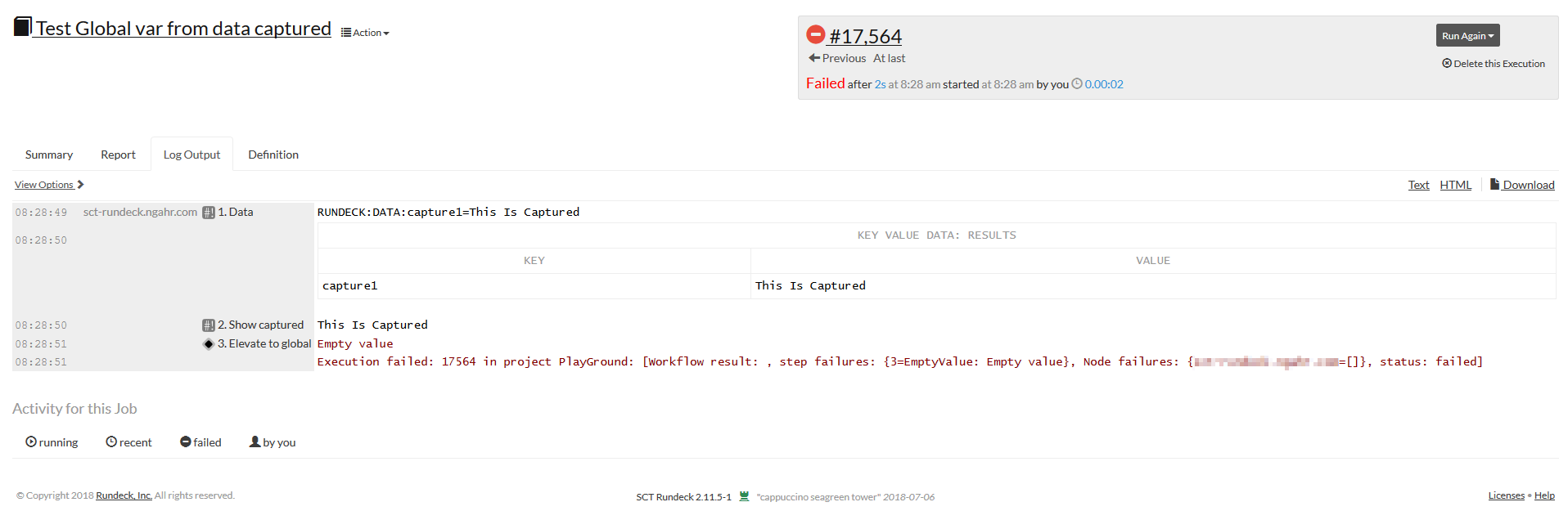
Desktop (please complete the following information):
- OS: Windows 10
- Browser Firefox
- Version 64.0
 JesusRo
All 4 comments
Hey guys,
Trying to see if the same happens on 3.0.11, I saw this extra explanation

Which makes much clear for me how this works.
So, tryed with the wildcard (so from all nodes) and it's working fine on 3.0.11 and 2.11.5-1
All documentation I saw was a bit short and not fully clear, I'd say something to improve.
But with last version, I'd say also what's done it's enought.
You may close this, thanks!
PS: In case someone arrives here with the same issue,
same job example than before but working now:
<joblist>
<job>
<defaultTab>output</defaultTab>
<description></description>
<executionEnabled>true</executionEnabled>
<id>b405eeb4-7f10-42f1-a332-e7678a90a249</id>
<loglevel>INFO</loglevel>
<name>Test Global var from data captured</name>
<nodeFilterEditable>false</nodeFilterEditable>
<scheduleEnabled>true</scheduleEnabled>
<sequence keepgoing='false' strategy='node-first'>
<command>
<description>Data</description>
<script><![CDATA[echo "RUNDECK:DATA:capture1=This Is Captured"]]></script>
<scriptargs />
</command>
<command>
<description>Show captured</description>
<script><![CDATA[echo @data.capture1@]]></script>
<scriptargs />
</command>
<command>
<description>Elevate to global</description>
<step-plugin type='export-var'>
<configuration>
<entry key='export' value='global1' />
<entry key='group' value='export' />
<entry key='value' value='${data.capture1*}' />
</configuration>
</step-plugin>
</command>
<pluginConfig>
<LogFilter type='key-value-data'>
<config>
<logData>true</logData>
<regex>^RUNDECK:DATA:(.+?)\s*=\s*(.+)$</regex>
</config>
</LogFilter>
</pluginConfig>
</sequence>
<uuid>b405eeb4-7f10-42f1-a332-e7678a90a249</uuid>
</job>
</joblist>
If your step is a nodestep, you have to export the value from the specific node. The syntax for this is somewhat undocumented, but you can find it in a post from Greg somewhere.
Anyway, we do the following, which always works if there is precisely 1 node in the set:
    - configuration:
        export: P4Job
        group: export
        value: ${data.P4Job*}
Note the * on the value key. This says export from _all_ nodes in the set. I don't recall the syntax for a specific node, but IIRC you have to know the node name _statically_ in the job config, which makes it not usable for us.
Here's a full job definition which runs a command on a node, prints some RUNDECK:DATA:... parses the output and hoists the value as a global variable. Note the use of the random-subset orchestrator to ensure only a single node, but you can ensure that however you need to.
- description: Create a perforce job for submitting generated config
  executionEnabled: true
  group: Server Tasks
  id: 60b2e37d-5904-428d-a94c-405f76663731
  loglevel: INFO
  multipleExecutions: true
  name: Generate P4 Job
  nodeFilterEditable: true
  nodefilters:
    dispatch:
      excludePrecedence: true
      keepgoing: false
      rankOrder: ascending
      successOnEmptyNodeFilter: false
      threadcount: 1
    filter: tags:fidserver
  nodesSelectedByDefault: false
  orchestrator:
    configuration:
      count: '1'
    type: subset
  scheduleEnabled: false
  sequence:
    commands:
    - description: Generate P4 job
      plugins:
        LogFilter:
        - config:
            logData: 'false'
            regex: ^RUNDECK:DATA:(.+?)\s*=\s*(.+)$
          type: key-value-data
      script: |-
        # Snipped. It eventually prints the RUNDECK:DATA:P4Job=<something>
        exit ${STATUS}
    - configuration:
        export: P4Job
        group: export
        value: ${data.P4Job*}
      nodeStep: false
      type: export-var
    keepgoing: false
    strategy: node-first
  uuid: 60b2e37d-5904-428d-a94c-405f76663731
To explain why this is, because it took me ages to understand.... I believe this is because the "Global Variable" step is a "workflow step" and thus has no context of any nodes. WHen your nodestep runs it stores the parsed data in a structure keyed on the _node_ itself . The global variable plugin (having no node context) requires to be told which node to grab the data from. The wrinkle is that you have to say that statically (something like ${data.Job@nodename}). You can't say, for example ${data.job@${option.node}} or anything like that. The ${data.Job*} syntax contcatenatas the data for all of the nodes in the set. Disclosure: not a rundeck dev so this is mainly pieced together from reading the code and experimenting.
 puremourning
on 7 Jan 2019
puremourning
on 7 Jan 2019
Exactly what I needed.
Thanks a lot @puremourning for the explanation.
JesusRo
on 7 Jan 2019
In an effort to focus on bugs and issues that impact currently supported versions of Rundeck, we have elected to notify GitHub issue creators if their issue is classified as stale and close the issue. An issue is identified as stale when there have been no new comments, responses or other activity within the last 12 months. If a closed issue is still present please feel free to open a new Issue against the current version and we will review it. If you are an enterprise customer, please contact your Rundeck Support to assist in your request.
Thank you, The Rundeck Team
![stale[bot] picture](https://avatars3.githubusercontent.com/in/1724?v=4&s=40) stale[bot]
on 3 Apr 2020
stale[bot]
on 3 Apr 2020
Related issues
 eblikstad
·
4Comments
eblikstad
·
4Comments
 MegaDrive68k
·
3Comments
MegaDrive68k
·
3Comments
 ZoeLeah
·
3Comments
ZoeLeah
·
3Comments
 greg0ire
·
3Comments
greg0ire
·
3Comments
 marcioyoshida
·
4Comments
marcioyoshida
·
4Comments
Most helpful comment
If your step is a nodestep, you have to export the value from the specific node. The syntax for this is somewhat undocumented, but you can find it in a post from Greg somewhere.
Anyway, we do the following, which always works if there is precisely 1 node in the set:
Note the
*on thevaluekey. This says export from _all_ nodes in the set. I don't recall the syntax for a specific node, but IIRC you have to know the node name _statically_ in the job config, which makes it not usable for us.Here's a full job definition which runs a command on a node, prints some
RUNDECK:DATA:...parses the output and hoists the value as a global variable. Note the use of the random-subset orchestrator to ensure only a single node, but you can ensure that however you need to.To explain why this is, because it took me ages to understand.... I believe this is because the "Global Variable" step is a "workflow step" and thus has no context of any nodes. WHen your nodestep runs it stores the parsed data in a structure keyed on the _node_ itself . The global variable plugin (having no node context) requires to be told which node to grab the data from. The wrinkle is that you have to say that statically (something like
${data.Job@nodename}). You can't say, for example${data.job@${option.node}}or anything like that. The${data.Job*}syntax contcatenatas the data for all of the nodes in the set. Disclosure: not a rundeck dev so this is mainly pieced together from reading the code and experimenting.