Rubberduck: Add ~> Existing Module
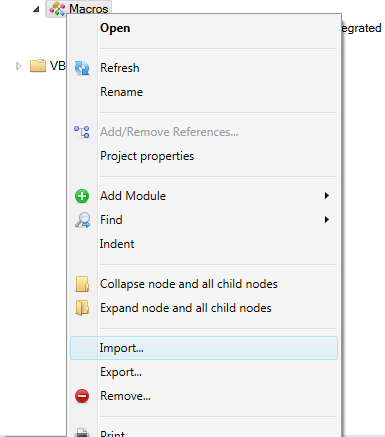
The "Import" functionality is currently visually rather far from the "Add Module" functionality:
Meanwhile in Visual Studio, Add -> Existing Item... is right on top of the list of available item types.
Let's leave "Export" grouped with "Remove" (they do go hand-in-hand), and move "Import" under the "Add" menu, both in the context menu and the "+" dropdown.
 retailcoder
All 13 comments
Nice idea. Could I also suggest the label gets changed from 'Add Module' to simply 'Add'? 'Module' doesn't really fit with UserForms for example, nor with ActiveX designers (if we ever want to support them for ODE) nor with several of the VB6 component types (if we want to be a little consistent between VBA and VB6)
 mansellan
on 13 Jun 2019
mansellan
on 13 Jun 2019
May I suggest adding a 'Replace' functionality? Quite often I find myself wanting to replace (first delete, then re-import) a certain module, for example when rolling back changes.
Edit: The VBE's standard behavior when trying to import a module whose name is already taken is to append a number to the name (or increment the existing number).
 Inarion
on 14 Jun 2019
Inarion
on 14 Jun 2019
@Inarion good idea! ref. #4781
retailcoder
on 14 Jun 2019
Currently, the Add button drop-down comes from the same resource entry as the Add context (sub) menu. If we add an entry for 'File...' there, it will show up in both places. That being so, the Import... menu item seems somewhat redundant. Did we want to keep it?
mansellan
on 20 Jun 2019
Indeed this makes the "Import..." menu item somewhat completely redundant, the "Existing Item..." menu item means to replace it, leaving "Export" close to "Remove", and effectively moving "Import" closer to the "Add" commands.
retailcoder
on 20 Jun 2019
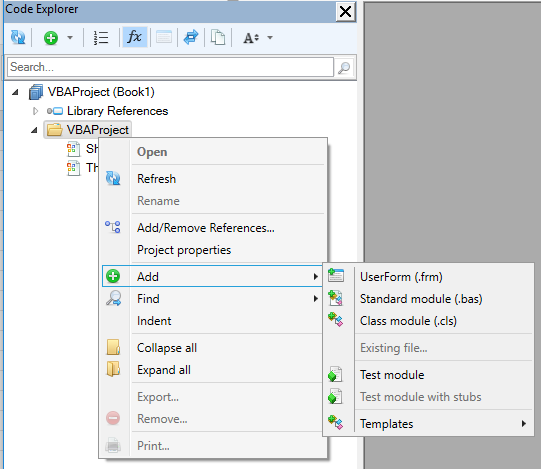
So, here's what the VBA context menu looks like with the changes (including shortening add/collapse):
mansellan
on 25 Jun 2019
@mansellan that looks great!
retailcoder
on 25 Jun 2019
I might suggest that the main menu level be Add/Import to retain consistency with the standard VBE Project Explorer context menu:
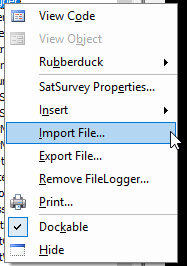
Having reread the issue log and knowing what was going on, it still took me a few moments to find Add | Existing file....
Perhaps at least consider changing Existing file... to Existing module... to retain consistency with the wording module since that's used on almost every other line of the sub-menu.
 daFreeMan
on 26 Jun 2019
daFreeMan
on 26 Jun 2019
Hmm, not sure... I definitely think Add/Import is too noisy. As for the Existing {?}, here's how it looks in VB6:

I think module would be counter-productive there. Torn between file and item though...
mansellan
on 27 Jun 2019
Incidentally, Import was never available to VB6, the word Import didn't really fit, so the functionality was missed. Now that it's Add, I'm adding it.
mansellan
on 27 Jun 2019
I do wonder though if Add, Export and Remove should be in one group, separately from Find and Indent?
mansellan
on 28 Jun 2019
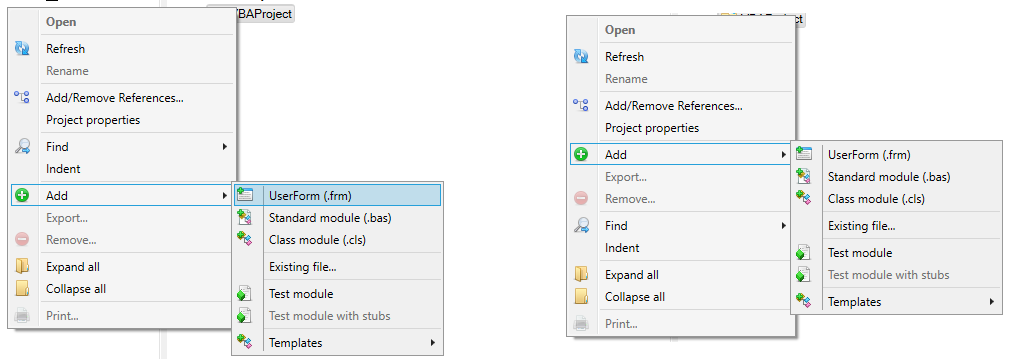
OK, so I've tried the following:
- Grouping Add\Export\Remove
- Putting Expand All above Collapse all (seems more natural)
The question then is - where should the group go? Below Find/Indent or above it. Both options shown below:
Thoughts?
mansellan
on 3 Jul 2019
For the question, I think the above makes more sense.
I would also think that I think it makes more sense & discoverable to have the Existing file... as a first menu option, with the new stuff following.
 bclothier
on 3 Jul 2019
bclothier
on 3 Jul 2019
Related issues
retailcoder
·
3Comments
retailcoder
·
3Comments
 susnick
·
3Comments
susnick
·
3Comments
 Gener4tor
·
3Comments
Gener4tor
·
3Comments
 ChrisBrackett
·
3Comments
ChrisBrackett
·
3Comments
Most helpful comment
May I suggest adding a 'Replace' functionality? Quite often I find myself wanting to replace (first delete, then re-import) a certain module, for example when rolling back changes.
Edit: The VBE's standard behavior when trying to import a module whose name is already taken is to append a number to the name (or increment the existing number).