Rubberduck: Code Inspection does not recognize Public Constants outside the module where the Public Constants are declared
Rubberduck version information
The info below can be copy-paste-completed from the first lines of Rubberduck's log or the About box:
Rubberduck version 2.4.1.4627
Operating System: Microsoft Windows NT 10.0.17763.0, x64
Host Product: Microsoft Office x64
Host Version: 16.0.11425.20204
Host Executable: EXCEL.EXE
Description
Code Inspection does not recognize Public Constants outside the module where the Public Constants are declared, showing up in "Code Quality Issues" as:
1: "Variable '
2: "Local variable '
3: "Variable '
To Reproduce
Steps to reproduce the behavior:
- At the top of Module A, put, for example, "Public Const constName As Integer = 0".
- In other modules, assign constName to a variable.
- Do a Code Inspection.
Expected behavior
Expect no identified issues.
Screenshots
Not Applicable
Logfile
Attached.
RubberduckLog.txt
Additional context
Add any other context about the problem here.
 DavidJLambert
All 4 comments
Could you please help us and be a bit more specific about the issue at hand, in particular the code of the other module?
I tried to reproduce, and could not find any unjustified inspection results.
In my attempt to reproduce, I used the following code.
Module 4:
Option Explicit

Public Const constName As Integer = 0
Module5:
Option Explicit


Private Sub Foo()
    Dim variableName As Integer
    variableName = constName
    Debug.Print variableName
End Sub
This yielded the following inspection results:
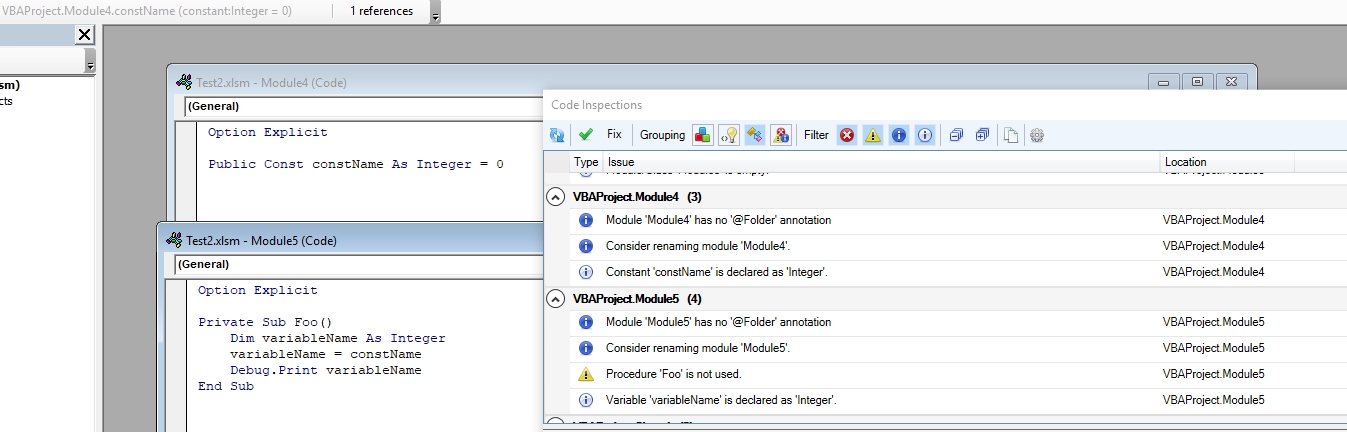
Then I changed the consumer code to the following:
Module5:
Private Sub Foo()
    Dim constName As Integer
    constName = constName
End Sub
This yielded the following inspection results:
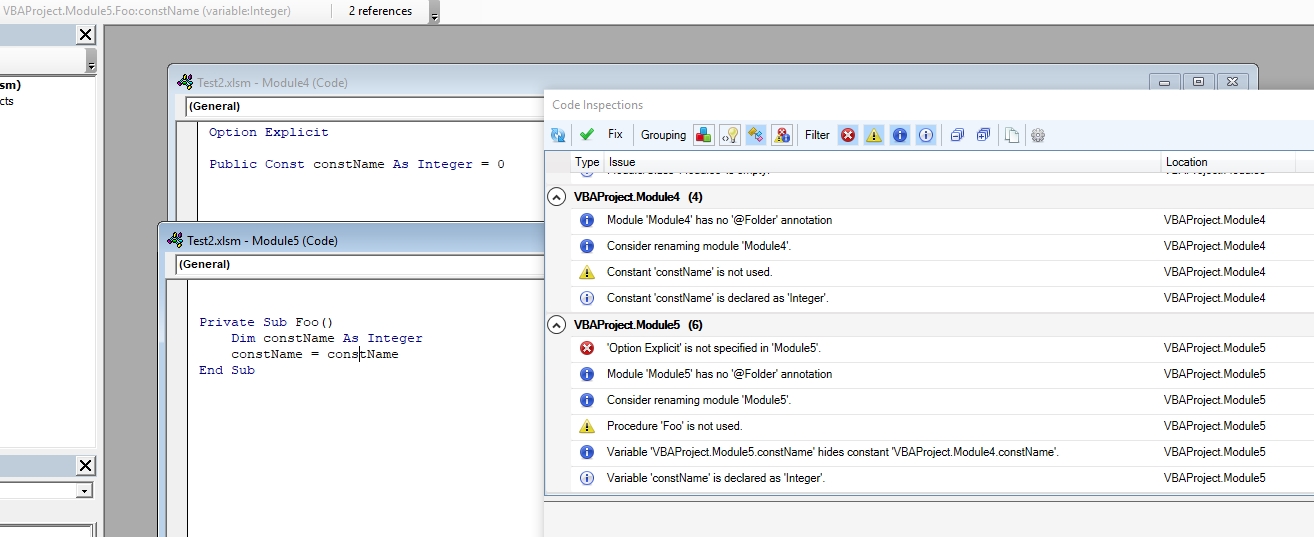
Finally, I changed the consumer code to the following:
Module5:
Private Sub Foo()
    someName = constName
End Sub
This yielded the following inspection results:
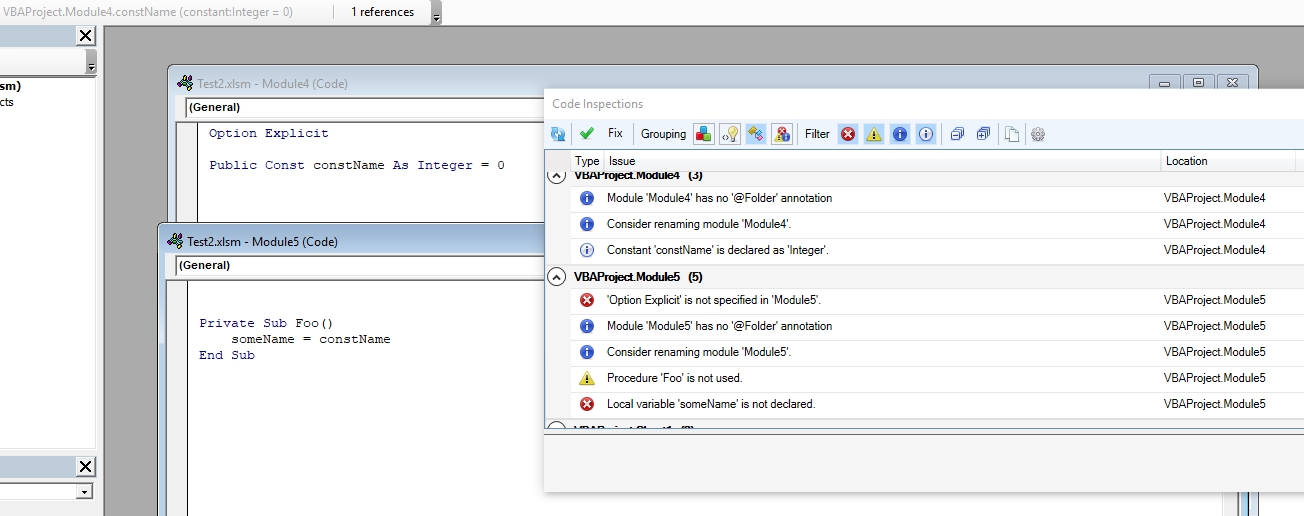
All of the above inspection results seem to be correct and unrelated to the constant.
Could you please help us by detailing a bit more where specifically the usage of a constant causes inspection results that are not present without using a constant?
 MDoerner
on 13 Apr 2019
MDoerner
on 13 Apr 2019
Hi Max,
Wow, that was quick. I’ll have to get back to you in a few days.
David Lambert
408-768-0924
From: Max Dörner notifications@github.com
Sent: Saturday, April 13, 2019 2:37 PM
To: rubberduck-vba/Rubberduck Rubberduck@noreply.github.com
Cc: David J. Lambert David5Lambert7@gmail.com; Author author@noreply.github.com
Subject: Re: [rubberduck-vba/Rubberduck] Code Inspection does not recognize Public Constants outside the module where the Public Constants are declared (#4917)
Could you please help us and be a bit more specific about the issue at hand, in particular the code of the other module?
I tried to reproduce, and could not find any unjustified inspection results.
In my attempt to reproduce, I used the following code.
Module 4:
Option Explicit
Public Const constName As Integer = 0
Module5:
Option Explicit
Private Sub Foo()
Dim variableName As Integer
variableName = constName
Debug.Print variableName
End Sub
This yielded the following inspection results:
https://user-images.githubusercontent.com/22868956/56085470-226f0900-5e44-11e9-86ed-3843ed0f4462.jpg
Then I changed the consumer code to the following:
Module5:
Private Sub Foo()
Dim constName As Integer
constName = constName
End Sub
This yielded the following inspection results:
https://user-images.githubusercontent.com/22868956/56085492-7b3ea180-5e44-11e9-97e8-7470fcebbad4.jpg
Finally, I changed the consumer code to the following:
Module5:
Private Sub Foo()
someName = constName
End Sub
This yielded the following inspection results:
https://user-images.githubusercontent.com/22868956/56085499-9f01e780-5e44-11e9-8c5b-b5955d670313.jpg
All of the above inspection results seem to be correct and unrelated to the constant.
Could you please help us by detailing a bit more where specifically the usage of a constant causes inspection results that are not present without using a constant?
—
You are receiving this because you authored the thread.
Reply to this email directly, view it on GitHub https://github.com/rubberduck-vba/Rubberduck/issues/4917#issuecomment-482891881 , or mute the thread https://github.com/notifications/unsubscribe-auth/AOBOEoICZ6r1ec7Fzu6uwGK9eiWQS3wcks5vgk3lgaJpZM4cuRY7 . https://github.com/notifications/beacon/AOBOErMHJ3SmdLwh2Oi_W9XdU_3PEsNEks5vgk3lgaJpZM4cuRY7.gif
DavidJLambert
on 14 Apr 2019
Hi Max,
The Code Inspector suddenly stopped complaining about the public constants. I restarted Excel, VBE, and RubberDuck, and everything looks good. I do not understand what happened, but I apologize for wasting your time. I'm closing the bug report.
DavidJLambert
on 14 Apr 2019
Better to report a bug a bit quicker than not reporting something reproducible :) No worries.
 Vogel612
on 14 Apr 2019
Vogel612
on 14 Apr 2019
Related issues
 ghost
·
3Comments
ghost
·
3Comments
 Inarion
·
3Comments
Inarion
·
3Comments
 ChrisBrackett
·
3Comments
ChrisBrackett
·
3Comments
 ThunderFrame
·
3Comments
ThunderFrame
·
3Comments
 bclothier
·
3Comments
bclothier
·
3Comments
Most helpful comment
Better to report a bug a bit quicker than not reporting something reproducible :) No worries.