Rubberduck: Inconsistencies adding Custom Addin reference
Rubberduck version information
Version 2.4.1.4627
OS: Microsoft Windows NT 10.0.17763.0, x64
Host Product: Microsoft Office x86
Host Version: 16.0.10730.20304
Host Executable: EXCEL.EXE
Description
Various problems related to using addins (.xlam) with the new _Reference Explorer_
1) Addins loaded through the browser can't be _Applied_ (see screenshot)

Use the arrows to move the addin up and down enables the Apply button. Until the Apply button is enabled, pressing OK does nothing (no reference added, no re-parse)
2) The next time I view references in the _Reference Explorer_, my password protected file has its name changed to the password! _Nope, I'd just set the project description to be that!_

Yes the password is 1, I added it to stop RubberDuck seeing the contents of the addin in older versions. Anyway this behaviour is slightly unnerving, but on the plus side, it does give a new method to crack project passwords that actually gives you the password in text!
3) Pinning is not persistent

When I close and re-open Excel, the pinned Library reference (usually) remains listed, however my .xlam never does. It also doesn't seem to show up in the Recent tab.
Also, some combination of pinning the .xlam and moving back and forth with the blue arrows gave this unhandled exception:
************** Exception Text **************
System.InvalidOperationException: Collection was modified; enumeration operation may not execute.
   at System.ThrowHelper.ThrowInvalidOperationException(ExceptionResource resource)
   at System.Collections.Generic.List`1.Enumerator.MoveNextRare()
   at System.Collections.Generic.List`1.Enumerator.MoveNext()
   at System.Linq.Enumerable.<OfTypeIterator>d__95`1.MoveNext()
   at Rubberduck.Navigation.CodeExplorer.CodeExplorerProjectViewModel.SynchronizeReferences() in C:\projects\rubberduck\Rubberduck.Core\Navigation\CodeExplorer\CodeExplorerProjectViewModel.cs:line 118
   at Rubberduck.Navigation.CodeExplorer.CodeExplorerProjectViewModel.AddNewChildren(List`1& updated) in C:\projects\rubberduck\Rubberduck.Core\Navigation\CodeExplorer\CodeExplorerProjectViewModel.cs:line 100
   at Rubberduck.Navigation.CodeExplorer.CodeExplorerItemViewModel.SynchronizeChildren(List`1& updated) in C:\projects\rubberduck\Rubberduck.Core\Navigation\CodeExplorer\CodeExplorerItemViewModel.cs:line 74
   at Rubberduck.Navigation.CodeExplorer.CodeExplorerProjectViewModel.Synchronize(List`1& updated) in C:\projects\rubberduck\Rubberduck.Core\Navigation\CodeExplorer\CodeExplorerProjectViewModel.cs:line 87
   at Rubberduck.Navigation.CodeExplorer.CodeExplorerViewModel.<>c__DisplayClass49_0.<Synchronize>b__0() in C:\projects\rubberduck\Rubberduck.Core\Navigation\CodeExplorer\CodeExplorerViewModel.cs:line 273
   at Rubberduck.Parsing.UIContext.UiDispatcher.<>c__DisplayClass2_0.<InvokeAsync>b__0(Object x) in C:\projects\rubberduck\Rubberduck.Parsing\UIContext\UiDispatcher.cs:line 26
But I'm afraid logging was off and I haven't been able to reproduce.
Additional Context
FWIW, this is the addin I've been using
 Greedquest
All 5 comments
That accidental VBA Project plain-text password exposure is hilarious... not sure how on Earth this is even possible, but will definitely send Microsoft an email about it once I repro.
Just to confirm: pinning should be possible from the left pane, i.e. under the "Projects" tab for a .xlam - is it not listed there along with a bunch of recent files?
 retailcoder
on 3 Apr 2019
retailcoder
on 3 Apr 2019
Ok I did have to fight it a bit, but...
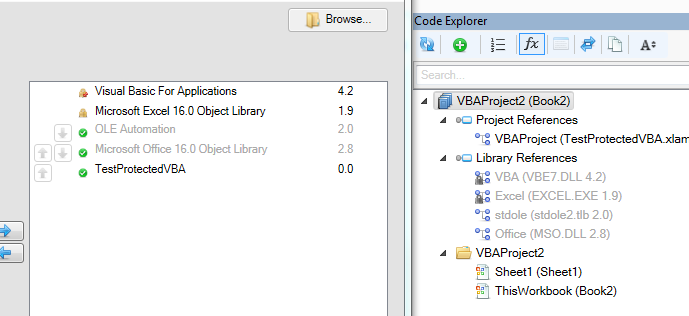
Can confirm that pinned .xlam isn't persisted for some reason, not showing up in recent, and when I tried removing the .xlam reference to see if it wasn't simply because the .xlam was already referenced, I got this:
 System.InvalidOperationException: Collection was modified; enumeration operation may not execute.
   at System.ThrowHelper.ThrowInvalidOperationException(ExceptionResource resource)
   at System.Collections.Generic.List`1.Enumerator.MoveNextRare()
   at System.Linq.Enumerable.<OfTypeIterator>d__95`1.MoveNext()
   at Rubberduck.Navigation.CodeExplorer.CodeExplorerProjectViewModel.SynchronizeReferences() in C:\projects\rubberduck\Rubberduck.Core\Navigation\CodeExplorer\CodeExplorerProjectViewModel.cs:line 118
   at Rubberduck.Navigation.CodeExplorer.CodeExplorerProjectViewModel.AddNewChildren(List`1& updated) in C:\projects\rubberduck\Rubberduck.Core\Navigation\CodeExplorer\CodeExplorerProjectViewModel.cs:line 102
   at Rubberduck.Navigation.CodeExplorer.CodeExplorerItemViewModel.SynchronizeChildren(List`1& updated) in C:\projects\rubberduck\Rubberduck.Core\Navigation\CodeExplorer\CodeExplorerItemViewModel.cs:line 75
   at Rubberduck.Navigation.CodeExplorer.CodeExplorerProjectViewModel.Synchronize(List`1& updated) in C:\projects\rubberduck\Rubberduck.Core\Navigation\CodeExplorer\CodeExplorerProjectViewModel.cs:line 90
   at Rubberduck.Navigation.CodeExplorer.CodeExplorerViewModel.<>c__DisplayClass49_0.<Synchronize>b__0() in C:\projects\rubberduck\Rubberduck.Core\Navigation\CodeExplorer\CodeExplorerViewModel.cs:line 273
...but I never managed to get the password to show up in place of the .xlam file name.
retailcoder
on 3 Apr 2019
Oh gosh I'm such an idiot, I set the project description:
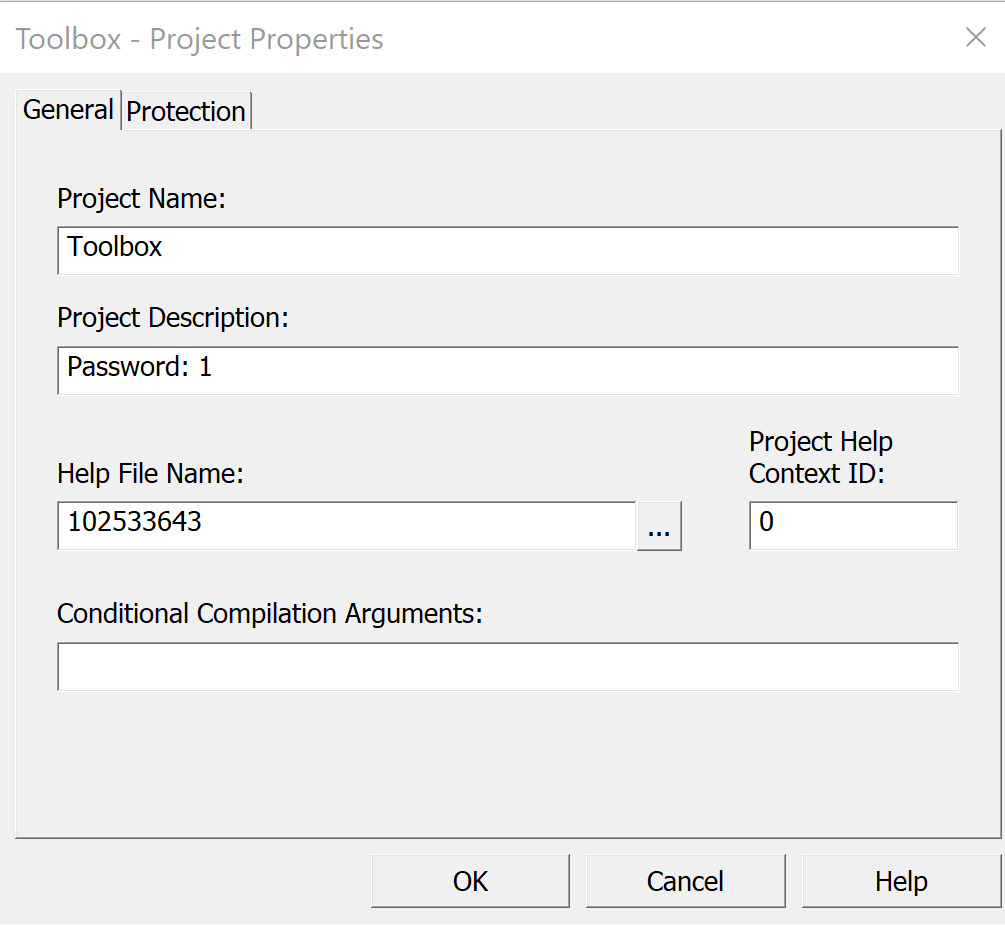
... so I wouldn't forget the password. I guess that's where the "leak" is coming from. False alarm! (I had read about plans for RD to expose members of password protected projects and assumed this was linked in some way)
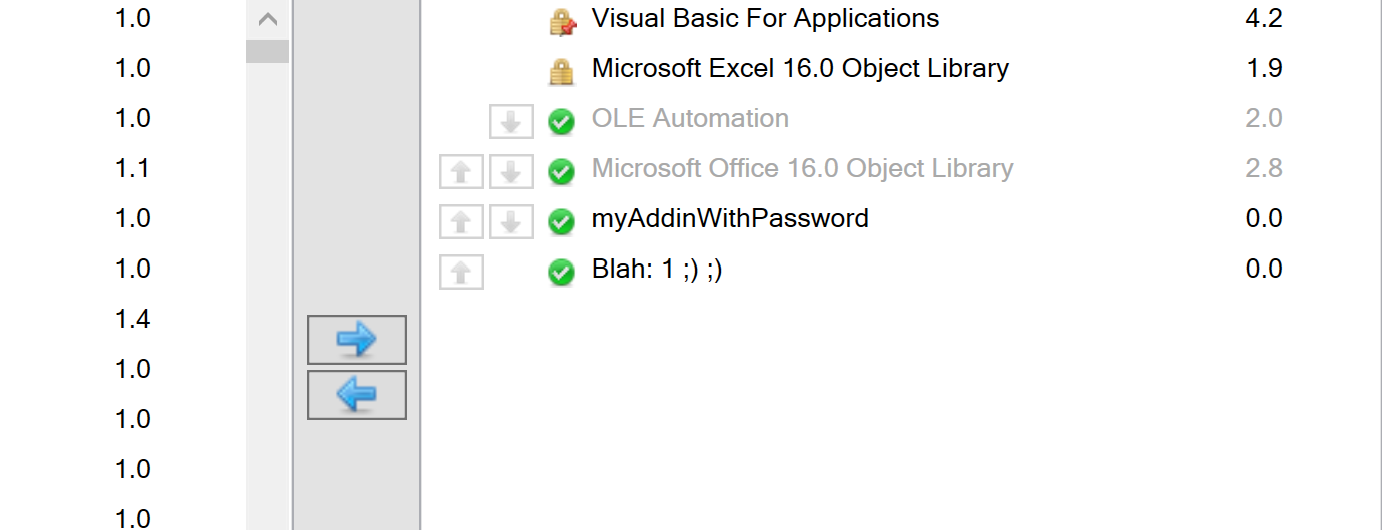
As expected changing it to something else updates the description (out of interest, is there an '@ProjectDescription annotation?)
Greedquest
on 3 Apr 2019
Phew! RE: @ProjectDescription - there isn't... mostly because we can read project properties, but we can't write them. Also, that annotation would feel out of place in just about any module!
retailcoder
on 3 Apr 2019
Just for clarification....
I had read about plans for RD to expose members of password protected projects and assumed this was linked in some way
We have no current plan to provide any password cracking service. 😆
We do have plans to allow parsing of locked projects but that would not necessarily provide us with any more information than what is already available via say, object browser.
 bclothier
on 3 Apr 2019
bclothier
on 3 Apr 2019
Related issues
 ChrisBrackett
·
3Comments
ChrisBrackett
·
3Comments
 philippetev
·
3Comments
philippetev
·
3Comments
 ghost
·
3Comments
ghost
·
3Comments
 eteichm
·
4Comments
eteichm
·
4Comments
 connerk
·
3Comments
connerk
·
3Comments
Most helpful comment
Oh gosh I'm such an idiot, I set the project description:
... so I wouldn't forget the password. I guess that's where the "leak" is coming from. False alarm! (I had read about plans for RD to expose members of password protected projects and assumed this was linked in some way)
As expected changing it to something else updates the description (out of interest, is there an '@ProjectDescription annotation?)