Rubberduck: Built-in variables flagged as errors?
In Code Quality issues I see a few errors that don't make sense to me. Maybe it's just a limit of Rubberduck? I'm betting it's a code problem on my end though (maybe related to references?)
Examples:
Variable 'dbText' is used but not assigned
Local variable 'dbText' is not declared
Variable 'dbText' is not assigned
This also happens with dbCurrency, dbOpenSnapshot, dbAppendOnly
The references I'm using:
Visual Basic for Applications
Microsoft Access 15.0 Object Library
OLE Automation
Microsoft DAO 3.6 Object Library
Microsoft ADO Ext. 2.8 for DDL and Security
Microsoft ActiveX Data Objects 2.1 Library
Microsoft Access 2013
 alexkadis
All 12 comments
Could you please add the code that reproduces this issue? Thanks!
 Vogel612
on 14 Feb 2018
Vogel612
on 14 Feb 2018
Smells like a resolver bug. dbText (and others) would be defined in the DAO type library. If you select dbText in the code (after a fresh parse), does the Rubberduck toolbar look like it's "seeing it"? If the resolver did its job, the toolbar should be saying something like:
dao360.dll;DAO.DataTypeEnum.dbText (enum member:DataTypeEnum)
I have build 2.1.2.2709 here, ..a bit dated, but if the version you're using (what version are you using?) is newer than that and doesn't resolve the constant / enum member, then we're looking at a regression bug with the resolver, rather than an inspection false positive..
 retailcoder
on 14 Feb 2018
retailcoder
on 14 Feb 2018
@Vogel612 Here are two examples:
' Error: Variable 'dbCurrency' is used but not assigned
' Error: Local variable 'dbCurrency' is not declared
' Code:
' If it's a currency field, we add a totals row
' Found at: https://access-programmers.co.uk/forums/showthread.php?t=292311
For i = 0 To qdf.Fields.Count - 1
    If qdf.Fields(i).Properties("Type") = dbCurrency Then
        qdf.Fields(i).Properties("AggregateType") = 3
    End If
Next i
' Error: Variable 'dbOpenSnapshot' is used but not assigned
' Code:
Dim rst As DAO.Recordset
Dim my_query As String
my_query = "SELECT field FROM mytable"
Set rst = CurrentDb.OpenRecordset(my_query, dbOpenSnapshot)
@retailcoder Not 100% positive I understand, but here's what I see:
L239C51 - L239C60 | MyDatabase.Form_QueryPicker.SearchButton_Click:dbCurrency (variable:Variant)
Next to that is a button that says "2 references". Clicking on it brings up search results:
All references: 'dbCurrency'
SearchButton_Click Procedure L216C47 - L216C57 If qdf.Fields(i).Properties("Type") = dbCurrency Then
SearchButton_Click Procedure L239C51 - L239C61 If qdf_ref.Fields(i).Properties("Type") = dbCurrency Then
I have Rubberduck v 2.1.1.2482
I have Rubberduck v 2.1.
Sidenote: I ended up commenting out code that was causing the dbText errors as I realized that I don't need that code.
alexkadis
on 14 Feb 2018
@alexkadis hmmm the later 2.1.2 pre-releases aren't super-stable yet, but it looks like the problem was addressed and fixed somewhere between 2.1.1.2482 and 2.1.2.2709.
@Vogel612 I wouldn't consider it a regression/bug unless it can be reproduced with current/next :wink:
retailcoder
on 14 Feb 2018
What 2.1.1.2482 is seeing is an undeclared variable in the SearchButton_Click scope (in the Form_QueryPicker module of the MyDatabase project), named dbCurrency and having the default Variant data type - which means that build has a resolver issue that's preventing it from correctly resolving some (all? just enums?) identifiers defined in referenced libraries.
The resolver is a critically important part at the very core of Rubberduck, responsible for resolving identifier declarations and references - if that part doesn't work exactly as it should, then Rubberduck isn't understanding the code the way we mean it to be understanding it... and that makes some inspections fire results when they shouldn't, e.g. "variable is not declared", because the resolver couldn't locate the referenced identifier, so it treated it as an undeclared variable.
retailcoder
on 14 Feb 2018
@alexkadis
Just to help us a bit -- I noticed you are using Access 2013 but you are referencing DAO 3.6 which is quite an old library (last used by Access 2003). Can you change to Microsoft Office Access Database 15.0 Object Library and see if the resolver is able to work with that?
Just want to be sure it's not an artifact of using older library than the PIA that's shipped w/ Rubberduck.
 bclothier
on 14 Feb 2018
bclothier
on 14 Feb 2018
@bclothier does that mean I should replace all of my DAO.Recordset with ADODB.Recordset? I know it'll require some rewrites.
alexkadis
on 14 Feb 2018
@retailcoder what version would you like me to try running?
alexkadis
on 14 Feb 2018
@alexkadis No. The Microsoft Office Access Database XX.Y Object Library is an updated version of DAO. Since Access 2007, Access team took the ownership of the Jet database engine and DAO library which formerly were Windows component but now are privatized to Office. There should be no code change when you change the references and it should still compile just as before. It's simply only a suggestion to assess if DAO version plays a role or not (likely not as @retailcoder may have informed me via chat it works on his RD).
bclothier
on 14 Feb 2018
@bclothier Ok. Here's my new references:
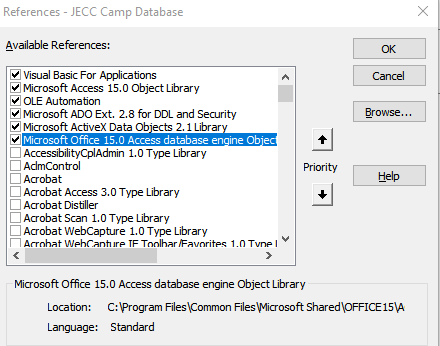
Compiling works great (faster too!) The errors persist.
alexkadis
on 14 Feb 2018
@alexkadis best is to keep up with the pre-releases; pull requests get merged pretty much every week, and every time a pre-release tag is automatically made available - you can click the merge commit link (1) or the AppVeyor link (2) to view the merge commit message (which I try to make as descriptive as possible), diff and build details (diff on GitHub, build details on AppVeyor), and decide if you want to use that version or not:

For example the commit message for this particular tag says:
Configuration defaults are now all in the .settings file.
That doesn't directly affect anything user-facing, so you might want to wait for another build if you're not experiencing settings-related issues with your current install.
The previous pre-release was:
Removed
IComponentreference fromQualifiedModuleName, made structreadonlyand introducedProjectRepository.
The previous significant pre-release build was .2817:
Fixes DefType letter ranges parsing, which interfered with expressions involving single-letter identifiers.
That was a grammar/parser fix for a bug introduced while upgrading our parser generator to Antlr 4.6, a problem that wasn't present in 2.1.2.2803.
As you can see, things are constantly moving, usually in the right direction :grinning: ...but using the pre-release builds is a bit like using "Microsoft Insider - Fast" builds, where you get to see every single update, and an opportunity to provide extremely valuable feedback on the latest/current version.
Alternatively, you could stick to "green releases" (latest was v2.1.1), which move much more slowly (I tend to never be satisfied enough with the current build to deem it "release-ready"...thank the rest of the team for pushing me to release!).
Lastly, if you have Visual Studio Community 2017 (free) and local admin privs, you can build & register Rubberduck yourself, and with git properly configured you can keep up-to-date without needing to monitor the GitHub repository (or Twitter / RD News announcements), simply with git pull upstream next. Plus you get to help us get Rubberduck where we want it to be! :innocent:
I should probably put that somewhere in the readme/wiki...
Whatever you choose to do, remember to always manually uninstall Rubberduck from the control panel's add/remove programs feature, before running the installer for the newer version.
retailcoder
on 14 Feb 2018
This appears to be fixed in next, possibly via the recent PRs with COM collection fixes.
 comintern
on 16 Jul 2018
comintern
on 16 Jul 2018
Related issues
 ChrisBrackett
·
3Comments
ChrisBrackett
·
3Comments
 connerk
·
3Comments
connerk
·
3Comments
 Gener4tor
·
3Comments
Gener4tor
·
3Comments
Gener4tor
·
3Comments
Gener4tor
·
3Comments
 eteichm
·
4Comments
eteichm
·
4Comments