Rubberduck: Access 2016 64Bit cannot find the procedure 'Setup.Test_This_Setup.'
All,
I know this has been addressed in various threads but my issue seems to be unique. Only 1 test module with only one test called Test_This_Setup in a database called Setup. When the parser runs it finds the test sub but when I try to run it I get the above error. I've tried Early and Late binding, and made sure there are no other subs anywhere in my project with that name. Please advise!
 BluejacketSoftware
All 63 comments
If you place a breakpoint on the test method's first executable statement, bring up the immediate pane (Ctrl+G) and type Setup.Test_This_Setup, I presume the breakpoint gets hit? Does Application.Run "Setup.Test_This_Setup" work too?
 retailcoder
on 5 Oct 2017
retailcoder
on 5 Oct 2017
No, I get a compile error: Expected Function or variable dialog.
BluejacketSoftware
on 5 Oct 2017
Oh, and the breakpoint never gets hit.
BluejacketSoftware
on 5 Oct 2017
@BitSprocket Just verifying - is the VBA project in fact named Setup? Typically it's same name but necessarily not as the database file name. Also, is the Test_This_Setup private or public?
 bclothier
on 5 Oct 2017
bclothier
on 5 Oct 2017
@bclothier if RD sees it as Setup, it's Setup. If the method can't be invoked through Application.Run, there's no way RD can invoke it. Is there a compile error in the code? Most if not all of Rubberduck's features require compilable code.
retailcoder
on 5 Oct 2017
Yes, the VBA project is called Setup and Debug/Compile works just great. The Sub is Public but the module is Private. In the immediate window if I do ? Setup. I get Test_This_Setup in intellisense so I know Access can see it.
BluejacketSoftware
on 5 Oct 2017
I'm curious - what is the name of the module that's housing the Test_This_Setup?
bclothier
on 5 Oct 2017
TestModule1 but I've tried to rename it to something new being aware of the namespace collision problem and that still didn't work. It's essentially the Test Module that RD creates with the exception of the Assert in the test sub is changed to: Assert.IsTrue False just for troubleshooting purposes.
BluejacketSoftware
on 5 Oct 2017
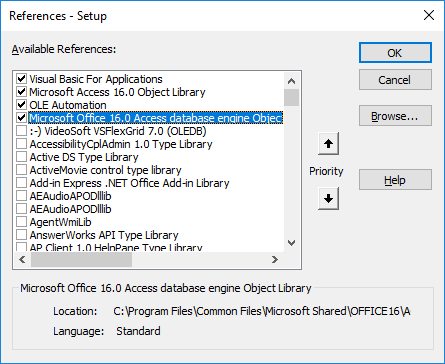
Just one more sanity check - you don't have any library databases or additional VBA project loaded? It's the only one VBA project, right?
bclothier
on 5 Oct 2017
That is correct. Here's a screenshot just so there's no confusion:

BluejacketSoftware
on 5 Oct 2017
I do have MZ Tools installed. Could that be causing a conflict?
BluejacketSoftware
on 5 Oct 2017
I doubt it. I'm more inclined to suspect 64-bit being a factor. From what I know, it should work. Do you have a 32-bit copy of Access around? Try and run it there.
bclothier
on 5 Oct 2017
I do but I will need this on 64bit because my client has 64 bit Access and will be using a 64 bit library that doesn't have a 32 bit version.
BluejacketSoftware
on 5 Oct 2017
By the way, of note, I did download and run a build from a few days ago of RD and it worked once but then never worked again.
BluejacketSoftware
on 5 Oct 2017
In the immediate pane, should be:
Application.Run "Setup.Test_This_Setup"
That should invoke the method and hit the breakpoint. Does it?
retailcoder
on 5 Oct 2017
Yes!
BluejacketSoftware
on 5 Oct 2017
Interesting. That is exactly what RD is attempting to do.
retailcoder
on 5 Oct 2017
Wow. So that's very strange.
What's next?
BluejacketSoftware
on 5 Oct 2017
Here's perhaps a clue. If you look at the error on the test explorer it has the sub in single quotes which does not work in the immediate window.
BluejacketSoftware
on 5 Oct 2017
Hehe.. that's just a display artifact, we use single quotes around every identifier everywhere in every WPF grid. The call is being generated here:
private string GenerateMethodCall(QualifiedMemberName qualifiedMemberName)
{
//Access only supports Project.Procedure syntax. Error occurs if there are naming conflicts.
// http://msdn.microsoft.com/en-us/library/office/ff193559(v=office.15).aspx
// https://github.com/retailcoder/Rubberduck/issues/109
var projectName = qualifiedMemberName.QualifiedModuleName.ProjectName;
return string.Concat(projectName, ".", qualifiedMemberName.MemberName);
}
...and I'll be damned, the double quotes are very clearly missing.
retailcoder
on 5 Oct 2017
Wow. So it's fixable then. That's fantastic! I'm so very impressed with how responsive you guys are! Any chance of a fix release any time soon?
BluejacketSoftware
on 5 Oct 2017
It's a trivial fix on a critical issue, and AppVeyor CI builds every single merged PR and packages a "prerelease" installer for us automatically. Give us a day or two :+1:
retailcoder
on 5 Oct 2017
Okay, thanks for that. BTW, any chance of fixing the early binding issue so I can use intellisense with the Assert method?
BluejacketSoftware
on 5 Oct 2017
I mean Class of course... sillly...
BluejacketSoftware
on 5 Oct 2017
Wait a second, we're invoking Application.Run directly off the interop API - call is a string, the double quotes shouldn't be there. I'm confused - the whole feature would've never worked in Access, for anyone, since day 1.
It's something else.
As for the early-binding issue, it's ...more complicated. We need to implement a method that spits out Declaration instances for every COM-visible class, member and parameter in Rubberduck, and substitute that method with the current "load the COM type library where it's at and iterate all COM types" logic, but only for Rubberduck.tlb.
retailcoder
on 5 Oct 2017
Yeah, I was just reading up on that. Okay - no worries. So what could be the problem with the test sub then? Remember it did work once for me but then never again.
BluejacketSoftware
on 5 Oct 2017
Just verified that 32bit works as expected.
BluejacketSoftware
on 5 Oct 2017
If I execute Call Setup.Test_This_Setup in both 32 bit and 64 bit it hits the breakpoint every time. Can you possibly change from Application.Run to Call instead?
BluejacketSoftware
on 5 Oct 2017
Call is a VBA keyword (obsolete at that); it works within the VBE because the VBA runtime knows what it means. We're in-process, but don't have access to the VBA runtime. If we did, our lives would be unmeasurably simpler. The only way we have of invoking VBA code is through the Application interop API, because the VBIDE API doesn't provide anything for that and tapping into the VBA runtime to take an arbitrary .net string and have VBA execute it, is beyond my paygrade.
retailcoder
on 5 Oct 2017
I get it. So this setup project I'm working on I can develop on my 32 bit install for now but I will most def need the 64 bit to work for the main project. Any thoughts on where to go next with isolating this bug?
BluejacketSoftware
on 5 Oct 2017
@BitSprocket not to distract from the main issue, but do you really? Your client shouldn't have to run tests; only would you when you're developing and changing and potentially changing things?
bclothier
on 5 Oct 2017
That's correct but they will need to run the 64 bit database when in production so I'll need to test under a 64 bit environment when I'm developing.
BluejacketSoftware
on 5 Oct 2017
What happens if you change the test procedure name from Test_This_Setup to TestThisSetup? That would do 2 things: Remove underscores which might be tripping 64-bit; and rename the procedure which might have been cached somehow....
You'll need to refresh RD after the rename, and then run tests...
 ThunderFrame
on 5 Oct 2017
ThunderFrame
on 5 Oct 2017
Just tried it and got the same results. I even tried using some random name that has never been used and got the same error.
BluejacketSoftware
on 5 Oct 2017
The exception is handled here:
catch(Exception exception)
{
result = new AssertCompletedEventArgs(TestOutcome.Inconclusive, "Test raised an error. " + exception.Message);
}
That should be pulling a resource key that contains the "Test raised an error. " part of the message, but note that the rest of the text is coming straight from the exception.Message.
Which leads me to this (credits @ThunderFrame for spotting it):
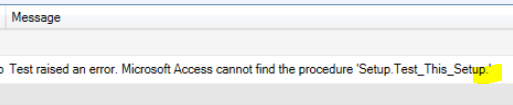
That dot shouldn't be there. Again, no idea how the same identical code could somehow generate a different method call in 32-bit Access, but if we're doing what amounts to Application.Run "Setup.TestThisSetup." , then yeah, that would definitely reproduce the error.
Right?
retailcoder
on 5 Oct 2017
Totally makes sense to me!
BluejacketSoftware
on 5 Oct 2017
To me as well, but I'll admit I'm kinda stumped at this point.
retailcoder
on 5 Oct 2017
And let's not lose site of the fact that it did work once but then broke after that. Sounds like the exception.Message in 64 bit access might be occasionally be appending a . at the end?
BluejacketSoftware
on 5 Oct 2017
No - otherwise there'd be no exception to begin with and the method would happily get invoked as it should. Somehow we're sending Setup.Test_This_Setup. with the extra dot... but not always. :confused:
retailcoder
on 5 Oct 2017
Can we just trim it off? I know it's a terribly ugly hack...
BluejacketSoftware
on 5 Oct 2017
I'd rather discover how MemberName gets that dot, but yeah we could do that.
retailcoder
on 5 Oct 2017
I'm with you. Where does MemberName get populated? Is it being returned from Access? Perhaps there's a bug in Access64 bit.
BluejacketSoftware
on 5 Oct 2017
Actually, it looks like Access is formatting the message incorrectly, if I call a non-existent procedure (with Application.Run), I get this error message:
---------------------------
Microsoft Visual Basic for Applications
---------------------------
Run-time error '2517':

Microsoft Access cannot find the procedure 'Setup.Test_This_Setup1.'
---------------------------
OK   Help
---------------------------
Damn, I was going to say:
MemberNamegets created by our parser, that one isn't on Access or Microsoft :wink:
retailcoder
on 5 Oct 2017
The test window shows the member name correctly until the exception happens...
BluejacketSoftware
on 5 Oct 2017
That may be confusing, the member name does stay the same under the "Method Name" column.
BluejacketSoftware
on 5 Oct 2017
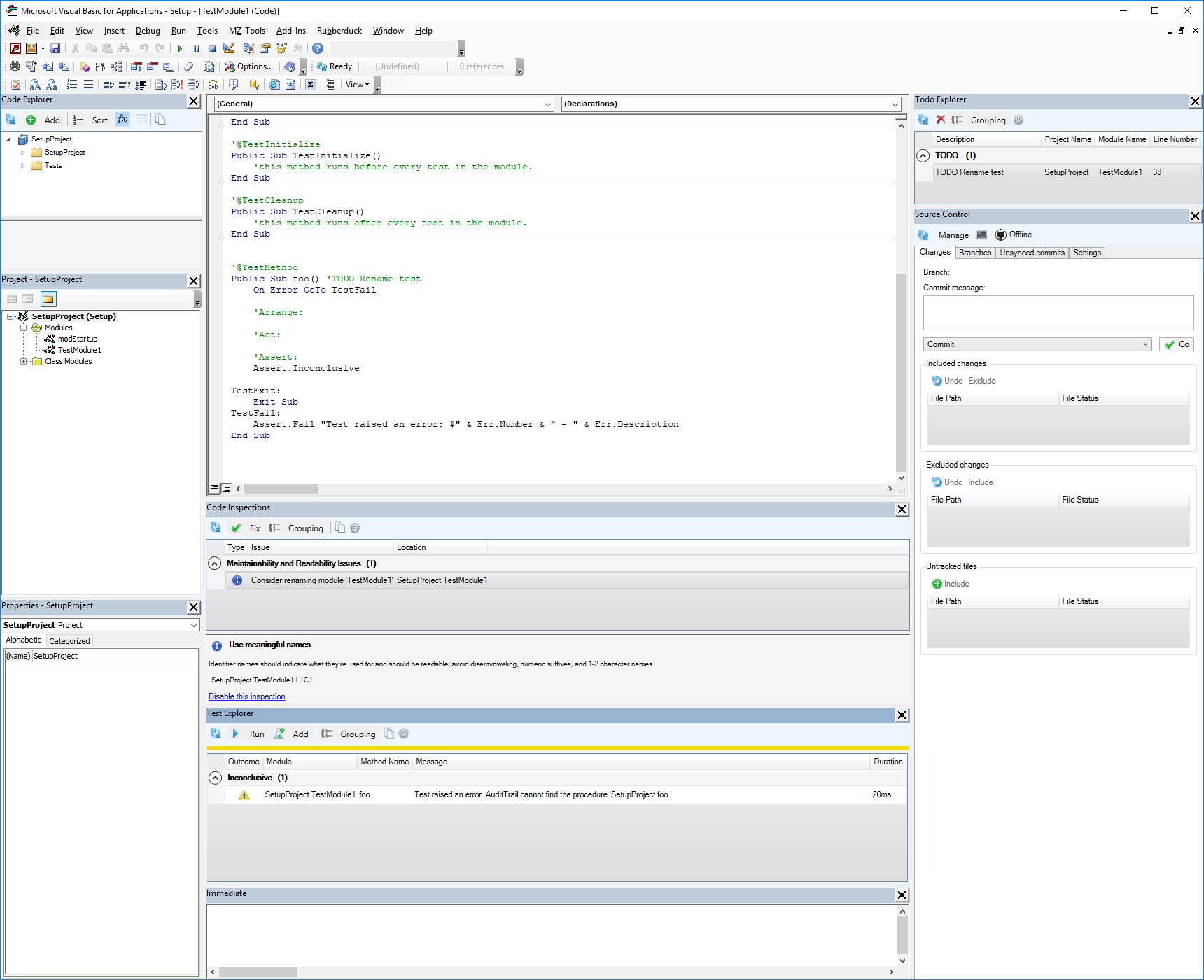
hmm, I see the project name is identical to the database name. What happens if the project name is changed to SetupProject and the database name remains as Setup?
ThunderFrame
on 5 Oct 2017
Let me try it...
BluejacketSoftware
on 5 Oct 2017
No dice. Same error.
BluejacketSoftware
on 5 Oct 2017
BluejacketSoftware
on 5 Oct 2017
What's AuditTrail?
ThunderFrame
on 5 Oct 2017
WAIT!
The database name is now AuditTrail which is an old project!
BluejacketSoftware
on 5 Oct 2017
Let me restart....
BluejacketSoftware
on 5 Oct 2017
Uh, something is really wierd. It's pulling the name of a completely different database now. Let me restart my machine and create a completely new db from scratch. Something is getting cached...
BluejacketSoftware
on 5 Oct 2017
I don't know Access much, but try compact/repair. Definitely Access acting up here.
retailcoder
on 5 Oct 2017
There's no real work in the DB I was working on so I'm just going to create one from scratch. Give me a second...
BluejacketSoftware
on 5 Oct 2017
Okay, so a virgin db works just fine. Now I'm going to load my Setup db and see if it's still borked.
BluejacketSoftware
on 5 Oct 2017
Well guess what, it works just fine now. Whisky Tango Fox Oscar? I have no idea what that could possibly be...
BluejacketSoftware
on 5 Oct 2017
Even changing the test method name works correctly.
BluejacketSoftware
on 5 Oct 2017
@BitSprocket Humor me - on the original whiskey'd file - can you please do a decompile, compile, compact & repair, then try it again?
bclothier
on 5 Oct 2017
:+1: #HappyEnding
Thanks Microsoft!
retailcoder
on 5 Oct 2017
I HATE phantom issues. Yes I can @bclothier but it's working perfectly now after a computer restart. Still want me to do that?
BluejacketSoftware
on 5 Oct 2017
Nah, that wouldn't help --- wait until it happens again (hopefully not!!) and then give that a try and report back.
bclothier
on 5 Oct 2017
Related issues
 susnick
·
3Comments
retailcoder
·
3Comments
susnick
·
3Comments
retailcoder
·
3Comments
 Hosch250
·
3Comments
Hosch250
·
3Comments
 philippetev
·
3Comments
retailcoder
·
3Comments
philippetev
·
3Comments
retailcoder
·
3Comments
Most helpful comment
Actually, it looks like Access is formatting the message incorrectly, if I call a non-existent procedure (with Application.Run), I get this error message: