Rubberduck: 2.1.02314: Rubberduck not visible in menu
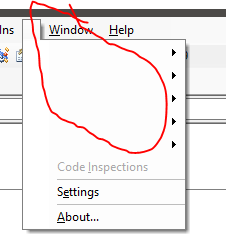
The rubberduck name is not visible on the menu but there is a small gap between 'Add-Ins' and 'Windows' which does pull down the Rubberduck menu.
In the pull down menu all names above settings are not visible but the right arrow menus work OK.
 ghost
ghost
All 10 comments
Which locale do you have set in your settings? What host are you running on? Do you have a logfile? Does the problem persist between restarts?
 Vogel612
on 8 Oct 2017
Vogel612
on 8 Oct 2017
The problem survives a reboot.
The problem did not go away on re-installing
WIndows 10 64 bit. (UK English)
Word 32 bit from Office 365 Business version 1709
Rubberduck runs as normal despite this oddity. e.g. I can select a refactor rename and it works.
I tried to look at a log file but the settings option does not pull up the settings dialog page.
The status line showing Pending/Ready is visible all the time
ghost
on 8 Oct 2017
I wonder if this might be somehow related to the localization issue I'm seeing at work, with a fr-CA desktop and Rubberduck set to en-US - some resources show up in French. Clearly there's something off with the resources.
 retailcoder
on 8 Oct 2017
retailcoder
on 8 Oct 2017
Could you try changing the language in the settings? If that "fixes" the issue, I have a repro:
Vogel612
on 9 Oct 2017
I'm afraid I can't do that as nothing appears to happen when I click on settings.
ghost
on 9 Oct 2017
Having the exact same issue
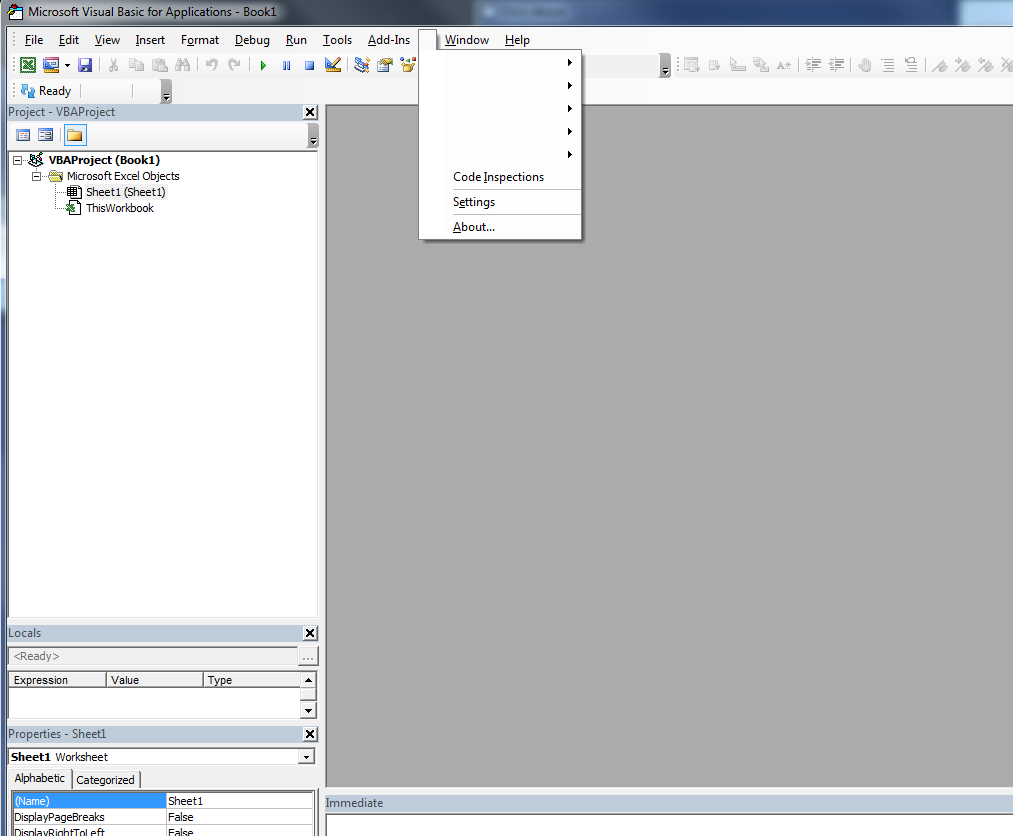
Windows 7, Excel 2013 32 bit
 Troubadoure
on 9 Oct 2017
Troubadoure
on 9 Oct 2017
Changing the language fixed the issue but it doesn't stay fixed on restart.
Menu bar also displays after 'reset' of settings
Troubadoure
on 9 Oct 2017
I'm seeing this problem as well using v2.1.0.2318-pre
 A9G-Data-Droid
on 9 Oct 2017
A9G-Data-Droid
on 9 Oct 2017
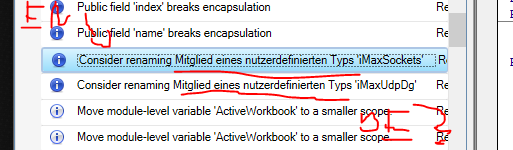
Possibly related i18n error:
Vogel612
on 10 Oct 2017
Nah, that's the weirdness I've been experiencing forever on fr-CA machines. Definitely another localization glitch, but not related.
retailcoder
on 10 Oct 2017
Related issues
retailcoder
·
4Comments
 DecimalTurn
·
3Comments
DecimalTurn
·
3Comments
 philippetev
·
3Comments
philippetev
·
3Comments
 Gener4tor
·
3Comments
retailcoder
·
3Comments
Gener4tor
·
3Comments
retailcoder
·
3Comments
Most helpful comment
Could you try changing the language in the settings? If that "fixes" the issue, I have a repro: