Rubberduck: Code Explorer should tell the user it needs to be refreshed when it's empty
Currently, the TreeView section of the Code Explorer window displays nothing before a parsing run has completed, not even a top-level ProjectViewModel.
When this section is completely empty but still active (i.e., not greyed out) it projects to the user the idea that something might be broken, when in fact, the parser just needs to run.
If nothing is being displayed in the Tree View, that section of the window should be grayed with a message along the lines of "Refresh to view the project tree."
 ghost
ghost
All 14 comments
An alternative idea would be to automatically run the parser when the CE window is opened. However, I wonder if that would cause issues if 1) the project being open causes a parser error or 2) if the CE is set to load on startup, if that would create a race condition where the project isn't yet available to parse?
ghost
on 28 Aug 2017
@shadowofsilicon in theory we're already running an initial parse on startup - it just doesn't happen consistently for some reason. We've had issues with the initial parse causing a hard crash / COMException on startup, so this is a critical area of the code that cannot be taken lightly.
I don't think we need to "gray out" everything; just a little yellow-background label (similar to what the Source Control panel uses) at the top of the client area could do the job:
Rubberduck doesn't see anything yet.
Click 'Refresh' to have Rubberduck parse and process the projects in the VBE.
Don't show this message again | Refresh now
 retailcoder
on 28 Aug 2017
retailcoder
on 28 Aug 2017
IMHO graying it out (The tree view, not the entire CE) would be cleaner UI, it would be more natural to the user, and likely easier to implement.
I see the reason for using the yellow banner in the SC window; on that window there is nothing to grey out to show inactive. Whereas here, we have something we can do that with.
Either one would work, though.
ghost
on 28 Aug 2017
A disabled WPF treeview isn't grayed out. We'd have to make it be. IMO it makes no difference what the backcolor of an empty panel is; without the info-banner either backcolor looks like the feature is broken anyway.
retailcoder
on 28 Aug 2017
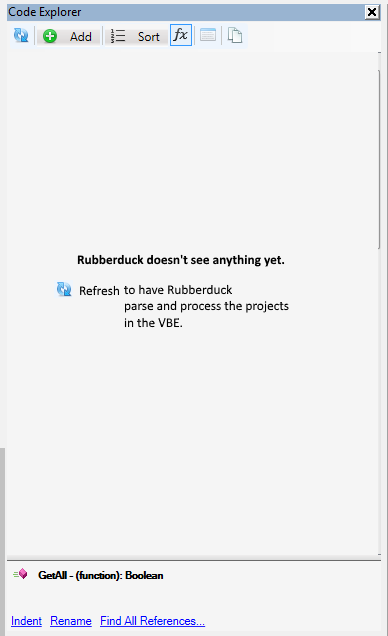
It's a very crude mockup but that is my vision.
That came across poorly; the color is a minor detail. We both agree that the message is most important. When I said "grey" I intended to convey the idea of "dim out to show inactivity."
ghost
on 28 Aug 2017
That would work. Make the background WorkArea-gray (dark), and put the centered message on a yellow-ish background banner spanning the whole width of the content panel, and it'll look pretty neat I think.
retailcoder
on 28 Aug 2017
If we put the message in a yellow-ish banner, then it should be at the top of the WorkArea. It won't look right being halfway down the work area. Certainly won't be consistent with any previous UI.
ghost
on 28 Aug 2017
Exhibit A:

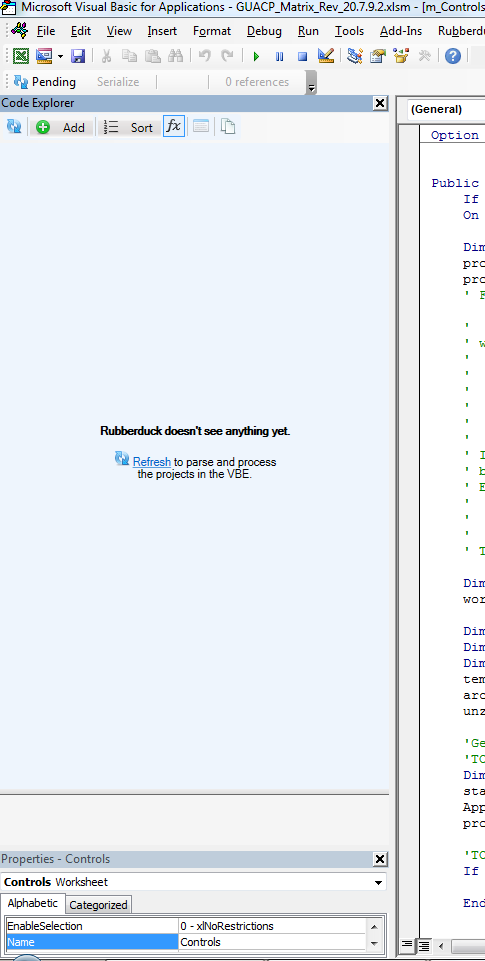
Exhibit B:
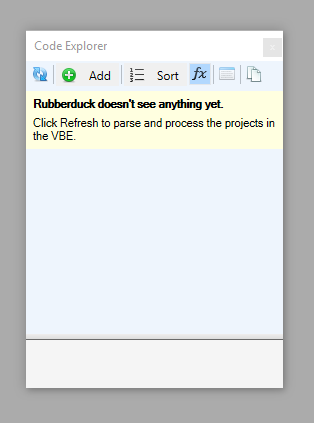
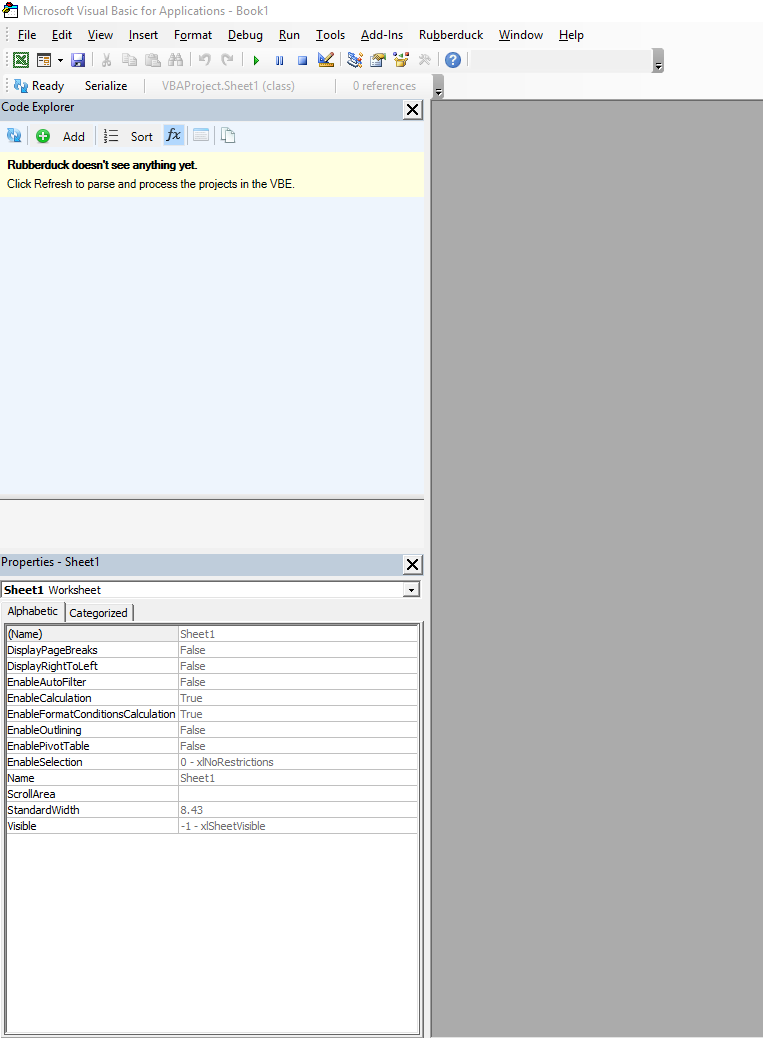
Submit your votes before polling closes!!! ;)
ghost
on 30 Aug 2017
Hmm, I like the centered one, however inconsistent it might be with the SC panel.
retailcoder
on 30 Aug 2017
I think the user interaction difference between the this message and the SC error messages are sufficiently different as so the centered message will not seem inconsistent. This message will be here when the "content" (tree) is "empty", and either the message _or_ the content will be visible. In the SC window, the "content" stays visible, and the message is specifically dismissed by the user.
ghost
on 30 Aug 2017
I vote that ALL features that is Code explorer and source controls are identical in behaviour waiting til it parses then provides a prompt.
 PeterMTaylor
on 30 Aug 2017
PeterMTaylor
on 30 Aug 2017
@PeterMTaylor The idea here is to display a message before the first parse, not after, i.e. this is the default appearance before the TreeView is populated. Before, because otherwise the Code Explorer sits empty when there is (presumably) a project to display, but instead it sits empty without any visual indication to the user that something needs to happen first.
ghost
on 30 Aug 2017
Voting Post for Exhibit A
 Vogel612
on 30 Aug 2017
Vogel612
on 30 Aug 2017
Voting Post for Exhibit B
Vogel612
on 30 Aug 2017
Related issues
 Gener4tor
·
3Comments
Gener4tor
·
3Comments
 ThunderFrame
·
3Comments
ThunderFrame
·
3Comments
 eteichm
·
4Comments
eteichm
·
4Comments
 Inarion
·
3Comments
retailcoder
·
3Comments
Inarion
·
3Comments
retailcoder
·
3Comments
Most helpful comment
@PeterMTaylor The idea here is to display a message before the first parse, not after, i.e. this is the default appearance before the TreeView is populated. Before, because otherwise the Code Explorer sits empty when there is (presumably) a project to display, but instead it sits empty without any visual indication to the user that something needs to happen first.