Rubberduck: 'Implicitly Variant' Inspection quick fix does nothing
Access2010 Win7 RD2.1.2003
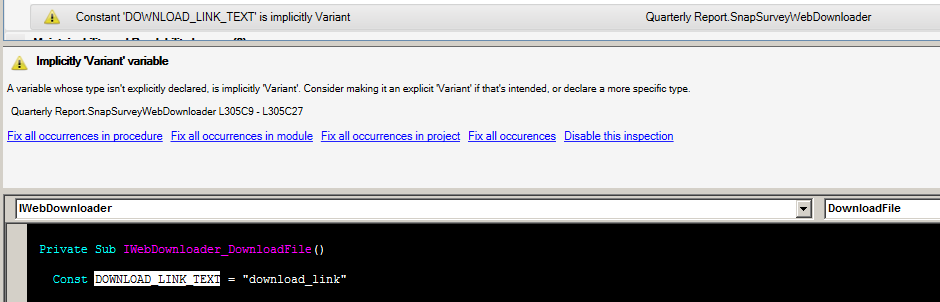
Clicking the Fix all occurrences in procedure link does nothing.
TBH, I'm not sure what the intent is on _how_ to fix this. Is it supposed to infer from the RHS what the type should be? Is it supposed to pop up a dialog asking for a type (by presenting a drop-down or radio buttons)? If it asks for a type, would it list _every_ type possible based on included libraries?
If there's no intent to fix, remove all the Fix... links, as they're confusing.
 daFreeMan
All 8 comments
IIRC, the intended fix is to make it an explicit Variant.
 MDoerner
on 27 Jul 2017
MDoerner
on 27 Jul 2017
The 'Fix' button in the toolstrip docked at the top of the toolwindow is a dropdown that lists all available quickfixes for the selected inspection result; using it fixes this occurrence, and its description says "declare as explicit variant". There is already an open issue to make it try to infer the type from usage.
 retailcoder
on 27 Jul 2017
retailcoder
on 27 Jul 2017
@MDoerner - ugh!
daFreeMan
on 27 Jul 2017
This may just come down to a general UX issue that the 'Fix' button is not intuitively obvious as a drop down - it looks like when I click it a fix will happen.
daFreeMan
on 28 Jul 2017
ref. #196
retailcoder
on 8 Aug 2017
@daFreeMan would changing the caption from 'Fix' to 'Available QuickFixes' solve the UX issue?
retailcoder
on 19 Aug 2017
Are we getting a repro with the latest build? Linked issue #3224 was fixed by 11a25f6
retailcoder
on 19 Aug 2017
@retailcoder - I just tested this with CI build .2213. As originally written:
Clicking the
Fix all occurrences in procedurelink does nothing.
Has been resolved, so I'll close this one.
I'll open a new issue (or track down the existing one) for the UX issue. I think I just realized what the problem is there...
daFreeMan
on 14 Sep 2017
Related issues
 ChrisBrackett
·
3Comments
ChrisBrackett
·
3Comments
 DecimalTurn
·
3Comments
DecimalTurn
·
3Comments
 Inarion
·
3Comments
Inarion
·
3Comments
 ThunderFrame
·
3Comments
ThunderFrame
·
3Comments
 SteGriff
·
3Comments
SteGriff
·
3Comments
Most helpful comment
@retailcoder - I just tested this with CI build .2213. As originally written:
Has been resolved, so I'll close this one.
I'll open a new issue (or track down the existing one) for the UX issue. I think I just realized what the problem is there...