A user is reporting that the "AWUS036ACH" is underpowered running at 200mA instead of 500mA
"I have noticed that with the Alfa AWUS036ACH device plugged in to a USB 3.0 port, it only is able to receive 200mA of power. When plugged into a USB 2.0 port it is able to receive 500mA. I'm not sure why this is, but the result of the loss in power is that the device has a very limited range for transmit and receive using these drivers. This information was obtained via the command lsusb -v."
"The AWUS036H being referenced in that post uses the RTL8187 driver, and runs at a full 500mA. The range on that adapter is much greater than the range on the AWUS036ACH, which uses the RTL8812AU driver. None of the users involved in this discovery are developers, so I'm adding this note here in hopes someone who knows what might fix this issue will see it."
Other sources:
https://forums.kali.org/showthread.php?38574-Old-AWUS036H-vs-new-AWUS036ACH-performance-comparison
https://github.com/abperiasamy/rtl8812AU_8821AU_linux/issues/12
 kimocoder
All 165 comments
This is a great find! It completely explains why I get such an abysmal range and why changing the txpower does pretty much nothing. At least now we can be reasonably sure that the problem is not with the way the txpower setting is comunicated in the driver but it probably is related to the adapter not getting enough power in order to have any effect.
The only question would be how accurate the lsusb -v is in that regard. It would be interesting to measure the actual current running through the cable with a current clamp, just to confirm and be absolutely sure. Unfortunately I don't have one myself, but I could check whether we have one in the lab and check the AWUS036ACH as well as the AWUS1900, maybe tomorrow.
 evilphish
on 3 Jan 2018
evilphish
on 3 Jan 2018
@i64X use the issue report here instead, my private fork is for experimental usage. It all ends up here anyways. But thanks for the report (wiki report) anyways, now we're aware of the issue as you may see here. Feel free to share thoughts here instead. :smiley_cat:
kimocoder
on 3 Jan 2018
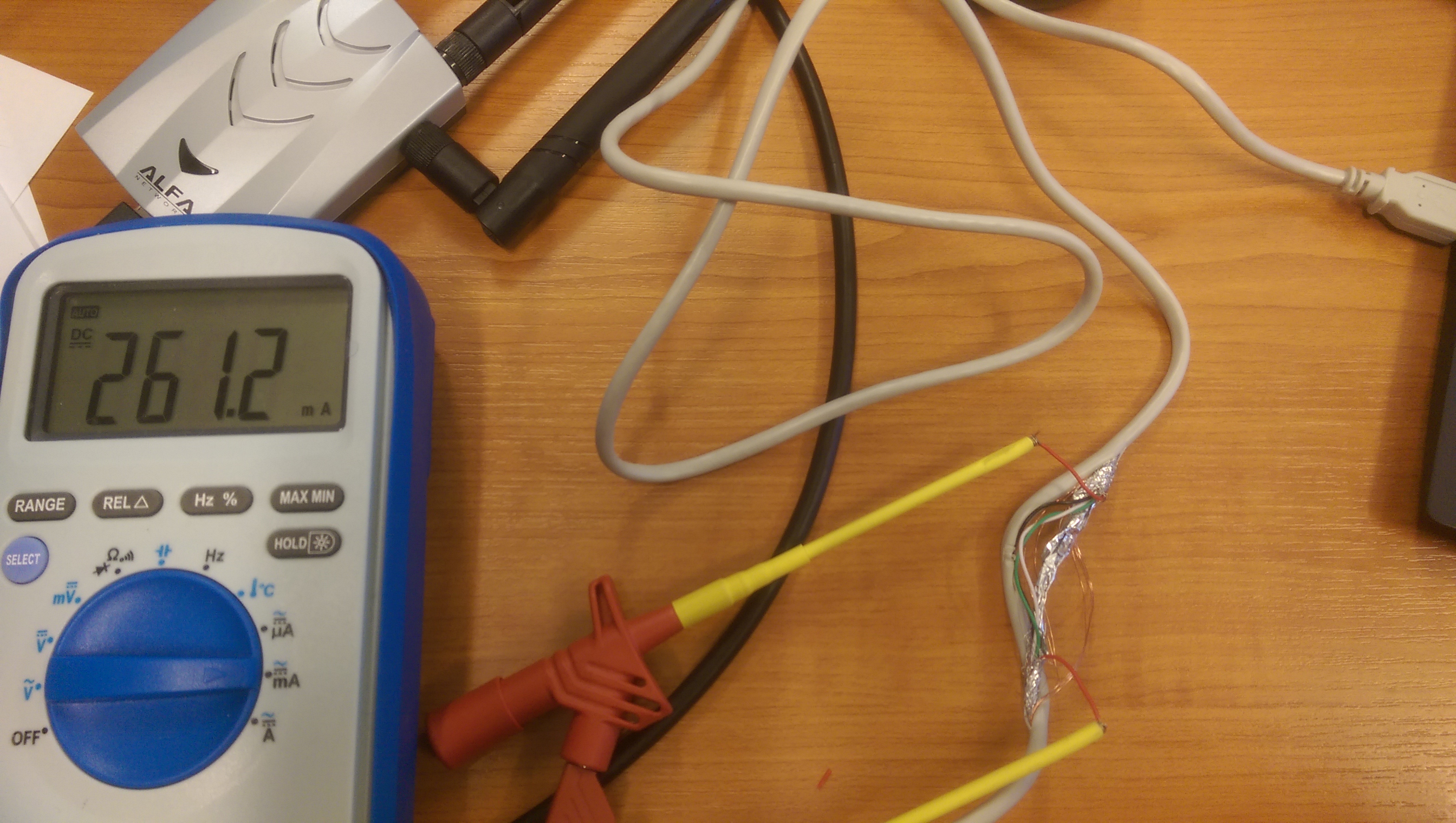
Ok, bad news. If I use a USB2 cable to force the device into USB2 mode, lsusb -v also tells me that it uses 500 mA whereas if I use it directly and it switches to super-speed USB3 mode it tells me it uses 200 mA for the AWUS036ACH and 214mA for the AWUS1900. But this is actually not true.
This is the shot of the AWUS1900 in USB2 mode:
and this is the AWUS036ACH in USB2 mode:
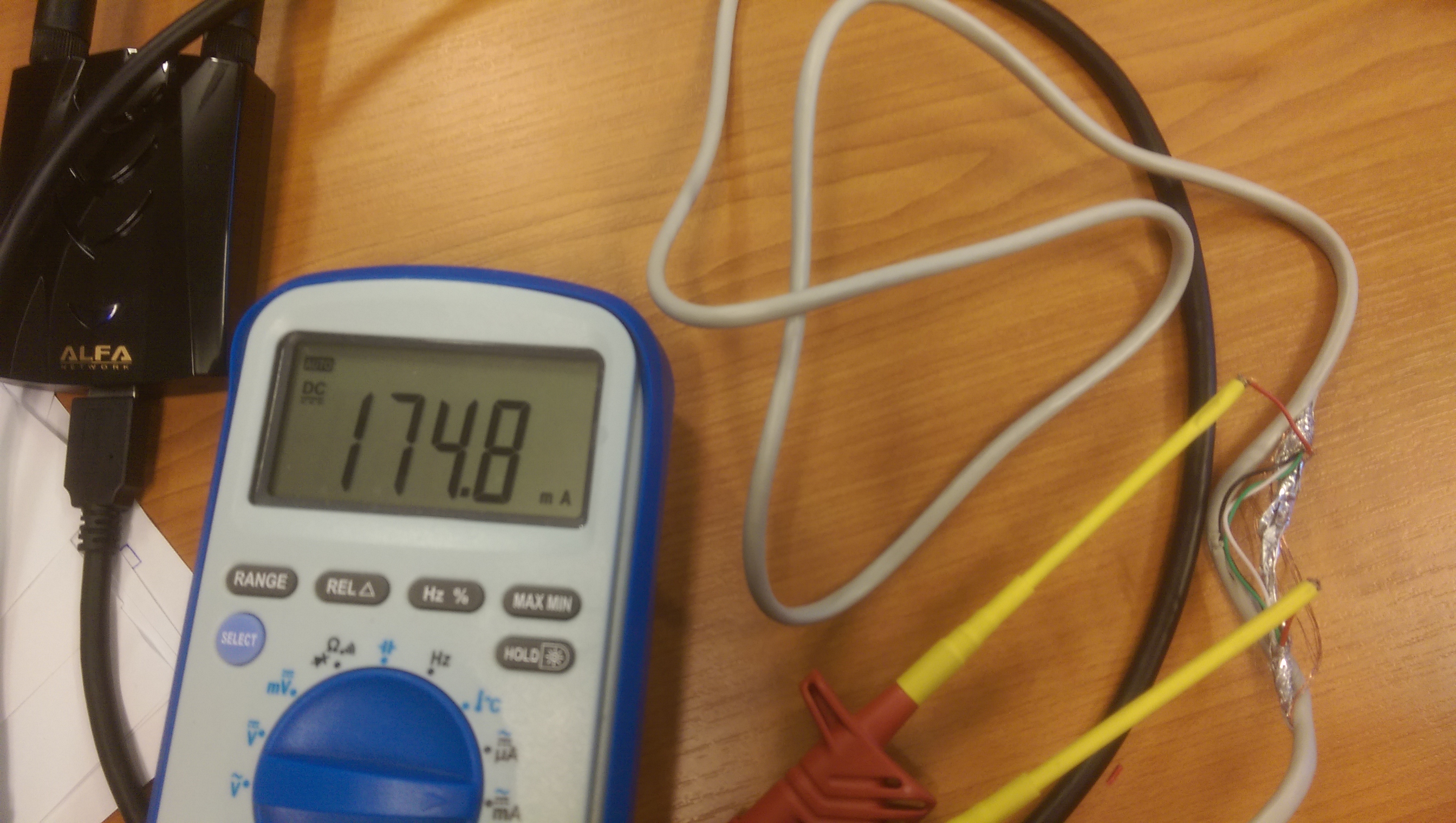
As you can see, this is by far not 500 mA. Also the current does not change while scanning, etc. In addition, I tried changing txpower and it has no effect on the current. Which also means the txpower setting does not affect both devices at all. :/
I don't have a spare USB3 cable which I can cut so I can not test the USB3 current for now.
evilphish
on 4 Jan 2018
Hi evilphish ... I am the other user that was discussing this on the kali forum ... I ordered a short usb3 male/female extension cable last night that I'm going to hack and measure the current from. Post is slow here this time of year but I'll hopefully get it in the next couple of days.
I've been testing many of the different drivers from version 4.3.14 onwards in debian stretch (just for range) and the best range I get is with 4.3.20 ... every driver after that has severely restricted range and shows MaxPower as 200ma on the usb3 ports .... version 4.3.20 which has the best range shows MaxPower as 500ma on the usb3 ports ... so I will compare actual true current readings between the 5.1.5 driver and the 4.3.20 driver on the same hardware.
Thanks to all you devs involved for looking into this ... :)
 Trace-2
on 4 Jan 2018
Trace-2
on 4 Jan 2018
Just thought ... How many mw is the 36ACH?
If it's 1000mw (1w) ... then 1w @5v = 200ma.
Trace-2
on 4 Jan 2018
That sounds great @Trace-2 , looking forward to your measurements. I am a little busy with thesis writing at the moment so can not spend too much time on it ;-)
Regarding the power it all depends on whether the 1W designation for the 36ACH (which I have also read somewhere) relates to the transmit power or to the overall power consumption of the device. We can safely assume that the onboard stuff also takes some current and that it does not put all of the current drawn from the usb port into boosting the signal strength.
Also the 170 mA for the 36ACH are a lot less than 200 mA and this includes the current required to operate the dongle electronics. The actual power available for the signal strength should therefore be less than 170 mA. Also interesting to see is that the AWUS1900 draws 260 mA. I think we really need USB3 measurements to arrive at a halfway decent conclusion. I also do not know whether the transmitter antenna driver operates with the full 5 V or whether it requires a lower voltage which would mean that we need more current for the same transmit power.
It would also help if you could try changing the txpower value and see whether that changes the current drawn. After all, a txpower of 30 dB is a factor of 1000 higher than a txpower of 1 dB. So if txpower setting works with any of your other drivers, the difference in current drawn should be very noticeable, not just a couple mA or so.
evilphish
on 4 Jan 2018
Just read in the spec. on this page: https://tienda.siliceo.es/en/alfa-network/256-alpha-awus036ach-wifi-usb-30-dual-band-anti-interference.html
That the 36ACH is a 1600mw device.
Yes I agree practical measurements are the only logical way forward.
When the usb3 cable arrives I'll see what current and voltage measurements I can take and also try the different drivers in Debian stretch and Kali 2017.3
If the adapter is easy to get into I'll maybe check out the internal component spec. too.
Trace-2
on 4 Jan 2018
I'm in a bit over my head here because I'm not really versed in EE so much, but in response to trying the drivers that Kali suggests on their webpage, that's what I tried first, and the 36AHC didn't show up at all when I plugged it into the Thinkpad. Searching based on that lead me to other users that were having the same issue, which then lead me here. Obviously these drivers fixed the problem, minus the range issue that we're talking about.
My current install is Kali 2017-3 on a bare-metal install on a Thinkpad T450S, if that matters to you Trace for when you experiment as well.
 i64X
on 4 Jan 2018
i64X
on 4 Jan 2018
Just a thought too... I haven't tried it yet, but I've seen other people who say that in Windows they're able to use the device without installing drivers (it must pick them up from Windows Update and install them automatically), but the range issue isn't an issue. I'd be curious to see power measurements when you get that USB3 cable while the device is plugged in to a Windows machine, if in fact it works properly under Windows. I'd test that quick right now but I don't have access to a Windows machine.
i64X
on 4 Jan 2018
Yes Win10 is already on the test list ... I have tried it in windows ... the driver for it is in the default set of drivers as I have never connected to the internet with the windows install.
I'll be putting the adapter through the ringer and disassembling it too ... :)
Trace-2
on 4 Jan 2018
The antenna Power Amp I.C's are:
SE2576L (2.4Ghz): http://www.skyworksinc.com/uploads/documents/202428A.pdf
SE5023L (5Ghz): http://www.skyworksinc.com/uploads/documents/SE5023L_202521B.pdf
Trace-2
on 4 Jan 2018
So for 2.4 GHz it draws 650 mA total supply current at a txpower of 29 dBm. This means that if we measure 170 mA we could estimate that it is currently locked to a txpower of 10*log(10^2,9*170/650) = 23 dBm. Probably a little less as the base operating current is higher in percentage for 170 mA than for 650 mA. So maybe 20.5 to 21 dBm? This is actually awfully close to the maximum allowed transmit power by regulatory domain for Germany for the 2.4 Ghz band which is limited to 100 mW or 20 dBm. Could be just a coincidence though.
For 5 GHz the power amp draws 600 mA at 26 dBm equating to 10*log(10^2,6*170/600) = 20.5 dBm. The limit for 5GHz is 200 mW or 23 dBm, so this is probably not the deciding factor.
Of course it could be a combination of the two if both are active at the same time and I have no idea whether they only draw the maximum power during an established connection or also in monitor mode. But if the 2.4GHz spec says that this amp alone can draw 650 mA we can for sure say that the 170 mA that I measured tell us that it is not running at full power.
Will be interesting to see what you can dig up with your USB3 cable.
evilphish
on 4 Jan 2018
Meant to say there are 2x each of the PA's (one of each for each antenna ... four in all):

Are you in Germany? The 036ACH I think just defaults to the global domain which is 20dB for 2.4Ghz
I am in the UK and have recompiled the crda and regulatory.bin for global and GB to 30dB in my copy of debian stretch for temporary testing purposes .... it didn't make any difference after reinstalling the 4.3.20 driver that I get the best range from in managed mode though.
I've also questioned realtek support for a breakdown of the supposed 1600mw power consumption ... but I've no idea what they are like for replying.
When the cable arrives I'll test the current draw in:
Win10 (new install with latest win driver from Realtek)
Kali (latest weekly install with drivers 5.1.5 & 4.3.20)
Debian Stretch (kernel 4.9 with driver 4.3.20 and recompiled regulatory.bin)
All on the same hardware with different modes, changing TX power value, etc. and we'll see how they compare in range and power consumption ... :)
Trace-2
on 5 Jan 2018
@Trace-2, yes I am in Germany. But as I said I doubt that any regulatory stuff is in effect. The option is disabled in the driver and switching to other domains also doesn't change anything about the reception for me.
I'm very interested in what you find out, thank you for taking the time to dive into that. Wish I could be of more help but as I said, kinda busy with my thesis atm :(
evilphish
on 5 Jan 2018
It's no problem ... if I can help increase the range of the adapter that would be a big plus for me.
My main objective is to get the best signal possible to a workstation in an outbuilding we have here through two walls and a wooden fence ... at the moment I can get a good signal to part of the building but ideally I'd like to position the workstation in a further away location.
I've got a feeling that the adapter is not performing as well as it should do and would like to do something about it ... driver development is outside my skill set but I don't mind doing a bit of electronic testing ... I'm hoping the cable will arrive tomorrow and I can test over the weekend if not I won't get it till Monday ... :)
Trace-2
on 5 Jan 2018
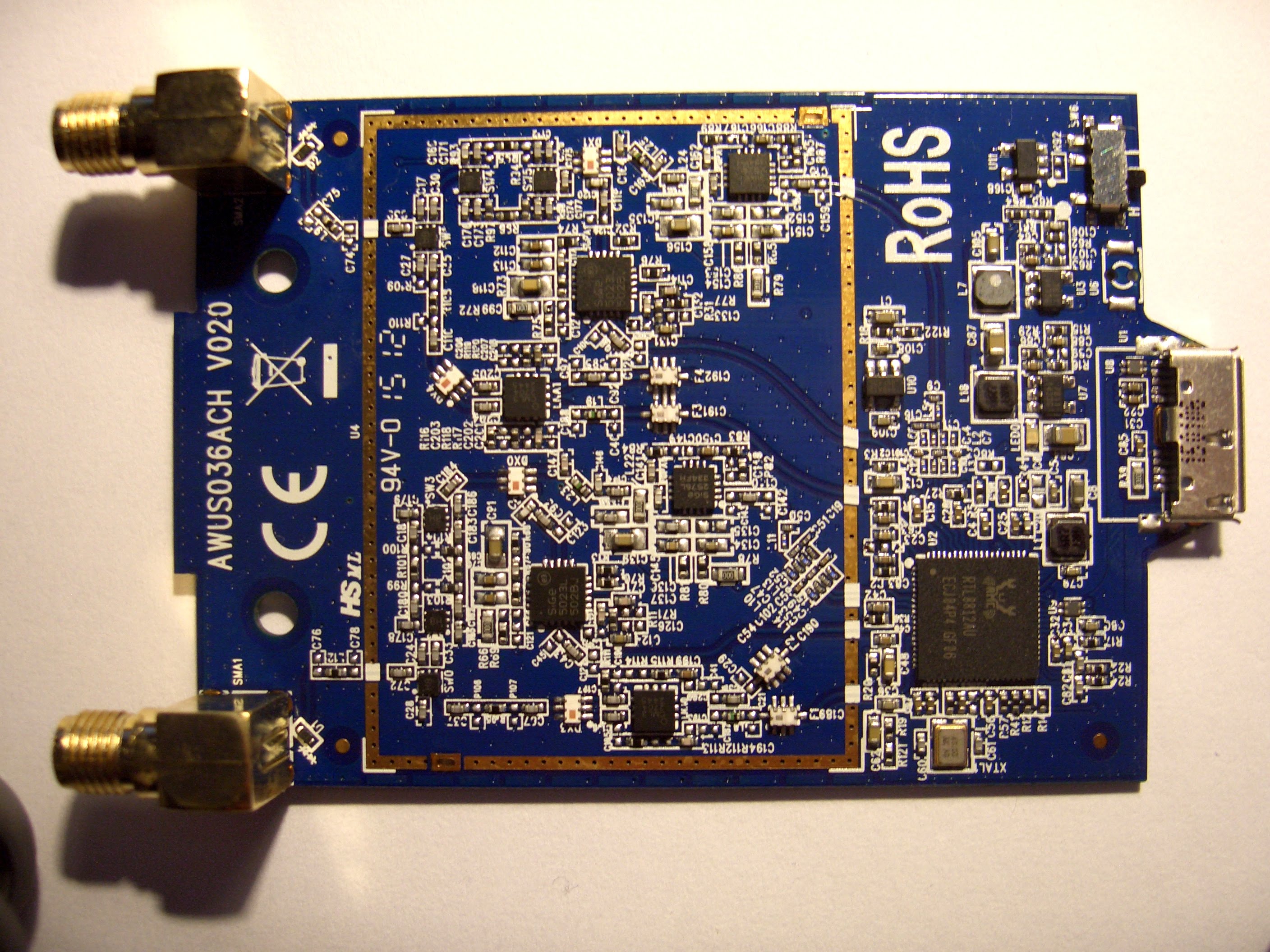
Haven't disassembled mine yet but here's a pic I've found online ... note the intriguing switch (SW6) top right ... I'll be trying to trace that back when I get inside it ... :)
Trace-2
on 5 Jan 2018
Power settings are set via the firmware or driver.
bMaxPower is in 2 mA steps.
0x64 == 100 => 200mA
0xfa == 250 => 500mA
The 500mA is due to the USB 2 initialization and then the 200mA when the driver changes to USB 3.
root@debian:/usr/src/rtl8812au# dmesg | grep -A 10 -B 10 bMax
[ 5724.257634] RTW: 8812au v5.1.5_19247.20160830
[ 5724.257663] RTW:
               8712_usb_configuration_descriptor:
[ 5724.257663] RTW: bLength=9
[ 5724.257664] RTW: bDescriptorType=2
[ 5724.257664] RTW: wTotalLength=35
[ 5724.257665] RTW: bNumInterfaces=1
[ 5724.257665] RTW: bConfigurationValue=1
[ 5724.257665] RTW: iConfiguration=0
[ 5724.257666] RTW: bmAttributes=80
[ 5724.257666] RTW: bMaxPower=fa
[ 5724.257667] RTW:
               usb_endpoint_descriptor(0):
[ 5724.257668] RTW: bLength=7
[ 5724.257668] RTW: bDescriptorType=5
[ 5724.257669] RTW: bEndpointAddress=81
[ 5724.257669] RTW: wMaxPacketSize=512
[ 5724.257670] RTW: bInterval=0
[ 5724.257670] RTW: RT_usb_endpoint_is_bulk_in = 1
[ 5724.257671] RTW:
               usb_endpoint_descriptor(1):
--
[ 5725.285762] usb 2-1: SerialNumber: 123456
[ 5725.286605] RTW:
               8712_usb_configuration_descriptor:
[ 5725.286608] RTW: bLength=9
[ 5725.286610] RTW: bDescriptorType=2
[ 5725.286611] RTW: wTotalLength=53
[ 5725.286613] RTW: bNumInterfaces=1
[ 5725.286614] RTW: bConfigurationValue=1
[ 5725.286616] RTW: iConfiguration=0
[ 5725.286617] RTW: bmAttributes=80
[ 5725.286618] RTW: bMaxPower=64
[ 5725.286620] RTW:
               usb_endpoint_descriptor(0):
[ 5725.286622] RTW: bLength=7
[ 5725.286623] RTW: bDescriptorType=5
[ 5725.286625] RTW: bEndpointAddress=81
[ 5725.286626] RTW: wMaxPacketSize=1024
[ 5725.286627] RTW: bInterval=0
[ 5725.286629] RTW: RT_usb_endpoint_is_bulk_in = 1
[ 5725.286631] RTW:
               usb_endpoint_descriptor(1):
--
[ 5751.481781] usb 2-1: SerialNumber: 123456
[ 5751.482603] RTW:
               8712_usb_configuration_descriptor:
[ 5751.482605] RTW: bLength=9
[ 5751.482607] RTW: bDescriptorType=2
[ 5751.482609] RTW: wTotalLength=53
[ 5751.482610] RTW: bNumInterfaces=1
[ 5751.482611] RTW: bConfigurationValue=1
[ 5751.482613] RTW: iConfiguration=0
[ 5751.482614] RTW: bmAttributes=80
[ 5751.482616] RTW: bMaxPower=64
[ 5751.482618] RTW:
               usb_endpoint_descriptor(0):
[ 5751.482619] RTW: bLength=7
[ 5751.482621] RTW: bDescriptorType=5
[ 5751.482622] RTW: bEndpointAddress=81
[ 5751.482624] RTW: wMaxPacketSize=1024
[ 5751.482625] RTW: bInterval=0
[ 5751.482626] RTW: RT_usb_endpoint_is_bulk_in = 1
[ 5751.482628] RTW:
               usb_endpoint_descriptor(1):
 jggithub2017
on 6 Jan 2018
jggithub2017
on 6 Jan 2018
The coresponding USB traces (usbmon)
USB 2.0
ffff8f127f53b300 93028227 S Ci:1:005:0 s 80 06 0200 0000 0009 9 <
ffff8f127f53b300 93028296 C Ci:1:005:0 0 9 = 09023500 01010080 fa
ffff8f127f53b300 93028308 S Ci:1:005:0 s 80 06 0200 0000 0035 53 <
ffff8f127f53b300 93028434 C Ci:1:005:0 0 53 = 09023500 01010080 fa090400 0005ffff ff000705 81020002 00070502 02000200
for USB 3.0
ffff8f126b8c4300 104056258 S Ci:2:002:0 s 80 06 0200 0000 0009 9 <
ffff8f126b8c4300 104056281 C Ci:2:002:0 0 9 = 09025300 01010080 64
ffff8f126b8c4300 104056296 S Ci:2:002:0 s 80 06 0200 0000 0053 83 <
ffff8f126b8c4300 104056322 C Ci:2:002:0 0 83 = 09025300 01010080 64090400 0005ffff ff000705 81020004 00063004 00000007
It would appear some are getting fantastic range with this driver.
Re4son has commented back on the above linked kali forum thread that he gets 150m range before he even starts to get a drop in signal when associated with an AC router.
He said he had attached an ammeter and the current draw was under 200ma till the signal started dropping at 150m then spiked to 500ma when he went further.
Wonder if it's the AC router that's making the difference ... with the same driver and an N router I can hardly associate at 5m ... :(
Trace-2
on 6 Jan 2018
Ok ... did some comparative current testing yesterday as detailed above.
First off the AWUS036ACH is 12m from my N router and the signal has to go through a brick wall, stud plasterboard wall and a wooden fence, all tests are using a USB3 cable with an accurate multi-meter in series on the vbus power wire in the cable using the same hardware with the adapter and router in fixed positions.
An interesting qwirk: In kali with the 5.1.5 driver and USB3 cable plugged into USB3 port I only get my own AP getting picked up and normally can't associate ... but when I put the multimeter in series to measure current I also could then pick up a lot more AP's all on only channels 1 or 11 and could sometimes associate with my AP.
Kali 2017.3 (kernel 4.14) live usb with persistence using driver 5.1.5:
On both USB3 and USB2 ports results were pretty much the same with the adapter drawing between 175 and 200ma at "idle" up to 266ma on transmit (although on the USB3 port the current went slightly higher to 311ma on download and upload speed tests.
Link Quality and Signal level for both were around 52/70 and -58dBm.
Monitor mode and injection worked.
Changing TX-power value from 18 to 30 dBm made no change to the current drawn.
Debian Stretch (Kernel 4.9) live usb with persistence using driver 4.3.20 (which I get the best range from in managed mode).
On both USB3 and USB2 ports the "idle" results were the same as kali with the adapter drawing around 175ma but on speed tests and transmit the adapter would sometimes go over 500ma. Adapter always shows as USB2 device bMaxPower=500ma on both USB3 and 2 ports.
The noticeable difference with this driver was the Link Quality and Signal level at 70/70 and around -10 dBm.
Monitor mode and Injection don't work with this driver
TX-power was fixed at 12dBm and couldn't be changed.
Windows 10 using latest win driver from Realtek support
Adapter draws between 170 and 230ma (with good Signal levels like the 4.3.20 Linux driver).
After trying many drivers what I've noticed here is that the Link Quality, Signal level and range dropped in the drivers after 4.3.20 when several patches were added. Although I think now this is probably hardware related as some like Re4son mentioned above are getting great range from the 5.1.5 driver.
Trace-2
on 8 Jan 2018
An interesting qwirk: In kali with the 5.1.5 driver and USB3 cable plugged into USB3 port I only get my own AP getting picked up and normally can't associate ... but when I put the multimeter in series to measure current I also could then pick up a lot more AP's all on only channels 1 or 11 and could sometimes associate with my AP.
I observe exactly the same from time to time too. Then I have to replug the adapter or reinitialize monitor mode or both once or more to get all APs around. But till now haven't investigated it.
By the way USB3 can create interferences with the 2.4 GHz band (observed with a USB3 hub) and you'll see only 5 GHz APs.
jggithub2017
on 8 Jan 2018
@jggithub2017 ... It didn't matter how many times I re-plugged the adapter etc. without the meter in series I only ever got my own AP and could hardly ever associate with it.
Every time I added the meter in series I could then pickup all the local AP's on channels 1 and 11 too ... all 2.4Ghz nobody uses 5Ghz locally here.
On my hardware (Dell Optiplex 7010, Intel i5 CPU) I get bad range, link and signal quality on all drivers after 4.3.20 ... :(
P.s. What is your range like ?
Trace-2
on 8 Jan 2018
Hi Friends, i am using AWUS036ACH; i cant to connect any WiFi. some times this adapter not showing any access point [OS:Kali Linux 2017.3 | Virtual Box]
 theshadowbrokerss
on 9 Jan 2018
theshadowbrokerss
on 9 Jan 2018
Guys I asked the manufacturer to give me as much info regarding the transmission power and power consumption. This are for Alfa AWUS036ACH. Hope they help.
 sheshes
on 10 Jan 2018
sheshes
on 10 Jan 2018
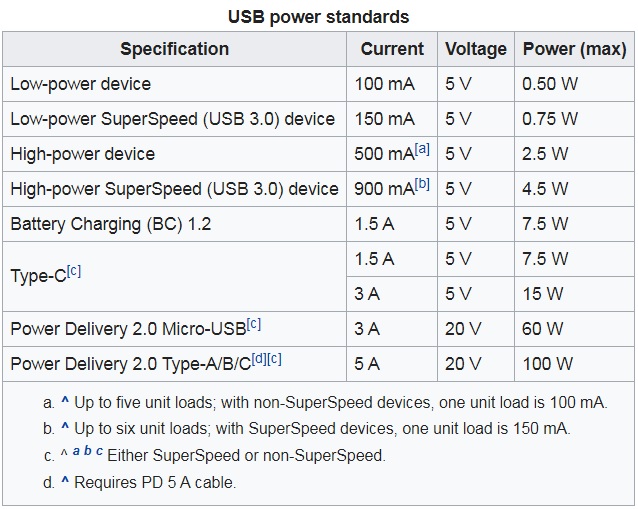
Great information in this issue report. Would like to add one more, related to the USB standard (USB 3.0 also listed) the information is taken from here and shows power outages, transmission rate & etc supported. See link for more information.
kimocoder
on 10 Jan 2018
Loads of info coming in now .... So is there anything can be done with the latest drivers to improve the very poor Link Quality, Signal Level and Range that a lot of people are experiencing?
Are many of you guys getting great range like Re4son mentioned above ? I've hardly seen anybody say they get really good range with the drivers after 4.3.20 in fact he is the only person I've seen.
Trace-2
on 10 Jan 2018
Using kernels <=4.13 not yet. All these issues with the power consumption and txpower are causing the range problems. There’s still a lot to be covered but it looks like a very promising project. It’s a matter of time all these great devs find the proper solution, and when they will it surely going to be an excellent choice for kali
sheshes
on 10 Jan 2018
Hi sheshes ... the driver compiles for me on kernel 4.13 & 4.14 no problem if the packages are updated/upgraded and the required depends: Linux-headers, build-essentials, BC etc. are installed first.
There still seems to be at least one person claiming great performance from these latest drivers ... just wondering if anyone else is also getting great performance.
Trace-2
on 10 Jan 2018
Yes i do understand the question. The compilation is done ok for both kernels. The actual functionality of the driver is not yet there in both cases. What Re4son did i presume is updated kali to the latest frm version 2017.1 without doing a dist-upgrade and aupgrading the kernel. I have tested it on kernel 4.10 and i can say that the device functions almost perfectly with some glitches here and there
sheshes
on 10 Jan 2018
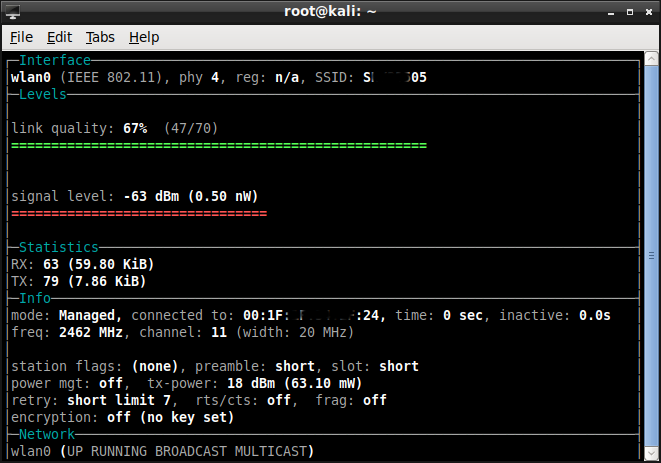
Here's a couple of shots from Wavemon showing the difference in Link Quality & Signal Level between the 4.3.20 driver with kernel 4.9 and 5.1.5 driver with kernel 4.14 on the same hardware:
Top is 4.3.20 ... bottom is 5.1.5

Trace-2
on 13 Jan 2018
Hi all ...
Has anybody had a chance to have another look at the range problem with the latest OS and driver or do you think this range issue only affects a small minority of us with certain hardware?
Trace-2
on 25 Jan 2018
I simply don't have a clue on this one. but it should be the highest prioritized issue to solve, as injection issue now seems resolved.
kimocoder
on 30 Jan 2018
I'm just going to try the new 5.2.20 driver.
Do you get good range Kimocoder?
Trace-2
on 31 Jan 2018
I'm using 8814, not 8812 but if you see some changes, please report back and I'll probe through the code for porting.
kimocoder
on 31 Jan 2018
Just tried the 8812 5.2.20 driver with kali 2017.3 (kernel 4.14) as I already had that installed and there was no noticeable improvement in range ... still terrible on this hardware (Optiplex 7010 with i5 CPU) ... :(
Trace-2
on 31 Jan 2018
Can confirm that I pick up a bunch more connections when my 036ach is plugged into a usb 2 port. Not only that but getting handshakes when in usb 2 port runs a whole lot smoother and is fast. In tests I have done I can confirm 100% that the 036ach when plugged into usb 2 port is on par with my 036nha in both signals it picks up and smoothness in getting handshakes. On usb 3 port it's the shits.
Once the usb 3 issue is addressed and power can be used to the full manufacturer specs the 036ach will replace my trusty go to 036nha for all my pentesting needs.
 Kaliforniah4kor
on 3 Feb 2018
Kaliforniah4kor
on 3 Feb 2018
Hi all,
at first, I would thank @Trace-2 @kimocoder @evilphish for testing and help to others for fixing 8812AU's issues.
my laptop model is: ASUS N56 - Core i7
i have three wlan interfaces (1 built-in + 2 usb dongles).
built-in: wlan0
usb-dongles: wlan1 + wlan2
wlan1: Alfa 036ACH
wlan2: Alfa 052NH-v2
phy0 wlan0 ath9k Qualcomm Atheros QCA9565 / AR9565 Wireless Network Adapter (rev 01)
phy8 wlan1 8812au Realtek Semiconductor Corp. RTL8812AU 802.11a/b/g/n/ac WLAN Adapter
phy9 wlan2 rt2800usb Ralink Technology, Corp. RT3572
root@kali:~# uname -a
Linux kali 4.14.0-kali3-amd64 #1 SMP Debian 4.14.13-1kali1 (2018-01-25) x86_64 GNU/Linux
root@kali:~# apt-get install realtek-rtl88xxau-dkms
Reading package lists... Done
Building dependency tree
Reading state information... Done
realtek-rtl88xxau-dkms is already the newest version (5.1.5~20180125-0kali1).
root@kali:~# iwconfig
kvnet     no wireless extensions.

wlan0     IEEE 802.11  ESSID:off/any
          Mode:Managed  Access Point: Not-Associated   Tx-Power=15 dBm
          Retry short limit:7   RTS thr:off   Fragment thr:off
          Encryption key:off
          Power Management:off

eth0      no wireless extensions.

wlan2     IEEE 802.11  Mode:Monitor  Frequency:2.417 GHz  Tx-Power=20 dBm
          Retry short  long limit:2   RTS thr:off   Fragment thr:off
          Power Management:off

lo        no wireless extensions.

wlan1     IEEE 802.11  Mode:Monitor  Frequency:2.437 GHz  Tx-Power=18 dBm
          Retry short limit:7   RTS thr:off   Fragment thr:off
a big difference between two Alfa cards:
https://imgur.com/a/fz3Uc
dear @Trace-2, I changed SW6 on 036ACH board, 4 times and checked again the Airodump. but i didn't see any difference. did you find !?
https://user-images.githubusercontent.com/35101372/34620216-990ba796-f23c-11e7-8d4b-05401c1e7f1d.JPG
If you have any ideas or developed new codes and then need to test it, please say me. because i have a 8812AU card.
Tnx a lot :X
 alimp5
on 15 Feb 2018
alimp5
on 15 Feb 2018
@alimp5
It's not actually fixed for me ... monitor mode and packet injection work but I still get terrible short range with all the latest drivers.
I didn't get a chance to investigate SW6 ... that's interesting that you tried and no difference ... I was going to trace back the circuit and see what the switch did but I haven't had any time for anything like that for ages now.
Trace-2
on 16 Feb 2018
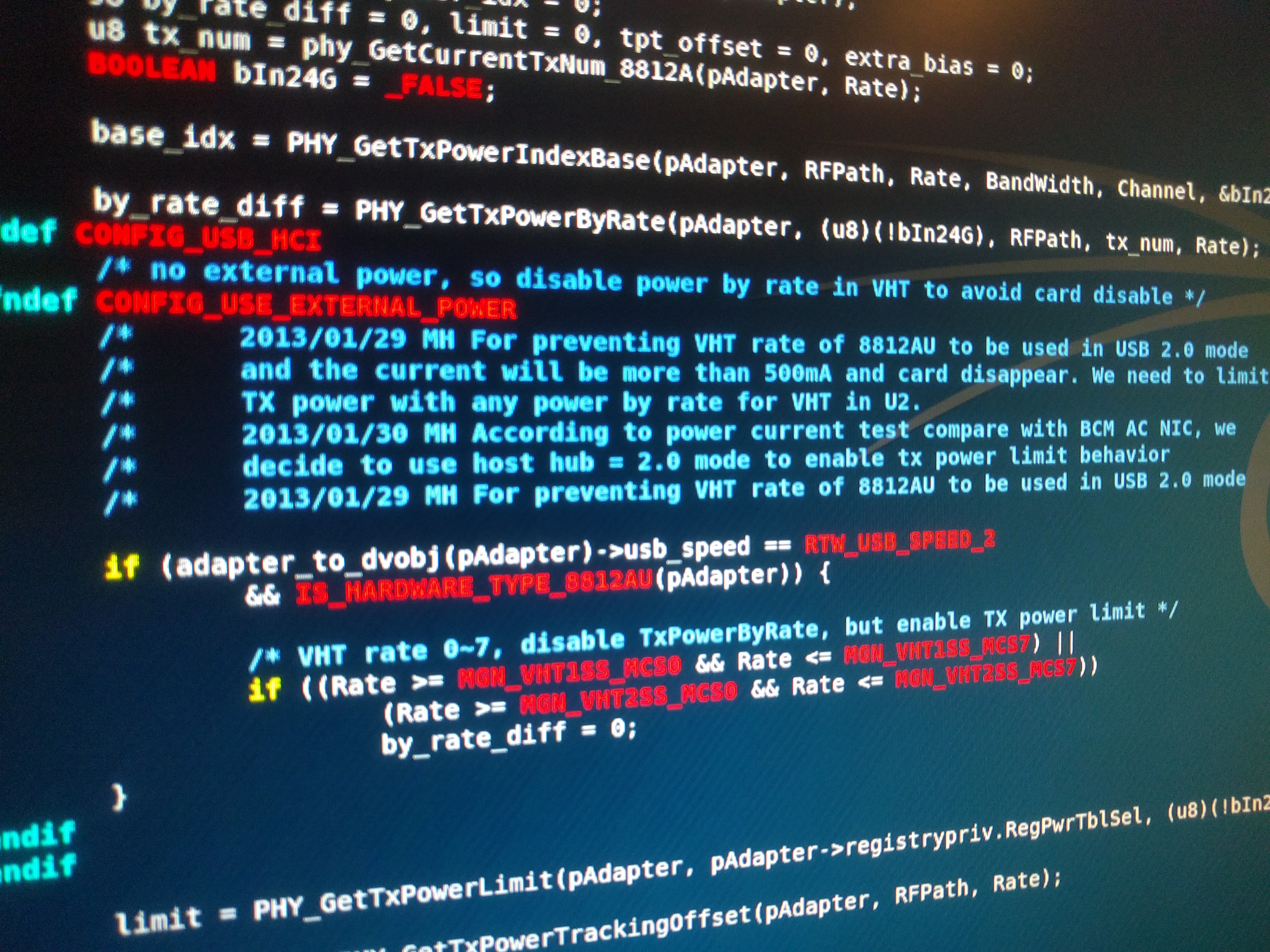
Found this.. "CONFIG_USE_EXTERNAL_POWER", but after probing txpower code I find it weird that the code for 8812 and 8814 are way different. In the file "rtl8812a_phycfg.c" there is lots related to limitations and power but it's way different than "rtl8814a_phycfg.c" again, so I can't really test the changes by myself. Pushing a commit which includes a good cleanup + more debug (around the txpower, rating) but you guys with 8812 should do the testing. Check both USB2 + USB3 & report back.
kimocoder
on 16 Feb 2018
@kimocoder @Trace-2
Hello dears, so you think the root cause of this limitation is for high-TX-power of Alfa 036ACH !?
In Ebay site, TX power of this Alfa card is: 1600mw. it's really !!!??. i thought it's 1000mw.
dear Kim, I should rebuild wireless driver again !?. do you have full driver for 8812AU card !?.
I could find just below files in Kali 2018 version:
root@kali:~# find / -name "rtl8812a_phycfg*"
/usr/src/rtl8812au-5.1.5/hal/rtl8812a/rtl8812a_phycfg.c
/usr/src/realtek-rtl88xxau-5.1.5~20180125/hal/rtl8812a/rtl8812a_phycfg.c
/usr/src/rtl8812au-4.3.14/hal/rtl8812a/rtl8812a_phycfg.c
if you have better customized driver or a full driver for 8812AU and we want just check above functions, please say me which functions should be revised and need code modification.
sorry for bad English language. :)
a question: what does U2 and MH and MP mean !?. I saw it in your snapshot. and I saw it in the source code.
an interesting link:
https://sites.google.com/site/pagecheztom/alfa-awus036ach
alimp5
on 18 Feb 2018
"git clone https://github.com/aircrack-ng/rtl8812au -b v5.1.5"
kimocoder
on 18 Feb 2018
@kimocoder
I've been having some problems with my laptop with a couple issues regarding all these drivers(however I believe I just need to just wipe it and start with a fresh install lol).
However, i did install the latest kali vm image on my gigabyte brix for several reasons including this usb power issue. So I'll run some tests today for the 8812 and let you know what I find. :anguished:
 Jinovas
on 19 Feb 2018
Jinovas
on 19 Feb 2018
Yeah I bet it's not the issue, have been looking further but.. really annoying as the range (power) limitation is the "final" big issue. Not at least an important one.
kimocoder
on 19 Feb 2018
Well here's what I've got working pretty smoothly. I used latest Kali 2018.1 VM release, Alfa AWUS036ACH with the "aircrack-ng/rtl8812au" driver version 5.1.5.
Accidentally closed terminal so running again now to log it
Jinovas
on 19 Feb 2018
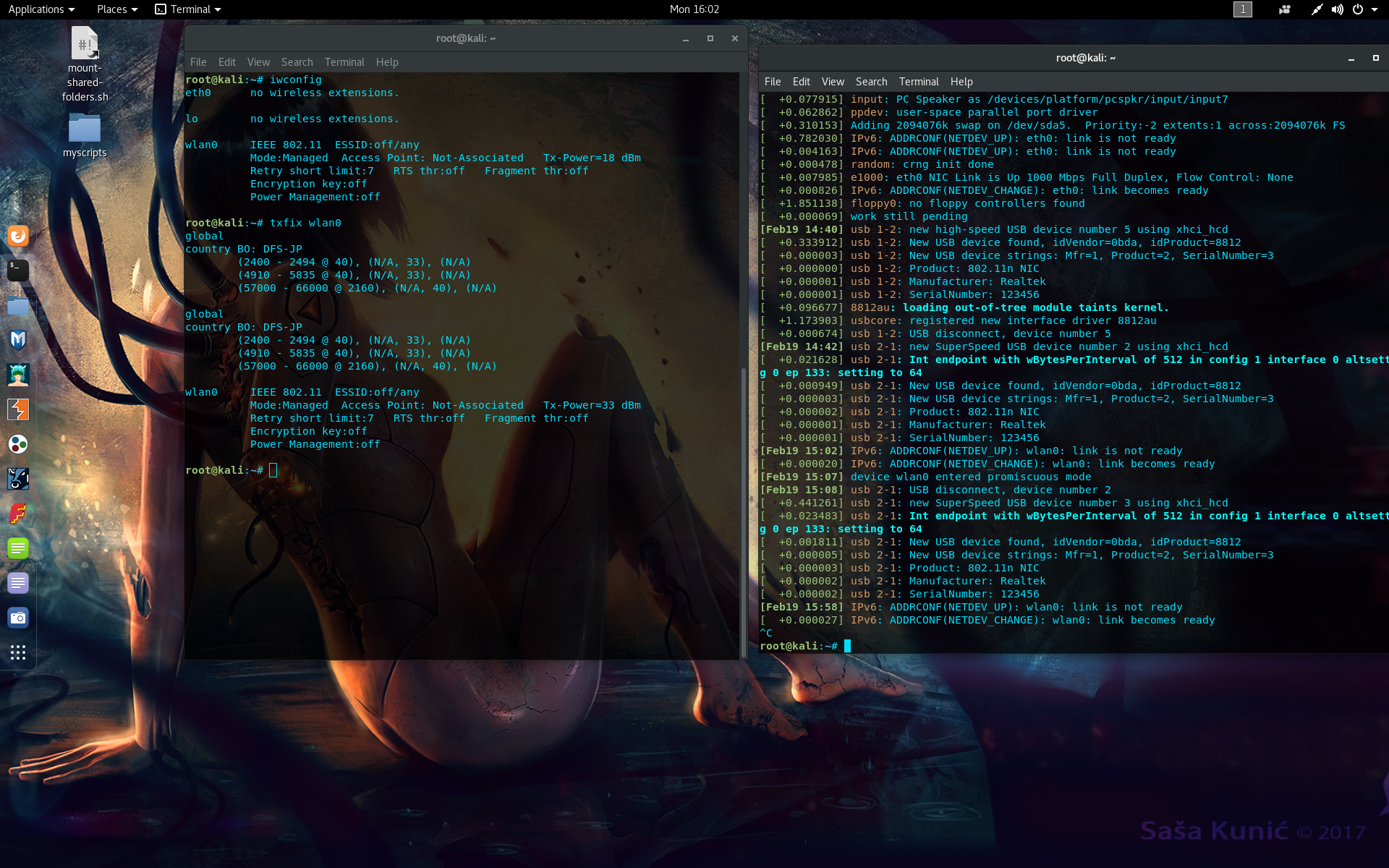
"txfix" is just my script to auto change the txpower to max originally for the AWUS036NH, but also worked for this adapter as well.
Lastly, I am able to change the txpower rating specifically due to https://github.com/hiruna/wifi-txpower-unlocker. I know this process works very reliably as i've used it on many different machines.
One exception is that the wifi-txpower-unlocker script has an issue that won't let it work anymore due to not being able to key format compatibility. The latest version of wireless-regdb that worked for me is "wireless-regdb-2016.06.10".
Jinovas
on 19 Feb 2018
I will test the new cleaned up 8812au here as soon as I've got free time and report back ... :)
Trace-2
on 20 Feb 2018
after hours of testing on 2 different machines, I too am not getting much performance out of this chip. Even with power change. I remember this working great in the past with a previous kernel but as of now, not so much :(
Jinovas
on 24 Feb 2018
after hours of testing on 2 different machines, I too am not getting much performance out of this chip. Even with power change. I remember this working great in the past with a previous kernel but as of now, not so much :(
Jinovas
on 24 Feb 2018
I'm also trying out the AWUS036ACH on the v5.1.5 driver (current master 3e78e9), VMWare Fusion 8.5.10, Kali VMware image 2018.1 running on a MacBook Retina late 2013 (2 USB3 ports).
I don't have hard evidence to back this up, but the adapter range seems to have improved a bit in comparison with the previous versions. It now picks up at least an AP outside the range of the built-in Apple NIC and I'm able to associate with at least one AP (albeit very close).
I will compare this performance and signal levels with an AWUS036NHA tomorrow if it can be any help. In the meanwhile, thanks all for your debugging effort 👍
 nerfologist
on 1 Mar 2018
nerfologist
on 1 Mar 2018
kernel v4.15 released in Kali repos. found by "apt-get" and supported by driver. testing power issue should also include the newer kernel as there are quite some changes to it.
kimocoder
on 1 Mar 2018
@nerfologist ... a comparison with the NHA would be interesting. Still doesn't sound like your getting anywhere near the outstanding (150m+) range that some are getting.
I've been really short on time recently but I'm hoping to get time this weekend to try the latest two drivers with the new (4.15) kernel ... :)
Trace-2
on 1 Mar 2018
@kimocoder ... a member "RUSSIAN_BEAR" on the kali forum has claimed to have compared and found some discrepancy between the 4.3.20, 4.3.21 and 5.1.5 drivers at the bottom of this post:
https://forums.kali.org/showthread.php?38574-Old-AWUS036H-vs-new-AWUS036ACH-performance-comparison
Here's the code comparison:
        **MASTER 4.3.20**

        static int usb_reprobe_to_usb3(PADAPTER Adapter)
        {
            struct registry_priv  *registry_par = &Adapter->registrypriv;
            int ret = _FALSE;

            if (registry_par->switch_usb3 == _TRUE) {


                if (IS_HIGH_SPEED_USB(Adapter)) {
                if ((rtw_read8(Adapter, 0x74) & (BIT(2)|BIT(3))) != BIT(3)) {
                        rtw_write8(Adapter, 0x74, 0x8);
                        rtw_write8(Adapter, 0x70, 0x2);
                        rtw_write8(Adapter, 0x3e, 0x1);
                        rtw_write8(Adapter, 0x3d, 0x3);
                        /* usb disconnect */
                        rtw_write8(Adapter, 0x5, 0x80);
                        ret = _TRUE;
                    }
                } else if (IS_SUPER_SPEED_USB(Adapter)) {
            rtw_write8(Adapter, 0x70, rtw_read8(Adapter, 0x70) & (~BIT(1)));
            rtw_write8(Adapter, 0x3e, rtw_read8(Adapter, 0x3e) & (~BIT(0)));
                }


            }
            return ret;
        }


        **4.3.20**

        static int usb_reprobe_to_usb3(PADAPTER Adapter)
        {
            struct registry_priv  *registry_par = &Adapter->registrypriv;
            u8 ret = _FALSE;


        #if defined(CONFIG_RTL8812A) || defined(CONFIG_RTL8821A)
            if (IS_HIGH_SPEED_USB(Adapter)) {
                if ((rtw_read8(Adapter, 0x74) & (BIT(2)|BIT(3))) != BIT(3)) {
                    rtw_write8(Adapter, 0x74, 0x8);
                    rtw_write8(Adapter, 0x70, 0x2);
                    rtw_write8(Adapter, 0x3e, 0x1);
                    rtw_write8(Adapter, 0x3d, 0x3);
                    /* usb disconnect */
                    rtw_write8(Adapter, 0x5, 0x80);
                    ret = _TRUE;
                }

            } else if (IS_SUPER_SPEED_USB(Adapter)) {
        rtw_write8(Adapter, 0x70, rtw_read8(Adapter, 0x70) & (~BIT(1)));
        rtw_write8(Adapter, 0x3e, rtw_read8(Adapter, 0x3e) & (~BIT(0)));
            }
        #else
            rtw_hal_set_hwreg(Adapter, HW_VAR_USB_MODE, &ret);
        #endif
            return ret;
        }


        **5.1.5**

        static int usb_reprobe_switch_usb_mode(PADAPTER Adapter)
        {
            struct registry_priv *registry_par = &Adapter->registrypriv;
            HAL_DATA_TYPE *pHalData = GET_HAL_DATA(Adapter);
            u8 ret = _FALSE;

            /* efuse not allow driver to switch usb mode */
            if (pHalData->EEPROMUsbSwitch == _FALSE)
                goto exit;

            /* registry not allow driver to switch usb mode */
            if (registry_par->switch_usb_mode == 0)
                goto exit;


            rtw_hal_set_hwreg(Adapter, HW_VAR_USB_MODE, &ret);

        exit:

            return ret;
        }
Have been reading it now. Feel free to do some edits and tests. I'll hurry and order an ammeter and a 8812au (allready got the 8814) to continue on it. As i said before, the range (power) issue is/should be a HIGH priority issue.
kimocoder
on 1 Mar 2018
what seems strange it that kernel v4.15 seems to give me higher output than the v4.14 kernel did..
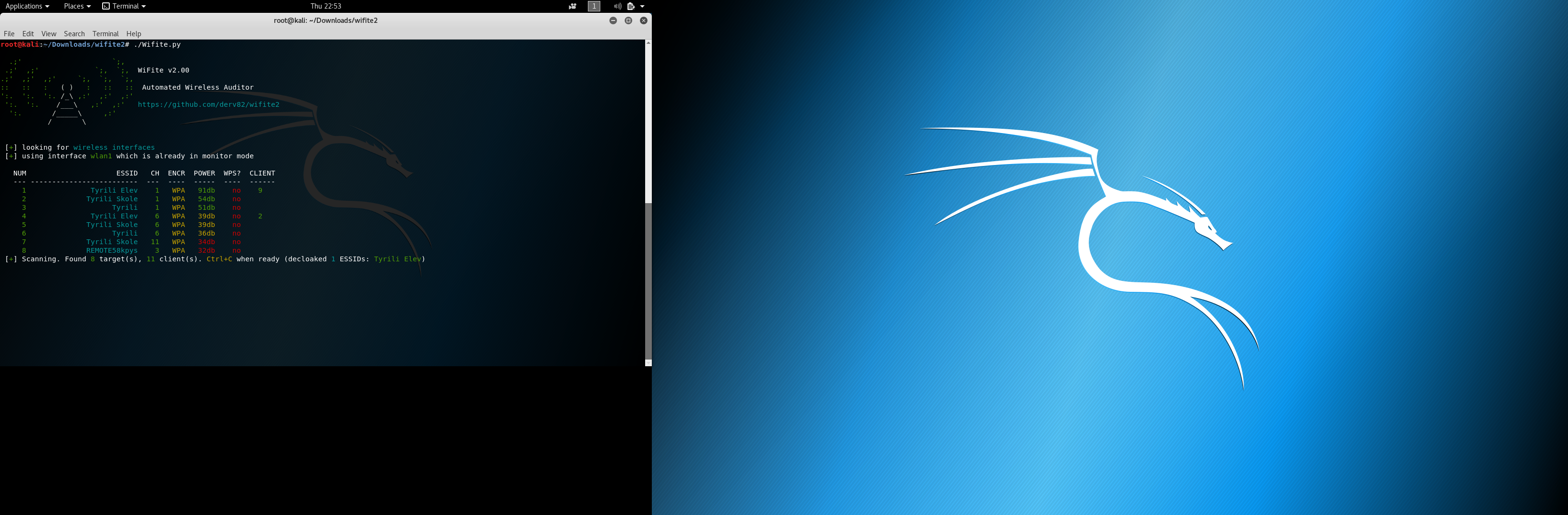
Do some tests with ammeter and kernel v4.15 and check if there is any difference there.
Play with the code provided by RUSSIAN_BEAR maybe.. I'll go inside the AWUS1900 hardware tomorrow.
kimocoder
on 1 Mar 2018
any news on this ?
 pixeldublu
on 3 Mar 2018
pixeldublu
on 3 Mar 2018
@Jinovas have you found any version that runs with alfa awus036ach I can't get it to work for nothing I'm trying to using it in a virtual machine kvm... Any ideas?
 AspenTheRealist
on 4 Mar 2018
AspenTheRealist
on 4 Mar 2018
@everyone
AspenTheRealist
on 4 Mar 2018
I'll double check today on my 3 setups I have (VMware 14, pure kali laptop, pi 3), but as far as I know, the ACH does work, but even with txpower set to 33dBm, it's performance is not very good. My alfa NH blows the ACH out of the water in every way (range, power, performance)
I have a ammeter but it's been forever since I used one lol
Jinovas
on 4 Mar 2018
@AspenTheRealist btw, I haven't ran anything in kvm successfully in the past and ran into hella issues. Try VMware, virtualbox or a pure install.
Jinovas
on 4 Mar 2018
ok thanks this is my first buy of a alfa or any antenna for this purpose and it really threw me into a mess lol!but it would probubly be a good idea to get a NH while this issue is being hashed out you think?@jinovas
 aspentharealist
on 4 Mar 2018
aspentharealist
on 4 Mar 2018
thanks again for quick reply!
aspentharealist
on 4 Mar 2018
also what version do you suggest ?i have tryed most maybe its kvm or maybe im missin somthing but i cant get it to even show in lsusb or iwconfig
aspentharealist
on 4 Mar 2018
@aspentharealist yes! The awus036nh is an awesome adapter and it's always good to have extras for when shit breaks like this lol
Fuck kvm. Get VMware player (it should be free) or get Oracle virtualbox which is free. There's images of kali already made for both specifically
Jinovas
on 4 Mar 2018
I just made virtual box kali witch I've always used on window and it freezes on Ubuntu 16.04 on starting machine... So I will have to try others u mentioned..I wanted to used kvm because of having multiple machines running they only took up amout of ram they are using at the time. . I thought VMware was payed Atleast on windows... I finally made my switch to Linux and for the most part it's been good but man I have been having a lot of issues here lately between Ubuntu 16.04 kvm and now the alfa and virtualbox. I'm going nuts lol but ya I will check those others out hopefully they don't freeze up and work with this alfa card
AspenTheRealist
on 4 Mar 2018
Does the driver have to be installed in some crazy specific fashion? I've try Ed it multiple ways on kvm machine now I tryed on a install and I can't seem to figured it out am I missing something?
AspenTheRealist
on 5 Mar 2018
Just my experience with this, using drivers from https://github.com/aircrack-ng/rtl8812au on 18th Feb (so maybe behind master now?)... I am using Linux Kernel 4.15 and an Asus AC68 dongle.
So far the only thing that works for me (found in the forum someone posted above: https://forums.kali.org/showthread.php?38574-Old-AWUS036H-vs-new-AWUS036ACH-performance-comparison) - is to us USB2 ports, which seem to allow a higher MaxPower.
Using lsusb -v | grep MaxPower, I can see than the entry changed from 216mA on USB3 to 500mA on USB2.
Using iwlist wlanXXX scan I see that the Quality is slightly higher (57/70 instead of 52/70) and that the levels is slightly lower. I honestly don't know how to interpret these results.
 Nicholas-Mitchell
on 7 Mar 2018
Nicholas-Mitchell
on 7 Mar 2018
@Nicholas-Mitchell pretty much the same as I get here and yet with older drivers: 4.3.14 - 4.3.20 I get 70/70 100% connections with much further range but monitor mode doesn't work. The "Quality" value is the signal to noise ratio.
For the hardware I have here "Dell Optiplex 7010 (Intel i5 cpu)" something changed in the drivers from 4.3.21 onwards ... the range has become very limited and the signal quality is a lot worse.
I'm still trying to find free time and I'll get the very latest drivers tested with the latest kernel and take some current readings for the 036ACH adapter .... hopefully soon ... :)
Trace-2
on 7 Mar 2018
I have added the "CONFIG_USB2_EXTERNAL_POWER" switch in Makefile at
https://github.com/kimocoder/rtl8812au
As seen here https://github.com/kimocoder/rtl8812au/commit/19c72ad5693e403e9f83a524f02f58179acb5f74
could someone clone my private repo (v5.1.5) branch, ENABLE the switch by setting "CONFIG_USB2_EXTERNAL_POWER" to "y", compile and install it and check if that made any difference at all? where does it do any difference, power etc..
trying to figure out what the switch does at all. it's only supported (added) in the 8812au code, not the 8814au so I can't test it for myself.
kimocoder
on 10 Mar 2018
@kimocoder I've been eager to try this but seem to be getting busier and busier every day at the moment ... hopefully manage to try it this weekend and get some current tests done etc. ... thanks for your continued work on the driver ... :)
Trace-2
on 14 Mar 2018
Hi everyone! I've been testing different driver versions and taking notes.
Driver version 5.1.5 on Arch (4.14.26-1-lts), lsusb shows 864mA on USB 3.0.
The device gets hotter, signal strength is better, and finds more APs. While on Kali this driver version shows 216mA, and the range is terrible.
I wanna try this on a different machine to be sure, but I'm sharing this ahead to see if it's something already known or if someone else can test the driver on a different distro/kernel. The older driver 4.3.21 didn't change mA for me on USB 3.0, it always stays at 500mA.
I'm using an Alfa AWUS1900(driver 8814au) and testing side by side against an Alfa AWUS036NHA (with the exact same antenna as the AWUS1900) for comparison.
I also noticed that on airodump-ng it doesn't seem to perform well. Very few beacons and data packets, ignores fixed channel argument, some APs show as duplicates on channel 44, and all the information takes long to update. Almost as if airodump could only use the device for a brief moment every 10 seconds or so. Is this an already known issue?
I'm not experienced, but I'm willing to provide any requested output if it helps.
 ghost
on 17 Mar 2018
ghost
on 17 Mar 2018
@kimocoder have you fixed or found out anything jew with this?
AspenTheRealist
on 20 Mar 2018
I can agree with @KiteGX, I have an Alfa ACH device, here are the results (v5.1.5):
- Archlinux (Linux 4.15.12) - 800mA
- Fedora (Linux 4.15.10) - 200mA
- Debian (Linux 4.9) - 200mA
- Ubuntu (Linux 4.4.0-116-generic) - 200mA
- Ubuntu (Linux 4.16.0-999-generic) - 200mA
It's a little confusing why arch shows 800mA, I'll try to check real power by driver.
is it possible for anyone to provide working Windows driver which uses more power using dynamic powering (AC mode + USB3) to check and use RE why this is happening?
I used multiple driver versions but none of them upgrade to USB3 when i used AC AP.
@kimocoder I didn't see any differences in reported MaxPower by lsusb and range but need more tests.
 sysreq48
on 26 Mar 2018
sysreq48
on 26 Mar 2018
On my USB Multimeter I get 800mw in Windows 10 and 280mw as soon as I activate the card in Virtualbox for use in Kali.
USB3 (surface pro) > USB multimeter > Wifi.
Does seem to work well with latest drivers here.
 fmlakej
on 2 Apr 2018
fmlakej
on 2 Apr 2018
I have been trying to optimise the output of the AWUS036ACH. I am using it with a raspberry pi with a USB 2 powered adapter.
I finally found a driver which seems to make a difference : https://github.com/mk-fg/rtl8812au
Using this driver and setting the following parameter to:
rtw_tx_pwr_idx_override=63
When I do this and set the adapter up as a hotspot and then do a speed test on a connected client I find the power drawn increases from 150mA upto 800mA at times (as measured with a USB ammeter).
Using the same test with the driver from which this driver was forked, diederikdehaas/rtl8812AU, there is no increase in the power drawn. However doing the same test and using wavemon on the connected client to the AWUS036ACH hotspot there seems to be no increase in the signal received.
I could really do with some help in using the phydm_cmd() command in the https://github.com/mk-fg/rtl8812au repository. When I type that command with any of the options e.g. phydm_cmd() -h, I get an error message:
-bash: syntax error near unexpected token-h'
`
If I could get this working I could do some interactive tests on the AWUS036ACH, so if anyone has any luck getting this to work I would greatly appreciate any pointers.
 cariad61
on 19 Apr 2018
cariad61
on 19 Apr 2018
@cariad61
Try the command again, but without the brackets: .g. phydm_cmd -h
Here is just a dump of where the vailable arguments are specified. It uses python3 are the argparse module, so you might need to erad the relevant documentation for that to understand what I paste below :wink:
parser = argparse.ArgumentParser(
        description='Interactive console for rtl8812au driver phydm_cmd debug interface.')
    parser.add_argument('-i', '--iface', metavar='iface',
        help=f'Network interface name to access under {node}/.'
            ' Default - pick first one that is there.')
    parser.add_argument('-p', '--odm-cmd-path', metavar='path',
        help=f'Full path to specific {node}/.../{proc_odm_cmd} node to use.'
            ' Overrides -i/--iface option. Default is to pick one for any iface that is there.')
    parser.add_argument('-c', '--cmd', action='append', metavar='command',
        help='Command(s) to send non-interactively and exit.'
            ' Same as doing echo to {proc_odm_cmd} node, disables interactive console.'
            ' Can be specified multiple times, commands will be sent in the same order.')
    parser.add_argument('-x', '--const',
        nargs='?', const=True, metavar='path',
        help='Parse/print various constants from driver code and exit.'
            ' Run without arg to dump hard-coded'
                ' list of constants, without re-parsing them from headers.'
            ' Things to parse: .../include/hal_com.h')
    parser.add_argument('-d', '--debug', action='store_true', help='Verbose operation mode.')
    opts = parser.parse_args(sys.argv[1:] if args is None else args)
the above chunk of code is what would automagically generate the output of your command phydm_cmd -h
Nicholas-Mitchell
on 20 Apr 2018
@Nicholas-Mitchell
Thank you for your time and the information. I did try phydm-cmd which returned command not found.
If I type phyd_cmd() with no options I get a prompt, but if I then try -h I am back to the original error message of -bash: syntax error near unexpected token `-h'.
The following is in the readme file:
`- /proc/net/rtl8812au/wlan0/odm/cmd
Read/write "console" for phydm_cmd() (phydm_debug.c, PHY DM = PHY-layer
Dynamic Management) interface in the driver, which can be used to debug its
low-level operation.
Expects "command arg1 arg2 ... argX" (commas also work) string to be written
there, ending in newline, which goes to phydm_cmd() and output can be read via
subsequent read on that node ("GET, nothing to print" indicates no output/command).
phydm-cmd.py script <phydm-cmd.py>_ (python3/readline) in this repo can be
used to work with this interface interactively.
Some phydm_cmd() commands/examples:
-h- list supported commands, except-hitself anddemo.demo 10 0x3a z abcde- dummy command to print arguments, parsed as different types.
`
I will have to find some time to fully understand the syntax and the relationship between the python script and the "console".
My motive was to adjust the power setting of the AWUS036ACH to compensate for the coax between the antenna at the top of a 2m mast and the unit in a waterproof box in the transom of a yacht, which is now working with the https://github.com/mk-fg/rtl8812au driver.
I just need to find time to learn more about drivers and python scripting.
cariad61
on 1 May 2018
Any update guys?
 johndoesenior
on 23 May 2018
johndoesenior
on 23 May 2018
+1 :)
pixeldublu
on 31 May 2018
So if the older driver works can I compile that with latest Kali version or do I have to go back to an older Kali version and if so what Kali version works with this adapter?
 stephan1827
on 22 Jun 2018
stephan1827
on 22 Jun 2018
Yeah, what is the most stable "configuration" (kali version/driver version) to make this works? I have an AWUS1900 but my AWUS036NHA destroy it in terms of performance.
 kekkokk
on 22 Jun 2018
kekkokk
on 22 Jun 2018
It works fine on the newest. But the power issue still remains unfortunately.
kimocoder
on 22 Jun 2018
FWIW, I reported issue #135 mentioned above, and that doesn't concern USB3 at all...
Also, is there a take-home message in this long discussion ("the fix is ..." or "nothing to be done about that for now, sorry")?
 RJVB
on 22 Jun 2018
RJVB
on 22 Jun 2018
As for this driver I really don't have a solution either haven't located the issue with power (range) matter.
But as another issue I've discussed this morning, we may separate the 8812/8814au from each other in order to at least get the 8812au up to v5.2.20 (which got lots of fixes, see that issue report with changelog), and use this for the 8814au, remaining om v5.1.5. Will start adding injection to the v5.2.20 soon and ser where it goes from there.
kimocoder
on 22 Jun 2018
Thx kimocoder, is there an older version of Kali and the driver that we could use in the meantime?
stephan1827
on 22 Jun 2018
The power/range issue is a problem with all our branches on all versions of Kali as far as I know.
All from v5.1.5 and versions below. Kali version doesn't matter, old or newest, the problem persists.
kimocoder
on 22 Jun 2018
Ordered a 8812 chipset and a high-grade USB ammeter to jump on this issue with the tools i need for it.
Hopefully would bring some news in a couple of weeks
kimocoder
on 28 Jun 2018
@kimocoder any news?
johndoesenior
on 16 Jul 2018
@johndoesenior in a couple of weeks, waiting for the USB ammeter + some more adapters.
what chipset are you using btw?
kimocoder
on 16 Jul 2018
@kimocoder i'm using ALFA awus036ach. I tried every type of driver i could find, in all of them I get very poor signal strength in monitor mode. i have just one purpose for the card and it's monitor mode but it doesn't work, and i can't find a suitable replacement to this card.
johndoesenior
on 16 Jul 2018
I'm waiting for a 8812au adapter myself, but have you tried the v5.2.20 branch (v5.2.20.2) version?
kimocoder
on 16 Jul 2018
@kimocoder actually no, do you think there is a change there? if so i will compile it and try.
johndoesenior
on 16 Jul 2018
Yes, clone the repo and edit the Makefile, disabled the "CONFIG_RTL8822A" by setting it to "n" before compiling
kimocoder
on 16 Jul 2018
@johndoesenior haha, this was weird.. the adapters and USB ammeter was in my mailbox :1st_place_medal: started testing right away
kimocoder
on 16 Jul 2018
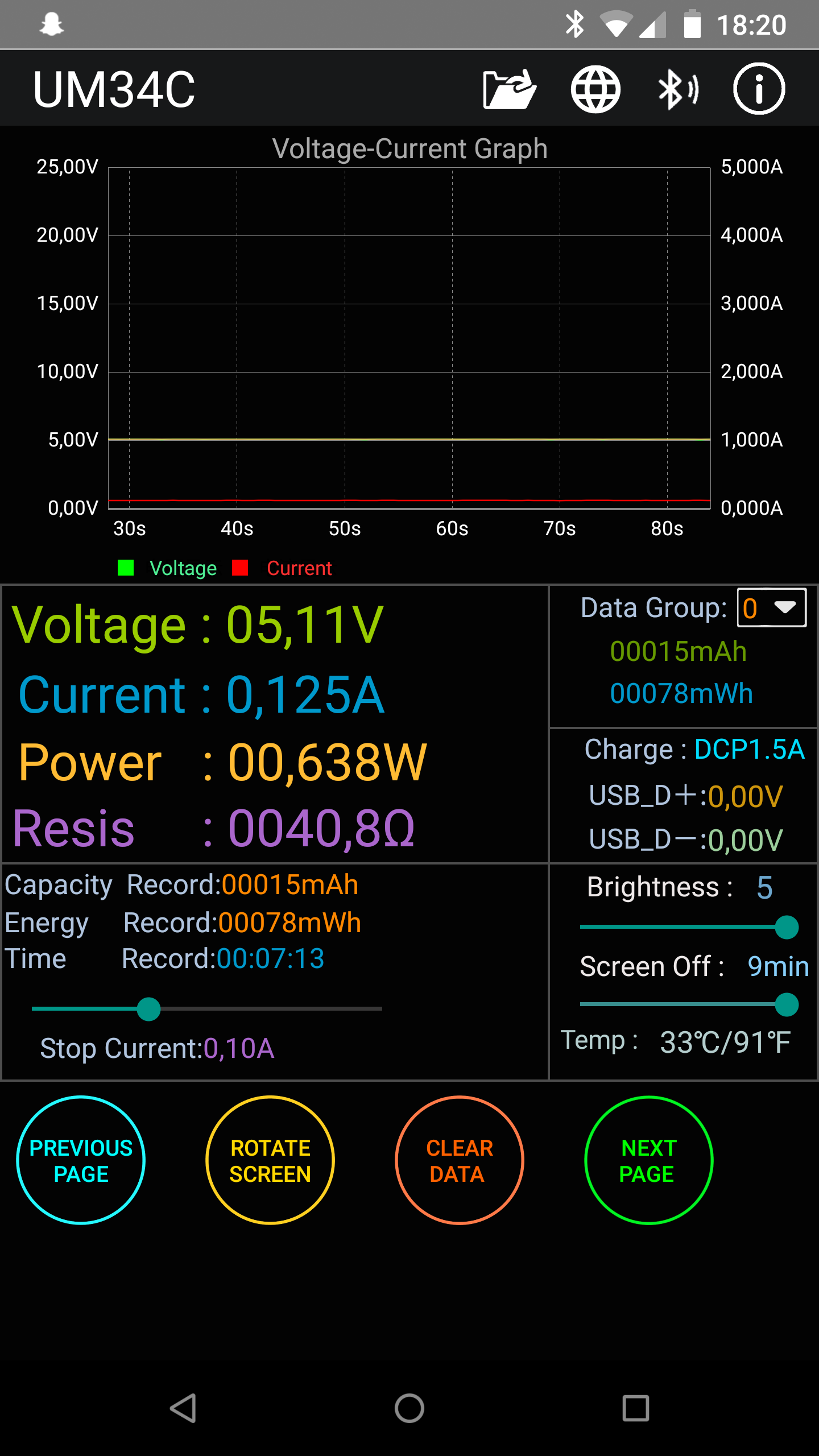
This is the AWUS036ACH on 8812 chipset running v5.2.20.2 under normal operation
kimocoder
on 16 Jul 2018
Ok. I've actually find that enabling "CONFIG_USB2_EXTERNAL_POWER" the power actually increases from 0,125A to 0,135A/0,138A an increase of 10-13.
Using mk-fg fork it runs on 0,165A approx, stable. that's an increase of what we got here but still under powered. Interesting!
kimocoder
on 16 Jul 2018
Ok. I've actually find that enabling "CONFIG_USB2_EXTERNAL_POWER" the power actually increases from 0,125A to 0,135A/0,138A an increase of 10-13.
Curiously that makes it impossible for me to connect to any network.
RJVB
on 16 Jul 2018
Yeah, but now I have to tools to look around the issue. will send this ammeter (with bluetooth support) to few other devs to and we'll see what we find ;)
kimocoder
on 16 Jul 2018
I've also seen an intriguing "CONFIG_BT_COEXIST" option that I'm now trying. My bluetooth is supposed to be off, but I know (ok, understand) it can cause WiFi interference.
RJVB
on 16 Jul 2018
Implemented txpower control, managed to get it from 0.127A - 0.163A . That's a start.
kimocoder
on 16 Jul 2018
@kimocoder the weird stuff is in the rx side. why is it so low powered? looks like there is power management and when it is in monitor mode it think is should not increase the power for some reason
johndoesenior
on 17 Jul 2018
Can you check how much mAh it takes in monitor mode?
thanks
johndoesenior
on 18 Jul 2018
Fantastic that you now have proper chipset and test gear Kimo! ... will be watching this thread with interest. What ammeter did you get?
Trace-2
on 18 Jul 2018
can do when I'm home again, got the UM34C from china with bluetooth support. A pretty awesome one I'd think :)
kimocoder
on 18 Jul 2018
Any updates @kimocoder ?
johndoesenior
on 22 Jul 2018
No I'm not available until a few more days, but last I checked it now runs stable om 145 approx. a small jump from 125 from before the txpower control was added. Devices has been sent to other devs too, so it will anyways take some time to figure out more about it. Will run some tests again in couple of days.
I'll do some tests on managed mode versus monitor and collect other rtl8812au drivers and compare them and see whats different for a starter
kimocoder
on 22 Jul 2018
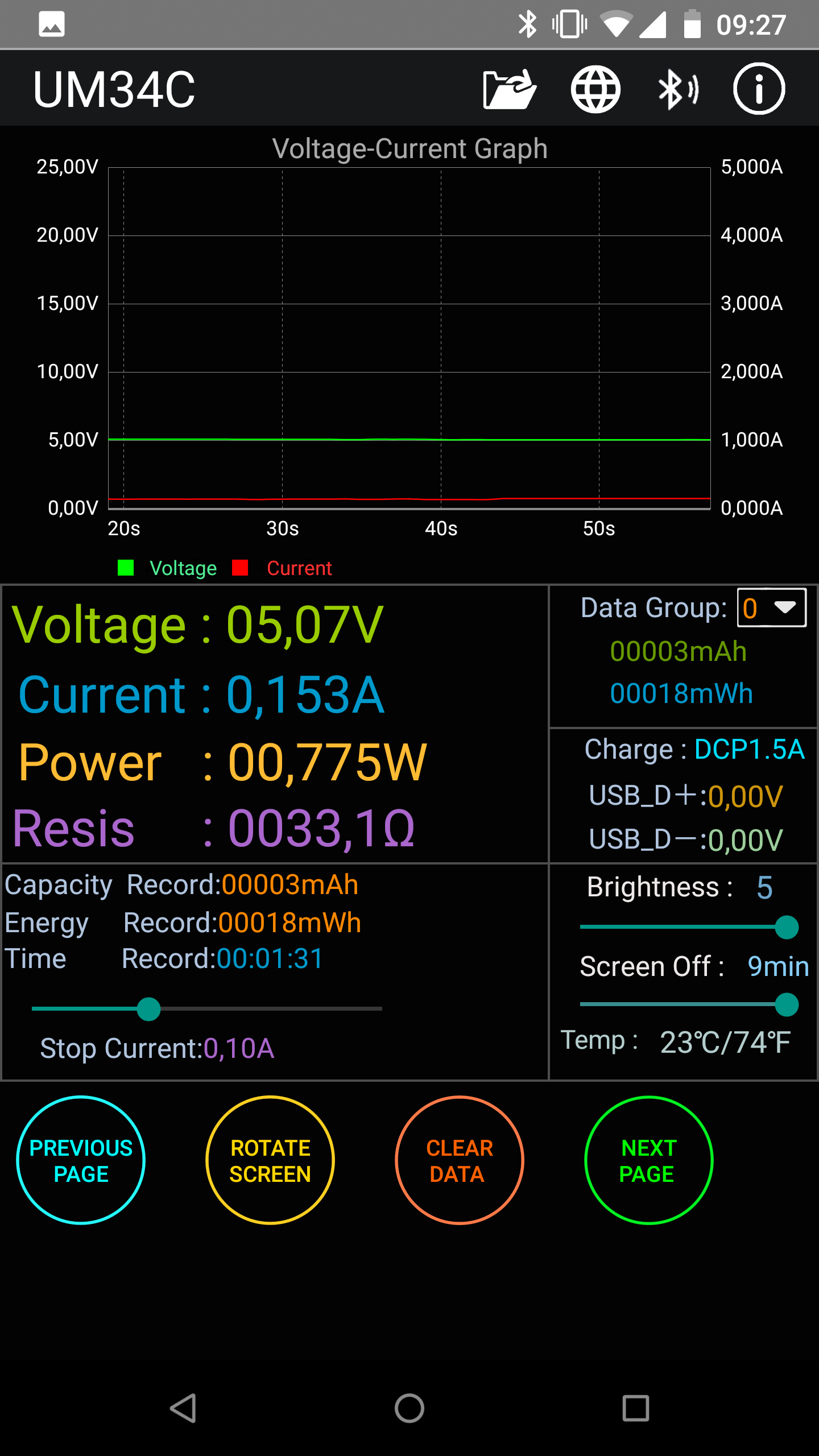
This is the normal, stable state for now in both managed and monitor state. A small increase.
Btw, all tests are run on the v5.2.20.2 branch.
kimocoder
on 24 Jul 2018
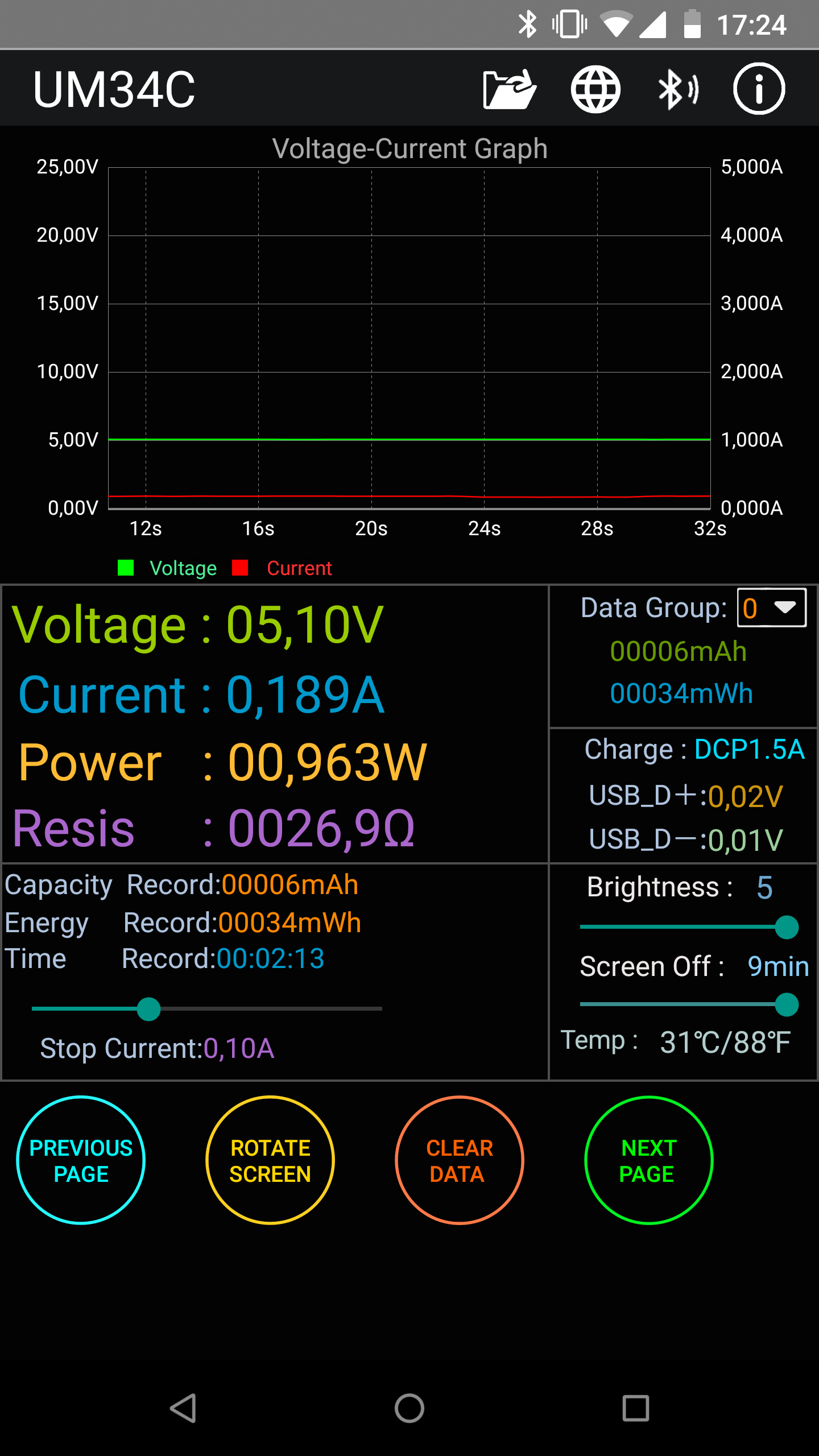
Testing a USB3 modeswitch function, which is hardcoded btw (OMG!), anyways, fixed the USB3 switching for now. USB3 power is stable at 0.130A, while om USB2 something changed to a bit better.. minor changes but..
kimocoder
on 24 Jul 2018
Tested lots of other versions/forks/customs of the driver, most of them was performing worse.
So it seems... USB3 for issues, that's sure. @Trace-2 if you look at the second (right above), which is the USB2 it's close upto 1W which it should isn't it?
kimocoder
on 24 Jul 2018
@kimocoder ...
Yeah you might as well say that is one watt.
But a google search seems to show that the AWUS036ACH is being marketed as 1600mW (1.6W) ... I've sent a letter to Alfa asking them to confirm the actual power spec.
Trace-2
on 25 Jul 2018
Well, been looking into it. v5.2.20 branch gives a minor increase at least.
Post it here if you get ut then
kimocoder
on 25 Jul 2018
They answered really quickly ... funnily enough they advised using the 4.3.21 driver which is the one I found above to be the best for me (but only in managed mode).
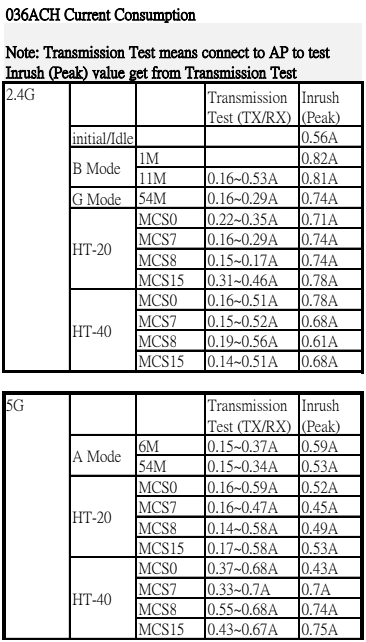
Here's the full reply and two info tables:
**"Thanks for you interest our product.
Attached files are RF output and power consumption
Please reference information as below
apt-get remove realtek-rtl88xxau-dkms
reboot
git clone -b v4.3.21 https://github.com/aircrack-ng/rtl8812au.git
cd rtl8812au
make
make install
Install v4.3.21 branch.
Attach adapter to USB 3.0 or externally powered USB 2.0 hub.
Use $sudo iwconfig wlan0 txpower 30
https://medium.com/@adam.toscher/configure-your-new-wireless-ac-1fb65c6ada57
Sincerely,
Jackie
ALFA Tech Support"**
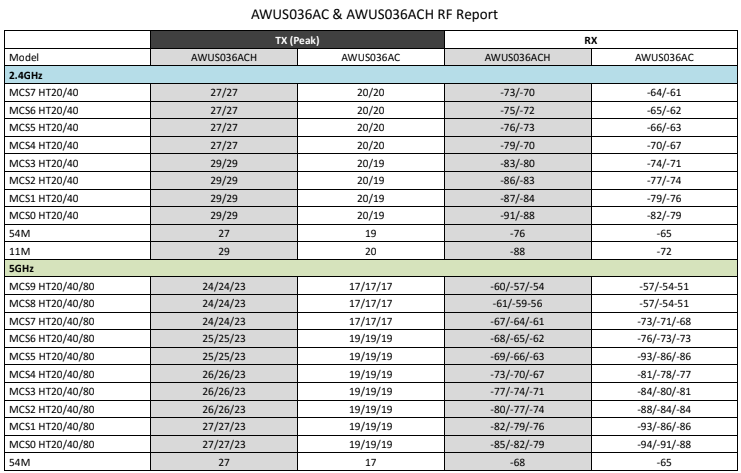
Trace-2
on 26 Jul 2018
funnily enough they advised using the 4.3.21 driver
Are they even aware there's a newer version of the driver?
But for me too that older version works best in a way: it gives me the strongest reported signal strenghts in any case. Other than that it's just as prone to connection time-outs and not seeing the 5Ghz networks as the newer versions.
RJVB
on 26 Jul 2018
Yes they are, or some of them are as I got contact with them. Anyhow, the v4.3.21 is running on bit lower power then v5.2.20(.2) branch again + more issues (bugs) on the driver. Still these drivers got many dirty/buggy functions/solutions/portions, all over the place.
kimocoder
on 26 Jul 2018
@kimocoder @RJVB - What are the result for monitor mode with 1Watt you've checked?
johndoesenior
on 30 Jul 2018
May confirm that the 8814au runs at 0.195A on the v5.2.20 branch in monitor mode. Peaking at 0.230. That's a good increase from v5.1.5's 0.150A. 8814 support in v5.2.20 branch is still in the works
kimocoder
on 4 Aug 2018
What are the RSSI results? are they anything compared to other Alfa cards which were working fine until there driver's EOL ?
@kimocoder
johndoesenior
on 5 Aug 2018
Any updates guys ?
 Oxycodon-IV
on 31 Aug 2018
Oxycodon-IV
on 31 Aug 2018
+1 :)
pixeldublu
on 10 Sep 2018
Any new updates?
 nakkins
on 27 Nov 2018
nakkins
on 27 Nov 2018
@kimocoder anything?
johndoesenior
on 18 Dec 2018
any christmas presents ? :D
pixeldublu
on 18 Dec 2018
@pixeldublu Only when Realtek starts to release good and latest kernel drivers. I'm glad this repo exists and the patched driver is working fine on my ASUS AC68 even on USB3.0.
 francoism90
on 18 Dec 2018
francoism90
on 18 Dec 2018
Care to share how you did it ? Im looking forward to be able to use my AWUS036ACH.
Thank you !
pixeldublu
on 19 Dec 2018
On Kali linux 2019.1 with driver 5.2.20 I have a MaxPower 200mA if I use the USB3.0 port and a MaxPower 500mA if I use the USB2.0 port (so better recpetion with usb2.0 but still very bad, worst than any other adpater I've used). Any progress on this or am I missing something?
Edit: I've just tried the 5.3.4 and I have the exactly the same issue.
I see a help-wanted tag on this issue, let me know if I can somehow help with it.
 mfoolb
on 9 Jan 2019
mfoolb
on 9 Jan 2019
@kimocoder @evilphish @Trace-2 @francoism90
Perfect!! I understand where is the problem. It is not in our driver. It is in lsusb of usbutils))) Just look at this commit https://github.com/gregkh/usbutils/commit/f10dd916254acdfe72f2976bc21f6ac9ac409792
"For USB 3.0 devices MaxPower is in units of 8 mA instead of 2 mA. " Actually bMaxPower is in 2 mA steps only for USB 2.0 and 8 mA for USB 3.x.
And because the debian unstable still has old 007 (of 2015 year!) version of lsusb, so does Kali linux... I compile 010 version of lsusb from source and ...
I now have this output with lsusb:
Bus 004 Device 003: ID 2357:0106 TP-Link 802.11ac NIC
Device Descriptor:
bLength 18
bDescriptorType 1
bcdUSB 3.00
bDeviceClass 0
bDeviceSubClass 0
bDeviceProtocol 0
bMaxPacketSize0 9
idVendor 0x2357 TP-Link
idProduct 0x0106
bcdDevice 0.00
iManufacturer 1 Realtek
iProduct 2 802.11ac NIC
iSerial 3 123456
bNumConfigurations 1
Configuration Descriptor:
bLength 9
bDescriptorType 2
wTotalLength 0x0053
bNumInterfaces 1
bConfigurationValue 1
iConfiguration 0
bmAttributes 0xa0
(Bus Powered)
Remote Wakeup
MaxPower 864mA
While with old lsusb:
Bus 004 Device 003: ID 2357:0106 TP-Link
Device Descriptor:
bLength 18
bDescriptorType 1
bcdUSB 3.00
bDeviceClass 0 (Defined at Interface level)
bDeviceSubClass 0
bDeviceProtocol 0
bMaxPacketSize0 9
idVendor 0x2357 TP-Link
idProduct 0x0106
bcdDevice 0.00
iManufacturer 1 Realtek
iProduct 2 802.11ac NIC
iSerial 3 123456
bNumConfigurations 1
Configuration Descriptor:
bLength 9
bDescriptorType 2
wTotalLength 83
bNumInterfaces 1
bConfigurationValue 1
iConfiguration 0
bmAttributes 0xa0
(Bus Powered)
Remote Wakeup
MaxPower 216mA
So, "I have noticed that with the Alfa AWUS036ACH device plugged in to a USB 3.0 port, it only is able to receive 200mA of power" is wrong, 200*4 == 800 mA, which is the right value.
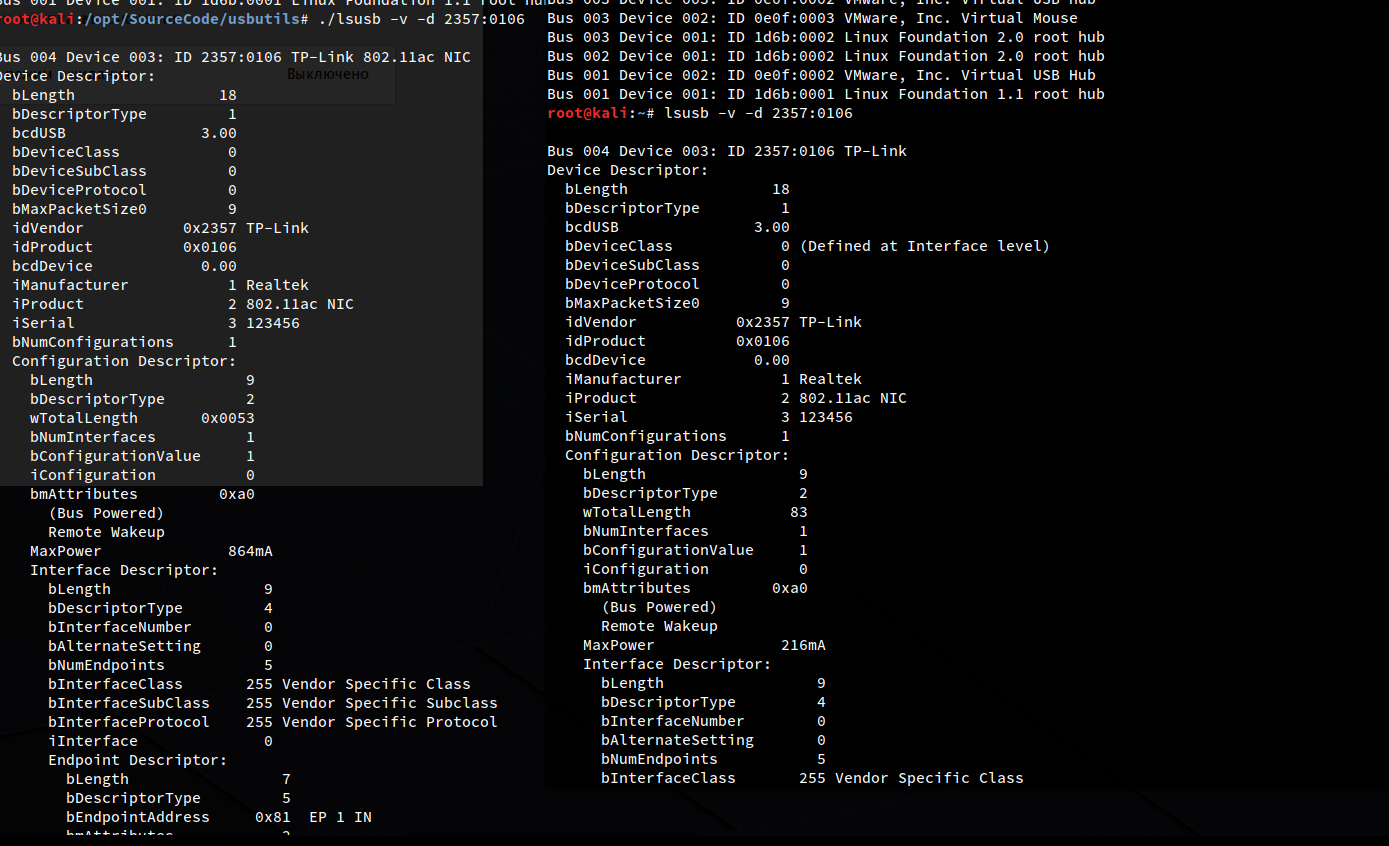
The new lsusb is on the left)))
 ValZapod
on 25 Jan 2019
ValZapod
on 25 Jan 2019
Wow! You are simply amazing.. so much people would give you a trophy for this one!
Let me dive into ut straight away! whats your Twitter handle btw?
@rhertzog is there anything you could do over at Debian with this?
@fariouche should also be notified
Besides that, I'll go through the whole regdom the next week, Looking into channels, 5 Ghz issues and the 80 MHz support.
- But if the txpower/maxpower isn't the issue, then WHY has the high-powered chipsets lower range than eg the TL-WN722n v1.. (ath9k_htc)
kimocoder
on 25 Jan 2019
@kimocoder I opened an issue on https://github.com/gregkh/usbutils/issues/85 maybe he will do something, but i suppose it won't be possible because debian did not like the new version of lsusb:
https://bugs.debian.org/cgi-bin/bugreport.cgi?bug=798148
I suppose they will accept only patches like these https://sources.debian.org/patches/usbutils/1:007-4/
ValZapod
on 25 Jan 2019
Aaah I see. Just pushed 2 minor fixes for regdom, "git pull" to update.
Besides, the patches that was added by us to the v5.2.20 branch is the same as we added to RTL8192EU and may be found here those 4 on the top
kimocoder
on 25 Jan 2019
@kimocoder After this oops with lsusb I think we should reconsider what comments on this issue are of any value.
Adapter always shows as USB2 device bMaxPower=500ma and in usb3.0
So bMaxPower was not that important in the beginning... After all it shows 864mA which is practically 900 which is max for usb 3.0. And I suppose this descriptor can't really be changed unless firmware is modified.
He said he had attached an ammeter and the current draw was under 200ma till the signal started dropping at 150m then spiked to 500ma when he went further.
with the same driver and an N router I can hardly associate at 5m ... :(
So, this a normal behaviour. Maybe there were no issue at all? By the way consider WLAN active scanning and other technologies which can create an illusion of better signal (more ESSID).
Driver version 5.1.5 on Arch (4.14.26-1-lts), lsusb shows 864mA on USB 3.0.
The device gets hotter, signal strength is better, and finds more APs. While on Kali this driver version shows 216mA, and the range is terrible.
Ha, 216*4 == 864
Very funny, you can imagine that Archlinux is the only distro, which have 010 of lsusb version \facepalm
BTW is there realy 800 mA Max somewhere or is it always 864?
I also heard that there is ftp://ftp3.realtek.com, user: RTL8812A pass: J2e8Fg
do you know about account for RTL8814A?
ValZapod
on 25 Jan 2019
Long time no see.
I can see that the issues I've seen have deeper roots....
A few points that may be important:
1- the power reported by the usb interface is purely indicative. Some devices may report lower power and does not actually limit the usb power for that device. The value is hardcoded in the firmware and the PC simply ignore that value as far as I know. I will not trust this value.
2- I've essentially test in AP mode, but I have seen that the tx power is ignored, and always below the legal max value. More and more manufacturers are enforcing the tx power to always stay in the legal range.
3- My tests showed that the chipset (or the driver or the firmware) is really bad at handling RF noises. It always prefers lower MCS values, and sometime it will select the best one. I have many wifi routers around me, plus other devices that emits RF noises. This may explain why some are getting better range than others.
Also, note that the connected device power signal level is based on the received power.
So, if the AP has a strong tx power, you will see 100%, even if the device cannot send any packet because of its own lower tx power. (howerever, if the AP has good antennas, it will be able to receive, but the AP must then better filter noise)
At last, note also that high tx power are only used at lower rate. This means that if you move away from the AP, you will see a decreasing rate at same tx power, and then the tx power will start to increase when the rate reach a certain level.
 fariouche
on 26 Jan 2019
fariouche
on 26 Jan 2019
@fariouche Can you comment what does commit 86079bb do? What are that streams: 802.11ac spacial streams are only 3 max and 802.11n also 3 max, so... Also look at https://github.com/aircrack-ng/rtl8812au/issues/253, please, it is discussed there.
ValZapod
on 26 Jan 2019
This is the number of antenas supported by the chip.
This is as far as I remember a mix between 2 and 5Ghz (3 for 5GHz and 1 for 2GHz if a remember correctly)
The driver is using the values to limit various parts of the driver (A ugly attempt from realtek to have an unified driver) and the number reported by the firmware itself.
The the exact SS number used, there is a table somewhere that does a mapping
fariouche
on 26 Jan 2019
One more thing.. could someone try the "ant_sel=1" / "ant_sel=2" parameter reffered to https://github.com/lwfinger/rtlwifi_new/issues/88
kimocoder
on 27 Jan 2019
@kimocoder BTW, did you see an efuse documentation... https://drive.google.com/file/d/10BdgMef4nE8XeD2IbdoccUUmaqvMikWb/view?usp=sharing
It is still not public... At least you can't google it...
ValZapod
on 27 Jan 2019
Yes I have. Also, the repo over here contains alot og documentation and a low level Interface in python
kimocoder
on 27 Jan 2019
@kimocoder Yeah I've seen it: phydm-cmd.py is really an inspiration. But there are no efuse docs... As I said it is not in google nor mentioned in that repo))
ValZapod
on 27 Jan 2019
the efuse doc is interresting. I wish I've read it before.
Does anyone know of a tw power index translates to dBm?
fariouche
on 27 Jan 2019
Here we've got more FTP accounts..
Ftp Server : ftp3.realtek.com
a)Account:RTL8192C Password: 3ubP7C (8188CUS/CTV/8192CU/8192CE)
b)Account:RTL8192D Password: a6dWF2 (8192DU)
c)Account:RTL8723 Password: F4v9Ws (8723AS/AS-VAU)
d)Account:RTL8188E Password: M6b3Er (8188EUS/ETV/8189ES)
e)Account:RTL8812A Password: J2e8Fg (8811AU/8812AU)
f)Account:RTL8192E Password: N5c6Sx (8192EU)
g)Account: RTL8723B Password: G3q6Wp (RTL8723B)
For 8192DU,the latest version of driver currently is
RTL8192DU_linux_v4.0.4_10867.20140321 in the following directory:
ftp://[email protected]/Linux/USB/v4.0/RTL8192DU_linux_v4.0.4_108
67.20140321.zip
kimocoder
on 28 Jan 2019
FYI @kimocoder So a newer usbutils is in Debian experimental but not in unstable because it drops the usb.ids file which will break other packages that have to be fixed/updated beforehand. See https://bugs.debian.org/cgi-bin/bugreport.cgi?bug=798148
 rhertzog
on 28 Jan 2019
rhertzog
on 28 Jan 2019
@kimocoder No, realtek now has ftp://ftp3.realtek.com, not ftp://ftp3.realtek.com.tw (they changed their whole zone from Country-code second-level domain) and BTW they have FTP over TLS now. Besides that all this passwords are in google, which is not very interesting... RTL8814AU on the other hand was later than all other chips but we don't have a password for it...
@rhertzog I wrote that
I suppose they will accept only patches like these https://sources.debian.org/patches/usbutils/1:007-4/
Is it possible to include this commit as patch gregkh/usbutils@f10dd91? It is old commit (2015), so I suppose this can be done without many problems, no?
I would like to suggest to re-introduce the latest usb.ids file
Good idea, the original file was from 2015 and who updates it with sudo update-usbids, probably nobody.
ValZapod
on 28 Jan 2019
Yes, my mistake for not editing, been looking in their FTP and found the rtl8188eus v5.3.9 (with MESH support and other yum yum) looking at the changelog https://github.com/kimocoder/rtl8188eus/blob/v5.3.9/RTL8188EUS%20ReleaseNotes.pdf and I'm sure I've could learn a thing or to from it.
What's "Great" with Realtek drivers, ALL bases are the same more or less, vendors add their stuff, devs/hackers add their ones again.. but now I'm stuck here with a really nice pure Realtek base with some extras.
Sadly.. been probing the whole internett for ANYTHING om the 8814(AU), because the HAL of 8814 differs alot from the newer 8812/21 HAL we're using.
8812/21 HAL and phydm/efuse are the same, they got some improvements with the time..(See Realtek_Changelog.txt" in the repo.
But the 8814A HAL/phydm/efuse is more or less the same we've (@fariouche actually did the heavy lifting on rewriting functions to fit and got them under 1 loadable module.) the same good old HAL from v4.3.22-beta (4.3.21 originally) picked from v5.1.5.
There are quite some differencies between them, and when 8812/21 actually gets better with time, the old 8814A just stays there. Really annoying
But again, looks like we got ourself a even better base than the v5.3.4 TP-Link vendor base we encountered some issues with..(look at the changelog)
Sadly the further we go, the longer 8814 goes.. and it's really annoying somehow.
BUT?
Will be looking into the new base, is it better, more usable, less crappy.. we could move it all over to it :+1: cause it seems like it is.
@ValZapod you're awesome :1st_place_medal:
kimocoder
on 28 Jan 2019
@ValZapod The quoted patch seems safe, yes. Feel free to open a Debian bug report suggesting its inclusion in version 007 from unstable until 010 gets released there. But I'm not sure that this fix is more important than any other fix also present in 010... so the best outcome would still be to have 010 in Debian unstable IMO.
rhertzog
on 28 Jan 2019
root@kimocoder:~/Downloads# cat changelog.Debian
usb.ids (2019.01.17-1) experimental; urgency=medium

  * New package split from usbutils as newer versions use the udev
    hardware database and do not provide this file anymore.

 -- Aurelien Jarno <[email protected]>  Tue, 05 Feb 2019 00:11:36 +0100
@kimocoder Yep, usbutils 010 were also moved to buster (testing) (buster is debian 10). So
on kali we have it too now. usb.ids were re-introduced as a separate packet, so it will be updated more regulary. usb.ids is not in experemental, btw. It is also in testing.
ValZapod
on 15 Feb 2019
Yeah I noticed you jumped on the usbutils repo. Awesome :1st_place_medal:
kimocoder
on 15 Feb 2019
So AFA I understood, the issue is solved if we use usbutils 010 under testing ?
And the power actually used is within the USB 3 expected range ?
If I compile current master of usbutils it should work fine with AWUS036ACH ?
 tiliarou
on 20 Apr 2019
tiliarou
on 20 Apr 2019
This issue seems fixed with the v5.6.4, it's performing better than my other Alfa cards. Finally.
But I'll leave this open until the branch is more complete.
kimocoder
on 22 Jun 2019
Great! ... can't wait to test with AWUS036ACH when I get some time ... Thanks kimo! ... :)
Trace-2
on 23 Jun 2019
v5.6.4.1 with WPA3 Personal support

kimocoder
on 23 Jun 2019
This issue has been resolved as Realtek upgraded their PHYDM :1st_place_medal:
kimocoder
on 23 Aug 2019
So I'm getting this usb3 issue. Is their a .sh that I can run to fix this please. Noob to kali
 machinejade
on 14 Sep 2019
machinejade
on 14 Sep 2019
We've turned off USB3 because of issues related to it..
kimocoder
on 14 Sep 2019
I'm still having this issue and I'm unsure what I may be doing wrong here. I've tried multiple clean installs followed by update, dist update and finally, installing version 5.6.4 drivers. Despite this, my AWUS036ACH still has the same appalling range, barely detecting my own router. I am new to most of this, but any help would be much appreciated.
 Eroilla
on 18 Sep 2019
Eroilla
on 18 Sep 2019
Use v5.6.4.1. my range is working exceptionally compared to all my other adaptere, same chipset, AWUS036ACH.
kimocoder
on 18 Sep 2019
To confirm I'm doing it right, these would be the steps right?
git clone -b v5.6.4.1 https://github.com/aircrack-ng/rtl8812au.git
Followed by, sudo ./dkms-install.sh or make, make install
Eroilla
on 18 Sep 2019
Jupp
kimocoder
on 18 Sep 2019
Tried that now, and unfortunately the same result: airodump is showing nothing beyond one of my routers. Not sure what I'm missing or doing wrong here. Running latest Kali in Virtual Box on a Mac.
Eroilla
on 18 Sep 2019
Virtual box & vmware is a issue it seems, i run pure Kali without, but yes I've heard that virtual machines is trouble
kimocoder
on 18 Sep 2019
Ok, I figured my usbc to a connector may be part of the problem, but wasn't sure. Do you recommend I get a usb build of kali and try booting that?
Eroilla
on 18 Sep 2019
Yes, whatever suits your needs
kimocoder
on 18 Sep 2019
I used 5.3.4 so far on Kali with latest vmware and I never had issue, but if you have, try a live usb to rule out (or not) the VM issue.
So 5.6.4.1 is now mature enough for daily use ?
tiliarou
on 18 Sep 2019
5.6.4.1 has better range and stuff, the 8821au hasn't been tested by me either, can't find the device atm, but 8812au has been properly tested
kimocoder
on 18 Sep 2019
In a country environment
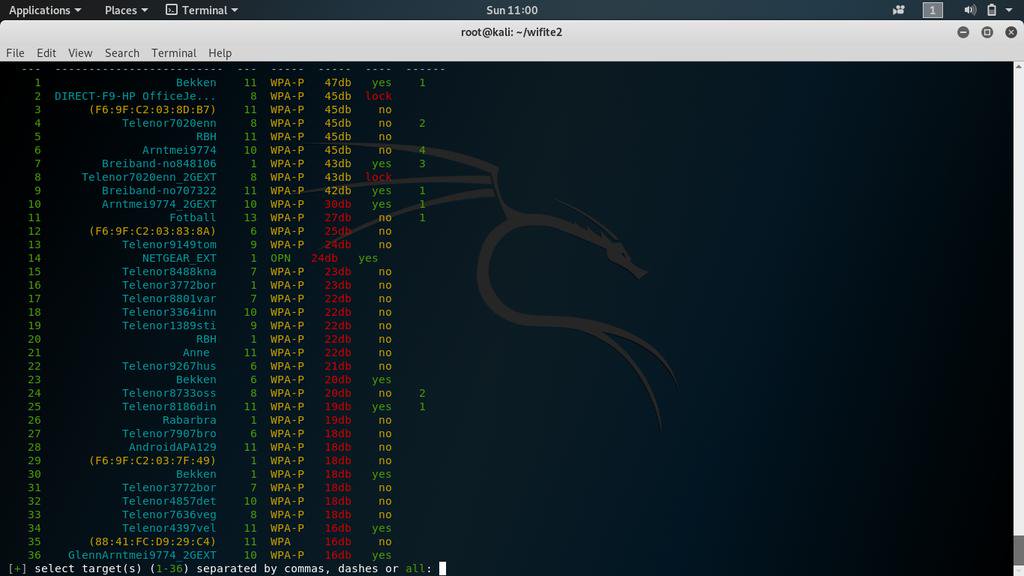
kimocoder
on 18 Sep 2019
Also running latest Kali in VMware (latest version of Fusion on a 15" 2017 MacBook Pro) and have tried numerous driver installs, up to and including the v5.6.4.1 above and still no luck.
[ 1204.490125] usb 1-1: New USB device strings: Mfr=1, Product=2, SerialNumber=3
[ 1204.490127] usb 1-1: Product: 802.11n NIC
[ 1204.490128] usb 1-1: Manufacturer: Realtek
[ 1204.490129] usb 1-1: SerialNumber: 123456
[ 1208.422164] usb 1-1: USB disconnect, device number 23
[ 1210.614045] usb 1-2: new high-speed USB device number 24 using ehci-pci
[ 1210.745829] usb 1-2: device descriptor read/64, error 18
[ 1210.985572] usb 1-2: device descriptor read/64, error 18
[ 1211.221456] usb 1-2: new high-speed USB device number 25 using ehci-pci
[ 1211.353098] usb 1-2: device descriptor read/64, error 18
[ 1211.590307] usb 1-2: device descriptor read/64, error 18
[ 1211.696926] usb usb1-port2: attempt power cycle
[ 1212.141860] usb 1-2: new high-speed USB device number 26 using ehci-pci
[ 1212.273907] usb 1-2: device descriptor read/64, error 18
[ 1212.509088] usb 1-2: device descriptor read/64, error 18
[ 1212.746382] usb 1-2: new high-speed USB device number 27 using ehci-pci
[ 1212.877063] usb 1-2: device descriptor read/64, error 18
[ 1213.114143] usb 1-2: device descriptor read/64, error 18
[ 1213.221208] usb usb1-port2: unable to enumerate USB device
root@kali:~/rtl8812au#
I would really like to get this working. Any thoughts / ideas / help please!
 robertstrom
on 2 Oct 2019
robertstrom
on 2 Oct 2019
@robertstrom This issue has nothing to do with yours. Please use
apt-get install realtek-rtl88xxau-dkms
ValZapod
on 3 Mar 2020
Related issues
 veganinside
·
6Comments
veganinside
·
6Comments
 lhernanz
·
15Comments
lhernanz
·
15Comments
 satmandu
·
18Comments
satmandu
·
18Comments
 manofftoday
·
8Comments
manofftoday
·
8Comments
 cristianav
·
7Comments
cristianav
·
7Comments
Most helpful comment
@kimocoder @evilphish @Trace-2 @francoism90
Perfect!! I understand where is the problem. It is not in our driver. It is in lsusb of usbutils))) Just look at this commit https://github.com/gregkh/usbutils/commit/f10dd916254acdfe72f2976bc21f6ac9ac409792
"For USB 3.0 devices MaxPower is in units of 8 mA instead of 2 mA. " Actually bMaxPower is in 2 mA steps only for USB 2.0 and 8 mA for USB 3.x.
And because the debian unstable still has old 007 (of 2015 year!) version of lsusb, so does Kali linux... I compile 010 version of lsusb from source and ...
I now have this output with lsusb:
While with old lsusb:
So, "I have noticed that with the Alfa AWUS036ACH device plugged in to a USB 3.0 port, it only is able to receive 200mA of power" is wrong, 200*4 == 800 mA, which is the right value.

The new lsusb is on the left)))