Rstudio: Feature request: option to assign a shortcut to toggle panes maximization (NOT zoom)
I usually keep my console on the top-right pane and plots on the bottom-right pane. Quite often while coding I'm also plotting and, thus, the console pane gets resized by the plot pane. Whenever I need to type some more code into the console I feel more comfortable if its not resized; hence, I maximize the console pane by clicking on the top-right "Maximize pane" button (see screenshot below).
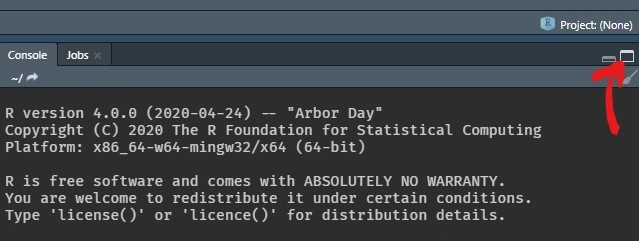
However, switching my hand from the keyboard to the mouse usually tends to slow down the coding workflow. Thus, what I would like to request is an option to assign the "Maximize pane" button to a keyboard shortcut.
Please note that the "Maximize pane" button behavior is _different_ than the (already available) "Zoom pane", which can be executed through the shortcuts Ctrl/Cmd+Shift+(0,1,2,3...). I'm interested in vertically maximizing the pane, _not_ zooming into it.
 almeidaxan
All 3 comments
@almeidaxan Good idea—and there's a shortcut option already for it! It's not assigned, though, so you need to pick one yourself. Go to
- Tools -> Modify Keyboard Shortcuts -> Maximize Console
and enter a shortcut of your choice. Just make sure that it doesn't conflict with an existing one. I just tried it out with ctrl-R and it worked with it.
 ronblum
on 2 Jun 2020
ronblum
on 2 Jun 2020
@ronblum Thanks for the heads up!
I know that my use case was specific to the console, but It would also be nice to have the same shortcut option for other panes, such as Source.
Also, a toggle would be handier than a maximize-only option (I've edited the issue title to reflect this).
Could you please reopen this issue?
almeidaxan
on 2 Jun 2020
This is closely related to #6225, let's track it via that issue. Once the IDE has a firm concept of "current pane" then we can create commands such as this without needing separate ones for each pane. Thanks!
 gtritchie
on 2 Jun 2020
gtritchie
on 2 Jun 2020
Related issues
 JanMarvin
·
3Comments
JanMarvin
·
3Comments
 richardohrvall
·
3Comments
richardohrvall
·
3Comments
 maelle
·
3Comments
maelle
·
3Comments
 Emmanuel-R8
·
3Comments
Emmanuel-R8
·
3Comments
 kevinushey
·
3Comments
kevinushey
·
3Comments
Most helpful comment
This is closely related to #6225, let's track it via that issue. Once the IDE has a firm concept of "current pane" then we can create commands such as this without needing separate ones for each pane. Thanks!