Rpcs3: Kingdom Hearts II Final Mix Roxas Slowdown
It seems somewhere in between the build 0.0.5-7091 and now 0.0.8-9454 Roxas has begun to slowdown extremely on anything past that. I'm testing this on 0.0.8-9454. 0.0.6-8272 has the slowdown present but it's not as bad, it makes combat sluggish. After some trial and error 0.0.7-9188 seems to be the worst build with flickering textures and the Roxas slowdown anything before that for me crashes after the cinematic and so does anything after. Log below is from the 0.0.7 build.
System specs are:
i5-6400
GTX 970
8gb ram
Windows 10
RPCS3.log.gz
 Jay2008p
All 30 comments
What do you mean by
in between the commit 4876 and now
What is the build number? 4876 would be around the middle of 2017, so you must mean something else. But really, before posting an issue you should go through https://rpcs3.net/compatibility?b and try builds in-between the date it regressed until you find it. Don't test every build, just try and quickly narrow it down first. Developers can't be expected to narrow down regressions like this for you when it may not appear on their system, and it's the responsibility of the person who reports the issue to provide a detailed break-down.
You're also missing a log file.
 Asinin3
on 29 Jan 2020
Asinin3
on 29 Jan 2020
Added log and changed the build numbers I used the number on the left side previously instead of saying the builds directly.
Jay2008p
on 29 Jan 2020
Is the bug the same as this old issue? https://github.com/RPCS3/rpcs3/pull/4876#issuecomment-406509121 The game used to run slow whenever roxas was in his attack stance/animation. But it was fixed.
Asinin3
on 29 Jan 2020
last known good build
0.0.5-7772
when in stance or atking

RPCS3.log.gz
slowdown on 0.0.6-7773 (#5587)
when in stance or atking

when idle

RPCS3.log.gz
 darkash
on 29 Jan 2020
darkash
on 29 Jan 2020
on 9xxx build, the dips is even more grave that my fps drops to single digit when using 300% scaling, probably thanks to the anti-alias that it's more noticeable.
darkash
on 29 Jan 2020
Yes it's the same as the old issue but like darkash mentioned it is significantly worse when attacking or in the attack stance.
Edit:
Forgot to mention that the frame rate would drop in the build that was "fixed" whenever roxas would blink and I couldn't get past the opening cinematic without the game freezing.
Jay2008p
on 30 Jan 2020
slowdown on 0.0.6-7773 (#5587)
So that's the right pr and build number, but.. how the hell does that pull request to change where game configs are located break this 🤔
Yes it's the same as the old issue but like darkash mentioned it is significantly worse when attacking or in the attack stance.
But that's quite literally what the old issue was.
Asinin3
on 30 Jan 2020
slowdown on 0.0.6-7773 (#5587)
So that's the right pr and build number, but.. how the hell does that pull request to change where game configs are located break this 🤔
Yes it's the same as the old issue but like darkash mentioned it is significantly worse when attacking or in the attack stance.
But that's quite literally what the old issue was.
not sure how it is related either, from the commit diff, it only adds 1 parameter to the function and the 1 more if branching
pretty sure it's for loading config before loading the game too
is capture needed for this as well?
darkash
on 31 Jan 2020
I'm experiencing the same issue. Whenever attacking with Roxas, the game will slow down to a very low frame rate and immediately pick back up again afterwards. Game runs at full speed in every other situation.
Willing to help however I can - I am new to RPCS3.
Windows 10, 32GB RAM, i7-4790K, GTX 1080 TI (11GB VRAM)
RPCS3 v0.0.8-9623
 Puremin0rez
on 19 Feb 2020
Puremin0rez
on 19 Feb 2020
Can confirm, this issue persists as of the current build (0.0.10-10451). However, it's _not_ exclusively when attacking; it also happens if Roxas blinks his eyes, for example. Possibly related to facial animations? Didn't really notice it during cutscenes if that's the case, could just be during gameplay. And I just recently finished KH1 FM from the 1.5 ReMix release without any major issues.
Also, a moderator previously mentioned that 0.0.5-7096 didn't have such an issue, however I'm going to have to disagree there; besides the fact that this buggy build barely maintains 30 fps on Vulkan with default settings, the framerate cuts in literal half (14-15 fps) whenever attacking. On current builds, I have a stable 30 fps but it dips to 10 fps when attacking.
EDIT: To reiterate, build 0.0.5-7096 was when kd-11 implemented asynchronous decompiling of shaders, which would of course improve performance; It wouldn't be surprising if someone with a beefy machine noticed the vast increase in framerate and assume the issue was fixed, when in fact I suspect the problem itself was never touched upon.
Specs:
OS: W10 64-bits
CPU: AMD A10-7850k (4 cores)
GPU: AMD RX470 (4 GB)
RAM: 8 GB
 D-TurboKiller
on 3 Jun 2020
D-TurboKiller
on 3 Jun 2020
Having exactly the same drop of frames when roxas attack or blinks his eyes. Any workaround? Like an older build that can run the game without stuttering. Finished today KH1 from KH1.5 Remix and was flawless (except not loading the Chain of Memories, but thats another problem).
 mumia7575
on 8 Jun 2020
mumia7575
on 8 Jun 2020
Having the same problem. Any solution yet?
 jezuzo
on 23 Jun 2020
jezuzo
on 23 Jun 2020
Been a few months since this issue was last updated. Just wanted to mention that the same issue is still present on the current build as of today (0.0.12-10820). I'm working on getting through the intro to see if the issue is persistent with both Sora and Roxas (as that wasn't specifically mentioned in this issue). At all other times this game runs smooth as butter.
I'm running on:
i7-9750H
RTX-2060 (Laptop)
32gb DDR4 3200
 pyr0ball
on 4 Sep 2020
pyr0ball
on 4 Sep 2020
Also, a moderator previously mentioned that 0.0.5-7096 didn't have such an issue, however I'm going to have to disagree there; besides the fact that this buggy build barely maintains 30 fps on Vulkan with default settings, the framerate cuts in literal half (14-15 fps) whenever attacking. On current builds, I have a stable 30 fps but it dips to 10 fps when attacking.
I tested it back then and confirmed it though, see: https://github.com/RPCS3/rpcs3/pull/4876#issuecomment-406509121
I'm very confused on where this broke again now. But someone needs to investigate it properly.
EDIT: To reiterate, build 0.0.5-7096 was when kd-11 implemented asynchronous decompiling of shaders, which would of course improve performance; It wouldn't be surprising if someone with a beefy machine noticed the vast increase in framerate and assume the issue was fixed, when in fact I suspect the problem itself was never touched upon.
You really think that the async build made fps go from 3 to 30? It was indeed what fixed it for me. I actually tested around 30 builds at the time to identify it. And it was actually another user who discovered that it as fixed, I just went through to investigate what pull request fixed it so we could close the issue off, and mention it in our progress report. If anything maybe you forgot to clean shader cache when testing between builds which caused the problem to persist on the old build.
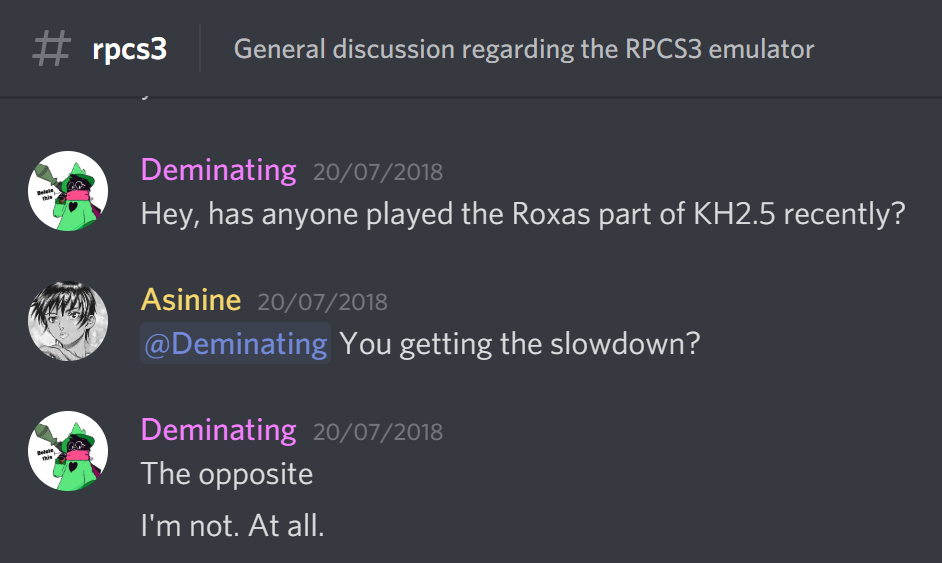
There's a ton of posts on discord if you're in our server can search for them on that date.
Asinin3
on 18 Sep 2020
If anything maybe you forgot to clean shader cache when testing between builds which caused the problem to persist on the old build.
Nope, I actually read the instructions. I made doubly sure by deleting the entire cache so there wouldn't be any inconsistencies. The cache was rebuilt from scratch in both the old and new versions.
As I've mentioned previously, I think the issue isn't exclusively related to his attacking animation. Perhaps it's a combination between his facial animations (most notably the eyes blinking, causing massive frame drops) and his attack effects (the swooshing color effect, perhaps?). Personally from my experience, fixing such things usually benefits by ending up solving other, seemingly unrelated bugs in the process.
Degrading the bug reporter for his assumed incompetence instead of looking at the issue doesn't solve the problem, but... eh, I get it. Last I checked, the server's help channel was flooded with reports of things already fixed or circumvented, by people looking to play a pirated version on their crappy computer. That's to be expected for emulation in general.
The moderators were clearly uninterested on most of it, for good reason. I posted as much detail as possible there, but it quickly got buried. I'm like to figure things out myself unless it's absolutely uncircumventable, which leads me to either find an alternative myself, or just wait for it to get patched up.
That being said, if it was indeed fixed before, then it's unfortunate, but reoccurring bugs are an inevitable part of programming.
Not a personal attack or anything, just annoyed that there isn't a better way to go about the bug-fixing process... but it is what it is.
As for KH2FM, I ended up replaying it on an english-patched PS2 version of Final Mix, which apart from the low-res videos and some textures, was just as playable as the PS3 version of KH1FM. I don't feel like retrying yet again (far too busy IRL at any rate), so I'll leave it to someone else to test the PS3 version if it ever gets fixed.
D-TurboKiller
on 18 Sep 2020
Degrading the bug reporter for his assumed incompetence instead of looking at the issue doesn't solve the problem, but... eh, I get it.
I get being upset, but how's that any different than you saying that I incorrectly presumed it was fixed because of a performance improvement? It went from 3FPS to 30, and was also fixed for another user. Something else is at play here. I confirmed another user in our discord an hour ago that it's not caused by 0.0.6-7773 as well. However the user above could reproduce it happening on 7773, which makes no sense due to what the pull-request entails.
I really think something strange is going on, needs investigation.
Asinin3
on 18 Sep 2020
I've got a decent amount of debugging experience and I'm no stranger to coding, but I lack experience in graphics and emulation software specifically, however I'd be happy to put in some time trying to reproduce issues and provide bugreports if it would help @Asinin3
If you let me know what kind of testing is needed to narrow this down, I can get started
pyr0ball
on 18 Sep 2020
The most important thing here is to find a way to consistently trigger the issue for everyone. A big problem with performance issues (and other issues such as heap corruption, etc) is that unless you can observe it happening in front of you it becomes near impossible to fix, which is the scenario here. The underlying cause could be a combination of hardware configuration, emulator configuration, OS version, 3rd party software, etc.
 kd-11
on 18 Sep 2020
kd-11
on 18 Sep 2020
@kd-11 well you're in luck because my setup consistently reproduces the issue right now and I can provide a lot of that info
pyr0ball
on 18 Sep 2020
@pyr0ball The problem is if other users can reproduce it as well, not just you. For me back then I could reproduce it every run. For the other user in this thread he could reproduce it not working on 7773, but working on 7772. Basically it needs to be confirmed where the cause is across multiple people's systems.
Try using old builds: https://rpcs3.net/compatibility?b - go back months at a time, and narrow down where it broke. Maybe start at the middle of 2019 and use the old build with rpcs3 after clearing cache's (right-click the game and remove them). Then see if it's broken. If it's working then you need to use a newer build, if it is broken then you need to use an older one. Basically just narrow it down quickly by jumping through multiple months of builds at a time, should be able to nail it down faiirly easily since it's easy to reproduce, just make sure to jump like ~4 months at a time when you first start trying to narrow it down.
Asinin3
on 18 Sep 2020
@pyr0ball The problem is if other users can reproduce it as well, not just you. For me back then I could reproduce it every run. For the other user in this thread he could reproduce it not working on 7773, but working on 7772. Basically it needs to be confirmed where the cause is across multiple people's systems.
Try using old builds: https://rpcs3.net/compatibility?b - go back months at a time, and narrow down where it broke. Maybe start at the middle of 2019 and use the old build with rpcs3 after clearing cache's (right-click the game and remove them). Then see if it's broken. If it's working then you need to use a newer build, if it is broken then you need to use an older one. Basically just narrow it down quickly by jumping through multiple months of builds at a time, should be able to nail it down faiirly easily since it's easy to reproduce, just make sure to jump like ~4 months at a time when you first start trying to narrow it down.
since you bring this up again, I decided to test it once again, you can ignore my previous report since it indeed was a mistake
perhaps thermal throttle kicks in since I spent like 4 or 5 hours testing random build at the time
at least can now bisect starting from 7773 instead
darkash
on 19 Sep 2020
Is this about the stutter issue that happens all the time ?
I also get it but I use a laptop .
It runs everything else on 1.5 and 2.5 well its only KH2 that gives me that issue.
 MojoJojoDojo
on 23 Sep 2020
MojoJojoDojo
on 23 Sep 2020
Did some testing, using Vulkan and the help of a 60fps tweak, and I've narrowed down a _"culprit"_ build. I put emphasis on that because, even though I've found an obvious performance regression between these builds, this issue is still present and results in a slowdown on _both_ builds. It just becomes a lot more intense and noticeable between these _particular_ builds.
Build 0.0.7-8952 (rpcs3-v0.0.7-8952-c16319f9_win64) seems to be the last "working" build, with fps dropping to around 45 at the lowest while attacking. Since the game is typically locked to 30fps, I doubt most people will ever notice the issue is present.
Build 0.0.7-8956 (rpcs3-v0.0.7-8956-3c440656_win64) the slowdown becomes much more intense, with fps dropping to around 20 while attacking. For those running at the standard 30fps, this issue once again becomes obvious.
So while I seem to have tracked down a culprit build, it seems like this issue was never actually fixed, just made less noticeable.
I did not test the builds between 0.0.5-7096 and 0.0.6-7773, despite there being an evident performance improvement, as I wanted to narrow down where the sudden regression had occurred. I could start going through those, if needed.
 Skooz
on 25 Sep 2020
Skooz
on 25 Sep 2020
Build 0.0.7-8952 (rpcs3-v0.0.7-8952-c16319f9_win64) seems to be the last "working" build, with fps dropping to around 45 at the lowest while attacking. Since the game is typically locked to 30fps, I doubt most people will ever notice the issue is present.
Would just like to say thanks. Reverted to that build for until I finish with Roxas. Would also like to say the issue still persists in 10965. Drops to around 80 FPS FPS in 8952 vs 25 FPS in 10965.
According to another post apparently the cause is his facial animations. When he blinks and when he opens his mouth while swinging.
 FatheredPuma81
on 1 Oct 2020
FatheredPuma81
on 1 Oct 2020
I tested Build 0.0.7-8952 with the 60fps patch (using CheatEngine) and the drop is still severe (60fps down to 18-20)


pyr0ball
on 1 Oct 2020
I tested Build 0.0.7-8952 with the 60fps patch (using CheatEngine) and the drop is still severe (60fps down to 18-20)
Don't use OpenGL. Just tested in Axel fight outside of Usual Spot and OpenGL gets 25 FPS while Vulkan gets 45FPS. Pretty sure in most other area's it stays above 60.
FatheredPuma81
on 1 Oct 2020
After reviewing the commits & pull request related to build 0.0.7-8956, it seems that enabling "Force CPU blit emulation" under the Debug tab will alleviate this issue, even on the most recent 0.0.12 build; I was not really dropping below 60fps while attacking, which is a tremendous performance improvement. However, it does cause various graphical bugs, and so when enabling "Write Color Buffers" under the GPU tab (as suggested by the CPU blit setting), performance does take a hit, and it drops back down to 40fps or so while attacking. You will still encounter some messed up graphics though, but enabling "Read Color Buffers" under the Advanced tab should solve them.
I suppose I should also note that _disabling_ all of these settings still results in worse performance than having them all on, so it definitely seems related to forcing CPU blit emulation.
Oh, and if you see the sun\lens-flare appearing through buildings\geometry in Twilight Town, that is not because of these settings. It's an upscaling issue with the latest builds. It's unrelated, but I figured I should mention it here so people don't get the wrong idea and assume it's because of this "workaround".
Skooz
on 2 Oct 2020
@FatheredPuma81 Right forgot about that bit. Confirmed on Vulkan the issue is a lot less pronounced:


The lowest I see it dipping is about 43fps with this build (without applying the changes suggested by Scooz)
@Skooz I did also try 0.0.12 (latest that downloaded yesterday) while enabling those three options I still get the same drop in performance if the read/write buffers, but about the same as 0.0.7-8956 if I ONLY enable "Force CPU blit emulation"

pyr0ball
on 2 Oct 2020
first comment here, made this account so i can help with this issue.
i tested both 0.0.5-7772 and 0.0.6-7773, they both have this issue on openGL but not on vulkan. the confusion was caused since darkash assumed the default setting would be vulkan while it was openGL. i will test other versions and see what i can find.
also CPU blit Emulation worked for me (sorta). i was running KH on 60 FPS and with CPU blit i had it running at 30 fps, with the other fixes the performance went to 20 fps only. these readings where taken during combat stance, the game was running at 60 FPS in every other scenario, with or without the CPU blit and the fixes. i'll try to run CPU blit only (without the fixes) and run it without the patch, see if that's playable.
BTW, the issue still remains on build 0.0.13-11371.
tell me what else i should test.
my build is a dell Inspiron 7000 gaming laptop
intel I7-7700HQ
8GB ram
GTX 1050Ti 4GB Vram
 LiLENZO1101
on 11 Dec 2020
LiLENZO1101
on 11 Dec 2020
update
i tried both 0.0.7-8956 and the one that came before it (0.0.7-8952), and here is what i found
0.0.7-8952 did not have this issue in vulkan
0.0.7-8956 had this issue in vulkan
that, CPU blit test, say that its is a gpu blit issue. (or at least part of it is)
i also tested the newest build, 0.0.13-11371 with only the 30 FPS (60 FPS patch disabled) & CPU blit config (without the fixes) and it gave me playable frame rates. exactly as the 0.0.7-8952 did. they also shared the same FPS fluctuation during an attack animation, it was a steady 30 FPS on the combat stance though. The fluctuation was mostly between 25-30 FPS, and rarely dropped to 20 FPS.
LiLENZO1101
on 11 Dec 2020
Related issues
 XeClutch
·
3Comments
XeClutch
·
3Comments
 LokiGrants
·
3Comments
LokiGrants
·
3Comments
 JohnGodgames
·
3Comments
JohnGodgames
·
3Comments
 Birch-san
·
3Comments
Birch-san
·
3Comments
 Xcedf
·
3Comments
Xcedf
·
3Comments