Rpcs3: Demon's Souls [BLES00932] flickering on AMD Vega
Hello everyone. Unfortunately I think that going from Nvidia to AMD has brought me some headaches, as is the case of trying to emulate Demon's Souls.
The game works excellent in terms of framerate, sound and graphics, but promptly I have a flickering problem that is really unbearable. I have tried using both the latest version of the emulator and previous versions, I have also reinstalled drivers, I have deleted the shader cache files but the problem continues.
There is a permanent flickering which makes the game literally unplayable.
You can see the Flickering issue here:
https://imgur.com/6Tg3oB9
My hardware is:
Ryzen 2600
RX Vega 56.
Windows 10 x64
Rpcs3 build: 0.0.6-8437
I'm using Vulkan api.
Thank you!
 megamaan
All 46 comments
Try the following:
SPU loop detection: OFF
TSX: Disabled
Vsync: Disabled
I'd start with disabling Vsync and SPU loop detection which are known to cause issues. TSX can also sometimes interfere with this one.
 kd-11
on 13 Aug 2019
kd-11
on 13 Aug 2019
I was finally able to reproduce this on my system, but it seems confined to the nexus. Likely caused by a fault in uninterruptible code. I'll see about a solution.
kd-11
on 25 Aug 2019
I upgraded drivers recently and suddenly I cannot reproduce this by loading the nexus like I could before. Verify if it still happens on a clean 19.8.2 install. I recently had to DDU my system and reinstall drivers after I seriously messed up my configuration and suddenly the bug isn't there anymore. I also went back and tried some older builds, no flickering in the nexus. Please update with more information on how to reproduce if this is still an issue for you @megamaan
kd-11
on 3 Sep 2019
Still the same issue for me on the lastes build with 19.8.2.
 AxiR2
on 4 Sep 2019
AxiR2
on 4 Sep 2019
You did not explain how to reproduce though. Does it happen immediately on loading your character, anywhere? How frequent are the flashes? I think a short clip would help with recreating the conditions.
kd-11
on 4 Sep 2019
The flashes for me start as soon as you gain control of character. And happen constantly. Frame rate is solid though. I followed your steps and got the same issue. I traveled to the Nexus and to first Archstone and issue was still present. Ive tried various settings with no improvent and went back to recommended settings.
 ajme1215
on 4 Sep 2019
ajme1215
on 4 Sep 2019
How about directly loading into the nexus without going through the tutorial?
kd-11
on 4 Sep 2019
Happens when I directly load as well. I have a capture of what it looks like. I have a 9700k oc to 4.9 on all cores and a Vega 64. If you want to check it out how would you like me to post the capture?
ajme1215
on 4 Sep 2019
No need. Can you try disabling native fp16 in your config file? You have to edit the file itself as there is no option in the gui.
kd-11
on 4 Sep 2019
I changed this value from this:
Disable native float16 support: false
to this
Disable native float16 support: true
I still got the same results
ajme1215
on 4 Sep 2019
Ok then, just attach the new log.
kd-11
on 4 Sep 2019
Here it is I believe.
RPCS3.log.gz
ajme1215
on 4 Sep 2019
You did not explain how to reproduce though. Does it happen immediately on loading your character, anywhere? How frequent are the flashes? I think a short clip would help with recreating the conditions.
https://www.twitch.tv/videos/476483521
Complete clean install, Ryzen 3600/Vega 56. The slowdowns happen because of OBS, but the black frames are pretty much constantly like seen in the video. Runs beatifully otherwise...
I've tried pretty much every combination of settings/rpcs3 builds to no avail.
AxiR2
on 4 Sep 2019
I also have this flickering issue, but I don't even make it through the tutorial before it crashes. I actually think it breaks my graphics driver, since I get a black screen on both monitors until I hit Esc to leave fullscreen.
The flickering looks just like the captures from the other posters, with black frames in between. The crash happens when entering the tunnel after the second tutorial enemy.
Windows 10, Ryzen 3600, Vega 56.
This log was with the 60fps patch, but I get the same behavior without it.
RPCS3.log
 alexhunt7
on 4 Sep 2019
alexhunt7
on 4 Sep 2019
This seems isolated to AMD VEGA. I have Polaris and everything is ok, I was only able to witness the flickering shown in that video when I ran through the tutorial a few times and warped to the nexus, and even then it was confined to the nexus area. Haven't seen it since.
I initially thought faulting in uninterruptible code was the cause, but this would mostly not show up with MTRSX enabled.
kd-11
on 4 Sep 2019
I have the same issue, Radeon R5 2600, RX 590.
Video driver is 19.8.2
Windows 10 x64
 GorthHaur
on 4 Sep 2019
GorthHaur
on 4 Sep 2019
GorthHaur
on 4 Sep 2019
GorthHaur
on 4 Sep 2019
So whats the common denominator here then? I have RX470 + R7 1700 and no flickering. Is it processor maybe? Anyone with an 8-core actually encountering this?
kd-11
on 4 Sep 2019
I do have an 8 core 9700k with the flickering.
ajme1215
on 4 Sep 2019
Also I have crackling and repeating game sounds. I tried to on/off SPU loop detection, VSync, sound buffer. Strange thing
GorthHaur
on 4 Sep 2019
That's completely unrelated to this issue.
kd-11
on 4 Sep 2019
Sorry for that "out of theme".
But about flickering issue: can it be unstable overclocked processor? Like throttling
GorthHaur
on 4 Sep 2019
As there is no common factor determined as of now, it is not possible to say what the real cause could be.
kd-11
on 4 Sep 2019
I removed the OC and still had issues so it's not an unstable OC on my side.
ajme1215
on 4 Sep 2019
As there is no common factor determined as of now, it is not possible to say what the real cause could be.
Only thing I can see is that so far it's only happend on amd GPUs?
AxiR2
on 4 Sep 2019
I have an i3 8100 and a rx 570 8g and I have the same issue, but there's a patch made by Whatcookie that solves the flickering disabling the dynamic exposure, but it makes the game sligthly darker
 Lenox548
on 4 Sep 2019
Lenox548
on 4 Sep 2019
I have an i3 8100 and a rx 570 8g and I have the same issue, but there's a patch made by Whatcookie that solves the flickering disabling the dynamic exposure, but it makes the game sligthly darker
Can I add the lines to the 60 fps patch?
AxiR2
on 4 Sep 2019
I have an i3 8100 and a rx 570 8g and I have the same issue, but there's a patch made by Whatcookie that solves the flickering disabling the dynamic exposure, but it makes the game sligthly darker
I tried the patch with 30 fps, doesn't work unfortunately
AxiR2
on 4 Sep 2019
I got the flickering to stop. In your patch file under:
PPU-83681f6110d33442329073b72b8dc88a2f677172: #BLUS30443
OPTIONAL: Disable dynamic exposure (can turn off WCB for 20% faster performance)
Enable this if you experience flickering
" # - [be16, 0x00025EDC, 0x981f]"
remove the hash tag on this line so it looks like this:
- [be16, 0x00025EDC, 0x981f]
after i removed the hash tag do disable dynamic exposure the flickering is completely gone
ajme1215
on 4 Sep 2019
I have an i3 8100 and a rx 570 8g and I have the same issue, but there's a patch made by Whatcookie that solves the flickering disabling the dynamic exposure, but it makes the game sligthly darker
patch.zipCan I add the lines to the 60 fps patch?
I think it's already in the 60 fps patch but it's disabled, you have to delete the # that is written next to it
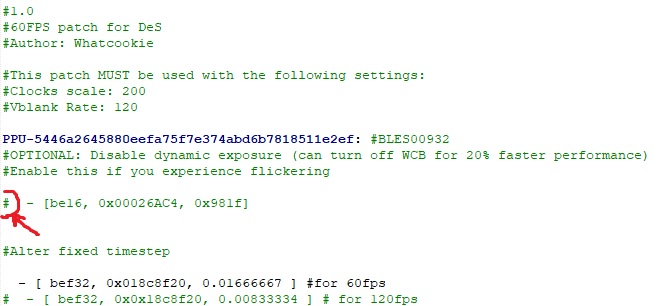
But if you don't want to touch anything you can copy the lines directly no problem
Lenox548
on 4 Sep 2019
Yes depending on what region disc your playing you'll have to remove it for the "BLUS30443" line or the "BLES00932" line.
ajme1215
on 4 Sep 2019
OH MY FUCKING GOD I LOVE YOU ALL!!!!!!!!!!!!!!!!!!!!!!!!!!!!!!!!!!!!!!!!!!!!!!!!!!!!!!!!!!!!!!!!!!
ITS GONE ITS GONE ITS FUCKING FINALLY GONE AFTER ALL THE HOURS AND THE PAIN
THANK YOUUUUUUUUUUUUUUUUU
AxiR2
on 4 Sep 2019
I cannot belive this, a month ago I completely gave up on this game, then the 60 fps patch comes out, and now THIS!
AxiR2
on 4 Sep 2019
Confirmed that uncommenting that line in the patch file fixes the flickering, though it does make the game significantly darker.
I still crash at the tutorial tunnel, though. I guess that should be a separate issue. EDIT: ticket for the crash: https://github.com/RPCS3/rpcs3/issues/6487
alexhunt7
on 5 Sep 2019
Retest with this build without the patch enabled and see if it fixes the flickering. Remember to enable WCB before testing.
kd-11
on 5 Sep 2019
Yes! It fixes the flickering! ;)
El jue., 5 de sep. de 2019 a la(s) 09:32, kd-11 ([email protected])
escribió:
Retest with this build
https://ci.appveyor.com/project/rpcs3/rpcs3/builds/27203683/artifacts
without the patch enabled and see if it fixes the flickering. Remember to
enable WCB before testing.—
You are receiving this because you were mentioned.
Reply to this email directly, view it on GitHub
https://github.com/RPCS3/rpcs3/issues/6287?email_source=notifications&email_token=AMYEVXG6YCMIF5N6FCV4HZTQID37JA5CNFSM4IIBQ2M2YY3PNVWWK3TUL52HS4DFVREXG43VMVBW63LNMVXHJKTDN5WW2ZLOORPWSZGOD565TZA#issuecomment-528341476,
or mute the thread
https://github.com/notifications/unsubscribe-auth/AMYEVXCHMVENIZTLTV564D3QID37JANCNFSM4IIBQ2MQ
.
megamaan
on 5 Sep 2019
Retest with this build without the patch enabled and see if it fixes the flickering. Remember to enable WCB before testing.
I downloaded that build and enabled WCB and the flickering returned. I went ahead and just turned WCB off for now.
ajme1215
on 5 Sep 2019
Rx 580 with driver 19.5.2 and the same issue.
The build above(2f54aba8) doesn't fixes the problem, but the patch(Disable dynamic exposure) does.
Changing the display color in Radeon Settings to "brightness 125, contrast 150, saturation 125" makes up for the darkening of the screen due the patch.
 rpjc
on 15 Sep 2019
rpjc
on 15 Sep 2019
Why such an old driver though? Also, please mention your CPU; something else is triggering this other than the GPU alone. The build fixed the flickering for the OP and for me as well, but somehow some people still have the problem. The OP and myself have something in common - Ryzen CPUs. This makes me wonder if something is interfering with TSX or other intel-specific options.
kd-11
on 15 Sep 2019
Newer drivers cause freesync to not work, beside other issues, but it still happened in newer drivers the last time I tried.
CPU is i5-3470.
The only difference from the wiki default settings is resolution scale to 200%, but it still happens in default resolution.
I can create a log or something if it helps.
rpjc
on 15 Sep 2019
Tested with 19.9.2, flickering persists:
RPCS3.oldrivers.log.gz
RPCS3.new19.9.2.log.gz
rpjc
on 15 Sep 2019
Black, rapid flickering is gone for me, using 60 fps patch but not disabling Dynamic Exposure, Write Color Buffers is on. Until today it was present on all versions I've tried (playing since the 60 fps patch was announced). Tested on a full playthrough.
RPCS3: v0.0.7-8751-3121fecc
Vulkan renderer
SPU loop detection OFF
Multithreaded RSX ON
Everything else default
CPU: AMD Ryzen 7 2700X
GPU: AMD R9 390 (Driver 19.7.3)
I was testing the lens flare fix (a mod) so I was rebuilding the shader cache and noticed the flicker gone (I always test re-enabling Dynamic Exposure and enabling Write Color Buffers when changing versions). Just in case I cleared the cache again and tried without the mod.
I initially thought it was activating Strict Rendering Mode that did it (was testing that too) but once disabled it kept working fine. Flickering gone with Strict Rendering Mode, with default rendering settings or 150% rendering scale (1080p). Vsync on or off also shows no flicker.
P,S.: I noticed that when the camera clipped through terrain I would get colored artifacts through the screen, only noticed it on those cases, but only could get it to happen during shader cache buildup, got it a lot on the Nexus early on the game, on the small corridors leading up but could not get it later as the camera properly bounced off or zoomed in when colliding with walls.
 Miltrivd
on 23 Sep 2019
Miltrivd
on 23 Sep 2019
Needs a retest with new rpcs3 versions and AMD drivers.
kd-11
on 10 Nov 2019
Needs a retest with new rpcs3 versions and AMD drivers.
GPU: MSI 390 Gaming
CPU: Ryzen 7 2700X (@stock)
GPU Driver: 19.11.1
RPCS3 version: v0.0.7-9124-abbf3c4d_win64
Vulkan renderer
Write color buffers on
Vsync on
I see no issues and even slightly better performance versus v0.0.7-8939-59382e02_win64 with driver 19.7.3
Video of play session in case it's useful: https://www.twitch.tv/videos/507462319
Miltrivd
on 13 Nov 2019
Closing as fixed.
kd-11
on 15 Jan 2020
I'm having this same exact issue on a RPCS3 0.0.8-9422-98a8eeaa, using an Nvidia GTX 1660 Ti. All settings default except "write color buffers" checked.
 jkh0208
on 21 Jan 2020
jkh0208
on 21 Jan 2020
Related issues
 xddxd
·
3Comments
xddxd
·
3Comments
 JohnGodgames
·
3Comments
JohnGodgames
·
3Comments
 Asinin3
·
3Comments
Asinin3
·
3Comments
 altiereslima
·
3Comments
altiereslima
·
3Comments
 xiangzhai
·
3Comments
xiangzhai
·
3Comments
Most helpful comment
I cannot belive this, a month ago I completely gave up on this game, then the 60 fps patch comes out, and now THIS!