Rpcs3: Castlevania - Harmony of Despair [NPUB30505] missing effects
Hello you absolute legends!
I'm really enjoying the game and having a wonderful time playing this gem but I can't seem to get some of the effects going in the game like numbers that is suppose to show up when you hit enemies (reference video from an older build that someone seems to use where numbers are working)
There is also other effects missing, like certain enemy attacks (Spittle Bone fire, White Dragon fire etc.)
Candles and chandeliers also seems to drop invisible Hearts and Gold.
Shanoa's magnet spots is also invisible.
The game is very playable but with the effects missing it can be hard sometimes avoiding enemy projectiles because they are invisible.
The current build I'm using is fairly new (0.0.6-8380 x64) with 4.84 PS3 Firmware and this is my setup:
i7 8700K @ stock
NVIDIA GTX 1070 6GB with latest drivers
16GB RAM
Windows 10 Enterprise LTSC 2019 with all updates
I'm currently playing with OpenGL which seems to be the safest and I'm using these options:
Write Color Buffers
Strict Rendering Mode
Vsync
Disable Vertex Cache
Except for Vsync these options states it will resolve missing graphics and flickering but other than resolving the broken menu it does not appear to help with the missing effects.
I'm playing the full American copy of the game (NPUB30505) with most of the DLC except for the bonus characters that seems to crash the game (that's another issue however)
Am I missing something here? Is there anyone else that can see the effects? Do you need anything else information wise?
Thanks in advance!
 ghost
ghost
All 26 comments
Always provide the RPCS3.log.gz file, and when reporting graphical errors you should be including a RSX capture and a render doc at the affected area. If it was working previously in an old build of RPCS3 and it broke in new builds (regression), then you should be including a RSX Capture and a Render doc from the old build to compare against.
To make a RSX Capture (or RRC), just go view > debugger on the RPCS3 window and hit "RSX Capture" when you're at the affected area. And do the same for each issue. Once done it will tell you in the log window where the capture was saved. To make a render doc capture, you have to install render doc https://renderdoc.org/builds then open it and set it to launch the RPCS3.exe file under the target executable option and hit launch. Once RPCS3 is open, run the game and go to the affected scene and hit F12 which is the Render Doc capture button. Do the same for each affected scene again and make sure you save the render doc files for each capture once you're done.
When you've got all the captures necessary, just archive them all, preferably with 7zip using the LZMA2 Ultra compression level and upload it somewhere and link it in your report.
 Asinin3
on 25 Jul 2019
Asinin3
on 25 Jul 2019
@Asinin3
Here is the log and one screenshot of the game from RPCS3 to compare with an image capture of the game from the console below.

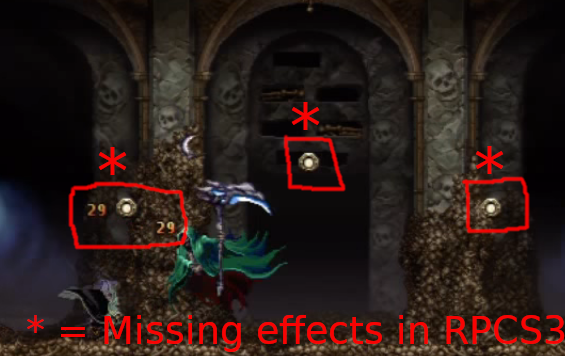
By comparing the images above you can all see that I got no numbers from hitting Death and there is no magnetic/magnes spots that Shanoa can use and yes they should still be there despite which character you play with.
Here is a couple of other effects that I have found missing:
- When Soma get souls
- When Alucard uses the Yasutsuna weapon there should be multiple swords coming out like the Valmanway sword I used in the above screenshot.
ghost
on 26 Jul 2019
I'm just curious if anyone have had a chance to look at the log that I provided earlier, is it satisfactory?
I have tried most of the options available in RPCS3 and haven't come up with anything new, the effects are still missing.
Please, could someone tell me if the game works properly with the effects for you. I really want to know!
ghost
on 28 Jul 2019
@RokkumanX Hey, can you please try this build and see if the effects are still missing? Try it with both OpenGL and Vulkan
https://ci.appveyor.com/api/buildjobs/25tbogtwn2n2q81f/artifacts/rpcs3-v0.0.6-6527-5d809724_win64.7z
 SutandoTsukai181
on 29 Jul 2019
SutandoTsukai181
on 29 Jul 2019
@SutandoTsukai181
It works beautifully, all missing effects are there and counted for and my eyes are in tears!
Does this mean you got a hunch of what's breaking it in newer builds?
ghost
on 29 Jul 2019
@RokkumanX Okay, try this now just to make sure https://ci.appveyor.com/api/buildjobs/co4ncc73nyglitd4/artifacts/rpcs3-v0.0.6-6529-e8023143_win64.7z
If it doesn't work then that means this issue is caused by commit e802314 which changed how stuff render at different depths, same issue as #4380
Furthermore, this makes your only option for now the Farseer build as it has better performance than the last build before the issue.
SutandoTsukai181
on 29 Jul 2019
Its caused by default initialization of some PS3 registers. I need to run some validation tests on hardware. I'll try and do them possibly tomorrow.
 kd-11
on 29 Jul 2019
kd-11
on 29 Jul 2019
@SutandoTsukai181
OK, I have now tested that build out and from the looks of it the effects are still working properly.
Is that good or bad?
EDIT:
Thanks for your input @kd-11, I didn't see your comment when I posted.
Just hoping the issue can be fixed gets me excited!
ghost
on 29 Jul 2019
@RokkumanX Are you using Vulkan or OpenGL? Also which worked for you when trying that old build?
SutandoTsukai181
on 29 Jul 2019
I know you said to test both Vulkan and OpenGL but Vulkan have been kind of jiffy in newer builds for me so I only tried OpenGL out which I know is stable.
Both builds you provided showed the effects properly with OpenGL.
ghost
on 29 Jul 2019
Ok can you please try Vulkan on both builds and report which one works? Because that could mean that this commit is related to Vulkan only.
Edit: Just to clarify, the life bars in JoJo were not working on OpenGL even before the commit. They were working on Vulkan and that commit broke it. This may not be the same with Castlevania, as OpenGL worked before and after the commit. Only further tests can assure whether the commit affected both OpenGL and Vulkan, or only Vulkan.
SutandoTsukai181
on 29 Jul 2019
Sure thing, I can make more thorough tests tomorrow morning.
ghost
on 29 Jul 2019
So I have managed to test both of the builds (6527 & 6529) you provided more thoroughly out this morning and I can safely say that on both OpenGL and Vulkan all effects that are missing in newer builds are showing up correctly as I expected them to do.
Enemy effects - check
Enemy dying effects - check
Weapon effects - check
Shanoa's magnetic/magnes spots - check
Soul effects when Soma gets a soul from enemies - check
Numbers from being hit/hitting enemies - check
Hearts and gold dropping from candles/chandeliers - check
All in all on both graphic backends everything looked good.
EDIT:
I honestly didn't think Vulkan would work as good as it did, to my surprise it actually did.
ghost
on 30 Jul 2019
Thank you for trying it. Btw those 2 builds are from my own fork so the version numbers aren't correct: Build 6527 is commit 5d80972 while 6529 is e802314.
I'm not sure now if this commit affected the game or not, but I want you to try one more time with commit 736415f which changed that same block of code. I don't have a build ready for it but I'll ping you once it's done. It'll take about 30 minutes.
Edit: Okay, forgot that appveyor fails to build that commit so i couldn't even try it myself. This build is after that commit so it may be the one that broke it. This one is directly before it so it should work. Please try them and tell me.
SutandoTsukai181
on 30 Jul 2019
kd-11 has already replied he knows the actual cause for this and he'll get to it, what's the point of testing these builds?
 VelocityRa
on 30 Jul 2019
VelocityRa
on 30 Jul 2019
@VelocityRa I just want to know the commit that made this issue since I've been trying to fix it for a week now. I know kd-11 will probably fix it soon but there is no problem in trying to learn I guess.
SutandoTsukai181
on 30 Jul 2019
@SutandoTsukai181
Thanks for the builds, I tested both 7742 and 7755 which you provided and they both worked as intended with all effects.
I tested with both OpenGL and Vulkan and no problems at all.
At the moment I could test more builds out for you if it would help, otherwise as @VelocityRa mentioned @kd-11 seems to know what's causing the problem so maybe we should just wait and see what happens.
Either way I'm really thankful for everything and I'm glad the effects actually worked, I was afraid my dump was bad or something but that's not the case.
Hopefully the issue can be solved soon and the effects will work in newer builds!
ghost
on 30 Jul 2019
OK I decided to test more builds out but this time in a higher range.
So far 0.0.6-8038 from April works and 0.0.6-8195 from June does not, somewhere in between things start to fail.
If I manage to pinpoint a more exact build and time frame I'll be back then.
ghost
on 30 Jul 2019
When I say that it worked with v0.0.6-8038-301dd828 I forgot to mention that only Vulkan would load a stage, OpenGL froze every time when a stage loaded. But Vulkan worked good with the effects.
The same can be said with v0.0.6-8105-3753d27a, only Vulkan would load a stage and the effects still worked.
I also tried v0.0.6-8147-8009e536 where neither backend would work/load a stage and with v0.0.6-8161-71b71537 only OpenGL would load a stage and the effects were broken like in newer builds.
I don't think I can pin point anymore, we can just assume it broke some time after v0.0.6-8105-3753d27a
But we'll just have to see what @kd-11 can discover.
ghost
on 30 Jul 2019
If we assume v0.0.6-8105-3753d27a were one of the last builds the effects were working in and v0.0.6-8161-71b71537 is one of the first builds were the effects started to broke I managed to make a compare list with all the commits in between.
There are 56 commits in total.
https://github.com/RPCS3/rpcs3/compare/3753d27a...71b71537
The commits doesn't mean anything to me due to my lack of knowledge and how recent I started to use the emulator, however it could be a possible lead that could save some time for the right eyes.
ghost
on 30 Jul 2019
Retest with https://github.com/RPCS3/rpcs3/pull/6415
kd-11
on 26 Aug 2019
@kd-11
It's semi-fixed with #6415, and by semi-fixed I mean that the effects work for a limited amount of time before they becomes absent (20-30 seconds of gameplay)
You are onto something but the issue is not entirely fixed.
Huge thanks though!
ghost
on 27 Aug 2019
kd-11
on 27 Aug 2019
@kd-11
I just tested rpcs3-v0.0.6-8609-cca6a19c_win64 which is the latest build as of right now and it's still the same issue as I mentioned above, the effects work for a short period of time and then become absent.
Is #6426 in rpcs3-v0.0.6-8609-cca6a19c_win64?
Otherwise I have to wait until that specific pull request is in the builds on https://ci.appveyor.com/project/rpcs3/rpcs3/branch/master
ghost
on 28 Aug 2019
kd-11
on 28 Aug 2019
Thank you very much @kd-11
It means a lot to me that the game finally works properly, although it saddens me that it will take some time until I play this game again since I completed it with "broken builds"
But on the positive side, next time I play it it will work correctly.
ghost
on 28 Aug 2019
Related issues
 elad335
·
3Comments
elad335
·
3Comments
 xddxd
·
3Comments
xddxd
·
3Comments
 LokiGrants
·
3Comments
LokiGrants
·
3Comments
 kurosh10000
·
3Comments
kurosh10000
·
3Comments
 altiereslima
·
3Comments
altiereslima
·
3Comments
Most helpful comment
Its caused by default initialization of some PS3 registers. I need to run some validation tests on hardware. I'll try and do them possibly tomorrow.