Rpcs3: Regression: Persona 5 freezes similarly to fullscreen crash (TSX Issues)
Hi thanks for the great emulator! I hope I can explain the issue well enough.
After a random time of play P5 the game crashes. Unlike in the nvidia bug I can close the game window without rpcs3.exe.
"~~" a Discord-user have the same issue.
I tested 4 different versions of rpcs3:
rpcs3-v0.0.0.6-8197-3e620f14 (preview build)
This prev build was the release of the nvidia fix for the fullscreen errors with nvidia hardware.
This seems to be the only build where the crash doesn't appear. (same by "~~" -> 5 hours without crash)
8272
This build need some time to play before it crash.
All builds after 8272
This builds crashes after 10-30 minutes
"~~" and me have sometime simular errors in log files:
I write sometime because the error doesn't appear every time.
·E 1:15:24.909721 {RSX [0x00b2938]} RSX: nv406e::semaphore_acquire has timed out. semaphore_address=0x403005A0
·E 0:36:29.511218 {RSX [0x00e99b8]} RSX: nv406e::semaphore_acquire has timed out. semaphore_address=0x403005A0
·! 0:36:59.819143 Stopping emulator
My hardware:
9900k - 1080 ti - 32 GB RAM
Hope you can help us / fix it
 blackecos
All 17 comments
Looks like it started happening after commit 5d45a3e. Setting spu threads to auto maybe improves stability, but does not prevent these crashes.
 GitArUs
on 24 Jun 2019
GitArUs
on 24 Jun 2019
Yup, happens to me as well.
 nbd3313
on 25 Jun 2019
nbd3313
on 25 Jun 2019
I already have SPU Threads on Auto. :)
At the moment I try ASMJIT Recompiler so far no crashes for me. I will test it for longer time. (@8275)
blackecos
on 25 Jun 2019
SPU Block Size: Giga
One of your logs has this, stick to Safe
SPU loop detection: true
Try disabling this
Alternatively, try setting TSX to Disabled too, this is probably due to all the fuckery introduced by Intel's latest microcode which impacts performance in RPCS3 and Nekotekina is currently fixing
 AniLeo
on 25 Jun 2019
AniLeo
on 25 Jun 2019
Good evening!
After some hours of playtime it seems 2 ways prevents the crash:
- Use ASMJIT Recompiler (faster) instead of LLVM (Read UPDATE at the bottom)
2. LLVM + TSX disabled
Seems to be stable with this settings so far.
Disable SPU loop detections didn't fix the crashes. :/
I have stable 58-60 FPS on both "ways" so I can't say what's the better solution at the moment.
UPDATE:
Option 1 seems to crash too ;(
blackecos
on 28 Jun 2019
Hello guys after update to #8322 I got a new crash + error (LLVM + TSX disabled)
Sry for double post but I need to push this thread ;(
Screenshot + Log
 blackecos
on 2 Jul 2019
blackecos
on 2 Jul 2019
Hello guys after update to #8322 I got a new crash + error (LLVM + TSX disabled)
If TSX was disabled then you should create a new issue for this, as it's probably not the same problem.
EDIT : But try the latest master first, since #6155 was recently merged and should have fixed multiple regressions
 AmineI
on 3 Jul 2019
AmineI
on 3 Jul 2019
Seems to be fixed in the latest release, no crashes since hours. (Unhandeld Win32...)
TSX enabled still crashes ;)
But its okay for me the game runs smooth without it.
blackecos
on 3 Jul 2019
It's not just you, I have the same issue with "enabled TSX", hope this get a fix in the future (keep the good work rpcs3 team, you are awesome), anyway I can play the game at solid 30fps (I don't like the glitches in 60fps patch so I'm ok with native framerate) but TSX is a good boost for others games (like gow 3).
 Midergo
on 4 Jul 2019
Midergo
on 4 Jul 2019
issue (TSX Freeze) seems to be fixed (at least for me) in lastest build 0.0.6-8330 (around 3 hours of play without freeze).
Midergo
on 5 Jul 2019
TSX Freeze after 15 minutes here @8330 ;(
blackecos
on 5 Jul 2019
update, around 4 hours of playing, happen again in build 0.0.6-8330... well, i´ll switch to the "stable settings" for now.
Midergo
on 8 Jul 2019
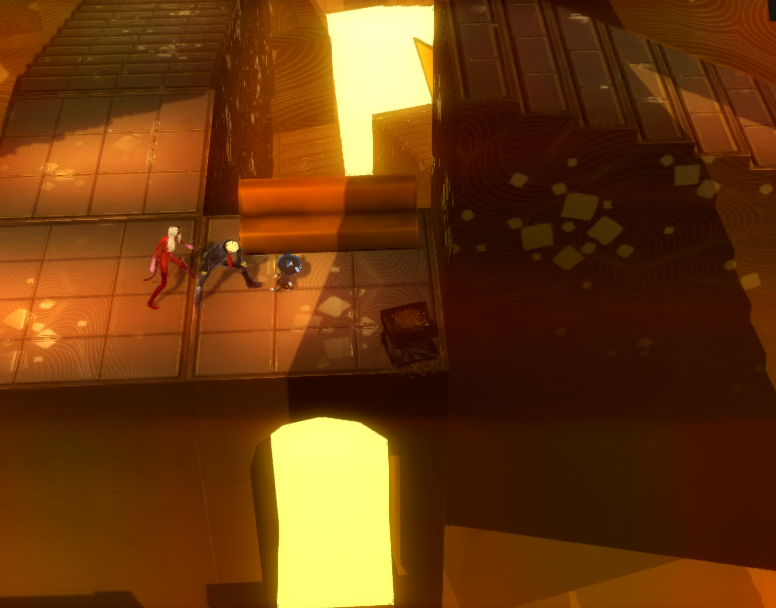
I am also having issues with Persona 5. In the second dungeon where you select the original painting. Joker disappears while walking through this room and I lose complete control, essentially causing the game to freeze. Has this happened to anyone else?
 raiderstudent
on 25 Aug 2019
raiderstudent
on 25 Aug 2019
Maybe try to disable 60fps patch
 CrabLugo
on 25 Aug 2019
CrabLugo
on 25 Aug 2019
Still issue?
 digitaldude555
on 8 Feb 2020
digitaldude555
on 8 Feb 2020
This was probably fixed already 100x over. Closeable.
 dio-gh
on 6 Jun 2020
dio-gh
on 6 Jun 2020
closing as dio suggested.
 elad335
on 27 Oct 2020
elad335
on 27 Oct 2020
Related issues
elad335
·
3Comments
 uaqlover
·
3Comments
uaqlover
·
3Comments
 Birch-san
·
3Comments
Birch-san
·
3Comments
 Emulator-Team-2
·
3Comments
Emulator-Team-2
·
3Comments
 On1ko
·
3Comments
On1ko
·
3Comments
Most helpful comment
closing as dio suggested.