Rpcs3: Suggestion: Add a line that shows your firmware
What about adding a line, that will show you your current firmware version in the "About RPCS3" tab?
 Hasster1
All 5 comments
Not needed. Everybody know that he just have FW 4.83. when he have PS3 right?(ONLY if you don't have pirate version) and now has been updated by PULL REQUEST to 4.83 firmware of RPCS3
 marosis
on 3 Nov 2018
marosis
on 3 Nov 2018
"About RPCS3" dialog doesn't sound like the right place.
Maybe on the log upon initialization and/or on settings dialog near the modules box?
It can be read from line 1 at dev_flash/vsh/etc/version.txt
 AniLeo
on 5 Nov 2018
AniLeo
on 5 Nov 2018
seems like it would be better to have it in help dropdown somewhere or toggable for the main window bar; somewhere out of the way. it seems necessary to have the updated firmware anyway, but for whatever reason (testing,etc) it seems like you would know which version you are using anyway.
 Marthgun
on 8 Nov 2018
Marthgun
on 8 Nov 2018
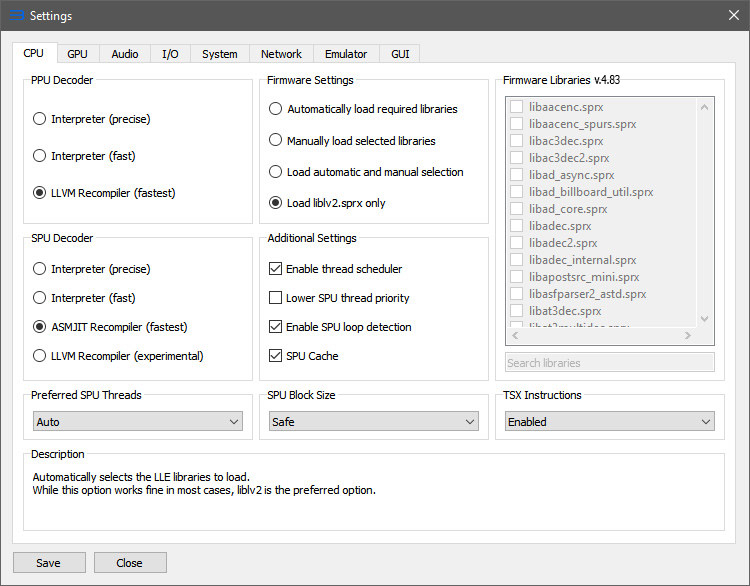
Or in the CPU tab,something like this
 vsub
on 8 Nov 2018
vsub
on 8 Nov 2018
Or in the CPU tab,something like this
This Is a good idea.
 Omaranwa
on 8 Nov 2018
Omaranwa
on 8 Nov 2018
Related issues
 xddxd
·
3Comments
xddxd
·
3Comments
 elad335
·
3Comments
elad335
·
3Comments
 kurosh10000
·
3Comments
kurosh10000
·
3Comments
 Birch-san
·
3Comments
Birch-san
·
3Comments
 altiereslima
·
3Comments
altiereslima
·
3Comments
Most helpful comment
Or in the CPU tab,something like this
