Rpcs3: Resolution Scale does not work with some games
Resolution scale works when playing as the female at the start of the game, but after taking control of the male character resolution scale no longer works which I have set 300%. Vulkan and OpenGL same issue. I'm using build RPCS3 0.0.5-6593-a5e6fc4e5 Alpha. This issue has always been present when i'm testing this game.
My specs is:
i7 8700K @ 5.1GHz
RAM: 16 GB 4200MHz
GPU: GTX 1050 Ti
OS: Windows 10 Pro x64
Here is the issue https://s17.postimg.org/x6goclm7h/Base_Profile_Screenshot_2018.03.25_-_21.15.20.60.png
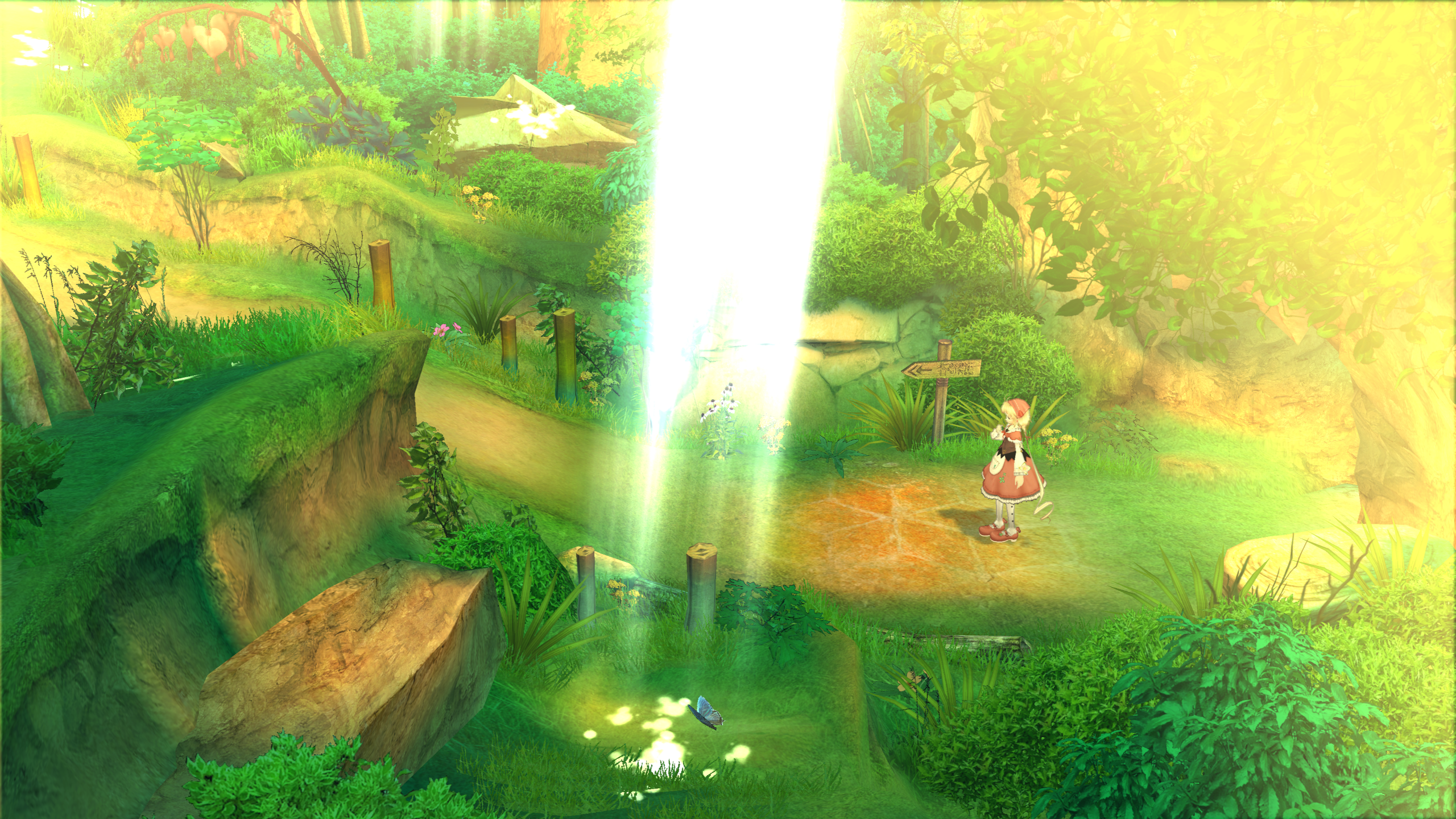
Here is how sharp it should look https://s17.postimg.org/hxqqyune5/Base_Profile_Screenshot_2018.03.25_-_21.21.58.25.png
 ghost
ghost
All 26 comments
Bugs caused by resolution scaling can only be resolved by moving the resolution scale threshold to avoid scaling images below a given size. Start at 1x1 and move up with increments of 16 or 32 until the problem clears itself.
That said, they are not real emulator bugs, games are not meant to be upscaled and are coded with the proper resolutions in mind. Closing as not an error.
 kd-11
on 26 Mar 2018
kd-11
on 26 Mar 2018
I tried what you're saying but in that one area the resolution scaling still isn't working. It's a bug with this game. Heck I tried 500% for Resolution Scale and 512x512 for Resoultion Scale Threshold. The graphics look pixaleted https://s17.postimg.org/a5ebvcs6l/Base_Profile_Screenshot_2018.03.26_-_11.08.40.32.png
ghost
on 26 Mar 2018
Resolution scaling is technically a hack, also github has an edit feature.
 Asinin3
on 26 Mar 2018
Asinin3
on 26 Mar 2018
Well I tried tinkering with every resolution scale yet the pixel count is still they same in that one area. Even at Resolution Scale 1x1 and 500% ( 6400x3600) the graphics is still pixelated with lots of jaggies in that one area. The first area of the game is fine and sharp, just the area where you play as the male is crap.

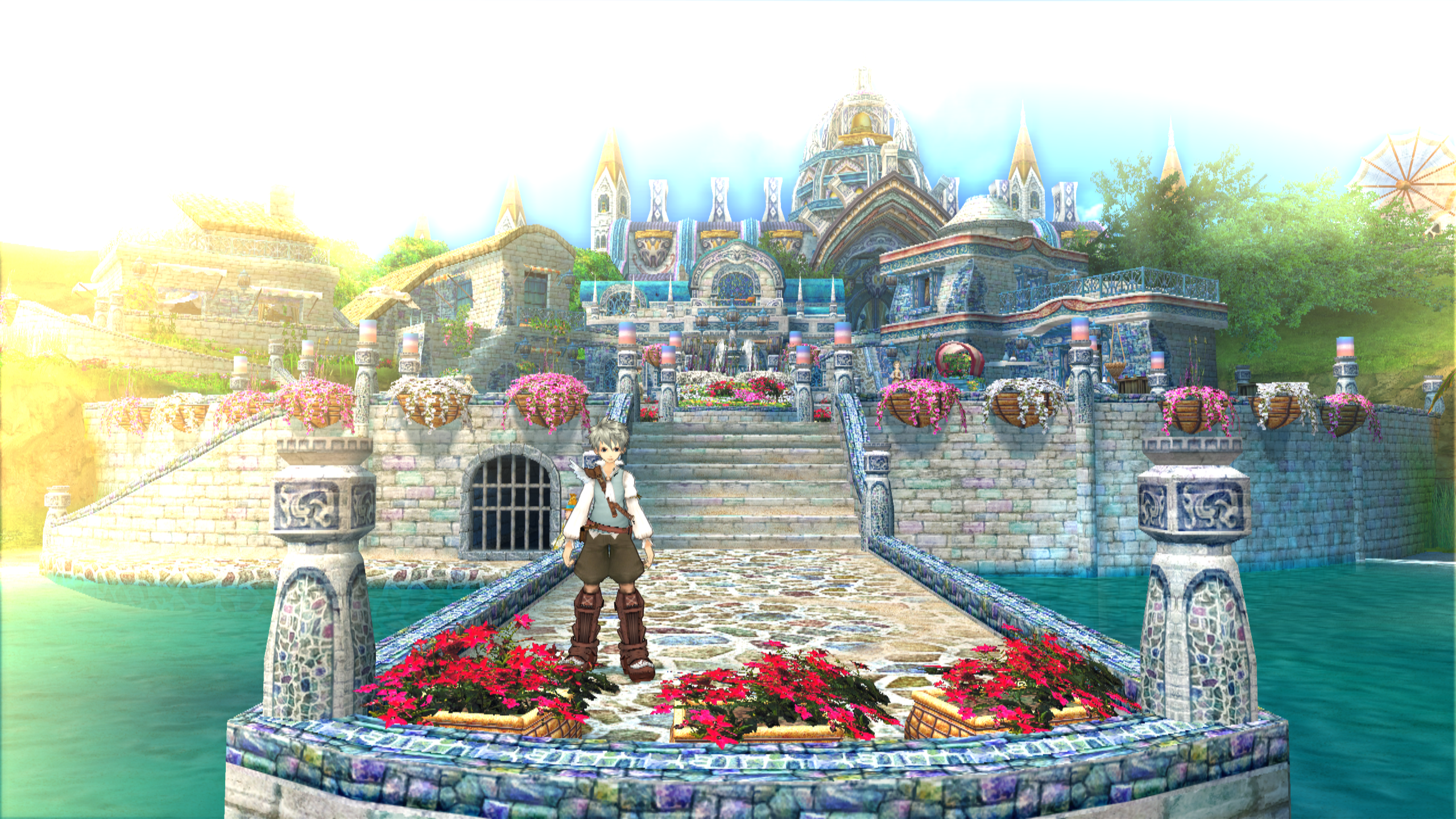
It's a bug, there's not doubt about it.
This is how crisp the graphics should look when rendering above the PS3s original resolution
ghost
on 26 Mar 2018
If you want support https://discord.me/RPCS3 #help channel is the place for it. As kd-11 said earlier, it's not a real emulator bug. That being said, this issue is very rare the vast majority of games do indeed work fine with resolution scaling. If you want to continue the discussion we can talk there on discord, we really don't want to have github spammed.
Asinin3
on 26 Mar 2018
It is a bug, because resolution scale should work properly throughout the game, not just one area.
ghost
on 26 Mar 2018
@Lumbeeslayer fuck off
 AniLeo
on 26 Mar 2018
AniLeo
on 26 Mar 2018
@Nikorasu95 not really, it depends on how the game renders stuff. Some textures may not scale in some parts. I'll tag @kd-11 for a final say
AniLeo
on 26 Mar 2018
It's not the textures that aren't scaling, it's the 3D models. Another game I tested where resolution scaling isn't consistent is Nier. I have to set that game to 600% scaling just for it to look crisp. Sounds like to me if this issue happens on more than one game it's a emulator bug with rsx. Now as you can see in the pictures I posted the quality is much sharper at the first part of the game vs the 2nd part where you play as the male.
ghost
on 26 Mar 2018
There is no rsx bug. I can prove that scaling is working; in fact I'm sure we had this conversation before. Even if we upscale the game does some 2d operations on the final image that force the emulator to downscale to whatever resolution the game is trying to render at (usually 720p). This is where the detail is lost. The only way to bypass such problems is patching the game executable itself to skip this step. So, render at native and zoom in and compare with the result with scaling - it is not the same. There are a few other games that do this as well like soul calibur 2 and nier. Resolution scaling tries to cheat ay emulating the ps3, hacks like that will never be fully compatible with every game (same thing goes for anisotropic filter overrides).
kd-11
on 26 Mar 2018
I'm renaming and tagging this issue as a discussion for future references, because it's not the first nor the last time people will ask about this
AniLeo
on 26 Mar 2018
Why not have an internal resolution option like in Dolphin? I spent a lot of time testing games in that emulator and the internal resolution feature is outstanding! They work perfect across all games and are consistent. I just can't find myself ever enjoying RPCS3 if there are games where the internal resolution doesn't work right. Can this issue not be fixed?? Eternal Sonata is also on XBOX 360 but Xenia progress is utter crap. There has got to be something you can do to fix issues with the emulator where resolution would be consistent across all games. As I said before I tried every slider in resolution thereshold and even cranked the internal scaler to 600%, yet that one area of the game still looks pixelated and jaggie. It's the same on Vulkan and OpenGL, It's only the first part of the game where it's sharp and detailed, until I reached the female character village and then it's stuck like that from that point on. It's really really weird. Can something not be done? Even setting the display resolution to 1920x1080 from the default 1280x720, the outcome is still the same. There's got to be something that can be done with the internal resolution feature to make things consistent.
ghost
on 26 Mar 2018
@RPCS3sucks Fix it then, retard
 Talkashie
on 26 Mar 2018
Talkashie
on 26 Mar 2018
When the salt is so big they have to create edgy accounts on GitHub
AniLeo
on 26 Mar 2018
That's not my job dumba** 😂 .
 RPCS3sucks
on 26 Mar 2018
RPCS3sucks
on 26 Mar 2018
LMAO, this shit is hillarious
AniLeo
on 26 Mar 2018
@RPCS3sucks not their either
They take donations, and that is only the _main_ devs. Others work for free. Grow up.
 Nicba1010
on 26 Mar 2018
Nicba1010
on 26 Mar 2018
Internal resolution scaling is the most used and favoured enhancement of any emulator. Should it not be perfected?
ghost
on 26 Mar 2018
I'm sure it will be adjusted at some point, but this emulator is in an alpha stage. These enhancements are not the main focus at the moment, nor should they be.
Talkashie
on 26 Mar 2018
Indeed it should @Nikorasu95 but the current aim is to perfect accuracy and make the games and software work perfectly the way it was intended. There will always be time for hacky things.
Nicba1010
on 26 Mar 2018
So you're saying the issue I'm having with Enternal Sonata and other games like it could be fixed in the future?
ghost
on 26 Mar 2018
Most certainly they could. Since rpcs3 is open source anyone could get around to it and fix it.
Nicba1010
on 26 Mar 2018
Now you're just making up assumptions that having "Internal Resolution" is possible here. As for display resolution, most games only support 1280x720 and won't change if you select 1920x1080.
AniLeo
on 26 Mar 2018
I'm confused, how I'm I making assumptions? I know internal resolution and display resolution aren't the same thing.
ghost
on 26 Mar 2018
He might have been talking to me, and that is why I said, _could_ not will.
Nicba1010
on 26 Mar 2018
Can this just be locked? There's nothing to be added, KD already said what had to be said, the issue is invalid and there's no way to fix this without patching the game.
 rodjun
on 27 Mar 2018
rodjun
on 27 Mar 2018
Related issues
Asinin3
·
3Comments
 uaqlover
·
3Comments
uaqlover
·
3Comments
 XeClutch
·
3Comments
XeClutch
·
3Comments
 LokiGrants
·
3Comments
LokiGrants
·
3Comments
 On1ko
·
3Comments
On1ko
·
3Comments
Most helpful comment
@Lumbeeslayer fuck off