Rpcs3: Geforce v390.65: No vulkan device was created

All 24 comments
Under "HKEY_LOCAL_MACHINE\SOFTWARE\Khronos\Vulkan\Drivers", create a new REG_DWORD, its has to be named "C:\Windows\System32\DriverStore\FileRepository\nv_dispi.inf_amd64_5601d21ccd639df9\nv-vk64.json", and the value is 0.
- -new driver install bug
 yxmline
on 9 Jan 2018
yxmline
on 9 Jan 2018
Confirmed to be a driver installation bug. Deregistering the manifest kills vulkan including the diagnosis tools provided by khronos like vulkaninfo.
 kd-11
on 9 Jan 2018
kd-11
on 9 Jan 2018
It's C:\Windows\System32\DriverStore\FileRepository\nvmii.inf_amd64_463ff046fd545b4a\nv-vk64.json
for notebook graphic cards.
 nex86
on 9 Jan 2018
nex86
on 9 Jan 2018
Can confirm that the issue is present, and yxmline's solution works, BUT... the specific folder name will differ based on the particular GPU chip and driver version you have installed, so don't use the exact folder he suggests. Instead, navigate to C:\Windows\System32\DriverStore\FileRepository and search for the file named nv-vk64.json. If there are multiples, choose the one that was created most recently. Then use the full path+filename of that file as the new registry entry as stated by yxmline.
 RiotDX
on 10 Jan 2018
RiotDX
on 10 Jan 2018
Thanks for the info @yxmline! I had to find the right folder path which was "C:\Windows\System32\DriverStore\FileRepository\nvdmi.inf_amd64_423cc2fecd1c7121\nv-vk64.json" & opened regedit location "HKEY_LOCAL_MACHINE\SOFTWARE\Khronos\Vulkan\Drivers" & then created the new REG_DWORD & set the value to 0. This worked for me.

 Tutankhamun8080
on 10 Jan 2018
Tutankhamun8080
on 10 Jan 2018
Navigate to C:\Windows\System32\DriverStore\FileRepository and search for the file named nv-vk64.json to get the right path for the new REG_DWORD file.
Tutankhamun8080
on 10 Jan 2018
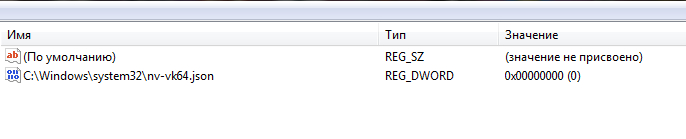
Is this value OK?
 isshininu
on 10 Jan 2018
isshininu
on 10 Jan 2018
@isshininu The path is wrong! You might have to rename it to the correct path for it to work. Navigate to C:\Windows\System32\DriverStore\FileRepository and search for the file named nv-vk64.json.


Tutankhamun8080
on 10 Jan 2018
@isshininu My path was "C:\Windows\System32\DriverStore\FileRepository\nvdmi.inf_amd64_423cc2fecd1c7121\nv-vk64.json" but, will be different for you because your GPU is different. You will have to search for the nv-vk64.json file.
Tutankhamun8080
on 10 Jan 2018
B-but i didn't change anything in registry by myself!
I have a laptop, nvidia driver version is 390.65.
vulkaninfo works, Vulkan device present in RPCS3.
isshininu
on 10 Jan 2018
@isshininu OK, that's good then! Yours is working properly.
Tutankhamun8080
on 10 Jan 2018
@isshininu The value "0" zero is OK.
Tutankhamun8080
on 10 Jan 2018
i don't have this probleme with my build compilled myself, but i have this with build appveyor, @kd-11 archive vulkan with lib inside have never update, maybe need update archive lib submodule for appveyor.
i have compiled master build myself, if user can say if works with 390 drivers
https://mega.nz/#!gN5jQIKC!nwc673tUxtf77E9MJqMrp9dlq63FNB8rwW994cTfCBc
 Zangetsu38
on 11 Jan 2018
Zangetsu38
on 11 Jan 2018
No version will ever work without an icd registered. This is very easy to show - delete the icd key and boot any vulkan application. Most applications will fall back to opengl or d3d if the icd key is missing since the runtime cannot see the hardware driver.
kd-11
on 11 Jan 2018
Fixed, like i have say, by just update Vulkan.7z
Zangetsu38
on 12 Jan 2018
It worked for me, my location is C:\Windows\System32\DriverStore\FileRepository\nvpcdi.inf_amd64_72fbac6575d684e6\nv-vk64.json
Be sure to take the nv-vk64.json file with the most recent date
 redyz13
on 14 Jan 2018
redyz13
on 14 Jan 2018
@Zangetsu38 that's because new vulkan versions have detection other than using icd register key. Applications/games compiled against old vulkan versions will not work and fall back to OGL/D3D as kd-11 said above. kd-11 opened a PR to update Vulkan, but this is still a problem with NVIDIA and Intel drivers, since they should be registering the icd key, otherwise they're breaking compatibility with applications compiled for older Vulkan libraries.
 AniLeo
on 14 Jan 2018
AniLeo
on 14 Jan 2018
@redxehanort don't needed change that, this probleme is now fixed, soon on master.
You can look this PR By KD with this Fix, after my search/test for fix problem.
https://github.com/RPCS3/rpcs3/pull/4053
@AniLeo yes, i have understund that ^^, i say just nows probleme is fixed for rpcs3
Zangetsu38
on 14 Jan 2018
I have removed regedit key, and with 0.0.4-7626 works perfectly .
Thanks, regards .
 Dani1977
on 15 Jan 2018
Dani1977
on 15 Jan 2018
Rpcs3 runs without the key but, can Xenia emu run with the key removed?
Tutankhamun8080
on 28 Jan 2018
i tried the regedit method C:\Windows\System32\DriverStore\FileRepository\nvpcdi.inf_amd64_72fbac6575d684e6\nv-vk64.json
but still not working.....
plz give me another ssolution for this
 msh4izee
on 26 Aug 2018
msh4izee
on 26 Aug 2018
This is no longer an issue for a long time, don't dig up old issues to ask for support, use the appropriate support channels. You have broken video entries.
AniLeo
on 26 Aug 2018
what do you mean by appropriate support channels???
i am having this issue right now..
i tried all these methods but still cant get vulkan option in rpcs3..
can u help me or not?
msh4izee
on 26 Aug 2018
Read the issue guidelines. The appropriate support channels are either Discord or the Forums, this is not a helpdesk.
AniLeo
on 26 Aug 2018
Related issues
 Luffykun007
·
3Comments
Luffykun007
·
3Comments
 kurosh10000
·
3Comments
kurosh10000
·
3Comments
 Xcedf
·
3Comments
Xcedf
·
3Comments
 Nezarn
·
3Comments
Nezarn
·
3Comments
 Birch-san
·
3Comments
Birch-san
·
3Comments
Most helpful comment
Under "HKEY_LOCAL_MACHINE\SOFTWARE\Khronos\Vulkan\Drivers", create a new REG_DWORD, its has to be named "C:\Windows\System32\DriverStore\FileRepository\nv_dispi.inf_amd64_5601d21ccd639df9\nv-vk64.json", and the value is 0.