Roundcubemail: The threaded view doesn't is not get bold on unread messages
_Reported by mrfrank on 30 Apr 2010 06:54 UTC as Trac ticket #1486701_
Hi folks,
if there are some read and some unread messages in a threaded view, the collapsed messages will be displayed with the read state of the Message in the highest level(the first message).
Let me give you an example:
Somebody wrote me, I 've createed a reply and the other one replyed too.
The gui displays the collapesd mails always as "read" because i read the first email. This is not very well because i don't recognize new mails easyly.
_Migrated-From: http://trac.roundcube.net/ticket/1486701_
 rcubetrac
All 22 comments
_Comment by @alecpl on 30 Apr 2010 07:41 UTC_
Works for me, but maybe I don't understand. Add some screenshots, describe your environment/browser.
rcubetrac
on 30 Apr 2010
_Owner changed by @alecpl on 30 Apr 2010 07:41 UTC_
=> _none_
rcubetrac
on 30 Apr 2010
_Milestone changed by @alecpl on 30 Apr 2010 07:41 UTC_
later => 0.4-stable
rcubetrac
on 30 Apr 2010
_Comment by @alecpl on 6 May 2010 09:44 UTC_
If thread is collapsed, the root message's subject is underlined. Works for me.
rcubetrac
on 6 May 2010
_Status changed by @alecpl on 6 May 2010 09:44 UTC_
new => closed
rcubetrac
on 6 May 2010
_Comment by kaz on 10 Aug 2010 15:37 UTC_
The UI is confusing because it introduces a different, inconsistent convention for indicating the unread status. I didn't notice this underline at all.
Moreover, the collapsed thread view still shows the properties of the root message in the conventional way.
Also, there is no thread-level indication for there being flagged messages in the thread. (And no, please don't jump the gun make the text italic to show this, LOL!)
There is too much overloading going on here. The collapsed thread should be regarded as a thread object, and show properties about the thread rather than those of the root message. A design which seems decent would be this:
- if the thread contains unread messages, show the subject in bold, and also turn on the blue star icon.
- if the thread contains flagged messages, show the subject in red, and also turn on the yellow star icon.
Basically, all of the visual indicators can simply be a boolean "OR" over the thread.
rcubetrac
on 10 Aug 2010
_Status changed by kaz on 10 Aug 2010 15:37 UTC_
closed => reopened
rcubetrac
on 10 Aug 2010
_Comment by @alecpl on 10 Aug 2010 16:42 UTC_
This is your opinion, our (and Thunderbird's developers) is different. You need to leave with this ;)
rcubetrac
on 10 Aug 2010
_Status changed by @alecpl on 10 Aug 2010 16:42 UTC_
reopened => closed
rcubetrac
on 10 Aug 2010
_Comment by kaz on 10 Aug 2010 17:06 UTC_
Thunderbird is a pile of crap I don't use.
Thanks for the CSS tip! Looking into the source, I can see how the mail states are incorporated into the document structure, and then visualized with CSS.
So the bolding behavior is achieved trivially:
--- roundcube.orig/skins/default/mail.css 2010-08-10 09:58:22.000000000 -0700
+++ roundcube/skins/default/mail.css 2010-08-10 10:00:29.000000000 -0700
@@ -816,7 +816,8 @@
/* thread parent message with unread children */
#messagelist tbody tr.unroot td.subject a
{
- text-decoration: underline;
- font-weight: bold;
- background-color: #FFFFFF;
}
#messagelist tr td.size
This is a good start; but I will refine the patch to get the nice icon behavior also.
rcubetrac
on 10 Aug 2010
_Comment by kaz on 10 Aug 2010 17:38 UTC_
Uh, it turns out there is already support in the skins for having an icon on the thread parent for denoting that it has unread children. It is the "unreadChildrenIcon", which is left undefined in the default/templates/mail.html. The code already handles this!
So now I have the text bolding, as well as the unread icon behavior. I'm hacking on the flag icon behavior.
rcubetrac
on 10 Aug 2010
_Comment by kaz on 10 Aug 2010 20:00 UTC_
My above CSS patch is idiotic; take out the background-color: #FFFFFF;. That only screws up the text when the list row is selected (and thus has a red background with white text).
All you want is:
/* thread parent message with unread children */
messagelist tbody tr.unroot td.subject a
{
font-weight: bold;
}
rcubetrac
on 10 Aug 2010
_Comment by kaz on 10 Aug 2010 22:04 UTC_
I added a patch which implements the behaviors I wanted (and presumably will work for the person who opened this bug also):
- if a collapsed thread has unread messages, the subject is bold, and the unread icon (blue star) shows in that list row.
- if a collapsed thread has flagged messages, the subject is colored red, and the flag icon (yellow star) appears in that list row.
Cheers ...
Note 1: I did not patch all of the .css files that work around for various version of explorer, etc.
Note 2: The patch also includes a fix for the bin/jsshrink.sh script not to bother shrinking files that are up to date (timestamp check, similar to the make utility).
rcubetrac
on 11 Aug 2010
_Comment by sergiocambra on 12 Aug 2010 07:11 UTC_
I like this patch because enable skins to set an icon and CSS to collapsed threads with flagged messages as you can do now with collapsed threads with unread messages.
Could you apply it leaving CSS changes out if you don't want them? Although I would move unread children icon below forwarded icon, just before unread icon.
rcubetrac
on 12 Aug 2010
_Comment by kaz on 12 Aug 2010 15:09 UTC_
sergiocambra wrote:
Could you apply it leaving CSS changes out if you don't want them?
Yes. In that case in the default skin the subject will be underlined if the thread has unread children, and will not be colored red if the thread has flagged children.
You can edit out that part of the patch. I should perhaps have separated it into two.
Also controversial may be that I patched in a choice for the unread children icon, which is left blank, and that I just used the unread message icon. It would be good if we had dedicated icons for this.
Although I would move unread children icon below forwarded icon, just before unread icon.
You mean if the thread root has been replied/forwarded, you want that icon to show, regardless of unread children? This is the original design and makes sense, because it's more important to know that the thread has unread messages than to know that the root message has been replied/forwarded. The list row for the collapsed thread should convey information about the thread as a whole.
rcubetrac
on 12 Aug 2010
_Comment by sergiocambra on 12 Aug 2010 22:22 UTC_
Replying to kaz:
You mean if the thread root has been replied/forwarded, you want that icon to show, regardless of unread children? This is the original design and makes sense, because it's more important to know that the thread has unread messages than to know that the root message has been replied/forwarded. The list row for the collapsed thread should convey information about the thread as a whole.
I think replied/forwarded can have priority over unread icon because you know thread have unread children because is bold too.
rcubetrac
on 13 Aug 2010
_Comment by kaz on 13 Aug 2010 18:34 UTC_
I have updated myself to the 0.4 release and rebased this patch.
In the 0.4 release, the behavior is much more stable. Bug #1486907 does not occur. The state of the icons always appears consistent (as far as I have been able to test so far). In 0.4-beta, you will see an inconsistent state of the thread parent subject underline, and this affects the patch also: the flagged and unread icons, and the subject line effects, will be somewhat unreliable (see #1486907 for details).
rcubetrac
on 13 Aug 2010
_Comment by kaz on 25 Jul 2013 00:22 UTC_
Hey everyone; I upgraded to 0.9.2 this week. If I have time, I will rework the patch to work with the new version.
I haven't tried switching skins, and so I wonder whether the message status icons are fixed, or whether they come from the theme. If they are from the theme, it complicates things slightly (an "unread children" icon will have to be made for each theme; but luckily there are just two in the shipping distro).
The code has probably changed too much for the patches to apply.
rcubetrac
on 25 Jul 2013
Hey!
This is still bad UX in 1.3.3.
please add to the "later" milestone.
Current
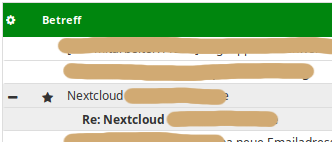
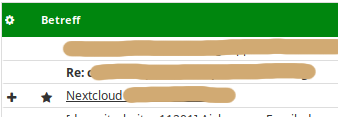
I propose
When collapsed, the title should be bold. when uncollapsed, only the actual unread messages should be bold.
Also, remove the star to the left of the title. Thats confusing, since there is another star to the right (not in picture). Also, a star for read/unread is a bad idea anyway, see my comment here https://github.com/roundcube/roundcubemail/issues/6636#issuecomment-466644547
All in all, I hope that roundcube moves to a real conversation view as proposed here https://github.com/roundcube/roundcubemail/issues/499
 alexanderdd
on 23 Feb 2019
alexanderdd
on 23 Feb 2019
Wow this is almost 10y old and still this weird UI issue exists. Yes the Thunderbird devs see it differently. Seems to be that the devs are not using their product at all.
 NickyWeber
on 19 Mar 2019
NickyWeber
on 19 Mar 2019
it's there again v 60.8.0 (64-bit)
 mitchobrian
on 11 Jul 2019
mitchobrian
on 11 Jul 2019
This fixes this problem:
Exit Thunderbird.
Create a folder called "Chrome" under the profile directory for Thunderbird located at:
C:Users\"YourUserName"AppData\RoamingThunderbird\Profiles\1oykatr9.default\
Substitute "1oykatr9.default" for your profile name. If there is more than one .default folder, then it is the folder with all your personal data....Mail..etc.
Create a file in the Chrome folder called userChrome.css using your text editor.
Paste the following code into the file and save:
/* Bold thread with unread messages */
treechildren::-moz-tree-cell-text(container, closed, hasUnread, read)
{
font-weight: bold !important;
}
Open Thunderbird.
Everything should work fine.
 sunshineisfine
on 12 May 2020
sunshineisfine
on 12 May 2020
Related issues
 jfcherng
·
5Comments
jfcherng
·
5Comments
 julianwap
·
3Comments
julianwap
·
3Comments
 Sebi94nbg
·
5Comments
Sebi94nbg
·
5Comments
 MichaelGNicholas
·
4Comments
MichaelGNicholas
·
4Comments
 Takika
·
3Comments
Takika
·
3Comments
Most helpful comment
it's there again v 60.8.0 (64-bit)