Roslyn: Roslyn Compilation and mscorelib.dll
I used "ef dbcontext scaffold" tools based on .NET Core and SQL Server (AdventureWorks) and I generated a source code that is uploaded.
The source code is valid and compiled in ClassLibrary but I need Load and compile it with Roslyn.
ef_source.cs.txt
so I tried the below extension method
public static Type[] ToTypes(this string source, out IEnumerable<string> failures)
        {
            SyntaxTree syntaxTree = CSharpSyntaxTree.ParseText(source);
            string assemblyName = Path.GetRandomFileName();
            var assemblyPath = Path.GetDirectoryName(typeof(object).GetTypeInfo().Assembly.Location);
            List<MetadataReference> references = new List<MetadataReference>();
            var referencedAssemblies = Assembly.GetEntryAssembly().GetReferencedAssemblies();
            foreach (var referencedAssembly in referencedAssemblies)
            {
                var loadedAssembly = Assembly.Load(referencedAssembly);
                references.Add(MetadataReference.CreateFromFile(loadedAssembly.Location));
            }
                        references.Add(MetadataReference.CreateFromFile(typeof(HashSet<>).GetTypeInfo().Assembly.Location));
            references.Add(MetadataReference.CreateFromFile(typeof(object).GetTypeInfo().Assembly.Location));
            references.Add(MetadataReference.CreateFromFile(typeof(Enumerable).GetTypeInfo().Assembly.Location));
            references.Add(MetadataReference.CreateFromFile(typeof(DbContext).GetTypeInfo().Assembly.Location));

            /*
            references variable contains these MetadataReference =>

System.Runtime.dll
System.Runtime.InteropServices.dll
System.Reflection.dll
System.IO.dll
System.Text.RegularExpressions.dll
System.ComponentModel.Primitives.dll
DotLiquid.dll
System.Diagnostics.Debug.dll
System.Collections.dll
Microsoft.Extensions.Logging.Abstractions.dll
Microsoft.CodeAnalysis.dll
System.Threading.Tasks.dll
Microsoft.CodeAnalysis.CSharp.dll
Microsoft.CodeAnalysis.Scripting.dll
System.Collections.Immutable.dll
System.Linq.dll
System.Runtime.Extensions.dll
System.Threading.dll
System.Text.Encoding.dll
System.Reflection.Extensions.dll
Microsoft.CodeAnalysis.CSharp.Scripting.dll
System.Runtime.Loader.dll
Microsoft.EntityFrameworkCore.dll
System.Collections.dll
System.Private.CoreLib.ni.dll
System.Linq.dll
Microsoft.EntityFrameworkCore.dll
            */

            CSharpCompilation compilation = CSharpCompilation.Create(
                assemblyName,
                new[] { syntaxTree },
                references.ToArray(),
                new CSharpCompilationOptions(OutputKind.DynamicallyLinkedLibrary));
            using (var ms = new MemoryStream())
            {
                EmitResult result = compilation.Emit(ms);
                if (!result.Success)
                {
                    var errors = new List<string>();
                    var diagnostics = result.Diagnostics.Where(diagnostic =>
                        diagnostic.IsWarningAsError ||
                        diagnostic.Severity == DiagnosticSeverity.Error);
                    foreach (Diagnostic diagnostic in diagnostics)
                        errors.Add(string.Format("{0}: {1}", diagnostic.Id, diagnostic.GetMessage()));
                    failures = errors;
                }
                else
                {
                    failures = null;
                    ms.Seek(0, SeekOrigin.Begin);
                    Assembly assembly = AssemblyLoadContext.Default.LoadFromStream(new MemoryStream(ms.ToArray()));
                    Type[] types = assembly.GetTypes();
                    return types;
                }
            }
            return null;
        }
and for Compilation and GetTypes
IEnumerable<string> failures;
var types = ef_source.ToTypes(out failures); // ef_source => attachment
I have more that 800 errors !
but most errors are dependent on mscorelib.dll
CS0012: The type 'Object' is defined in an assembly that is not referenced. You must add a reference to assembly 'mscorlib, Version=4.0.0.0, Culture=neutral, PublicKeyToken=7cec85d7bea7798e'.
 HamedFathi
All 18 comments
16810
 HaloFour
on 31 Jan 2017
HaloFour
on 31 Jan 2017
@HaloFour
No way ? any temporary solution ?!?! I need to compile the source on the fly with Roslyn in .NET Core.
HamedFathi
on 31 Jan 2017
Just noting that the issues are similar as it can't resolve System.Object.
I wonder if you're mixing CoreCLR and non-CoreCLR assemblies in your references?
HaloFour
on 31 Jan 2017
@HaloFour
I use and must use .NET Core. this is my project.json.
{
  "version": "1.0.0-*",
  "buildOptions": {
    "embed": "**/AdventureWorksSource.txt",
    "emitEntryPoint": true
  },

  "dependencies": {
    "Microsoft.CodeAnalysis.CSharp": "1.3.2",
    "Microsoft.Extensions.Logging.Abstractions": "1.1.0",
    "DotLiquid": "2.0.64",
    "Microsoft.NETCore.App": {
      "type": "platform",
      "version": "1.0.1"
    },
    "System.ComponentModel.Primitives": "4.3.0",
    "System.Runtime.Loader": "4.3.0",
    "Microsoft.CodeAnalysis.Scripting.Common": "1.3.2",
    "Microsoft.CodeAnalysis.CSharp.Scripting": "1.3.2",
    "Microsoft.EntityFrameworkCore": "1.1.0"
  },

  "frameworks": {
    "netcoreapp1.0": {
      "imports": "dnxcore50"
    }
  }
}
Have you tried to add a reference to "mscorlib.dll"?
 tmat
on 31 Jan 2017
tmat
on 31 Jan 2017
There are two approaches to runtime code generation:
1) Compile against runtime (implementation) assemblies
This is what C# Scripting API currently does. There are a few gotchas with this approach:
- the implementation assemblies currently contain some duplicate public types
- the implementation assemblies change with releases, so code that compiles against one version of CoreCLR might not compile against newer version.
The APIs are backward compatible, however compiler overload resolution might prefer an API added in the new version instead of the one that it used to pick before.
The Scripting APIs use Trusted Platform Assembly list to locate the implementation assemblies on CoreCLR.
You can get a list of semicolon-separated paths to these .dlls like so (see RuntimeMetadataReferenceResolver implementation):
C#
AppContext.GetData("TRUSTED_PLATFORM_ASSEMBLIES")
Enumerate this and find paths to assemblies you're interested in (you'll find "mscorlib.dll" on that list too).
You can use RuntimeMetadataReferenceResolver to do this for you.
2) Compile against reference (contract) assemblies
This is what the compiler does when invoked from msbuild. You need to decide what reference assemblies to use (e.g. netstandard1.5). Once you decide, you need to get them from nuget packages and distribute them with your application, e.g. in a form of embedded resources. Then in your application extract the binaries from resources and create MetadataReferences for them. Unfortunately, we don't currently have any tool that would do this for you.
This approach has the benefit of stable APIs - the reference assemblies will never change, so your code will work on future versions of CoreCLR runtimes.
UPDATE: To find out what reference assemblies you need and where to get them you can create an empty .NET Core library, set the target framework to the one you need to target, build using msbuild /v:detailed and look for csc.exe invocation in msbuild output. The command line will list all references the C# compiler uses to build the library (look for /reference command line arguments).
tmat
on 31 Jan 2017
@tmat
Thanks
first about your question
I added below code based on this approach http://stackoverflow.com/a/39260735/6768721
            var mscorlib = @"C:\Program Files\dotnet\shared\Microsoft.NETCore.App\1.0.1\";
            var coreDir = Directory.GetParent(mscorlib);
            references.Add(MetadataReference.CreateFromFile(coreDir.FullName + Path.DirectorySeparatorChar + "mscorlib.dll"));
seems it works and solve the mscorelib errors but the location is hard coded
Is there any way to find smart and automatically the mscorelib location ? (cross platform solution)
second about your brilliant explanations
1) C# scripting can not help me because I have namespaces and these are so important for me but ScriptEngine can not work with any namespaces
2) yes the good aproach
HamedFathi
on 31 Jan 2017
@HamedFathi
You don't need to use the Scripting APIs to compile the code. You can just use the RuntimeMetadataReferenceResolver to resolve the assemblies, which would allow you to avoid hardcoding the reference paths to the implementation assemblies.
tmat
on 31 Jan 2017
@tmat
Can you rewrite my source code (first post) with "RuntimeMetadataReferenceResolver " ? because I am not familiar with it.
HamedFathi
on 31 Jan 2017
@HamedFathi Did you figure out the answer to this question?
 gafter
on 9 Feb 2018
gafter
on 9 Feb 2018
@gafter, Unfortunately not. Finally, I had to find the mscorlib.dll file in C:\Program Files\dotnet folder and introduce it to the compiler like below. (I know this is a disaster! and this is not a cross-platform way)
var mscorlib = @"C:\Program Files\dotnet\shared\Microsoft.NETCore.App\1.0.1\";
            var coreDir = Directory.GetParent(mscorlib);
            references.Add(MetadataReference.CreateFromFile(coreDir.FullName + Path.DirectorySeparatorChar + "mscorlib.dll"));
While I was expecting to work in the following way.
references.Add(MetadataReference.CreateFromFile(typeof(object).GetTypeInfo().Assembly.Location));
still, I don't know what is the problem!
HamedFathi
on 10 Feb 2018
Hamed
This coment could fix you're issue ???
https://github.com/dotnet/roslyn/issues/22905#issuecomment-342468835
Actually, i'am to working on solution that could create class model, generate migrations, and all source code will compile to assembly ! Its not simple as i thoght !
Could U share a project, I wanna see how u're solution is constructed !
 Diaskhan
on 14 Feb 2018
Diaskhan
on 14 Feb 2018
@Diaskhan
See my repository RoslynExtension
@gafter
I checked the latest version right now. Everything is correct. so I closed the issue :)
HamedFathi
on 17 Feb 2018
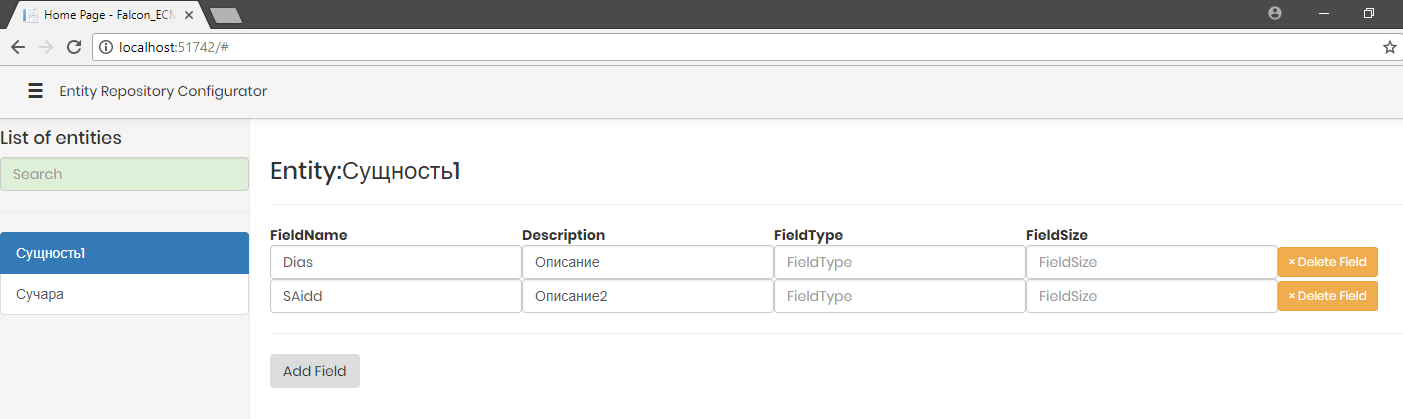
1.HamedFathi i have question, ure tryig to create RepositoryModel ?
2.If yes Maybe we unite our forces ???
Diaskhan
on 17 Feb 2018
@Diaskhan
Unfortunately, I already had such an idea, but I did not follow it. no experience now :(
HamedFathi
on 17 Feb 2018
There One man already maded generation EF model via Fluent Api.
https://github.com/dr-noise/PolyGen
But the problem, that enterpise system must have a GUI configurator !
If we unite our forces, we could do opensource GUI generator for EF models,and other users will give-it thanks to us,
after what Maybe we could added it to https://github.com/thangchung/awesome-dotnet-core
Hamed what do think about it ???
Diaskhan
on 19 Feb 2018
I have already maded SPA client. Another step is generate compilable model for, and generation assembly !
Diaskhan
on 19 Feb 2018
@Diaskhan
Sorry, I have no time. I am working on AureliaToolbelt. I can not help you.
HamedFathi
on 19 Feb 2018
Related issues
 johndog
·
3Comments
johndog
·
3Comments
 joshua-mng
·
3Comments
joshua-mng
·
3Comments
 glennblock
·
3Comments
glennblock
·
3Comments
 MadsTorgersen
·
3Comments
MadsTorgersen
·
3Comments
 AdamSpeight2008
·
3Comments
AdamSpeight2008
·
3Comments
Most helpful comment
@tmat
Can you rewrite my source code (first post) with "RuntimeMetadataReferenceResolver " ? because I am not familiar with it.