Rocket.chat: [BUG] Profile picture changes with change in username for a user
Description:
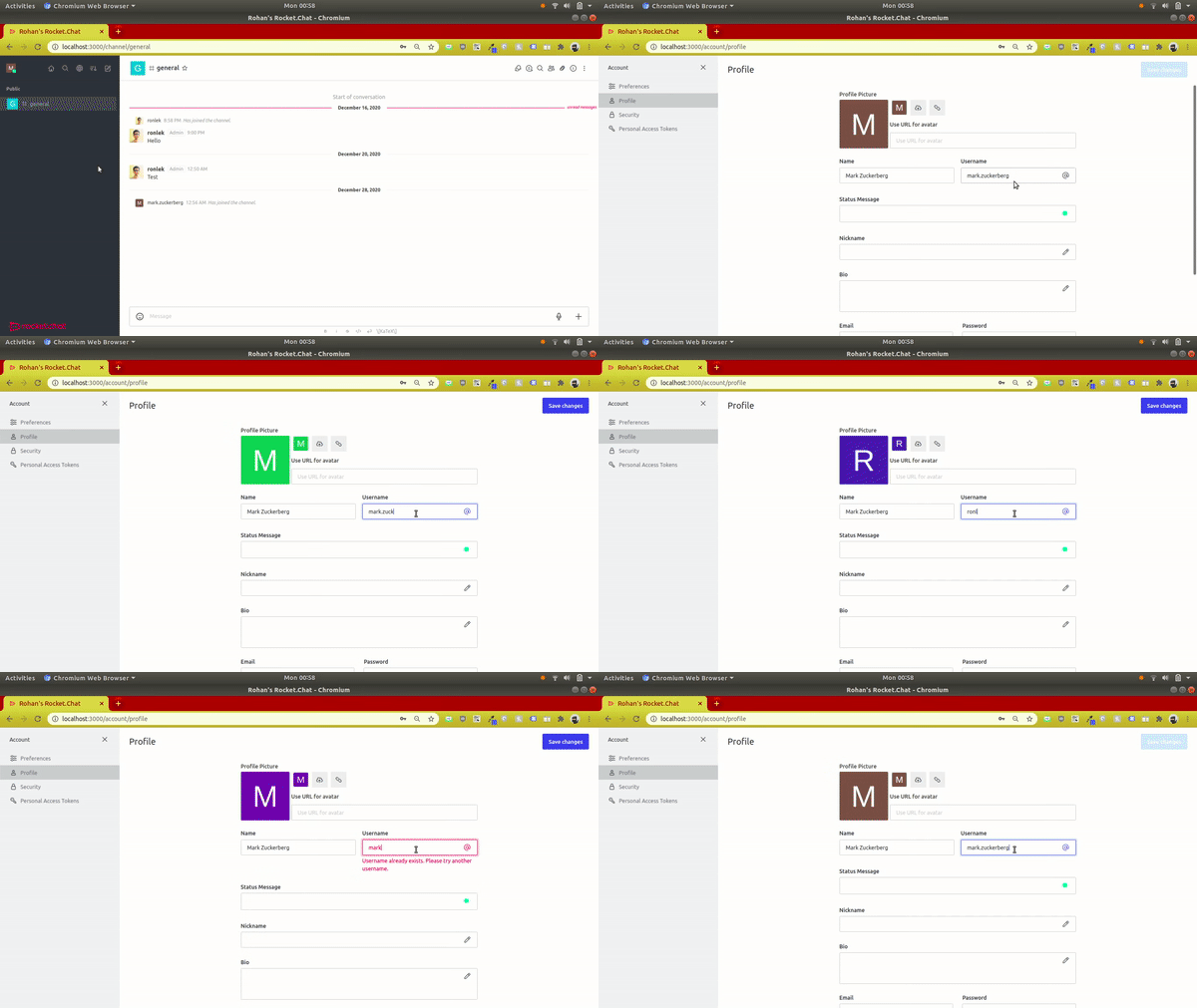
As and when the username for a user is changed, the user's corresponding profile picture also changes automatically. In case the user justs wants to change her username she would have to re-upload her profile picture back again unless she selects her current profile picture from the right every time before changing the username.
Moreover, if an existing username is typed, that user's profile picture appears. Only a message saying "Username already exists" would suffice without changing the profile picture.
Steps to reproduce:
- Click on your profile picture on the top-left.
- Select My Account.
- Edit your username.
Expected behavior:
The profile picture remains the same and only the username changes. If an already taken username is entered, the profile picture of that user shouldn't appear.
Actual behavior:
The profile picture changes as and when the username changes. On clicking "Save Changes" the changed profile picture appears.
Server Setup Information:
- Version of Rocket.Chat Server: 3.9.3
- Operating System: Ubuntu
- NodeJS Version: 12.18.2
- MongoDB Version: 4.4.2
Client Setup Information
- Desktop App or Browser Version: Google Chrome
- Operating System: Ubuntu
 RonLek
All 7 comments
Can I work on this issue?
 b2pacific
on 29 Dec 2020
b2pacific
on 29 Dec 2020
Sir, Should the suggestion avatar image change with the change in the username or it should also be fixed.
 iamtushar324
on 29 Dec 2020
iamtushar324
on 29 Dec 2020
Looks like it may be addressed in Rocket.Chat 3.10. Noted that the default avatar changes letter (not colour) as appropriate only after saving, and custom avatars are left intact.
https://github.com/RocketChat/Rocket.Chat/pull/19805 - For reference
 MJPGPleasant
on 29 Dec 2020
MJPGPleasant
on 29 Dec 2020
Looks like it may be addressed in Rocket.Chat 3.10. Noted that the default avatar changes letter (not colour) as appropriate only after saving, and custom avatars are left intact.
Ok Got it
iamtushar324
on 29 Dec 2020
Please Review My fix https://github.com/RocketChat/Rocket.Chat/pull/19991
iamtushar324
on 29 Dec 2020
iamtushar324
on 29 Dec 2020
I believe the Default avatar "suggestion" should always show the color and letter changing, but the actual profile pic should only change when one of the buttons is clicked.
 gabriellsh
on 29 Dec 2020
gabriellsh
on 29 Dec 2020
Related issues
 djeber
·
3Comments
djeber
·
3Comments
 brendanheywood
·
3Comments
brendanheywood
·
3Comments
 Kiran-Rao
·
3Comments
Kiran-Rao
·
3Comments
 lunitic
·
3Comments
lunitic
·
3Comments
 amayer5125
·
3Comments
amayer5125
·
3Comments
Most helpful comment
I believe the Default avatar "suggestion" should always show the color and letter changing, but the actual profile pic should only change when one of the buttons is clicked.