Rocket.chat: Memory Leak/ Garbage collection issue Version 2.4.2
Hi All,
I am experiencing an issue with memory growing out of control. I am running RC on Ubuntu 16.04 using SNAPS. I'm having a hard time tracking down what is causing it, but the best I can guess/tell from observations is that it has to do with file uploads that users are doing. I can watch the RAM amount increase as file transfers come in monitoring network with iftop. This grows until the RAM is totally full and things start to hang. The amount of RAM has no bearing, it will grow and consume whatever is available. I increased the RAM available from 16GB to 24GB to test this theory, and all it does is delay the inevitable. Both node and mongod seem to grow at roughly the same rate in RAM usage.
Hopefully this is helpful information and not a duplicate of #15624 #13602 #12880 #6588 #6552
If it is a duplicate feel free to merge mine in with someone else, I just didn't want to muddy the waters of their ticket, and I feel that mine provides potentially more information. If you need/want specific logs etc and I am happy to oblige.
Thank you for the fantastic App (: I hope you all are able to get enough people on board to start tackling the open issues log Some of those issues I referenced above are open from 2017 :/
 matthewbassett
All 30 comments
hi @matthewbassett .. thanks for the infos.. I have some other questions:
- how long it takes to eat all RAM available?
- do you have any charts to share showing the RAM increase that co-relates to file uploading?
- how many users are using your server?
thanks for your understanding as well.. it's always hard for us decide whether focus on github issues or developing new features.. we do our best.
 sampaiodiego
on 17 Feb 2020
sampaiodiego
on 17 Feb 2020
another important question, what storage type are you using?
sampaiodiego
on 18 Feb 2020
Thanks for getting back, my apologies for the delay in my response. I work for an international school in China, so life is a little crazy right now as I'm sure you can imagine! q:
I just had RC use up all of the 24GB of RAM and need to be restarted again. The amount of time it takes to eat up all the RAM varies greatly. overnight it won't add anything, then throughout the day it just steadily climbs. Increasing to 24GB gives me maybe 3-5 days of uptime at this point before I need to restart? I will try to keep better track of the timing so we have more accurate data.
We have ~1400 users, generally between 100-300 online at any given time. Many of the users rarely use the service, a good group use it a great deal.
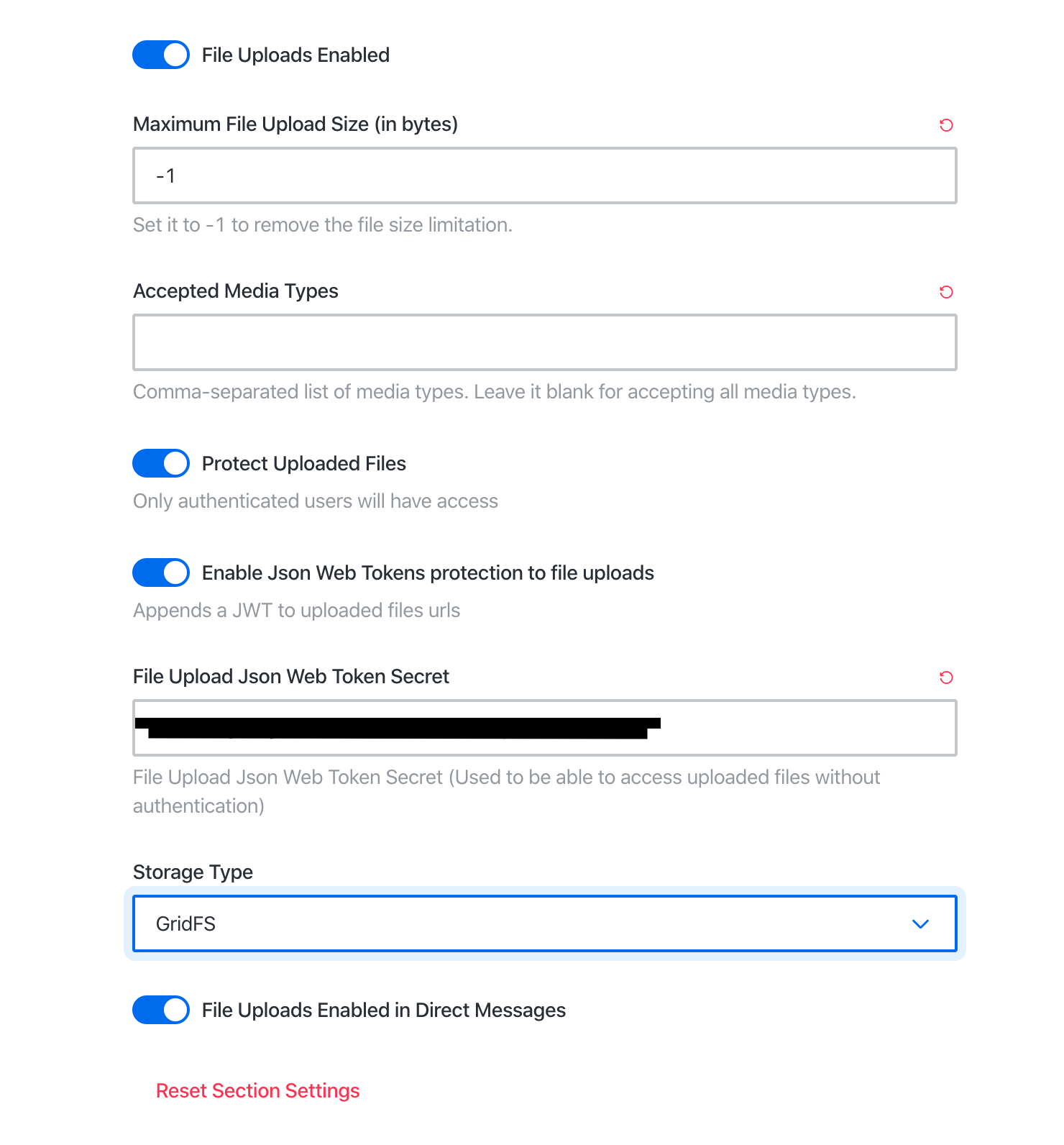
Storage type: GridFS. See attached for further settings
matthewbassett
on 19 Feb 2020
I actually came up with some ideas for charting RAM usage and network usage over time to see if I can come up with some correlations. I'll start working on that and post results here.
matthewbassett
on 19 Feb 2020
I monitored a memory leak and found out that this is a nodejs.
 UAnton
on 20 Feb 2020
UAnton
on 20 Feb 2020
For me both nodejs and mongod increase at a pretty similar rate. @UAnton are you seeing similar things? or is your nodeJS growing faster than mongo?
matthewbassett
on 21 Feb 2020
@sampaiodiego any further thoughts with the information provided?
matthewbassett
on 21 Feb 2020
Here is some data from the graphing I setup. I wouldn't say its exactly conclusive, but certainly the memory drain starts when traffic picks up.

Interestingly enough you can see some things requiring memory, but then it springs back. So it must be something very specific that is causing the drain.
matthewbassett
on 21 Feb 2020
Sorry, had my graph set to last 6 hours. here is a more comprehensive shot of the whole time I have been monitoring:
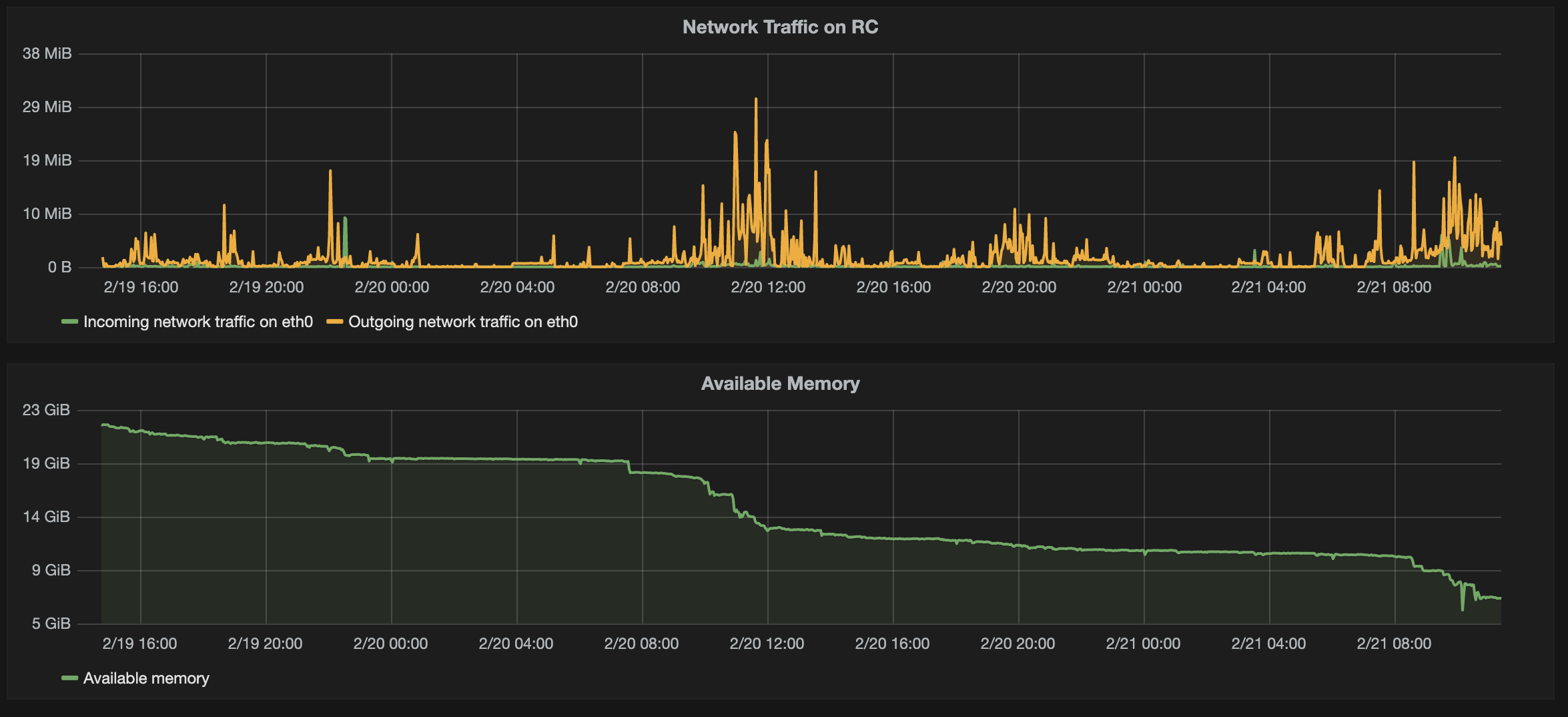
I wouldn't call it conclusive by any means, but I certainly think it supports my theory a bit. At least proves that high usage times cause the available RAM to drop and it does not recover during low use times, but it also doesn't drop further during low usage times.
matthewbassett
on 21 Feb 2020
Hi wanted to bump this again. Any movement on looking into this or any further data needed to troubleshoot. I am now on 2.4.11 and I am still seeing this issue regularly. I have had to restart the server several times in the past week.
matthewbassett
on 17 Mar 2020
Hi @matthewbassett . We made some improvements on RC version 3.0 (specially regarding the file upload, that also 'helps' to create this memory leak). Maybe, if you are interested, you can install another server of RC 3.0 and compare both behaviors.
We will analyze/investigate this memory leak situation as whole, but we cannotgive an ETA right now. Thanks for the detailed analysis, so far.
 rsjr
on 17 Mar 2020
rsjr
on 17 Mar 2020
@matthewbassett do you have Admin > Logs > Prometheus enabled?
 rodrigok
on 18 Mar 2020
rodrigok
on 18 Mar 2020
@rsjr Thanks for the thoughts! Glad there has been some progress, and I really appreciate you all looking into this. I will work on getting a 3.0 instance up and running (:
matthewbassett
on 19 Mar 2020
@rodrigok I do not have Prometheus enabled. Should I?
matthewbassett
on 19 Mar 2020
Adding some further information to this issue as I have more time to watch it and it becomes more of a problem for our org. My new theory is that it might have something do with streaming video from the RC server? I have a user that posts weekly videos that a good chunk of our org watches. This hits the server pretty hard on downloads, and I am also seeing the RAM usage use up 24GB in less than 24 hours now.
thoughts?
matthewbassett
on 30 Mar 2020
I have the same problem. My server has only 54 registered users, but in two days the server consumes about 28GB in less than 24 hours.
I disabled video uploading to see if it resolves, but I don't think that can be it.
 giovanecoca
on 7 Apr 2020
giovanecoca
on 7 Apr 2020
@matthewbassett After upgrading to version 3.0.12 the problem appears to have been solved.
giovanecoca
on 8 Apr 2020
Sweet! that is good news! Unfortunately I'm running my server on a snap.
Any chance this will get a back port fix so I can get it a bit sooner?
Otherwise I'll just keep restarting every fews days until I can get there q:
Matt Bassett
On Thu, Apr 9, 2020 at 1:42 AM Giovane Coca notifications@github.com
wrote:
@matthewbassett https://github.com/matthewbassett After upgrading to
version 3.0.12 the problem appears to have been solved.—
You are receiving this because you were mentioned.
Reply to this email directly, view it on GitHub
https://github.com/RocketChat/Rocket.Chat/issues/16586#issuecomment-611095767,
or unsubscribe
https://github.com/notifications/unsubscribe-auth/ABZNGNFJ6WNYOBQWLQURGPTRLSZP3ANCNFSM4KUHYVAA
.
matthewbassett
on 9 Apr 2020
@matthewbassett actually version 3.0.10 is already available via snap on the channel 3.x/stable
sudo snap install rocketchat-server --channel=3.x/stable
more details at https://snapcraft.io/rocketchat-server
sampaiodiego
on 9 Apr 2020
@sampaiodiego would you recommend this jump for a production server? I'm assuming that the 3.x line will come to latest/stable as well eventually? I guess I'm a little hesitant to jump my server, and then get into a situation where I'm needing to jump back to latest/stable at some point... thoughts?
matthewbassett
on 10 Apr 2020
3.0 is pretty stable right now, I definitely recommend upgrading, as we've being doing changes to improve performance month after month..
but I'd always recommend to test before upgrading and making a backup of your database.. sometimes it is hard to rollback due to database changes.
sampaiodiego
on 15 Apr 2020
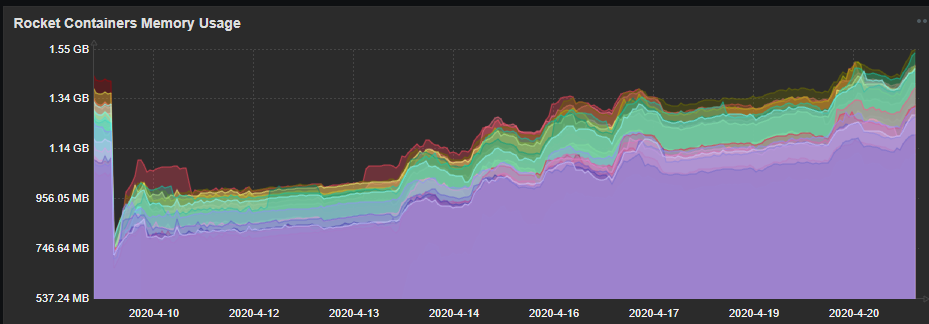
Hi, in our installation we are using Docker containers. We are observing that RAM usage is
daily increasing. At start usage was about 700-800 MB per container. During 12 days increased to about 1,5 GB per container and grow. Could you check what causing this behaviour. I have attached graph with RAM usage.
 emikolajczak
on 24 Apr 2020
emikolajczak
on 24 Apr 2020
We have similar memory leak problem, but not so speedy.
We have File upload enabled, maximum size is 30Mb, storage - S3 (Minio)
We have about 3000 users connected everyday.
We have 12 instance on RC running in docker on 3 VM with CentOS7 (12CPU, 16Gb RAM)
Currently we are on 3.0.3, but will be at 3.1.1 in near future.
Here is a available memory graph for one of our 3 VM
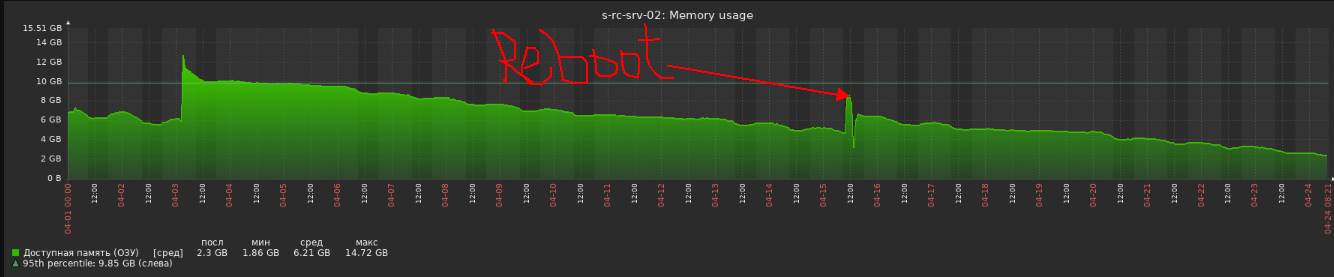
Reboot is a necessary solution for big problem described here https://github.com/RocketChat/Rocket.Chat/issues/17310
As you can seem memory is leaking in our case, but not so quickly like other deployments in that issue.
After upgrading to 3.1.1 we plan to start using great monitoring https://github.com/RocketChat/Rocket.Chat.Metrics provided by @frdmn and I hope I will help us to find memory leaking root cause.
 ankar84
on 24 Apr 2020
ankar84
on 24 Apr 2020
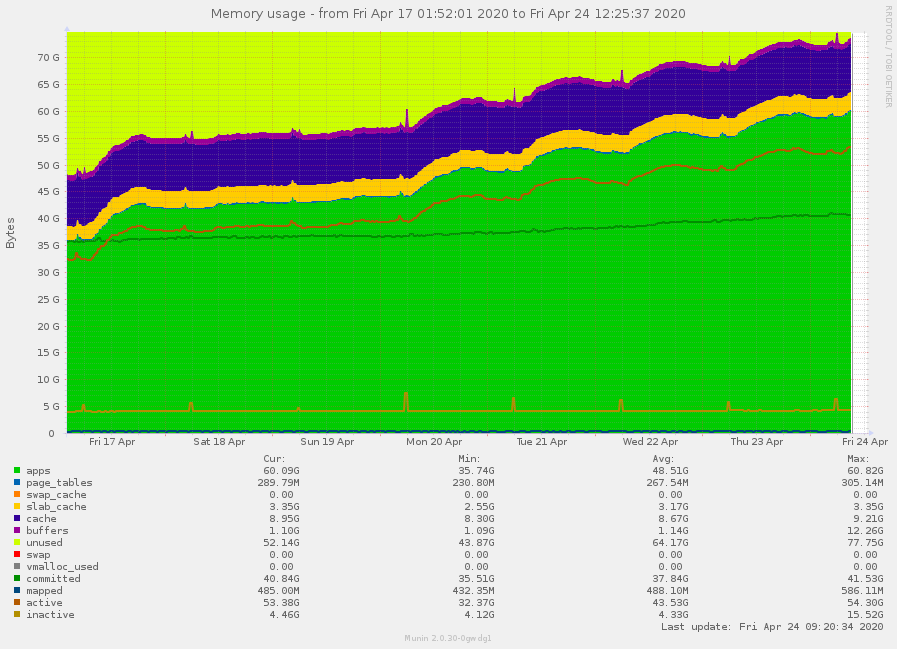
We experience memory leaks as well.
Version 3.1.1
File upload enabled: filesystem, max 20MB
20 instances, max. 2500 users connected.
Docker on ubuntu 16.04
 bbrauns
on 24 Apr 2020
bbrauns
on 24 Apr 2020
Hi and thank you for all who are reporting on this issue. We are experiencing the same with running out of memory every so often. With us this is true up until 2.4.12, I have now switched to 3.2.2 to further investigate. Ubuntu 18.04. LTS with Snap install.
We are 30 users and I can report, that uploading videos and playing back those videos in rocket.chat is relevant to the memory leak. The memory leak is less straining when we post and playback fewer videos and vice versa.
According to top, both node and mongo increase in memory usage.
Is there any info I might add to debug this issue?
Thank you.
Andy
 Andy58
on 13 May 2020
Andy58
on 13 May 2020
I have a memory leak too when playing/downloading videos. I am using RC 3.3.0, Node 12.16.1 and MongoDB 4.0.18, all under Debian. Issue tested with GridFS and Filesystem.
Memory increment used by RC (Node) when a video is played/downloaded is very similar to video file size. I think issue can be related to cached video resource, and not freeing once it is downloaded.
RC load file into memory, serves it to client, and then RC does not remove it from memory.
 RavenSystem
on 9 Jun 2020
RavenSystem
on 9 Jun 2020
RC 3.6.1
700-800 online users. Rebooting every week.
UAnton
on 24 Sep 2020
Rebooting every week.
Yeah, we are on 3.1 1 now and reboot every week only solution.
ankar84
on 24 Sep 2020
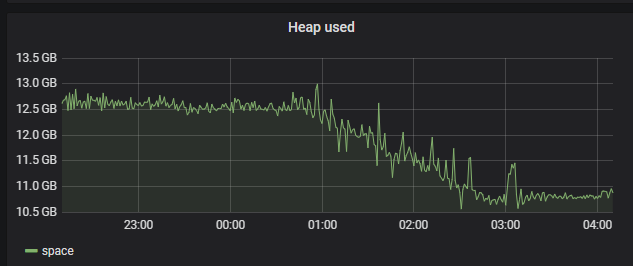
3.6.3 issue still here
Here is a graph about all 25 my instances reboot every 5 minutes one by one. Last reboot was on Sunday (3 days ago)
ankar84
on 14 Oct 2020
3.7.1 - 32GB Memory leak
UAnton
on 4 Nov 2020
Related issues
 danpospisil
·
3Comments
danpospisil
·
3Comments
 neha1deshmukh
·
3Comments
neha1deshmukh
·
3Comments
 Buzzele
·
3Comments
Buzzele
·
3Comments
 tanc
·
3Comments
tanc
·
3Comments
 amayer5125
·
3Comments
amayer5125
·
3Comments
Most helpful comment
We experience memory leaks as well.
Version 3.1.1
File upload enabled: filesystem, max 20MB
20 instances, max. 2500 users connected.
Docker on ubuntu 16.04