Rocket.chat: Mobile push notifications not working: There are not tokens for this user
Description:
Push notifications are not working. Testing the feature in the admin section results in an error message: "There are not tokens for this user"
I checked issue https://github.com/RocketChat/Rocket.Chat/issues/10142 but were not successful applying the hints given there.
Steps to reproduce:
- Enable push notifications for mobile in settings
- Press Button "send a test push to my user"
-> see the error in the screenshot above
Expected behavior:
No error message and push notifs on phone.
Actual behavior:

Server Setup Information:
- Version of Rocket.Chat Server: 1.1.1
- Operating System: Linux
- Deployment Method: docker
- Number of Running Instances: 1
- DB Replicaset Oplog: Enabled
- NodeJS Version: v8.11.4
- MongoDB Version: 3.4.20
Due to privacy reasons, I set these to false, but I guess this does not cause the problem.
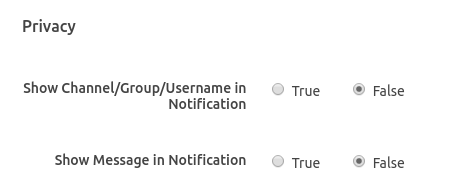
Relevant logs:
On Server I see lots of instances of this message:
rocketchat:logger server.js:199 System ➔ error Error sending push to gateway (7 try) -> { Error: tunneling socket could not be established, statusCode=404 at ClientRequest.onConnect (/app/bundle/programs/server/npm/node_modules/meteor/http/node_modules/tunnel-agent/index.js:166:19) at Object.onceWrapper (events.js:319:30) at emitThree (events.js:136:13) at ClientRequest.emit (events.js:217:7) at Socket.socketOnData (_http_client.js:474:11) at emitOne (events.js:116:13) at Socket.emit (events.js:211:7) at addChunk (_stream_readable.js:263:12) at readableAddChunk (_stream_readable.js:250:11) at Socket.Readable.push (_stream_readable.js:208:10) at TCP.onread (net.js:597:20) code: 'ECONNRESET' }
 MathiasRenner
All 22 comments
Same here - but only in a docker environment. Debian 9, native Rocket.Chat (= without docker): push works. Debian 9, Docker: push doesn't work. (Rocket.Chat 0.74.3)
 31337
on 6 Mar 2019
31337
on 6 Mar 2019
This may help you check the settings:
 reetp
on 6 Mar 2019
reetp
on 6 Mar 2019
@31337 Intersting, I really wonder if Docker might be an issue. Have no clue so far. This is the Docker-compose file I use:
https://github.com/bitleaf/simple-traefik-proxy-and-services/blob/master/backend-rocket.chat/docker-compose.yml
@reetp Thanks! Checked, all OK in my config. Still no notifs.
MathiasRenner
on 8 Mar 2019
@sampaiodiego Hi Guys I am using the latest docker image, and can successfully reproduce this error.
I activated the Push debugging and when I restarted the instance here are the events/logs I could record:
Fresh Start
Push: configuring...
I20190513-18:42:19.272(0) Push.Configure { sendTimeout: 60000,   apn: undefined,   gcm: undefined,   production: true,   sendInterval: 5000,   sendBatchSize: 10 }
I20190513-18:42:19.281(0) Push: Send worker started, using interval: 5000
Test Push
I20190513-18:49:35.208(0) Push: send message "support" via query { userId: 'vYzwqzkXSBpodzSmE' }
Behavior
All I get is the error message:
Error There are no tokens for this user
Information
Server
- Instance Type: Docker
- Version 1.0.2
- App Engine 1.4.2
- Database Migration143
- PID 1
- Runnung Instance1
- OPlog Enabled
App
- Latest Develop Android build.
- Android Gradle 3.3.2
- Gradle version 4.10.2
Mobile device model and OS version: Nexus 7 / Nexus 5 / HUAWEI /P6 / P9 / P20 - Android 6.0.1 / 7.x / 9.0
 franckadil
on 13 May 2019
franckadil
on 13 May 2019
@MathiasRenner I saw on your compose file you have settings for proxy is that correct? as I can see from the logs you've posted your server could not reach our gateway, having incorrect proxy setting might explain that.
@franckadil you issue is different. the log says something about the user vYzwqzkXSBpodzSmE . do you know who that user is? have you sure that user have connected to your server using mobile apps already? you can check direct on db if you want to make sure:
db.getCollection('_raix_push_app_tokens').find({ userId: 'vYzwqzkXSBpodzSmE' })
 sampaiodiego
on 13 May 2019
sampaiodiego
on 13 May 2019
@sampaiodiego Thank you for your time and help, the user Id: vYzwqzkXSBpodzSm is my admin account (support) that I was using to click the test button in the RocketChat Admin section.
franckadil
on 14 May 2019
thanks @franckadil .. and have you logged in using the mobile app using this same account?
sampaiodiego
on 14 May 2019
@sampaiodiego That's a good point, So I logged in with both my account and the support account to no avail. I have compiled the android client and I am using the apk in the \app\build\outputs\apk\foss\debug folder.
franckadil
on 14 May 2019
@franckadil that explains the issue. Using a custom app and our push gateway will not work. You'll have to disable push gateway and fill in the same certificates you used to compile your app.
sampaiodiego
on 15 May 2019
@sampaiodiego I am really new to Android studio and App development, I will try to do some research about how to do that, I also found this thread, hope it can be helpful for other people as well for reference: https://github.com/RocketChat/Rocket.Chat/issues/8692 Thank you very much for your help, I saw how you handle some other issues and that's one of the reasons why I love this community! Keep up the good work!
franckadil
on 15 May 2019
@sampaiodiego One question though, when I geerate my keys do I have to fill in the information in Administration > Push > Certificate and Keys ?
franckadil
on 15 May 2019
@franckadil exactly. You'll also need to restart the server after that to apply the new keys.
sampaiodiego
on 15 May 2019
@sampaiodiego
@MathiasRenner I saw on your compose file you have settings for proxy is that correct?
I removed these two lines of proxy settings and restartet the server. Same issue ("No token for this user")
MathiasRenner
on 4 Jun 2019
@MathiasRenner just to make sure, are you using our official mobile apps to connect to your server? have you logged in on the mobile app with the same user you're hitting the test button from the admin panel?
sampaiodiego
on 5 Jun 2019
Hi! @sampaiodiego @MathiasRenner
What worked for our team is to follow this guide and self configure the app for Android. When there is a release all we do is update the Google Json file, and build a signed application with the same certificate we used to make FCM work.
Here are my personal notes if that can be helpful:
1) Signing Android
After you create your upload key and keystore, you need to generate a public certificate from your upload key using keytool, with the following command:
"C:\Program Files\Java\jdk1.8.0_211\binkeytool.exe" -export -rfc -keystore "C:\Users\franc[REDACTED]\Keys[REDACTED]signature.jks" -alias [redacted] -file output_upload_certificate.pem
- https://developer.android.com/studio/publish/app-signing
- https://github.com/RocketChat/Rocket.Chat/issues/8692
- https://github.com/RocketChat/Rocket.Chat/issues/13608
2) If you need a fingerprint (optional | Android Studio 2.3 users)
"C:\Program Files\Java\jdk1.8.0_211\binkeytool.exe" -list -v -alias [redacted] -keystore "C:\Users\franc[REDACTED]signature.jks"
For Current Updated Android Studio 2.3 users this answer is for you as hardly people use eclipse nowadays for Android development as Android studio has huge advancements.
3) Everyone else, follow this way to create your Signed apk file.
In Android Studio, go to Build > Generate Signed apk.
- Create Keystore path.
- Put Password, alias, key password.
- Build type select accordingly(eg to release in playstore use release).
- Signature Version select both V1 and V2 checkboxes.
Finsih. - Go to from explorer where you selected for the apk to store and you will see your .apk file name as app-release.apk use it.
Keep smiling!
franckadil
on 7 Jun 2019
@sampaiodiego
@MathiasRenner just to make sure, are you using our official mobile apps to connect to your server? have you logged in on the mobile app with the same user you're hitting the test button from the admin panel?
Sure, let's narrow down the problem: Yes, I downloaded the latest App from Github releases (FOSS version) and just updated Server version to 1.1.1
Yes, it's the same user.
I just tried again. Same error.
@franckadil Thanks for your notes. For me, I prefer the simpler option for now, using the default push infrastructure provided by rocket.chat.
Update: The logs seem better to me now:
I20190607-23:27:31.449(0) Push: send to token { apn: 'c141e5a9a1c6b81733b24d1...' }
I20190607-23:29:26.490(0) Push: send message "" via query { userId: 'e6SqAbRH...' }
I20190607-23:33:16.605(0) Push: send message "" via query { userId: 'e6SqAbRHqz...' }
But on the phone there are still no notifs :-/
MathiasRenner
on 8 Jun 2019
Update: IT WORKS :)
More precicely: it works for all users now who do not have a rooted phone with LineageOS like me...
Any hints how I can enable FCM on LineageOS to get push support?
MathiasRenner
on 8 Jun 2019
thanks @franckadil for the instructions, they'll be helpful.
@MathiasRenner thanks for giving it a try as well.. so, the FOSS version doesn't include any Google Services, which are needed for push notifications because we only support push notifications through FCM.. so it seems a blocker for you.. in the future we might want to support other push notification services (like Pushy), but right now we depend on Google Services.
sampaiodiego
on 14 Jun 2019
Maybe I need to open a new issue, but we recently changed to O365 authentication via OpenID. When we did that we all got new accounts based on our O365 identities. Since that transition, we get the same error as described above, and no push notifications.
 shellster
on 17 Jul 2019
shellster
on 17 Jul 2019
I have version 2.2.0 and was having problems with push notifications. Eventually I got push notifications working. Later down the road (today) I had to remove my user and import a different user from ldap. Now I get, "There are not tokens for this user" when doing the push notification test.
 amoebav
on 2 Mar 2020
amoebav
on 2 Mar 2020
Hello @franckadil, @sampaiodiego
Could you help me to explain something below that I am not still clear?
- Rocket chat server only send push notification request to FCM endpoint use GCM API key in push setting, right?
- I must implement the notification event listener in the app by myself?
- if 1 and 2 are true, then how to send fcm device token to Rocket chat server for push notification?
If any could you provide me more details about the steps you did?
Many thanks.
Hi! @sampaiodiego @MathiasRenner
What worked for our team is to follow this guide and self configure the app for Android. When there is a release all we do is update the Google Json file, and build a signed application with the same certificate we used to make FCM work.
Here are my personal notes if that can be helpful:
- Signing Android
After you create your upload key and keystore, you need to generate a public certificate from your upload key using keytool, with the following command:
"C:\Program Files\Java\jdk1.8.0_211\binkeytool.exe" -export -rfc -keystore "C:\Users\franc[REDACTED]\Keys[REDACTED]signature.jks" -alias [redacted] -file output_upload_certificate.pem
- If you need a fingerprint (optional | Android Studio 2.3 users)
"C:\Program Files\Java\jdk1.8.0_211\binkeytool.exe" -list -v -alias [redacted] -keystore "C:\Users\franc[REDACTED]signature.jks"
For Current Updated Android Studio 2.3 users this answer is for you as hardly people use eclipse nowadays for Android development as Android studio has huge advancements.
- Everyone else, follow this way to create your Signed apk file.
In Android Studio, go to _Build > Generate Signed apk_.
- Create Keystore path.
- Put Password, alias, key password.
- Build type select accordingly(eg to release in playstore use release).
- Signature Version select both V1 and V2 checkboxes.
Finsih.- Go to from explorer where you selected for the apk to store and you will see your .apk file name as app-release.apk use it.
Keep smiling!
 long-cv
on 24 Mar 2020
long-cv
on 24 Mar 2020
Hello @franckadil, @sampaiodiego
Could you help me to explain something below that I am not still clear?
- Rocket chat server only send push notification request to FCM endpoint use GCM API key in push setting, right?
- I must implement the notification event listener in the app by myself?
- if 1 and 2 are true, then how to send fcm device token to Rocket chat server for push notification?
If any could you provide me more details about the steps you did?
Many thanks.
- Yes, if you'll use your own mobile app you have to configure Rocket.Chat with FCM certificates to send push notifications
- Yes. You can always take a look how we did by looking at the source code of our official apps at https://github.com/RocketChat/Rocket.Chat.ReactNative
- You should use the following endpoint to register the device token https://rocket.chat/docs/developer-guides/rest-api/push/push-token/
sampaiodiego
on 28 Apr 2020
Related issues
 amayer5125
·
3Comments
amayer5125
·
3Comments
 danpospisil
·
3Comments
danpospisil
·
3Comments
 mattlin
·
3Comments
mattlin
·
3Comments
 royalaid
·
3Comments
royalaid
·
3Comments
 engelgabriel
·
3Comments
engelgabriel
·
3Comments
Most helpful comment
@franckadil exactly. You'll also need to restart the server after that to apply the new keys.