Rocket.chat: Can't login with sAMAccountName
Rocket.Chat Version: 0.57
Running Instances: 1
DB Replicaset OpLog: false
Node Version: 4.8.1
After update 0.57, I can't login using my sAMAccountName. I need to use my email.
If the Active directory account does not have email, login with sAMAccountName works.
In logs, I can see the search works:
LDAP ➔ Search.info Search result count 1
[... my user info printed are ok]
And after, I can see this:
[LDAPSync ➔ debug user { email: undefined, _id: 'ktb98PyMhbst8jFn5' }
 nORKy54
All 38 comments
Same for me. Only Email works after the update.
 willihelm
on 5 Jul 2017
willihelm
on 5 Jul 2017
Same here.
 paulrobello
on 6 Jul 2017
paulrobello
on 6 Jul 2017
Same here. even Email doesn't work.
 maxdwit
on 6 Jul 2017
maxdwit
on 6 Jul 2017
Try to disable LDAP Avatar Sync, worked for us.
 KervyN
on 6 Jul 2017
KervyN
on 6 Jul 2017
Thanks @KervyN ! it works
nORKy54
on 6 Jul 2017
Confirmed @KervyN Disable avatar sync fixed it for the moment.
maxdwit
on 6 Jul 2017
Anyone can provide a LDAP server for tests?
 rodrigok
on 6 Jul 2017
rodrigok
on 6 Jul 2017
What happens if you enable the Avatar Sync again?
rodrigok
on 6 Jul 2017
We were not able to log in
KervyN
on 6 Jul 2017
Disabling avatar Sync worked for us
paulrobello
on 6 Jul 2017
Ok worked a case that also has this issue. Logging with email worked. But logging in with username did not. Disabling avatar sync was the magic bullet that got it working.
 geekgonecrazy
on 7 Jul 2017
geekgonecrazy
on 7 Jul 2017
I have disabled Avatar sync and my ldap users are still unable to log in. I am getting the following in my log:
rocketchat_logger rocketchat_logger.js:377 [31mLDAPHandler ➔ error [Error: invalid nested parens]
I am on 0.57.1.
 sc10n
on 8 Jul 2017
sc10n
on 8 Jul 2017
After disabling avatar, it works but lost our pictures :-(
 pedroxim
on 10 Jul 2017
pedroxim
on 10 Jul 2017
@ranga in the demo platform was affected by this as well:

As well as @bad-bb:
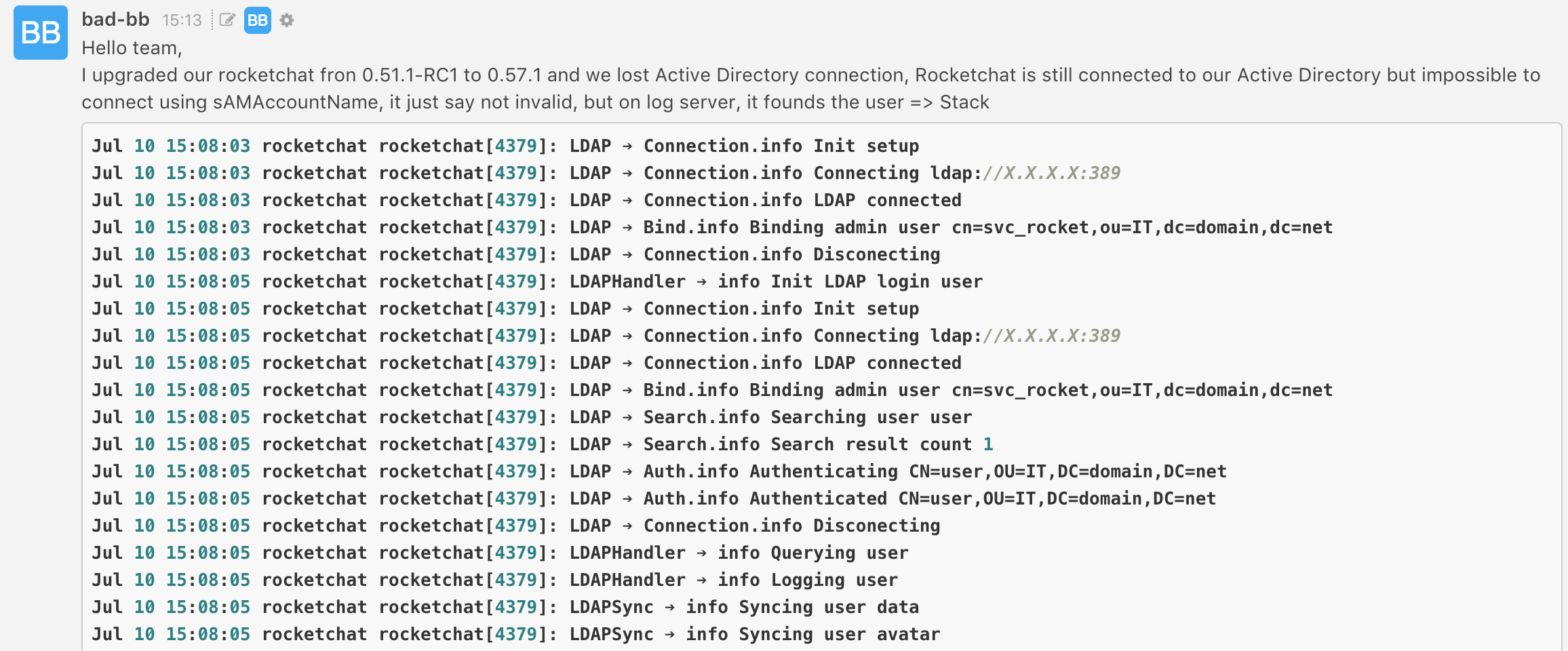
and @t.m.andersen:

and @sk.siv:
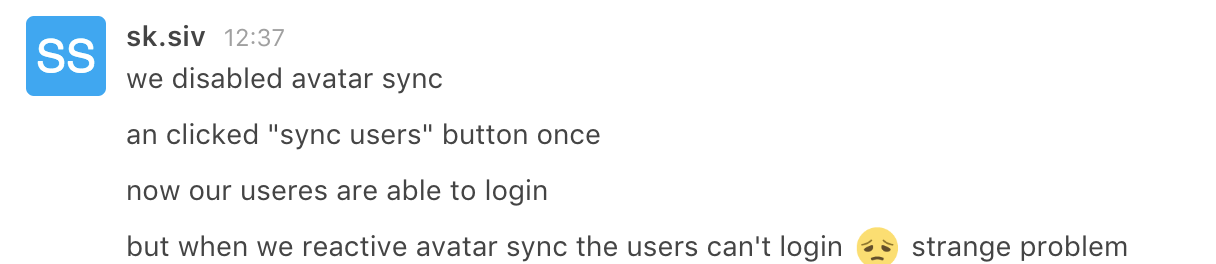
 frdmn
on 11 Jul 2017
frdmn
on 11 Jul 2017
@nORKy54 can you please try please enabling Merge existing users?

 sampaiodiego
on 11 Jul 2017
sampaiodiego
on 11 Jul 2017
Closed by #7472
Please reopen it if the problem persists after the release of version 0.57.2
rodrigok
on 14 Jul 2017
It still persists.
Login is not possible when Profilepicture sync is enable.
KervyN
on 16 Jul 2017
For me too, the issue stands as mentioned above:
Rocket.Chat Version: 0.57.2
Database Version: 99
Running Instances: 1
DB Replicaset OpLog: false
Node Version: 4.8.3
- LDAP login not possible, when avatar sync is enabled
- LDAP login possible, when avatar sync is disabled, no avatars though (quite obvious)
 TwizzyDizzy
on 17 Jul 2017
TwizzyDizzy
on 17 Jul 2017
The workaround we use: Activate avatarsync, sync ldap data, disable avatarsync. I began to do this as a morning routine
KervyN
on 17 Jul 2017
Just to be clear: by sync ldap data your mean the option Import LDAP users in Administration > LDAP, right? In my case, rather impractical, as we have a huge amount of LDAP users.
TwizzyDizzy
on 17 Jul 2017
Yes
KervyN
on 17 Jul 2017
@KervyN Your daily workaround is now mandatory here, until this is fixed.
maxdwit
on 1 Aug 2017
Problem persists in 0.57.3 turning "Sync Profile Pictures / Profilbilder synchronisieren" on.
validateLogin -> .... message: 'Forbidden [forbidden]', errorType: 'Meteor.Error' ....
maxdwit
on 9 Aug 2017
Problem was not supposed to be fixed in 0.57.3 (see changelog). Issue #7472 (see above) is scheduled for 0.58.0. Currently there are release candidates available, see https://github.com/RocketChat/Rocket.Chat/releases.
Cheers
Thomas
TwizzyDizzy
on 9 Aug 2017
As I see it, this issue hasn't been resolved in 0.58.2, has it?
So the state at my end is as before:
Rocket.Chat Version: 0.58.2
Database Version: 99
Running Instances: 1
DB Replicaset OpLog: false
Node Version: 4.8.4
- LDAP login not possible, when avatar sync is enabled
- LDAP login possible, when avatar sync is disabled, no avatars though (quite obvious)
TwizzyDizzy
on 22 Aug 2017
Is this issue gone for others? I'm asking, because I would assume that this has an impact on virtually everybody who uses LDAP (usually companies). Or is everybody using the "workaround"?
Cheers
Thomas
TwizzyDizzy
on 28 Aug 2017
No, Issue still there. Check https://github.com/RocketChat/Rocket.Chat/issues/7773
KervyN
on 28 Aug 2017
Can I somehow help debugging to fix this rather urgent issue as it blocks us from upgrading from 0.56.0 to a recent release of RC.
Cheers
Thomas
TwizzyDizzy
on 5 Sep 2017
In accordance with this feedback by @sampaiodiego I will again summarize the current situation in the hopes of providing valuable information in order to fix this problem:
Issue
Beginning with Rocket.Chat 0.57.0 (my LIVE instance is on 0.56.0, my DEV instance is currently on 0.59.0-rc.4.), there is an issue concerning the authentication against an ActiveDirectory. Also every release after 0.57.0 has this issue.
Tried mitigations
1) PR 7472 implies, that activating the LDAP setting Merge existing users can mitigate the problem. This is not the case with my problem. It may also be the case that I'm misreading the information over there.
2) it was suggested above, that disabling Avatar Sync in LDAP settings would somehow mitigate this issue. That is true in my case. Though, quite obviously, avatars won't get synced anymore. Side note: one might argue, that the issue isn't "that bad", if only avatars are missing, yet I find avatars to be a central part of the overall user experience that helps users finding their way around Rocket.Chat.
Logs
rocket.txt
This is a logfile of a failing login with the sAMAccountName as login username. Log level is Debug (2)
Interesting enough, there is the following error, when I login with the local administrator account:
rocketchat_logger rocketchat_logger.js:375 LDAPHandler ➔ error [Error: User not Found]
Yet when I login with sAMAccountName, there is the UI feedback "user not found", but no log message as the above.
LDAP-Settings
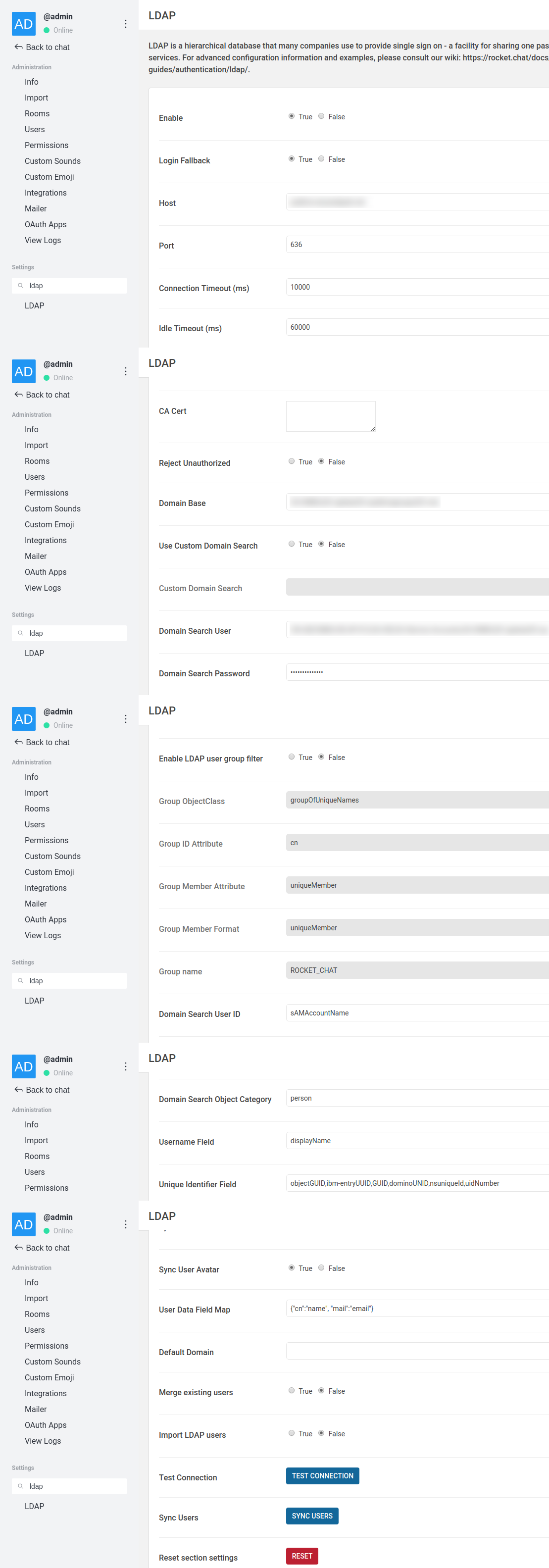
Speculation about where this error might have come from
The Rocket.Chat changelogs of 0.57.0 might give a clue as to which commits/pull requests may (!) have caused the issue (those are issues that involve the keywords avatar or LDAP):
https://github.com/RocketChat/Rocket.Chat/pull/6921
https://github.com/RocketChat/Rocket.Chat/pull/7030
https://github.com/RocketChat/Rocket.Chat/pull/7055
https://github.com/RocketChat/Rocket.Chat/pull/6788
https://github.com/RocketChat/Rocket.Chat/pull/7045
https://github.com/RocketChat/Rocket.Chat/pull/6972
https://github.com/RocketChat/Rocket.Chat/pull/7352
Please don't hesitate to ask for further details.
Cheers
Thomas
TwizzyDizzy
on 11 Sep 2017
Guys I just submitted the PR https://github.com/RocketChat/Rocket.Chat/pull/8099 which I think solves this issue.
I do not have an LDAP server with avatars for testing, so I had to hack the sync.js file to read the avatar from a file instead the AD.
So if you guys can please test the PR and give some feedback that would be more than welcome.
sampaiodiego
on 11 Sep 2017
For those of you who want to test the change: it seems as though the file path from the PR doesn't reflect on the filesystem location of the affected code passage. I'm on 0.59.0-rc.4 and the code from the PR seems to be contained in the file /opt/rocketchat/bundle/programs/server/packages/rocketchat_ldap.js (beginning from line 677). I guess there is some node packaging or compiling foo done that combines several files to form this file in the end.
Be that as it may, I just tested that piece of fixed code and I'm now able to login again with sAMAccountName! The avatar seems to be set correctly (at least I see the correct avatar that seems to be drawn from AD/LDAP).
Great job! :)
I would love to see this confirmed by others ASAP so this can maybe make it's way to 0.59.0-rc.5 (or final release).
Cheers & Thanks to @sampaiodiego
Thomas
TwizzyDizzy
on 12 Sep 2017
Would love to hear a feedback of @KervyN @maxdwit @pedroxim @paulrobello @nORKy54 @willihelm @mkretzer
Cheers
Thomas
TwizzyDizzy
on 13 Sep 2017
Hi,
currently no spare time to check that. Sorry.
KervyN
on 13 Sep 2017
I just tested, I spent yesterday half a day trying to understand why I could login with the user mail but not the sAMAccountName.
Today after reading this, everything is working as intended, I first tried to just disable the avatar sync and started working perfectly.
Afterwards, I installed the RC7 through snap (something I didn't saw anywhere how to do it, and I was not familiar with snap... maybe put an article about the "sudo snap refresh rocketchat-server --candidate" somewhere).
Everything is working now, Avatar correctly synced and sAMAccountName working as intended.
@TwizzyDizzy @sampaiodiego thanks!!
 mauricio-sonegatti
on 22 Sep 2017
mauricio-sonegatti
on 22 Sep 2017
Hi,
we updated to 0.58.3 today and the issue still persists. We are not able to login via LDAP credentials when profile picture sync is enabled.
KervyN
on 28 Sep 2017
The issue is fixed only from 0.59.0-rc.5 on. See this comment.
EDIT: ... and seems to not have been backported to 0.58.3.
Cheers
Thomas
TwizzyDizzy
on 28 Sep 2017
Oh man, you are right. Haven't thought about the possibility that the RC fixes are not by default included in the normal updates (non RC) I do. My bad, sorry.
KervyN
on 28 Sep 2017
Rocket.Chat Version: 3.6.0
Running Instances: 4
DB Replicaset OpLog: true
After our recent update to 3.6.0 this issue is back! I cant login with my samaccountname when Profilepicture sync is activated.
Please Help
 r4nc0r
on 3 Sep 2020
r4nc0r
on 3 Sep 2020
Related issues
 Kiran-Rao
·
3Comments
Kiran-Rao
·
3Comments
 zeigerpuppy
·
3Comments
zeigerpuppy
·
3Comments
 mddvul22
·
3Comments
mddvul22
·
3Comments
 Buzzele
·
3Comments
Buzzele
·
3Comments
 antn89
·
3Comments
antn89
·
3Comments
Most helpful comment
Try to disable LDAP Avatar Sync, worked for us.