Your Rocket.Chat version: 0.26.0
It would be great to be able to upload files via the rest API or directly via the webhooks.
In the end what i would like to be able to do is to use Webhooks to push an image and then push a message that uses that image inside of the message body via the attachment image_url.
So either a way that you can have webhooks that accept certain mime_types and a binary payload or an extension to the RestAPI to be able to upload images and then to get back in the response the url pointing to the location of that Url.
If anyone could point me in the direction of where the upload is handled now, i could try to extend the rest api myself :)
Thanks
 Dutzu
Dutzu
All 7 comments
Hi, I'm also trying to implement such feature too but with no luck. Can anyone give me some direction on how you could send FormData properly to the server? All I could get was an empty object, and no matter how hard I tried, It just couldn't go through.
According to my research online, it seems that we needed to have some sort of middleware on parsing the FormData object, but I really don't have any idea on how to do it.
Thanks.
 littlep13
on 23 May 2016
littlep13
on 23 May 2016
Depends on #5650
 graywolf336
on 18 Jan 2017
graywolf336
on 18 Jan 2017
Thank you for your suggestion. This feature is not on our short-term roadmap so we will revisit once other priorities have been addressed.
 louisemessage
on 13 Mar 2018
louisemessage
on 13 Mar 2018
Actually this feature has been added so should have been closed as "added": https://rocket.chat/docs/developer-guides/rest-api/rooms/upload/
graywolf336
on 13 Mar 2018
Thank you @graywolf336
louisemessage
on 13 Mar 2018
@graywolf336, it seems like it's impossible to preview images sent using this method:
curl -v "https://localhost:3000/api/v1/rooms.upload/GENERAL" \
-F [email protected] \
-H "X-Auth-Token: token" \
-H "X-User-Id: userId"
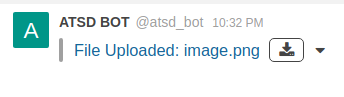
In addition, the .bin extention is added to the attached image name with attempt to download it.
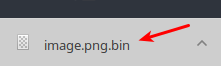
Are there any ways to configure image preview and disable suffix for downloads?
 annstriganova
on 20 Apr 2018
annstriganova
on 20 Apr 2018
The issue is not reproduced for .jpeg.
There is a workaround for .png: specify Content-Type: image/png
curl -v "https://localhost:3000/api/v1/rooms.upload/GENERAL" \
    -F "[email protected];type=image/png" \
    -H "X-Auth-Token: token" \
    -H "X-User-Id: userId"
Related issues
 lunitic
·
3Comments
lunitic
·
3Comments
 ghost
·
3Comments
ghost
·
3Comments
 Buzzele
·
3Comments
Buzzele
·
3Comments
 brendanheywood
·
3Comments
brendanheywood
·
3Comments
 tanc
·
3Comments
tanc
·
3Comments
Most helpful comment
The issue is not reproduced for
.jpeg.There is a workaround for
.png: specifyContent-Type: image/png