Rocket.chat.electron: Desktop notifications not appearing on Windows 10
I have desktop notifications enabled, but they do not appear. The 'Test Desktop Notifications' button does not do anything for me (though it works for my co-workers with a similar set-up). I have tried rebooting, upgraded from 2.7 to 2.8, using only a single monitor, and using only one virtual desktop, all to no avail. The only visual indication of new messages is that the tray icon changes colour.
OS: Windows 10 x64
Rocket.Chat client: 2.8.0 (latest release from GitHub as of writing)
Anything I could do to help debug this?
 cameron314
All 6 comments
@cameron314 Is it possible that you disabled notifications on Windows 10 either for all apps, or for Rocket.Chat?
Are there any other cases of it not working?
 alexbrazier
on 7 Jul 2017
alexbrazier
on 7 Jul 2017
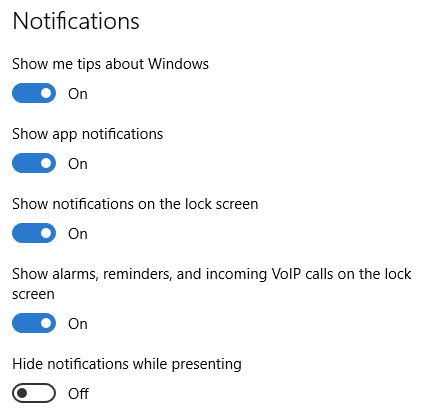
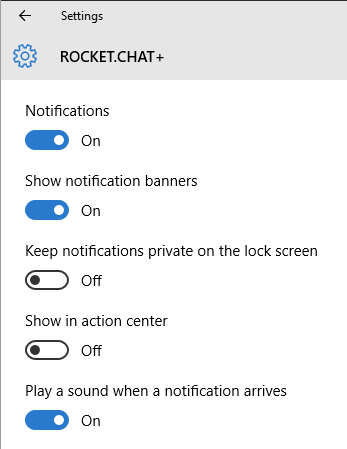
Hmm, didn't know this could be enabled/disabled per app. I don't have any other applications that generate notifications. In any case, they seem to be enabled:
cameron314
on 12 Jul 2017
For what it's worth, I don't think this is specific to RocketChat anymore. I upgraded to Office 2013 and I don't receive notifications from Outlook either.
cameron314
on 11 Sep 2017
@cameron314 Interesting... any way we'll keep investigating the issue. Thanks for the feedback.
 gdelavald
on 11 Sep 2017
gdelavald
on 11 Sep 2017
AHA! I had somehow enabled 'Quiet Hours' in the Action Center. This was nearly impossible to find since you have to a) know that the Action Center is responsible for showing the notification banner thingies, and b) I had hidden the Action Center icon thinking it was useless, so this setting was out of sight.
cameron314
on 11 Sep 2017
AHA! I had somehow enabled 'Quiet Hours' in the Action Center. This was nearly impossible to find since you have to a) know that the Action Center is responsible for showing the notification banner thingies, and b) I had hidden the Action Center icon thinking it was useless, so this setting was out of sight.
Had the same problem on one of user computers. Quiet Hours was enabled, but Action Center was disabled by Group Policy.
In modern Windows 10 MS changed it to Focus assist and user do not need Action Center to manage this.
 ankar84
on 10 Feb 2020
ankar84
on 10 Feb 2020
Related issues
 nstoeckigt
·
3Comments
nstoeckigt
·
3Comments
 geekgonecrazy
·
4Comments
geekgonecrazy
·
4Comments
 SQUIDwarrior
·
3Comments
ankar84
·
4Comments
SQUIDwarrior
·
3Comments
ankar84
·
4Comments
 jswolf19
·
4Comments
jswolf19
·
4Comments
Most helpful comment
AHA! I had somehow enabled 'Quiet Hours' in the Action Center. This was nearly impossible to find since you have to a) know that the Action Center is responsible for showing the notification banner thingies, and b) I had hidden the Action Center icon thinking it was useless, so this setting was out of sight.