Roadmap: Please don't upgrade docker without asking first
Please don't auto-upgrade Docker Desktop. Or give us an option to disable upgrades like this. It's fine to prepare the new patch. It's fine to simplify the process. But don't just install without giving us some recourse.
Despite the most heroic efforts of the Docker team, a new release may have new bugs. In software we deal with this all the time. All of us face it, and to move forward there has to be some risk.
However, if there's no way to stop auto-upgrades, there's no easy way to go back to the working version.
So Docker Desktop for Mac 3.0.2 has problems that completely break ddev and some other tools, see https://github.com/docker/for-mac/issues/5157. So fine, we need to roll back to 3.0.1 right?
Unfortunately, with the current auto-upgrade approach introduced in 3.0.0, If you install 3.0.1 it will immediately prepare to install 3.0.2. Then when you reboot or restart docker, voila, you have 3.0.2 again, which doesn't work. And there seems to be no way to stop this cycle.
For those with this pain right now: I think installing Docker Desktop 2.5.0.1 is the only solution.
 rfay
rfay
All 138 comments
I 100% agree. 3.0.2 completely broke my volumes, I rollbacked to 3.0.1 which was self-updated again to 3.0.2... Please ask the user to update or make it optional in the settings.
 kinoute
on 21 Dec 2020
kinoute
on 21 Dec 2020
Sorry about it, we rushed a bit the last update and introduce a severe bug.
I'll try to fix it today and if I cannot, rollback last grpcfuse patches.
On next updates we will do some canary updates.
But the whole goal of auto-upgrading is to avoid the spread versions, it's a mess to investigate when you have reports from 1 year old version, that's the main reason why we choose to do that.
Just for you to understand:

 ebriney
on 21 Dec 2020
ebriney
on 21 Dec 2020
@ebriney
We appreciate your hard work in maintaining the software.
I totally agree that the spread of versions is a real problem.
The problem for a developer is, that on one day your local setup might work, and you reboot your machine the other day, and your setup is broken without any hint.
A comparison with a browser version, as @stephen-turner did in https://github.com/docker/for-mac/issues/5119#issuecomment-742842241, is not a practical usecase for a system backing your development workflow.
So please let us choose when we update the client, and don't do the decision for us.
 ThomasNegeli
on 21 Dec 2020
ThomasNegeli
on 21 Dec 2020
Blocking outgoing network connections to desktop.docker.com can keep you on on the functional 3.0.1 by not allowing the auto-upgrade to 'find' the broken 3.0.2 version, this can be used as a temporary patch.
You'd need somethling like Little Snitch to achieve it, but at least you won't lose a Monday.
 mehigh
on 21 Dec 2020
mehigh
on 21 Dec 2020
You can also use 3.0.2 and switch back to osxfs
ebriney
on 21 Dec 2020
Preferences -> Experimental Features -> Turn Off "Use gRPC FUSE for file sharing"

Thanks for the tip @ebriney
mehigh
on 21 Dec 2020
Disabling use of gRPC FUSE was not sufficient to fix my ddev environment (composer commands was freezing, web container unable to stop), I had to revert Docker Desktop to v2.5.0.1
 CedricAlb
on 21 Dec 2020
CedricAlb
on 21 Dec 2020
@CedricAlb I hope you'll test with the build in https://github.com/docker/for-mac/issues/5157#issuecomment-748952320 - it would be really important to know if it solves your specific problem.
rfay
on 21 Dec 2020
@rfay I just installed this build for testing but no success...
Composer is still freezing here :
my-project-web:/var/www/html$ composer info -vvv
Reading ./composer.json
Loading config file ./composer.json
Checked CA file /etc/ssl/certs/ca-certificates.crt: valid
Executing command (/var/www/html): git branch -a --no-color --no-abbrev -v
And I still have this error when I try to stop any project :
ddev stop
Stopping ddev-my-project-web ...
Stopping ddev-my-project-dba ... done
Stopping ddev-my-project-db  ... error

ERROR: for ddev-my-project-web  UnixHTTPConnectionPool(host='localhost', port=None): Read timed out. (read timeout=70)
An HTTP request took too long to complete. Retry with --verbose to obtain debug information.
If you encounter this issue regularly because of slow network conditions, consider setting COMPOSE_HTTP_TIMEOUT to a higher value (current value: 60).
Failed to pause containers for my-project: Failed to run docker-compose [-f /Users/me/Develop/my-project/.ddev/.ddev-docker-compose-full.yaml stop], err='exit status 1', stdout='', stderr='Stopping ddev-my-project-web ...
Stopping ddev-my-project-dba ... done
Stopping ddev-my-project-db  ... error

ERROR: for ddev-my-project-web  UnixHTTPConnectionPool(host='localhost', port=None): Read timed out. (read timeout=70)
An HTTP request took too long to complete. Retry with --verbose to obtain debug information.
If you encounter this issue regularly because of slow network conditions, consider setting COMPOSE_HTTP_TIMEOUT to a higher value (current value: 60).'
Removing container: ddev-my-project-web
Should I create an issue with these details in the ddev github page ?
CedricAlb
on 21 Dec 2020
@CedricAlb this conversation should be in the other issue (#5157) or in DDEV-Local issue queue. If you can tell us how to recreate the issue - full instructions, preferably with a simple example, it can likely get fixed. This doesn't look like any of the reported issues in docker/for-mac#5157, so it may be something new, or of course, something else. I think the best thing would be a new issue either in this issue queue or the ddev issue queue.
rfay
on 21 Dec 2020
A reasonable compromise to prevent version spread while allowing people some control over when and how updates install would be to allow the feature to be turned off, but either require the update or disable the software after a reasonable period of time. The definition of "reasonable period" of time might be the subject of some debate, of course.
 jonesiscoding
on 21 Dec 2020
jonesiscoding
on 21 Dec 2020
As users we need to be able to control when an upgrade happens. We understand the need of you maintainers to limit the exposure to a thousand versions, but we really do have to know:
- What version might be installed (currently "Update and restart" doesn't give any suggestion of this)
- When an upgrade will happen. We don't want an upgrade to an unknown version just because macOS or Windows decided to reboot.
- What is in the proposed version and why. Apparently the release notes are not automated, as version 3.0.3 was released today and it does not show in the release notes.
We understand your need to control the number of versions out there, but I think you can understand our need for control of when new versions get installed. Thanks!
rfay
on 22 Dec 2020
Automatic updating is not an acceptable solution to your version spread problem. This tool simply cannot be used if it is subject to failure at any moment. Forcing auto-updates on unwilling developers will backfire on you. They will either roll back to v2.5.0.1 and stay there until you change your mind, or install Little Snitch to block your automatic upgrades (which will also block your telemetry feed). I almost placed an order for Little Snitch yesterday, but decided to wait a week or two for you to change your minds about this.
You can address version spread by disabling the ability to upload diagnostics from non-current versions, closing issues opened with old versions, and other ways to simply say "we only support the current version, and if you are not on the current version, we are not going to talk to you". Maybe that sounds harsh, but what you are actually doing by forcing version updates on people is even harsher. Not only are you saying "we are not going to talk to you", you are saying "we are not even going to let you run old versions".
Keep the auto-update feature. Allow people to turn it off. Allow people to select which version (of some reasonable number of past versions) to run so they can be secure in the ability to roll back if they have problems with the new version.
 Nuru
on 22 Dec 2020
Nuru
on 22 Dec 2020
Sorry about it, we rushed a bit the last update and introduce a severe bug.
But the whole goal of auto-upgrading is to avoid the spread versions, it's a mess to investigate when you have reports from 1 year old version, that's the main reason why we choose to do that.
@ebriney Another reason besides https://github.com/docker/for-mac/issues/5163#issuecomment-749283618 that automatic updates is not a solution to your problems is that with automatic updates, any bug that you release becomes an urgent production issue affecting all your users. You need the edge and stable channels and you want to be able to tell people to use an old version while you work on fixes for problems in the current version. The idea that somehow you will be able to do what no one else can do and guarantee you will only release bug free code is just fantasy. No one expects you to be perfect. What we all expect is that you will give us some ability to carry on when bugs make it into a release, and not break our big presentation because we had to reboot our laptop an hour before it.
Nuru
on 22 Dec 2020
Auto-upgrading to avoid the spread versions is nice, but a reliable working setup is important too. An option to disable auto-upgrading would solve this problem.
 EFvS
on 22 Dec 2020
EFvS
on 22 Dec 2020
An additional point regarding the automatic upgrades is that not all users that run Docker have admin rights on the machine they are using. The machine may have been configured by a systems administrator, or even by a MDM tool. When the software prompts them to download the new update, it then asks for admin rights to install (naturally), which the user does not have.
Even if the ability to disable or delay updates was in the Experimental section, that would be a big help.
jonesiscoding
on 22 Dec 2020
Before doing this, we looked at lots of other programs, and this model is very common. Obviously it's universal for web software, but it's common even for other installed development tools such as GitHub Desktop. Our thought was that if it makes sense for GitHub, it makes sense for us. If you disagree, I would genuinely like to understand whether you see Docker Desktop as being in a different category from GitHub Desktop, and if so why.
 stephen-turner
on 23 Dec 2020
stephen-turner
on 23 Dec 2020
Also I'm going to move this into the roadmap, as it's a feature request not a bug.
stephen-turner
on 23 Dec 2020
@stephen-turner
If Github Desktop is broken, I can switch to a different GIT tool as a workaround.
Also if a Browser is broken, I can temporary switch to a different one.
If Docker Desktop with auto update is broken, I can go home and wait until you fix the problem. My customers will love me for that.
ThomasNegeli
on 23 Dec 2020
I have installed Github Desktop to see how it handles automatic updates, when the user is not an admin user and doesn't have write access to /Applications. Unfortunately, I probably won't be able to answer the question until they do a new release, unless someone has a link to a previous version that I could try.
While these aren't all specific differences, as @stephen-turner asked for, these are the main issues I can see with the present setup of not having the ability to either delay or disable the update prompt:
- Docker Desktop fills a role that cannot be easily duplicated from the command line, as most git functions can.
- The user receiving the prompt might not be an admin user, and therefore may not have the ability to install the update.
- Docker Desktop is more complex than Github Desktop. While it's certainly possible that an update to Github Desktop might be designed to work with a new major version of Git, and therefore require external changes, I would guess this would be a rare occurrence. Due to it's complexity, Docker Desktop may contain changes that would require the user to change their container, docker compose configurations, mount points, or related scripts. If an update installs with an single click, with no opportunity to review release notes or delay the update (other than clicking No every time), then the user is forced to make any required changes in 'real-time' rather than completing the task they are already working on.
@stephen-turner, I would be happy to file a feature request regarding verifying that the user is an Administrator prior to prompting for an update, if you think that would be helpful to the discussion.
I would also be happy to file a separate feature request for the ability to specify a preference to delay the installation of new versions for X days, with a reasonable maximum timeframe.
jonesiscoding
on 23 Dec 2020
Also I'm going to move this into the roadmap, as it's a feature request not a bug.
@stephen-turner I suggest you could and should have posted "auto-update" as a feature request before surprising the user base with it, and you would have seen the wide lack of support for it if presented as a no-opt-out feature. No user was requesting forced auto update, which is why I opened https://github.com/docker/for-mac/issues/5119.
Before doing this, we looked at lots of other programs, and this model is very common. Obviously it's universal for web software, but it's common even for other installed development tools such as GitHub Desktop. Our thought was that if it makes sense for GitHub, it makes sense for us. If you disagree, I would genuinely like to understand whether you see Docker Desktop as being in a different category from GitHub Desktop, and if so why.
I only know of 3 desktop tools that force auto-updates on you:
- Google Chrome, which I stopped using because of this
- GitHub Desktop, which I never used because of its limitations
- Lens, which I use a convenience, but can always fall back to
kubectland other command line tools.
As for browsers, Firefox, Safari, and Opera all give you ways to avoid updating if that is what you want. Firefox also provides a very stable ESR version (which I use) which has few and infrequent updates. I don't know how Safari gets tested, but it does not get updated until I explicitly update it and I have never had it break due to an update. The process of getting an update into any of the browsers besides Safari is that new features and bug fixes are tested on a developer channel, promoted to an early adopter channel, and after being found to work in both those channels, by volunteers who expressly opted into testing unstable versions, the change gets promoted to the production channel using a canary deployment, and after passing that gets rolled out widely. So unlike with Docker for Mac, which has had significant bugs in every one of its past 5 production releases, serious bugs in browser production releases are genuinely rare. When serious bugs do get released, the browser teams have the capability to quickly patch them or roll back the breakage. Docker for Mac does not have that kind of system in place. (That is not a criticism of the Docker team in general, as it is very hard to do and not generally expected, but on the other hand it _is_ a prerequisite for forcing users to accept updates.)
GitHub desktop is a convenience tool. It slaps a nice Graphical User Interface on a bunch of stuff, but it is in no way production critical, as evidenced by my happily doing GitHub-centric development without using it. I can do everything I need to do from the command line. I can do most of what I need to from within my IDE. I use a different tool for a graphical UI to Git, again one which only updates when I tell it to, and when it fails (which happens from time to time) I can go and use the Git command line. Since I do not use it, I cannot speak to their track record of releasing bug free code, but I suspect it is better than Docker for Mac's.
If Git fails, which actually happened when git v2.22 was released and dropped support for the filter specification --filter=sparse:path=, I can roll back to an earlier version of git, which I did at the time. Note that this was a fail that was not a bug, but rather dropping a feature some tools relied on.
I am not happy that Lens auto-updates and I have told them about it. They are in the process of making it optional (see https://github.com/lensapp/lens/pull/1831).
The critical difference between all those tools and Docker is that I have no replacement for Docker and it is integral to my day-to-day work, which is a combination of building Docker image and running Docker containers. If Docker Desktop with auto-update fails, what am I supposed to do to keep being able to work, do demos, and so on? This is not a rhetorical question, I want to know because I need to be able to keep working in the face of https://github.com/docker/for-mac/issues/5164, and when I ran into that as a consequence of rebooting my computer to install an Apple update, I had no idea how I was going to continue working. My entire work day was hijacked into finding the cause of the problem, reporting it, and finding a workaround. The fact that I did not have another option is exactly the reason the forced update is not acceptable.
Nuru
on 23 Dec 2020
It's not a subtle difference that Docker Desktop is a full system, not just a front-end on another system. So the noted comparison items that do automatic invisible automatic updates are front-end type tools, like Chrome or Github Desktop. Those are tools that let you drive a back-end system, like a webserver or a git server or github. If they break, there are lots of replacements for them. The fundamental back-end functionality is elsewhere, though.
A more appropriate comparison for Docker Desktop would be MariaDB (which certainly doesn't auto-update itself, and couldn't, for stability reasons), or macOS (which is happy to do auto-updates, but only if you opt in.).
I certainly understand the need that drove the auto-upgrade feature, but IMO it's not a match for the type of product that Docker Desktop is, and it's certainly not a match to what we as users want in terms of predictability.
This problem can be fixed simply though IMO by
- Allowing opt-out. Pestering is OK.
- Showing the version that will be upgraded to in the "upgrade and restart". Just "Upgrade to
and restart"
rfay
on 25 Dec 2020
@ebriney
That's fair point about limiting number of versions, but please do not forget, that experience of user is more important that convenience of developer.
 citizen-stig
on 25 Dec 2020
citizen-stig
on 25 Dec 2020
I've been reinstalling 3.0.2 2-3 times a day since 3.0.3 broke my implementation and it continues to upgrade. I have asked my client to install or keep 2.5 since I can't ask them to reinstall docker constantly. I can't imagine that was the user experience that the docker team wanted when developing this feature
 qhenkart
on 28 Dec 2020
qhenkart
on 28 Dec 2020
Today's Docker Desktop for Mac 3.0.4 seems to work OK, but all of the issues here are really problematic.
But on macOS, it doesn't even tell me what it's going to update to, or give me a link to release notes, nothing. On Windows, it does all that.
rfay
on 7 Jan 2021
It can be seen as a feature request, but it's also a bug, because it makes the product unreliable and risky to use. Can't trust something that can commit suicide on a whim (update and break compability, update and introduce a bug, etc).
As a workaround while this sleeps in the backlog, blocking these addresses worked for me: Blocking that subset breaks other services, e.g. Slack. Maybe the IPs can be hand-picked, not sure how AWS works.65.9.96.0/24.
 wilem82
on 7 Jan 2021
wilem82
on 7 Jan 2021
I do in fact disagree with you treating this as a feature request, @stephen-turner . We all seem to think that the new auto-upgrade "feature" is terribly flawed and thus is a bug, needing near-term attention. There are simple things that can be done to minimize the damage of the new feature/bug, and we're all hoping you'll take those on.
rfay
on 7 Jan 2021
It's not a bug because it's working exactly as designed. We're very aware that you regard it as a misdesign.
Don't worry about this ticket languishing, there are very active discussions going on internally and something will happen, although I'm not sure exactly what yet.
stephen-turner
on 8 Jan 2021
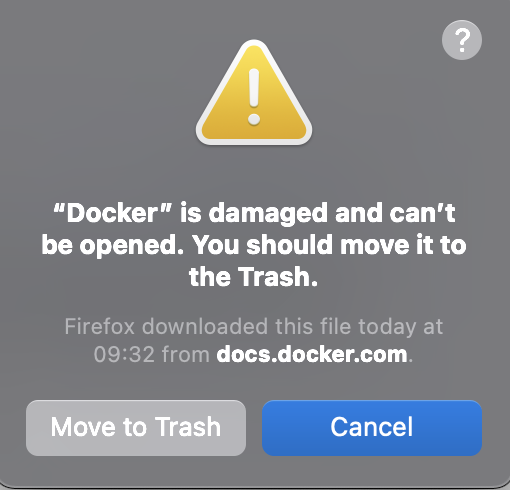
Result of autoupdate
Downgrade to 2.* for now
 Zipfer
on 8 Jan 2021
Zipfer
on 8 Jan 2021
I don't know what that dialog is: an autoupdate wouldn't come through Firefox, and the download doesn't come from docs.docker.com. Anyway, this thread is about the policy of autoupdating, not any bugs in the mechanism. We believe that the mechanism is working as designed, but if not please file a bug.
stephen-turner
on 8 Jan 2021
I've tried to download the 3.0 version of docker. then it was updated again and crashed.
Zipfer
on 8 Jan 2021
I cannot imagine how people will live with autoupdate feature that cannot be disabled. This way, people will lost control on configurations of their computers as the autoupdate can change the computer's configuration at any moment w/o letting the owner of the computer to opt-out in any way other than to stop using Docker. I guess it will be hard for people to trust Docker at all anymore.
 qbixus
on 16 Jan 2021
qbixus
on 16 Jan 2021
Another thing that should be IMO considered is that some companies have some security tools applied which won't allow you to execute any executables or block an application which checksum is not whitelisted. This doesn't play very nicely when Docker Desktop is automatically updated ;)
Furthermore, I could probably understand if you autoupdate Docker Desktop when you have provided a new patch release. But it seems that you're also doing this for minor version upgrades where you introduce new features or change the backends, e.g. Debian Buster based container instead of Alpine for the Docker daemon. I'm really worried about this upgrade strategy.
 zwilling79
on 20 Jan 2021
zwilling79
on 20 Jan 2021
@ebriney I'm one of those people who stay on an old version (v2.3.0.4 of docker-for-mac). I've tried a couple of times to upgrade to later versions. But each time I ran into performance issues. I assume it was linked to gRPC FUSE but not sure, because switching the toggle to osxfs didn't completely solve my issue. Downgrading to 2.x however, did.
We use kubernetes + convox locally to host our dev environment. Several upgrades has reset all that data, requiring us to re-provision the dev environment. This takes about 30-40min on top of going through the docker installer & starting docker. I've spent way too much time reinstalling docker, re-provision my dev environment & then figuring out that there are performance issues and having to downgrade (and re-provision again).
I really try to update docker as little as possible due to this. Knowing there is an auto-update feature in 3.x only makes me want to update less.
 subwai
on 20 Jan 2021
subwai
on 20 Jan 2021
Our thought was that if it makes sense for GitHub, it makes sense for us. If you disagree, I would genuinely like to understand whether you see Docker Desktop as being in a different category from GitHub Desktop, and if so why.
Some differences:
- If GitHub Desktop autoupgrades and crashes 5 Minutes before a management or marketing demonstration of an application, it has no effect since I'm prepared and have everything I need ready long before. If Docker Desktop autoupgrades and crashes 5 Minutes before such a situation, all things I've prepared to run inside containers are of no value.
- If GitHub Desktop fails, there are alternatives. For most people there is a last line of defense using a Web Browser, SDK Plugins and the command line. There is not a single fallback solution for Docker Desktop.
- If GitHub Desktop fails, it is no hindrance to me developing features of an application. If Docker Desktop failsm it is a hindrance to me developing features of a docker based application.
 raspe88
on 22 Jan 2021
raspe88
on 22 Jan 2021
My setup only works as expected with Docker 3.0.0; as soon as it applies the first update after that, everything falls apart and I have to system restore to prior to Docker's installation, install 3.0.0 again, and run it until the next restart.
This is a daily thing for me that I have to expect whenever I shut down/crash/restart, because of the lack of a "stop automatic installation of updates" option. I'm kind of baffled to see that this was an intentional choice.
Our thought was that if it makes sense for GitHub, it makes sense for us. If you disagree, I would genuinely like to understand whether you see Docker Desktop as being in a different category from GitHub Desktop, and if so why.
That's probably fine for the github desktop client. No one has a hard dependency on that for getting anything done. People can always fall back to the command line if the GUI app decides to "upgrade" itself to a new version that breaks committing. There's nothing I can do like that for docker; I'm just stuck uninstalling it and starting over at the version I actually want, or restoring my computer to a state prior to the self-inflicted update.
If actual git started updating itself (it doesn't do this currently) and breaking committing/pushing in a way that I couldn't control in the process, I would see that as a big problem as well.
 Pathel
on 24 Jan 2021
Pathel
on 24 Jan 2021
O.K. Since I'm now affected by one of the already reported errors in 3.x your autoupdate mechanism forces me to switch back to 2.x since it is too much work to block the autoupdate each and every time the permission wants me to give administration rights to Docker Desktop. I'm writing this to give you one example on how the enforced autoupdate can have negative impact on how willing people will be to use the latest version.
Maybe you should consider some common approach many platforms use e.g. with a stable LTS and a rolling release where you only accept error reports that affect one of them.
raspe88
on 25 Jan 2021
Two days in a row, Docker Desktop 3.1.0 (51484) on Win10 tried to allocate 100GB out of my 32GB of RAM. Needless to say, auto-update to unreliable releases like this is... well, you know.
(EDIT: Just to be clear, this is Docker Desktop.exe taking 70~100GB of virtual memory, while 1 docker pod was taking <200MB.)
How about a LTS release of 2.3.x that I'll just keep running for like two years until 3.x works correctly?
 analytik
on 25 Jan 2021
analytik
on 25 Jan 2021
This should be considered a bug in the most secure environments. One site does not allow binary execution from AppData\Temp. The moment Docker decides to auto-update, it bricks itself into an update loop. The user can no longer use docker desktop until interacting with an administrator.
Reinstalling the EXE on the Docker Home page says that the application version is already installed (it's not the latest version), so we would have to do a full uninstall/reinstall and still immediately get stuck in the update loop once it's forced.
At the bare minimum, please allow customization for updates to a specified folder. Or, publish the latest version binaries on your github/front page.
I would still prefer going the extra bit and allowing a choice to autoupdate or not.
At this time we are forced to rollback to 2.x, but i'm also experimenting with the enterprise MSI installer, because we may have some option there with changing the default installation path.
 gsxryan
on 25 Jan 2021
gsxryan
on 25 Jan 2021
Developers can have many different reasons for disabling autoupdate. So, this option should be available to us. In my case, I have the docker-desktop-data (ext4.vhdx) on another disk, because the current installation disk does not have enough space. Whenever the Docker Desktop is updated (automatically unfortunately), it does not run vm docker-desktop-data (an error appears, but I was never able to understand the exact cause) and I need to do it manually. So I would like to leave autoupdate disabled for the moment. I'm stuck in a bug deadlock, actually.
 eduardoafontana
on 26 Jan 2021
eduardoafontana
on 26 Jan 2021
Enforcing auto update is some kind of nearly viral behaviour! Even if it would be default I don't know any _serious_ or _professional_ software where I can not even disable this.
 blindzero
on 26 Jan 2021
blindzero
on 26 Jan 2021
Was just burnt with this and found docker/for-win#10035 which redirected me to this ticket.
I use chocolatey for installing docker-desktop but today docker just completely stopped and said "An update will be applied next time you start".
Attempted to run choco upgrade and it failed as it appeared the auto upgrade has mangled the choco install. Was also unable to uninstall completely from choco and ended up having to run the following to clean up:
choco uninstall docker-desktop -n --skipautouninstaller
An option to disable auto updates would be great a we should be in control when we upgrade especially when we consider some people may not want to upgrade so the version aligns across environments.
 cdavid15
on 26 Jan 2021
cdavid15
on 26 Jan 2021
Was just burnt with this and found docker/for-win#10035 which redirected me to this ticket.
I use chocolatey for installing
docker-desktopbut today docker just completely stopped and said "An update will be applied next time you start".Attempted to run choco upgrade and it failed as it appeared the auto upgrade has mangled the choco install. Was also unable to uninstall completely from choco and ended up having to run the following to clean up:
choco uninstall docker-desktop -n --skipautouninstallerAn option to disable auto updates would be great a we should be in control when we upgrade especially when we consider some people may not want to upgrade so the version aligns across environments.
Just a follow up. I am now completely unable to install ANY version of docker desktop. After cleaning up choco I was then getting errors about docker already being up to date (even though nothing was installed).
Reverted to manually clearing registry settings and then the installs failed (via manual and choco) with another open issue (docker/for-win#9825).
That's me lost a complete day trying to resolve this and I have now had to request my laptop to be reimaged because of a forced upgrade that we cannot recover from.
cdavid15
on 26 Jan 2021
Lando is another Docker-based tool that expects a specific version. It won't always break with a Docker update but _could_ and thus throws a warning when the Docker version is newer than the currently supported version. You are a developer, are you not, @stephen-turner? You of all people should understand dependency management issues. ;) Please do not go (even potentially) breaking things for people and then not even give them the ability to revert let alone opt out in the first place. @rfay - nice to see you! :)
 seanr
on 30 Jan 2021
seanr
on 30 Jan 2021
- Navigate to
%LOCALAPPDATA%\Docker Desktop Installerdirectory (e.g.C:\Users\USERNAME\AppData\Local\Docker Desktop Installer)- Delete the existing installer
exethat may already be present (if applicable)- Right click on that folder, either in the navigation pane or somewhere in the whitespace and select "Properties"
- Go to the "Security" tab
- Click "Edit" to change permissions
- Uncheck "Modify" permissions and click "Ok" on all dialogs
I couldn't reproduce this. I'm getting an exe in AppData\Local\Temp\1\h2sabbde.glz
any modification just creates a new random foldername "????????.???"
gsxryan
on 1 Feb 2021
But the whole goal of auto-upgrading is to avoid the spread versions, it's a mess to investigate when you have reports from 1 year old version, that's the main reason why we choose to do that.
This statement summarizes your problem and your motivation for implementing autoupdate.
Another approach is to enforce that reports must be from a current or supported version. Simply warn users that reports from older versions will be ignored and warrant a public shaming. This is a common practice.
Autoupdate is a great feature - even if enabled by default - but only if it can be disabled or at least paused. Then nagging can be effective at encouraging the lazy to upgrade.
 CheckeredFlag
on 4 Feb 2021
CheckeredFlag
on 4 Feb 2021
I couldn't reproduce this. I'm getting an exe in AppData\Local\Temp\1\h2sabbde.glz
any modification just creates a new random foldername "????????.???"
@gsxryan It's possible that it has changed since 3.0.4, yet another "improvement" I suppose. 😞 I'll edit my instructions so folks are aware of which version this applies to.
I'm not exactly sure which version this changed, but for now people can revert to version 3.0.4 (https://desktop.docker.com/win/stable/51218/Docker%20Desktop%20Installer.exe) and the auto-update folder will then predictable, allowing you to at least manually and forcibly override this bug 🐞 using my technique above until it's eventually _fixed_. Also, links to prior versions can be found here in the release notes.
 patricknelson
on 4 Feb 2021
patricknelson
on 4 Feb 2021
decided to chime in.. for me this would not be an issue, if I had permanent admin rights; however, in our corporate environment it's almost impossible. so what happens is Docker Desktop out-of-the-blue stops functioning until I manage to request administrative permissions and apply updates. and it's very bad... :(
 62mkv
on 5 Feb 2021
62mkv
on 5 Feb 2021
I've been bitten by this issue. The software I'm using (Localdev, a GUI atop Lando that in turn uses Docker) points out it hasn't been verified to work with the latest version of Docker and that it's not recommended to upgrade until it has been verified.
This is sensible and responsible behavior by the developers of Localdev. They are saying, "We know this is a working version so please stick with it until we've done our due diligence and tell you it's ok to upgrade."
So, I downgrade to 3.0.1 only to have Docker upgrade for me when I reboot it. Wondering what has just happened, I downgrade again only to find I'm in an infinite loop. Infuriating and the opposite of sensible and responsible behavior.
Moreover, upgrading critical components such as Docker (no, GitHub Desktop is not critical to me, nor is Chrome) almost always has ramifications that take time to work through. We know our machines and when they are working we need them to continue to work until such time as we are ready to invest in upgrading our setup. Auto-updating takes away control of when we have to deal with the ramifications and that may be at a bad time for us—such as when there is a deadline.
Please provide a fix for this frustrating issue.
 aangelinsf
on 5 Feb 2021
aangelinsf
on 5 Feb 2021
Another use case is people with Internet connection quotas. In such cases it is important to control when updates occur. Automatic updates are highly problematic due to the lack of control. As a concrete example my normal Internet connection has a 15GB per month quota. This is workable provided I can shift updates to times when I'm at locations with unlimited data (once every few months or so). Fortunately I don't automatically have to pay for going over quota, but some people do.
 sstock
on 12 Feb 2021
sstock
on 12 Feb 2021
Another reason to support this feature: a mysterious modal Docker launches (a bug in itself) when a system can't (auto-)update. This is annoying, and it also is not something I can fix: Apple withdrew the update because it's bricking some motherboards.
Every time I open my (admittedly old) laptop I get this error:
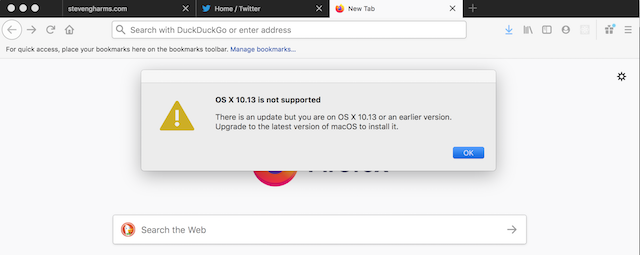
I, and others, would have _really_ liked to have known it was Docker. _That_ issue notwithstanding, the recommended fix suggests disabling auto-update so that this trigger-modal condition is not satisfied. Apparently this was available once, but is no longer. Restoring it would satisfy all the above on the philosophical arguments, and would also help those of us doing some work with Docker on aged, but still functional, hardware.
 sgharms
on 17 Feb 2021
sgharms
on 17 Feb 2021
@sgharms That's a separate bug from what is being discussed on this ticket. Unfortunately as Docker Desktop is installed software, we can't go back and fix it in old versions, which is what would be needed.
stephen-turner
on 18 Feb 2021
Hey all.
Thanks for everyone’s feedback on this.
We still want folks to update to the latest versions of Docker Desktop as quickly as possible but definitely hear the impact the current UX has.
We plan to start work soon on some changes that will still encourage folks to update, largely via some increasingly persistent reminders.
While we encourage everyone to stay up to date, we understand that in some large corporate environments individuals can't update software themselves. They may not have root access on their machines, and there may be a process for IT approving new versions of software.
So for users on Pro subscriptions they will be able to choose to skip additional notifications for a particular release and for users with Team subscriptions they will be able to choose to opt out of update notifications, altogether.
At the same time, we will also remove the current behavior of installing the update without user prompting on restart for all Desktop users.
We’re hoping to make these changes available in an upcoming release.
 dieucao
on 18 Feb 2021
dieucao
on 18 Feb 2021
Last night auto update has installed a version that has a bug thats not allowing me to use any kind of tools due to this issue:
https://github.com/docker/compose/issues/8186
To my surprise the solution is rolling back to an older version, and this auto update "idea" is invalidating any rollback on windows.
As everyone else said, notifying about an update being available is great, tell us about the great features..., forcing it? Its a really bad idea.
Plus, if people dont update because its their choice (or being lazy), eventually it becomes their problem, but dont force it!
 zeadgif
on 10 Mar 2021
zeadgif
on 10 Mar 2021
Can't agree with this more. Please don't upgrade docker without asking. We've had critical internal dev tooling break numerous times from docker upgrades, including 3.2.0.
Is there a concept of "don't break userspace" in the docker community? It's also possible that we've used unstable APIs, but not intentionally.
 cakeface
on 11 Mar 2021
cakeface
on 11 Mar 2021
This Auto-Update thing ruins my development setup. Just downgraded to a previous version due to some issues, now after restart i am back at the current version. Is there any way to turn this thing off? It always bothers with this tiny exclamation mark which starts to make me nervous.
 crud42
on 11 Mar 2021
crud42
on 11 Mar 2021
Hey, @crud42 use what @patricknelson said above https://github.com/docker/roadmap/issues/183#issuecomment-767333775, worked for me while devs work on the not forced update version.
Must use the specific version mentioned.
zeadgif
on 11 Mar 2021
This Auto-Update thing ruins my development setup. Just downgraded to a previous version due to some issues, now after restart i am back at the current version. Is there any way to turn this thing off? It always bothers with this tiny exclamation mark which starts to make me nervous.
If you stay on the latest v2 release it won’t auto update. This is what some of my colleagues are doing just now to ensure it doesn’t upgrade unexpectedly.
cdavid15
on 11 Mar 2021
@zeadgif Thanks for pointing me there. I am on Docker for Mac which seems to have the same issues.
@cdavid15 THX, i'll guess i have to roll back then.
crud42
on 11 Mar 2021
While I, too, understand why it was done, the choice to do it without a consent mechanism, for a production-level technology (not just a client for that technology) was simply a wrong choice, and both the PM and release engineers should have already gone "we pushed this too fast, we need to release a point version as immediate follow-up, as soon as possible, that adds the missing consent mechanism for this feature". Any amount of reflection (already provided by several comments above) shows that this feature will break, and has broken, both developer setups and production instances. Even if you hadn't realized this before you pushed the change out, you most certainly know this now, and this should be a p1/s2 at the least: if you release a change that will take down production for folks, you rush to fix that.
As per earlier comments, nagging users to update is fine: automatic updates are a good thing, and checking for available updates is an excellent idea, but: have a checkbox that turns off the _installation_ of those updates, and instead notify the user that they have pending updates and that they should apply them if they wish to keep qualifying for support.
Because if the reason you added it is to prevent a proliferation of versions that you get support requests for, please consider that you fixed a leaky faucet by shutting off the water mains: if you only want to offer support for the latest version, then update your issue triage process to include a bot that monitors new issues, and looks for the user's reported version that they should have provided as per the issue template. If they didn't include one, or they didn't use the format that the issue template prescribes, then have the bot reply with a warning that they need to include their docker version (or show the format they need to use again so they can fix it), and if there is a valid version listed (either on filing or after updating) and it's too old for you to want to support, have the bot reply with a notice that only versions X through Y are supported and that this issue will be automatically closed in a week unless the person filing it updates to a more recent version and can still reproduce the problem they're reporting on.
 Pomax
on 11 Mar 2021
Pomax
on 11 Mar 2021
Please allow us users to control the update process by disabling automatic updates.
I'm currently experiencing weird behaviour in my dockerized applications after updating from 3.1.0 to 3.2.1.
Docker is a great tool and critical at least for me, and you can't foresee the impact of your updates on any ragtag application.
So it would be great to allow is to rollback to a version that works at least for us and keep it until another promising version is released.
In the meantime I'm using the workaround posted here above by patricknelson (thx).
 zongo811
on 12 Mar 2021
zongo811
on 12 Mar 2021
As said above, we're working on this: we're planning to download the update in the background and then give the user the choice whether to update to it on next start. It's taken a little longer than we hoped because the Sparkle framework we use on Mac doesn't expect that workflow: once the update has been downloaded, it wants to apply it without confirmation at next shutdown. We are keen to retain the invisible download but give the user a choice whether to apply it later.
The current schedule for releases is that we will do a 3.2.2 patch release early next week to fix three (relatively rare, but blocking when they occur) regressions present in 3.2 (docker/for-win#10563, docker/for-win#10594 and docker/for-win#10601) . The next release after that (assuming we don't need another patch release) will be 3.3 and will fix the automated updates: expect that in the first half of April.
stephen-turner
on 12 Mar 2021
That's great to hear! Knowing which version/when they can expect this to be resolved will no doubt help a lot of folks. And hopefully nothing crops up between 3.2.2 and 3.3, of course.
But I would also encourage you to set aside some time to add a triage bot to help you manage support requests for unknown or outdated versions, of course. Everyone wins when you're not bogged down by people requesting support for versions that are too far behind the curve (just remember to make it ignore any issue that's seen real activity, e.g. comments, labels, assignments, etc. so you don't run into common problem of a bot closing issues because it thinks they're stale, even though they're entirely valid, received triage labels, but just happen to live in the backlog for a while =)
Pomax
on 12 Mar 2021
As said above, we're working on this: we're planning to download the update in the background and then give the user the choice whether to update to it on next start. It's taken a little longer than we hoped because the Sparkle framework we use on Mac doesn't expect that workflow: once the update has been downloaded, it wants to apply it without confirmation at next shutdown. We are keen to retain the invisible download but give the user a choice whether to apply it later.
What if someone using metered connection and docker starts downloading the update? Actually, sometimes I'm using a hotspot from my phone when I'm working?
It would be great if a user can decide about download also because in the other way they could lose money
Zipfer
on 14 Mar 2021
Today Docker Desktop on Mac offered to upgrade. Simply the popup offering to upgrade destroyed my docker setup and my dev environment is still hosed after trying to fix for 8 hours. I even pressed "no" but it didn't matter.
 eraoul
on 16 Mar 2021
eraoul
on 16 Mar 2021
Each docker update re-enables Windows 10 features like Hyper-V and Containers. I have to go manually and disable them each time as I can't have them turned on. It breaks my workflow in other applications which are telling me, that I have to turn off Hyper-V.
I receive docker updates several times a week.
The only solution I now have, is to set "Docker Desktop Service" startup type to "Manual" - this leads to a crash in the update installer on docker startup and it leaves me with the latest installed version. It seems like the update installer can't automatically start the service.
Maybe there is a better solution to prevent it from installing the updates on startup, but this workaround is ok for me atm.
Update: each update also sets back Docker Desktop Service to "Automatic"
 georgealar
on 16 Mar 2021
georgealar
on 16 Mar 2021
Quoting this for visibility:
The next release after that (assuming we don't need another patch release) will be 3.3 and will fix the automated updates: expect that in the first half of April.
Sounds like Docker will disable auto-updates in 2-4 weeks. Longer than I'd have expected for something dangerous and breaking like this, but at least it's coming.
 SamuelMS
on 16 Mar 2021
SamuelMS
on 16 Mar 2021
Thanks @SamuelMS. Source for reference?
patricknelson
on 16 Mar 2021
@patricknelson At the bottom of Stephen's post a little ways up in this issue: https://github.com/docker/roadmap/issues/183#issuecomment-797412882
SamuelMS
on 16 Mar 2021
Please don't auto-upgrade Docker Desktop. Or give us an option to disable upgrades like this. It's fine to prepare the new patch. It's fine to simplify the process. But don't just install without giving us some recourse.
Despite the most heroic efforts of the Docker team, a new release may have new bugs. In software we deal with this all the time. All of us face it, and to move forward there has to be some risk.
However, if there's no way to stop auto-upgrades, there's no easy way to go back to the working version.
So Docker Desktop for Mac 3.0.2 has problems that completely break ddev and some other tools, see docker/for-mac#5157. So fine, we need to roll back to 3.0.1 right?
Unfortunately, with the current auto-upgrade approach introduced in 3.0.0, If you install 3.0.1 it will immediately prepare to install 3.0.2. Then when you reboot or restart docker, voila, you have 3.0.2 again, which doesn't work. And there seems to be no way to stop this cycle.
For those with this pain right now: I think installing Docker Desktop 2.5.0.1 is the only solution.
On Windows 10 I've found a workaround so far!
Disable "auto startup" and disable on "services.msc" Docker Service. After that, never start again Docker Service as "Administrator" account. Create a "User Account" and grant "Docker User" security group. On Logon, Docker will never auto start. When you start Docker Desktop manualy, de WIndows UAC will ask permisson for both Docker Service and after for Docker Update. DO NOT grant permission do Docker Update ... never... This will prevent Docker from auto update, until Dev team fix this ridiculous lack of option...
Ps.: On my Windows 10 Dev machine, the McAfee Service is breaking the auto update... It's a pain, because the antivirus policies are enterprise managed, and cannot be easily disabled.
 mmcarmo
on 16 Mar 2021
mmcarmo
on 16 Mar 2021
Please don't auto-upgrade Docker Desktop. Or give us an option to disable upgrades like this. It's fine to prepare the new patch. It's fine to simplify the process. But don't just install without giving us some recourse.
Despite the most heroic efforts of the Docker team, a new release may have new bugs. In software we deal with this all the time. All of us face it, and to move forward there has to be some risk.
However, if there's no way to stop auto-upgrades, there's no easy way to go back to the working version.
So Docker Desktop for Mac 3.0.2 has problems that completely break ddev and some other tools, see docker/for-mac#5157. So fine, we need to roll back to 3.0.1 right?
Unfortunately, with the current auto-upgrade approach introduced in 3.0.0, If you install 3.0.1 it will immediately prepare to install 3.0.2. Then when you reboot or restart docker, voila, you have 3.0.2 again, which doesn't work. And there seems to be no way to stop this cycle.
For those with this pain right now: I think installing Docker Desktop 2.5.0.1 is the only solution.On Windows 10 I've found a workaround so far!
Disable "auto startup" and disable on "services.msc" Docker Service. After that, never start again Docker Service as "Administrator" account. Create a "User Account" and grant "Docker User" security group. On Logon, Docker will never auto start. When you start Docker Desktop manualy, de WIndows UAC will ask permisson for both Docker Service and after for Docker Update. DO NOT grant permission do Docker Update ... never... This will prevent Docker from auto update, until Dev team fix this ridiculous lack of option...
Ps.: On my Windows 10 Dev machine, the McAfee Service is breaking the auto update... It's a pain, because the antivirus policies are enterprise managed, and cannot be easily disabled.
Docker 3.1.0 prompts to start the service, I say OK then don't grant UAC and docker fails to start. Doesn't seem like this is a viable workaround.
 bc3tech
on 16 Mar 2021
bc3tech
on 16 Mar 2021
Just piling on to make it clear forcing auto-updates should've never happened. I've lost count of the number of hours of productivity I've lost in the past week because of this. Version 3.2.1 breaks my development environment and the only fix is to use an older version, but because you haven't figured out how to properly manage cpu/memory consumption, I have to restart docker on a daily basis, sometimes multiple times a day. And because you decided to force updates on us, it breaks my dev environment all over again each time. I didn't think I could be more infuriated with docker.. until I came here and read the comments from docker collaborators trying to justify this horrible decision, especially in response to so many people explaining just how much of a negative effect it has had.
 thomasruns
on 16 Mar 2021
thomasruns
on 16 Mar 2021
Docker Desktop auto update is getting very annoying
 anthonyvk
on 17 Mar 2021
anthonyvk
on 17 Mar 2021
Did Release 6.2.2 (61853) (Docker Desktop for Mac at least) not just remove the auto-update and moved it to the Top Navigation using an Upgrade-Button? Or is Auto-Update still active in the background in this Release?
Actually all this could be resolved by moving it as an option to the General tab. I bet this would make everyone happy right away :-)
crud42
on 17 Mar 2021
Auto Update is a NoGo! Please stop this.
We want to have a stable Dev Env which is the same at all Developer Places.
Enterprise Policy is strictly against that and as others already statet above VSCAN disallows .exe files to start from AppData under Windows 10. This lead to at least 5 Days delayed work here by now.
So please give back that option. It is simply silly to take this away from the user.
If not, the only way will be to move away from docker.
 mac-dev
on 17 Mar 2021
mac-dev
on 17 Mar 2021
Is it possible to add an option to disable auto-updates? This is causing severe problems for me. Thanks!
 shstkvch
on 18 Mar 2021
shstkvch
on 18 Mar 2021
Our IT admins have decreed that we don't have admin access on our machines, so every time I try to start Docker it tries to request admin permissions which I don't have, to do the update. It also prevents Docker desktop running at startup. If I could turn these auto-updates off, this problem would be solved.
I wouldn't expect bugfixes in old versions. My first thing to do if I find a bug would be to make sure I'm on the latest version, then for the bug to be fixed in a future version. So I really don't get the justification given for forcing auto-updates on us.
 rhys-vglc
on 18 Mar 2021
rhys-vglc
on 18 Mar 2021
Everybody hope for non-auto update feature come back, please!
 quycao
on 18 Mar 2021
quycao
on 18 Mar 2021
Can people stop asking for a feature that, in this very thread, has already been clearly explain will be put in, with an actual timeline and explaining which version numbers will introduce what? It doesn't help get the work done any faster, but it does clearly drown out the _actual_ information with "me too" messages.
To requote Stephen, on March 12th 2021:
we're working on this: we're planning to download the update in the background and then give the user the choice whether to update to it on next start. It's taken a little longer than we hoped because the Sparkle framework we use on Mac doesn't expect that workflow: once the update has been downloaded, it wants to apply it without confirmation at next shutdown. We are keen to retain the invisible download but give the user a choice whether to apply it later.
And the important part that you, the person writing a comment right now, mostly care about:
The current schedule for releases is that we will do a 3.2.2 patch release early next week to fix three (relatively rare, but blocking when they occur) regressions present in 3.2 (docker/for-win#10563, docker/for-win#10594 and docker/for-win#10601) . The next release after that (assuming we don't need another patch release) will be 3.3 and will fix the automated updates: expect that in the first half of April.
At this point, pretty much everything that needs to be said in the context of this issue has been said. Even if the latest automatic update broke your Docker installation, the fix for this is already planned in for the next release. Do we all want it sooner? Absolutely. But unless you have a compelling argument that _hasn't been made yet_ that'll explains why, leaving comments that drown out the genuine "we are working on this, this is the timeline" information doesn't help anyone.
Pomax
on 18 Mar 2021
Thank you, @Pomax. At this point I'm going to lock this thread to stop the message scrolling off the top again.
stephen-turner
on 18 Mar 2021
This is now fixed in Desktop 3.3.0. See the blog post for more details: https://www.docker.com/blog/changing-how-updates-work-with-docker-desktop-3-3/
NB You will still get the automatic update to 3.3.0: you will see the new behaviour when you update from 3.3.0 to the next version.
stephen-turner
on 8 Apr 2021
Thank you!
rfay
on 9 Apr 2021
While this system is an improvement over the old update system, it really sounds like "Let us sell you a solution to a problem that we created".
Do I really have to pay to _not_ update? If I'm using a Docker for Mac install for hobby projects, I don't want my environment to randomly break when you guys decide to change something/rush something out the door/etc, and I certainly don't want to be "encouraged" with "increasingly persistent reminders". In most cases, I don't really need nor want to apply any given update and being pestered to do so with no way to opt out seems somewhat hostile. I'll update when I'm prepared/able/inclined to spend the time debugging the upgrade after the fact. If that means "never", then so be it.
I can certainly understand not wanting to support old versions of Docker for Mac, but I cannot understand why you feel the need to take away my choice to run an old version.
 cweagans
on 9 Apr 2021
cweagans
on 9 Apr 2021
First of all, thank you for listening and allowing us to disable automatic updates. And thank you for listening to those explaining how the auto-download idea would negatively affect them.
Having said that, I'm definitely disappointed that you've decided it's acceptable to add "increasingly persistent reminders" to nag users unless they decide to pay you. There are legitimate reasons why lots of us would not just want, but need to avoid updates sometimes. Annoying users on purpose for the sake of making money might make your support job a little easier in the short term, but ultimately it's going to cause you to lose users.
thomasruns
on 9 Apr 2021
Like many I am glad to see our feedback has been listened to however I am cynical and I wonder if this was all deliberately done to monetise a feature.
The upgrade process worked in v2.x and was free to all. It’s then “broken” in v3 to allow you to support versions better and a spin of the old update process is reintroduced but requires subscription?
I don’t fully understand the rationale behind this but I would be keen to know exactly what “increasingly persistent” means? Will it start as daily reminders, becoming hourly, then every 15 minutes? How aggressive will it be?
You also say we can’t skip without having a Teams subscription but exactly how does it work if you don’t have a teams subscription. I’ll need to stick to same version we use in our production environment and I know paying won’t be an option for us. Will I be forced to upgrade still and become out of sync of production or will I just have to put up with notifications every X minutes?
cdavid15
on 9 Apr 2021
@cweagans @thomasruns I'd like to clarify that what we expect the reminder behavior to look like.
Once a new update is available, for the first two weeks, it'll just display a different icon on the docker whale menu in your system tray and if you open up the menu you'll see a menu item for Download update.
After that two week period, we'll remind folks once a day with a dialog box that there's an update available, which you'll be able to dismiss. And that's it.
We are trying to balance a few different concerns with this new update behavior, but I hope the above clarifies what the behavior will be to try to encourage users to update.
dieucao
on 9 Apr 2021
@dieucao Thank you for clarifying so we know what to expect.
thomasruns
on 9 Apr 2021
@cdavid15 Apologies, if it wasn't clear from the blog post what the behavior will be.
All developers can choose when to download the update, when to install updates, and to skip any particular update.
What that "Pro" option does is allow you to skip additional dialog notifications about any particular update.
The "Team" option allows folks to skip all dialog notifications about updates.
I hope that helps to clarify? You will not be forced to update, even without a team subscription.
dieucao
on 9 Apr 2021
@dieucao thanks for the clarifications above. I think the points above and the detail on the frequency helps explain things further as the language on the blog post didn’t come across as a very welcoming feature / addition and did concern me reading it.
“we have built in increasingly persistent reminders after an update has become available”
cdavid15
on 9 Apr 2021
Literally intentionally making the interface more annoying unless we give you money.
What’s weird is that the Pro plan already adds value. Why intentionally do this to users? Seems greedy and would repel me and not entice me into potentially spending more money. Granted, it’s $5 and this is a good UI, but still.
patricknelson
on 9 Apr 2021
@cdavid15 I appreciate the feedback. I can see how that came across more strongly than what we had implemented.
dieucao
on 9 Apr 2021
I do apologize for any inconvenience I was under the impression that was what was expected. The only reason a patch was submitted was there where serious security issues. I do understand and this will be the last time
 invictus80
on 9 Apr 2021
invictus80
on 9 Apr 2021
We are trying to balance a few different concerns with this new update behavior, but I hope the above clarifies what the behavior will be to try to encourage users to update.
I'm sorry, but you have failed in the balance. It's now clear that the auto-update debacle is just about monetisation.
- (Naive) users will still be pressured to click that button, and will click it
- The support burden for any undesirable effects of broken upgrades is thus still pushed onto admins for those users
You've merely added a pointless yet annoying manual human step in the middle for extra plausible deniability and variability.
This is a hostile business model and will encourage people who have a say in what software is used to avoid this software.
 philipcraig
on 9 Apr 2021
philipcraig
on 9 Apr 2021
The auto-update was not about monetisation, as is proved by the fact that we didn't allow paying users to opt out of auto-updates.
Nevertheless, we heard from the feedback that users in a commercial context have additional constraints on updating, and we have now tried to reflect that.
We do believe that all users should stay up to date with the latest bug fixes, and we do think it's reasonable to remind community users once a day about an update, especially as the reminders don't start until two weeks after it's been released so that any show-stopper bugs will have been caught.
stephen-turner
on 9 Apr 2021
Please don't auto-upgrade Docker Desktop. Or give us an option to disable upgrades like this. It's fine to prepare the new patch. It's fine to simplify the process. But don't just install without giving us some recourse.
Despite the most heroic efforts of the Docker team, a new release may have new bugs. In software we deal with this all the time. All of us face it, and to move forward there has to be some risk.
However, if there's no way to stop auto-upgrades, there's no easy way to go back to the working version.
So Docker Desktop for Mac 3.0.2 has problems that completely break ddev and some other tools, see docker/for-mac#5157. So fine, we need to roll back to 3.0.1 right?
Unfortunately, with the current auto-upgrade approach introduced in 3.0.0, If you install 3.0.1 it will immediately prepare to install 3.0.2. Then when you reboot or restart docker, voila, you have 3.0.2 again, which doesn't work. And there seems to be no way to stop this cycle.
For those with this pain right now: I think installing Docker Desktop 2.5.0.1 is the only solution.
I'm using macOS (with a portable device and a battery) with Docker and the Homebrew package manager and I need to block the docker update URL with Little Snitch (which isn't a solution) to save battery because I have an internal update solution (brew) and do not need docker for checking itself for every update.
I'm also a student, so I don't have a docker team licence.
Please docker allow other people without a premium licence to disable the auto update!
 iMonZ
on 9 Apr 2021
iMonZ
on 9 Apr 2021
@iMonZ Auto-update has been removed in 3.3.0.
stephen-turner
on 9 Apr 2021
We do believe that all users should stay up to date with the latest bug fixes, and we do think it's reasonable to remind community users once a day about an update, especially as the reminders don't start until two weeks after it's been released so that any show-stopper bugs will have been caught.
It's my computer. I don't need to be told what to do with it. I don't need the updates because my usage is simple, my setup works as-is, and the bug fixes (more often than not) are for features that I don't use.
I just don't need it. Any of it. Frankly, this might be the final straw for me. I've been an avid docker user for a long time. I can work around the file system slowness and overlook cramming a bunch of extra nonsense into the default install, but when you start ransoming my attention like this, I'll retool my entire development workflow to stop using it.
If you don't want to support old versions, don't. But don't tell me that it's necessary to annoy me into updating as a result. Nagging me about stuff I don't need is unacceptable, regardless of what you find "reasonable".
cweagans
on 9 Apr 2021
@cweagans no one "needs" the update in the sense that if your setup works, then sure, it works. But Docker is just like every other software that we rely on for development work, and no sane developer would prefer to stay on an old version and out-of-support version, because updates bring feature updates (sure, you might not care about those, but most of us do) as well as bug fixes (which you certainly want) and CVE fixes (which you absolutely _need_). Just like Firefox, or Photoshop, or FL Studio, or VS Code, lots of software update on a regular basis. Docker updates every few weeks, and under normal use you most certainly want to keep up to date with it.
The forced autoupdate wasn't cool, and that got removed again in favour of an much more sensible "no nag for 2 weeks, then a daily reminder" (heck, if you're part of the 50% or so Mac users in the dev landscape, you already experience this on the daily for literally any update to any app that MacOS manages). And those two nagless weeks are plenty of time for everyone else to find the bugs/problems in the release you'd holding off on, if your reason for not immediately updating is that the new version might have broken something.
Unless you're running it on an air-gapped machine, in which case you can do whatever you want of course, because then Docker (or anything with a built-in updater) can't even check its release server to see if there's a new version.
@stephen-turner it might be worth writing a new summary comment and then locking the thread so that folks who find bugs in the new updating mechanism can file a new issue and the discussion specific to the new functionality can take place there, instead.
Pomax
on 9 Apr 2021
@stephen-turner it might be worth writing a new summary comment and then locking the thread so that folks who find bugs in the new updating mechanism can file a new issue and the discussion specific to the new functionality can take place there, instead.
Thanks. I might do later if the discussion starts going round in circles again, but I only unlocked it yesterday when we released the new version because I did want to give people a chance to comment.
stephen-turner
on 9 Apr 2021
That's certainly one way of looking at it. Another is that it's a single purpose machine that has limited connectivity and access running non-sensitive applications and I simply do not care about the updates (even the security ones). For this particular application, I value being able to sit down for a couple hours per month and actually make progress on my project. If there's one update per month and it takes an hour to untangle any update related issues, that's 25-50% of the time I have available to spend on this project.
But again: it's my computer. It's my choice. Don't nag me.
cweagans
on 9 Apr 2021
@stephen-turner
I'll first thank you all for heeding our feedback and attempting to do the right thing.
Perhaps I'm an edge case, but here's a situation that might not have been thought through. I have a Mac that can't get upgraded beyond High Sierra (10.13.x)*. It still works fine. After the upgrade to 3.0.1 (50773), Docker would (daily) urge me to upgrade.
The promised cure in this issue was to upgrade to the up and coming release. But that's not possible because, per https://docs.docker.com/docker-for-mac/install/, "macOS must be version 10.14 or newer."
So, here I am, stuck with this annoying modal. Am I to be stuck this way until I buy into the planned obsolescence of this laptop? From a sustainability, sensitivity to programmers' budgets, etc. this seems undesirable, if so.
*: For various reasons not worth covering here, the installer + installer combo seems to be bricking Macs so I can't upgrade past this point.
sgharms
on 9 Apr 2021
That's certainly one way of looking at it. Another is that it's a single purpose machine that has limited connectivity and access running non-sensitive applications and I simply do not care about the updates (even the security ones). For this particular application, I value being able to sit down for a couple hours per month and actually make progress on my project. If there's one update per month and it takes an hour to untangle any update related issues, that's 25-50% of the time I have available to spend on this project.
But again: it's my computer. It's my choice. Don't nag me.
@cweagans Is your complaint really that once or twice a month when you sit down at this machine you will have to do one of the following?
- Ignore a possible update reminder from Docker.
- Dismiss a possible update reminder from Docker.
- Install a possible update for Docker.
You're absolutely right: it is your machine and therefore should be your choice about whether you install any given update or not. This implementation probably amounts to roughly 2-3 mouse clicks per month for you to dismiss the reminder, given the usage pattern you describe, though, so I don't understand why you seem to be so upset.
All developers can choose when to download the update, when to install updates, and to skip any particular update.
@dieucao Would you please elaborate on what you mean by "skipping an update" here? Does the reminder have an option that allows us to say "I don't care about this version, stop reminding me" or are you just reiterating that the reminders are only reminders and will never force an update?
 jsmythsci
on 9 Apr 2021
jsmythsci
on 9 Apr 2021
Is your complaint really that once or twice a month when you sit down at this machine you will have to do one of the following?
No, my complaint is that Docker has adopted an attitude of "we know best" for this "feature". Yes, I could turn off the nag with a $5/mo subscription. Yes, I can simply say "no" to the update prompt every time I sit down and work at this machine. Yes, I could probably just update and deal with the consequences. Yes, the ideal case is for me to install every update when it's released. I'll probably end up having to do one of those things.
But _that's not the point_. Why should it be acceptable for software to _annoy_ you into doing things? Without paying for the subscription, there's no way to tell Docker to not remind me anymore. It's right there in the blog post:
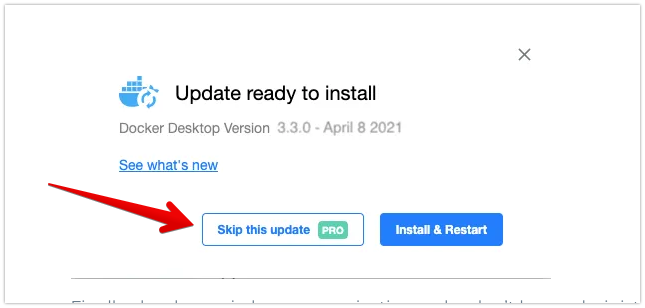
That's unacceptable.
cweagans
on 9 Apr 2021
No, my complaint is that Docker has adopted an attitude of "we know best" for this "feature".
I suppose we just see things differently, then.
What I get from this thread is that the Docker team made a decision that was very unpopular with what probably amounts to a (relatively) small percentage of their users. Yes, pretty much everyone who posted here is in agreement that the choice to force updates on people was a poor one, for many good reasons, but there is presumably also a large population of Docker users who didn't post in the thread specifically because the autoupdates were not an issue for them.
What I also get from this thread is that the Docker team took the feedback they received here and revisited their decision, as any good development team should. To me that seems like the exact opposite of the "we know best" attitude you claim the Docker team has adopted.
Yes, I could turn off the nag with a $5/mo subscription. Yes, I can simply say "no" to the update prompt every time I sit down and work at this machine. Yes, I could probably just update and deal with the consequences. Yes, the ideal case is for me to install every update when it's released. I'll probably end up having to do one of those things.
So there are multiple ways for you to solve your issue and you acknowledge that the ideal thing is to install updates as they are released.
From what I've read, the reminders implemented by the Docker team are intended to encourage people to do the right (ideal) thing. Personally I find that reasonable and totally acceptable.
But if you want to be annoyed, that, too, is your choice.
@dieucao, @stephen-turner Would either of you care to comment on why skipping a version was made a Pro-only feature or why opting out of update notifications entirely was made a Teams-only feature? Also, from the screen shots in the blog post it looks like even for Pro users the update needs to be downloaded before it can be skipped. Is this accurate?
jsmythsci
on 9 Apr 2021
This implementation probably amounts to roughly 2-3 mouse clicks per month for you to dismiss the reminder, given the usage pattern you describe, though, so I don't understand why you seem to be so upset.
Only 2-3 mouse clicks per month wouldn't be so bad, but they've stated it will be once per day (after 2 weeks). That's excessive and is coercive when it was initially stated that the goal was merely to reduce support of outdated releases. It's hard not to see this as exploiting a monetization opportunity.
CheckeredFlag
on 9 Apr 2021
@sgharms Your case is a bug in old versions of Desktop that we unfortunately can't go back and fix. In future you won't get notified about updates that you can't take.
stephen-turner
on 9 Apr 2021
To respond to the rest of the discussion. Some people have found the wording confusing in the screenshot, so we might go back and revise some of the text. So to clarify:
"Skip this update" just skips future notifications about this update. Nobody is required to download or install the update. At one stage we had a "Remind me later" button: we removed it because the [x] close button does exactly the same thing, but we're wondering about putting it back just to make it clearer that you have that option.
stephen-turner
on 9 Apr 2021
Is there any reason that “skip this update” must be a pro feature?
cweagans
on 9 Apr 2021
☝️ this is the core issue now. (the point of my comment. That is, on hand I definitely want to _express my gratitude_ 🙏 for what Docker has done so far with this great product and user interface, but that I'm also still confounded by decision to resolve this issue by making "Skip this update" a pro feature.
Basically: The Pro plan already adds value on its own and I think Docker should explain the logic behind why that particular capability (skipping a specific update) is a _value add in itself_ that requires payment. That's all. 😄
patricknelson
on 9 Apr 2021
@dieucao, you stated the following:
We are trying to balance a few different concerns with this new update behavior
After reading through this issue and yesterday's blog post, it is not clear exactly what "few different concerns" you are trying to balance and how those concerns shaped this 'feature'.
Please list (or link to) these "few different concerns" in clear detail (preferably in order of concern priority), so the community can weigh in on whether we feel the concerns listed are actually addressed by the 'feature' added.
 kopepasah
on 9 Apr 2021
kopepasah
on 9 Apr 2021
Thanks for taking our feedback into account and disabling auto-update. That's all that really mattered.
Could we change the update notification from daily to weekly? I'll get around to upgrading, but the timing generally revolves around releases for _our_ products (i.e. Docker stability is important while we're working under time constraints).
SamuelMS
on 9 Apr 2021
The balance @dieucao referred to is between encouraging users to update promptly, while accepting that in commercial environments there are sometimes additional constraints preventing people from being able to do so.
stephen-turner
on 9 Apr 2021
Encouraging users to update promptly, presumably so that you don't have to support old versions, right?
Can't you just _not_ support old versions? Why do you have to annoy your users into updating?
cweagans
on 9 Apr 2021
Encouraging users to update promptly, presumably so that you don't have to support old versions, right?
Can't you just _not_ support old versions? Why do you have to annoy your users into updating?
There's probably still some overhead for ticket triage. I'd imagine they get bombarded with help requests, so I can see the value in limiting scope there.
I would push for weekly notifications rather than daily ones.
SamuelMS
on 9 Apr 2021
There's probably still some overhead for ticket triage. I'd imagine they get bombarded with help requests, so I can see the value in limiting scope there.
Sure. Totally understandable problem. It's also easily automated for this specific thing. Enforce use of an issue template that includes somewhere to put the version. If the version isn't the newest or maybe even newest minus 1, auto-reply and close the issue. If the issue doesn't follow the template, either auto-close it or flag it for manual review.
cweagans
on 9 Apr 2021
Also, it’s 11pm on Friday evening here and I’m logging off until Monday, so don’t expect any replies from me for a couple of days.
stephen-turner
on 10 Apr 2021
There's probably still some overhead for ticket triage. I'd imagine they get bombarded with help requests, so I can see the value in limiting scope there.
Sure. Totally understandable problem. It's also easily automated for this specific thing. Enforce use of an issue template that includes somewhere to put the version. If the version isn't the newest or maybe even newest minus 1, auto-reply and close the issue. If the issue doesn't follow the template, either auto-close it or flag it for manual review.
That's assuming all their triage is in this repo, rather than by email, chat, or other forms of direct contact by customers and free users. You don't want engineers triaging tickets as level-one support, but I'd hazard a guess that's what is happening now to an extent – and that Docker is pushing so hard for auto-updating because they're losing velocity / missing targets as a result.
Anyway, I don't mean to play devil's advocate so hard here. I'd be happier with the old model too, but I want to find an equitable solution for both parties where possible. Auto-updates are already disabled now, and that's a win, so now I'd just be happy with reducing the notification frequency so I don't need to think about something out of my control as much.
SamuelMS
on 10 Apr 2021
Looking at some of the feedback/confusion folks have had about the "Skip this update" button, as @stephen-turner mentioned above, we'll look to make it a bit more clear that you don't have to be a Pro or Team user in order to dismiss the reminder and aren't forcing people to be a Pro user in order to not install a particular update.
I'm currently thinking of adding the word "Snooze" next to the X on the upper right of that dialog.
Regarding why we want to encourage folks to update, there are a lot of ingredients to it, some of which others have stated, such as the support requests/burden, but also the amount of effort required to maintain sensible/working upgrade paths.
Folks might delay one month or three months or even longer before picking up a new update and which then results in a wider set of "from" versions, also increasing support burden.
There are a lot of different strategies folks have chosen to mitigate that, but for our team, we've chosen to try to encourage folks to stay closer to latest so we don't have to look back so far when thinking of potential issues with upgrade paths from a longer tail of "from" versions which then keeps us from being able to move forward quickly.
I worry that if we make the reminders too infrequent for the majority of users, that the issues that crop up in the trailing "from" versions will keep us from moving forward as the tech stack continues to evolve and as we as a company are trying to deliver new valuable experiences to more developers that they feel justifies paying for a subscription.
Like @stephen-turner, I'm also at the end of my work week, and will check back on Monday.
dieucao
on 10 Apr 2021
@iMonZ Auto-update has been removed in 3.3.0.
Still I can’t untick the auto update checkbox
iMonZ
on 10 Apr 2021
@iMonZ As of 3.3.0 you cannot deselect "Automatically check for updates" unless you are a Teams member but Docker will not automatically download or install updates. If a new version is discovered Docker will notify you about the new version but it will be up to you if/when the new version is downloaded and installed. Like you, I use an external package manager to manage my Docker install (Chocolatey rather than brew) so I view the Docker notifications as reminders that I need to check for updated versions of all of the things I manage via Chocolatey. In your initial post you mentioned needing to block Docker's update URL "to save battery." Are you suggesting that the very act of checking for updates causes undue strain on your battery and that running Little Snitch to block what I assume is a single HTTP call actually uses less battery?
@dieucao I think the current points of confusion/contention are not so much around _how_ things work as they are around _why_ specific options are only available to paying customers. As a free user I cannot opt out of daily reminders for a new version even if I have reviewed the changes in the new version and determined that they do not offer me anything or, worse, actually break something that I am currently working on.
As a Pro user Docker will notify me of a new version but I have the option of telling Docker that I am not interested in v3.3.1 (for example), so stop reminding me about updates until v3.3.2 is released. The question most, myself included, seem to be asking now is "why is this a Pro-only feature?"
The stated reason for the reminders is to encourage people to "do the right thing" (upgrade) but why, then, does the reminder notification include a reminder to free users that they can get rid of these notifications by upgrading to a Pro subscription? Why not just hide the "Skip this version" button entirely for free users?
Similarly, only users with a Team (or Large) subscription can completely opt out of checking for updates. Why is this feature restricted to that group? And why does the UI for the lower tiers include a greyed-out version of the checkbox with a "TEAM" tag next to it? Again, why not just hide the option completely for Pro and Free users who don't qualify for it?
I think there is probably a lot of people who consider an upgrade to their Docker environment to be a Change (with a capital "C") that should be rolled out via a Change Management process. If I'm a Developer working in an Agile team using SCRUM, that probably means that when Docker releases an update, we add a ticket to the backlog that we will then pull into a future sprint to manage upgrading our environment. Maybe the Docker team believes that the majority of people working in this type of environment are already on Pro or Team plans and therefore don't care that opting out of notifications is a paid-only feature but, based on the feedback here, I suspect that is not the case.
It is tough to not conclude that the reason for these design choices is that the Docker team wants to encourage people to either stay current or pay to use the Docker software. While I don't think there is anything wrong with this stance, I also think there is value in transparency.
jsmythsci
on 10 Apr 2021
There are some things money can't buy. For everything else 🎵 money money money 🎵

 KheeWong
on 10 Apr 2021
KheeWong
on 10 Apr 2021
Just a suggestion to make everyone happy:
Why not allow do disable updates and popups - 1 button (has an update icon in tray/opened menu)
For anyone who wants old version support - the TEAM version
If someone - want to disable a particular update - the TEAM version
If someone created a bug and choose an old version - forward it to the TEAM account.
Conclusion: For anyone who wants old version support you have TEAM version, for other people who just work with their own environment and don't want any bugs after updates, interruption/notification ability to disable the distracting notifications.
Win-Win.
Zipfer
on 11 Apr 2021
It is tough to not conclude that the reason for these design choices is that the Docker team wants to encourage people to either stay current or pay to use the Docker software. While I don't think there is anything wrong with this stance, I also think there is value in transparency.
We want _everyone_ to stay current. E.g. we don't take support tickets on old versions even from paying users. But we recognise that in a commercial environment, it's not always possible to roll changes out quickly, so we allow Pro and Team subscribers a bit more latitude.
I think there is probably a lot of people who consider an upgrade to their Docker environment to be a Change (with a capital "C") that should be rolled out via a Change Management process. If I'm a Developer working in an Agile team using SCRUM, that probably means that when Docker releases an update, we add a ticket to the backlog that we will then pull into a future sprint to manage upgrading our environment. Maybe the Docker team believes that the majority of people working in this type of environment are already on Pro or Team plans and therefore don't care that opting out of notifications is a paid-only feature but, based on the feedback here, I suspect that is not the case.
I think this is the heart of the issue. Unlike some other developer software, we haven't made Docker Desktop "free for personal use only". But if you do choose to use the community version, you can be expect to get the options more appropriate for a personal user.
stephen-turner
on 12 Apr 2021
ITT: People trying to make money complaining about people trying to make money. Give them a break!
While I will admit that "nagging" me to get on a Pro/Teams plan will reduce the likelihood of me considering a Pro/Teams plan, I'll state that it is fair business practice. Maybe it's not the solution everybody wanted in a perfect world, but it is understandable and most importantly _enables us to work again_. Ever used a premium IDE on trial and got prompted to upgrade? Play a free mobile game and have to click X to dismiss ads? Yeah, that's pretty much how things work.
We got what we needed: the ability to prevent the software from updating itself to sustain stability in our projects.
Who cares about you now having to create and plan tasks into sprints so your team can stay on the latest version, or that you need to make one extra click? Be happy that they don't lock the "Start Docker automatically" behind a paywall.
This is really turning into a "choosing beggars" thread and it is ridiculous how you take the Docker team's efforts for granted as a service to the public. If you don't like the new notifications, downgrade to 2.5.0.1. Please leave this thread for _issues_ with the implementation.
 Harti
on 12 Apr 2021
Harti
on 12 Apr 2021
Speaking of issues:
My IT policy prohibits running executables located within AppData. Without "...\AppData\Local\Temp\
Is there a workaround where I can just start the regular Docker Desktop software without the Installer.exe chiming in?
Harti
on 12 Apr 2021
There are no changes when updating to 3.3.0, only when updating from 3.3.0 to the next version, so right now you're still on the old behaviour.
However, going forward, once you've downloaded the update, you still can't stop it installing on next launch. Your choice is at download time.
stephen-turner
on 12 Apr 2021
However, going forward, once you've downloaded the update, you still can't stop it installing on next launch. Your choice is at download time.
It seems that a new "Docker Desktop Installer.exe" is being generated upon each launch of "Docker Desktop.exe", even on a "clean" install of 3.3.0 where no update should yet be available. Did I miss a registry entry or is this intentional, or did you mean that this will only no longer happen once the next update is available (and got declined)?
(Just checking what the target behavior is - I'll create a separate issue for this when it's not intentional)
Thanks!
Harti
on 12 Apr 2021
No, I don't think that's intentional, please create a ticket in docker/for-win. Thanks.
stephen-turner
on 12 Apr 2021
But if you do choose to use the community version, you can be expect to get the options more appropriate for a personal user.
This is really the core issue: docker is a developer tool. There is fundamentally no difference between a developer who is using docker on a team project vs a personal project: if you're just trying to get things done (on a team or otherwise), the last thing you want is to have to deal with a docker upgrade (or any other meta-work for that matter). I want to write code and I want my tools to get out of the way when I'm not using them.
If Docker for Mac were so stable and the releases so reliable that things weren't regularly breaking with new releases, this would be a different conversation. As it is right now, I can't trust that an upgrade won't break any particular workflow, so I'll do the upgrade when I have the time/energy/inclination. If that means buying/using Little Snitch, fine. I'd rather pay money to Little Snitch than pay for the privilege of being allowed to decide that I don't want to be constantly nagged to install a docker update.
Just to be clear: I have no issue paying for software. I would even pay for Docker for Mac. I _am_ opposed to software that makes demands of my time and attention like this though. Just doesn't work for me.
cweagans
on 12 Apr 2021
@stephen-turner
Just FYI the link you have here for downloading:
https://www.docker.com/products/docker-desktop
Still gives you version 3.2.2 and not 3.3.0
3.2.2 tried to update to 3.3.0 which failed and left my docker desktop inoperable and I had to reinstall it. Since you don't have version numbers as part of the installer file name, I didn't notice I re-downloaded 3.2.2 and not 3.3.0
Thanks for removing the force auto updates. Anytime I had to reboot my machine or restart the docker desktop app I was forced to reinstall it, since the update always failed and trashed my existing installation.
 dakimaz
on 13 Apr 2021
dakimaz
on 13 Apr 2021
I was really looking forward to disable auto updates. This is a critical feature, since we're using Docker to operate a Kiosk system, which needs to start automatically when rebooting the machine. So Docker will still prompt to download and install an update? That's actually very disappointing. :-( Is there anything else I can do to "mute" and disable auto updates?
 rbluethl
on 13 Apr 2021
rbluethl
on 13 Apr 2021
Yeah, this is super frustrating. In the space of a weekend, Docker's auto-update caused this bug. Eventually, wiping and re-installing it gave me this issue. I feel like auto-updates would be easier to stomach if I hadn't encountered these workflow-breaking issues in final releases.
 toph-allen
on 13 Apr 2021
toph-allen
on 13 Apr 2021
@rbluethl if you run a kiosk, firewall docker so it can't talk to public networks? That way it'll never even know there's an update. But if your kiosk is also internet-connected, then running potentially security-compromised software open to anyone to exploit rather than making sure the software that's running it is updated every week is kind of... questionable?
Pomax
on 13 Apr 2021
@Pomax I'm not debating the importance of security updates, but I'd rather perform them manually every week instead of risking the application not coming up due to an automatic update being performed. Although maybe granting the service higher privileges would be an option, so that Windows doesn't prompt for Administrator privilege.
rbluethl
on 13 Apr 2021
if you do them manually every week anyway, then there is no problem? As per https://github.com/docker/roadmap/issues/183#issuecomment-816448490, for the first two weeks, all that happens is that you get a different looking systray icon (which folks won't see because presumably your kiosk is full screen). It's not until after 2 weeks that docker will go "hey you really should update at this point" on startup.
Pomax
on 13 Apr 2021
Ah, that makes sense. I obviously missed that one - thanks for pointing out. Then there shouldn't be any problem. Might be worth mentioning somewhere more visibly. 👍
rbluethl
on 13 Apr 2021
OK, I can see that this conversation is going round in circles and people aren't able to read everything that's already been written, so I'm going to lock it permanently now and summarise one last time.
stephen-turner
on 13 Apr 2021
In the latest release these are the changes. Our intent is to balance encouraging people to take updates promptly, with giving them the flexibility to defer downloading and installing until later if they need to.
- When there is a new release, you will get a notification on the whale icon.
- After two weeks, you will start getting daily popups too.
- You can download the update at that point, and it will install on next restart.
- But you are never forced to take it, you have the option to dismiss the popup until the next day.
The above is what users of the community edition see. We also recognise that commercial environments may have additional constraints around longer periods of stability, planned rollouts, or IT-managed rollouts. So for Pro and Team customers, there are additional options:
- Pro and Team customers can select "Skip this Update" to ignore all future notifications about a specific update.
- Team customers can turn off all checking for updates ever.
stephen-turner
on 13 Apr 2021
Related issues
 pkennedyr
·
3Comments
pkennedyr
·
3Comments
 hairyhenderson
·
5Comments
hairyhenderson
·
5Comments
 esemate
·
4Comments
esemate
·
4Comments
 olegburov
·
6Comments
hairyhenderson
·
5Comments
olegburov
·
6Comments
hairyhenderson
·
5Comments
Most helpful comment
As users we need to be able to control when an upgrade happens. We understand the need of you maintainers to limit the exposure to a thousand versions, but we really do have to know:
We understand your need to control the number of versions out there, but I think you can understand our need for control of when new versions get installed. Thanks!